
Stop CRM Data Decay: Keep WordPress Leads Fresh
Your CRM rots about 22.5% every year. The fix isn't more cleanup tools - it's capturing complete, clean lead data once at the WordPress form and fanning it out to every system at the same instant.
In This Guide
- What Is CRM Data Decay and Why Does It Matter?
- Where Does Data Decay Actually Begin?
- Why Do Stale and Duplicate Records Cost You Deals?
- How Does Tool Sprawl Make Decay Worse?
- How Do You Capture Complete Lead Data Once?
- Why Is Simultaneous Fan-Out Better Than Manual Re-Entry?
- Doesn't Zapier Already Do Fan-Out?
- Why Make Google Sheets Your Single Source of Truth?
- What If Your Team Lives in Excel, Not Sheets?
- A Simple Playbook to Keep Leads Fresh
- Recap: Fight Decay at the Source
- Frequently Asked Questions
What Is CRM Data Decay and Why Does It Matter?
CRM data decay is the steady rot of your contact records as people change jobs, emails, and phone numbers. B2B contact databases lose about 22.5% of their accuracy every year (HubSpot). That means roughly one in five records goes stale annually, with no action from you.
The damage compounds quietly. A bounced email here, a wrong number there, a duplicate that splits one lead's history across two records. Sales reps stop trusting the data. Marketing pays to re-acquire contacts it already had.
Decay matters because it sits on top of a market built on data. The CRM market reached about $73.4 billion in 2024 and is projected to hit $163.16 billion by 2030 (Grand View Research). Companies invest heavily in systems they then let degrade. Fixing decay is one of the cheapest performance wins available.
Where Does Data Decay Actually Begin?
Most teams treat decay as a maintenance problem to clean up later. In our experience it starts earlier than that, at the moment of capture. Data enters dirty, incomplete, or duplicated, then degrades from there. B2B databases already lose 22.5% of accuracy each year (HubSpot), so starting clean buys you real time.
The usual entry point is a WordPress form. A lead fills it out, and from there the data takes a fragmented path. Someone copies it into a CRM by hand. Someone else exports a CSV into Mailchimp next week. A third person pastes a few rows into a sheet.
Every hand-off is a chance to drop a field, fat-finger an email, or create a second copy of the same person. The cleanest record you will ever have is the one the visitor just typed. That is the moment to capture everything and distribute it untouched.
Why Do Stale and Duplicate Records Cost You Deals?
Stale data costs deals because the contact moment is fragile and brief. Contacting a web lead within 5 minutes instead of 30 makes you roughly 100x likelier to reach them and 21x likelier to qualify the lead (HBR, 2011). A wrong number or a duplicate record blows that window instantly.
Duplicates are quietly expensive. When one lead lives as two records, follow-up history splits in half. A rep calls thinking it is a fresh inquiry while another rep already emailed. The lead feels spammed, or worse, ignored, while your team looks disorganized.
Most teams are slow already. In a study of 114 B2B companies, average email response ran about 11 hours 54 minutes and average phone response about 14 hours 29 minutes, with essentially none replying inside 5 minutes (Workato, 2019-2020). Adding dirty data to a slow process turns a soft problem into lost revenue. You can read more in our guide to deduplicating leads in Google Sheets automatically.
How Does Tool Sprawl Make Decay Worse?
Tool sprawl multiplies decay by multiplying the copies of each record. The average company now runs about 106 SaaS applications (BetterCloud State of SaaSOps via Statista, 2024). Each app that holds lead data is another place that goes stale on its own schedule.
When a lead lives in a CRM, an email tool, a sheet, and a support desk, you have four versions of the truth. A contact updates their email in one system. The other three keep bouncing. There is no single record to trust, just four partially-wrong ones.
The usual reflex is to buy a sync tool to reconcile them all. That adds another app to the 106, plus per-task fees and a new failure point. The better move is upstream: capture once, then deliver the same clean record to every destination in the same instant, so none of them ever drifts apart from the source.
How Do You Capture Complete Lead Data Once?
You capture complete data once by treating the WordPress form as your system of record, not just an inbox. Because decay runs at 22.5% per year (HubSpot), the fields you grab at submission are the freshest you will ever hold. Grab all of them, including the invisible context.
The context is where most teams leave money behind. SheetLink Forms automatically captures UTM parameters and click IDs (GCLID, fbclid, msclkid) on every submission, with no extra fields for the visitor to see. Capturing the Google Click ID is exactly how you attribute and import offline conversions back to the campaign (Google Ads Help).
That means the record leaving your form already knows which ad, keyword, and campaign produced it. No enrichment vendor, no manual tagging, no decay. See our walkthrough on UTM and GCLID marketing attribution for WordPress forms for the full field list and setup.
Why Is Simultaneous Fan-Out Better Than Manual Re-Entry?
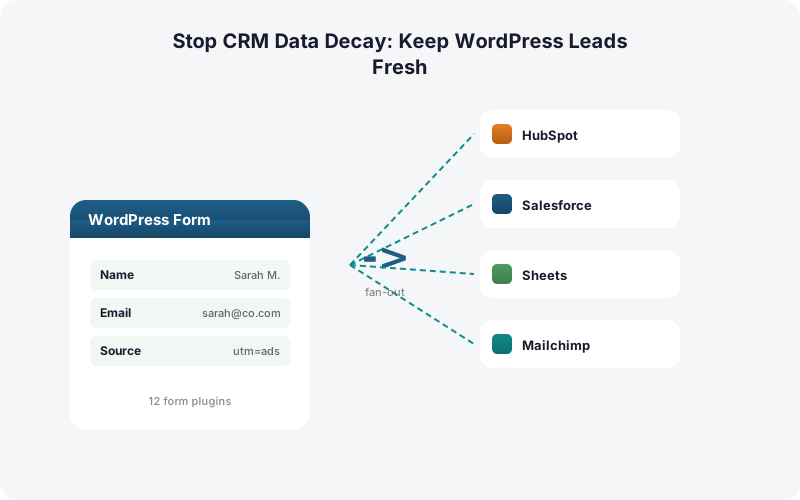
Simultaneous fan-out beats manual re-entry because it removes every hand-off where data goes stale or gets dropped. With the average company running about 106 SaaS apps (Statista, 2024), re-keying a lead into even four of them by hand guarantees inconsistency. Fan-out writes the same clean record to all of them at once.
The Multi-CRM Routing add-on sends each submission to HubSpot, Salesforce, Pipedrive, Zoho, Mailchimp, and ActiveCampaign simultaneously, alongside your Google Sheet, with conditional routing by field value. Airtable and Notion are supported destinations too. There are no per-task fees.
Speed is the payoff. Reaching a lead inside 5 minutes makes you 100x likelier to make contact (HBR, 2011), and a record that lands in the CRM the instant the form submits beats a nightly export every time. Instant fan-out simply outruns batch sync. Compare the approaches in our breakdown of conditional routing for WordPress forms.
Doesn't Zapier Already Do Fan-Out?
Zapier can fan out, but it taxes you per copy and adds a layer that itself decays. Zapier is metered so that one task equals one action, which means fanning a single submission to 6 CRMs in a multi-step Zap burns 6 or more tasks per lead, on a paid plan, with overage billed at 1.25x (Zapier, 2026).
Six destinations times a few hundred leads a month escalates fast. The free tier allows only 2-step Zaps and 100 tasks per month, so any real fan-out forces a paid plan. You are paying recurring fees to copy data you already captured cleanly once.
A direct integration skips that middle layer entirely. SheetLink Forms writes from WordPress straight to each destination, so there is no metered hop, no Zap to maintain, and one fewer SaaS app to count against your 106. We run the full math in Make vs Zapier vs direct plugin true cost and the real cost of Zapier for WordPress forms.
Why Make Google Sheets Your Single Source of Truth?
A spreadsheet makes a clean, neutral source of truth that every other tool can be reconciled against. When records scatter across about 106 apps (Statista, 2024), you need one canonical copy that is cheap, queryable, and not owned by any single CRM vendor. A Sheet fits that role.
With SheetLink Forms, every fanned-out submission also lands in Google Sheets in real time, alongside the CRM writes. Sheets delivery is free, set up once - a one-click Google connect or the classic Apps Script webhook. So the same complete record exists in your CRMs and in a master sheet you fully control.
That master sheet becomes your decay check. Bounced from HubSpot? Compare to the sheet. Duplicate in Salesforce? Dedupe against the sheet. Because the sheet captured the freshest version at submission, it stays the reference everything else is measured by. See our guides to running a Google Sheets CRM for WordPress and building Google Sheets dashboards from your lead data.
What If Your Team Lives in Excel, Not Sheets?
Excel-first teams get the same protection without changing tools. CRM data still decays at 22.5% per year (HubSpot) regardless of which spreadsheet you use, so the source-of-truth strategy is identical. SheetLink Forms delivers to Excel Online too, in real time, into a OneDrive workbook via Microsoft Graph, provided the connected account is a Microsoft 365 work or school one - personal Outlook.com accounts are not supported by Microsoft's Excel API.
There is a free mirror mode where one rule writes to Google Sheets and Excel Online at the same time. For Microsoft-only shops, the Primary Destinations add-on makes Excel the sole destination, no Google account required.
The principle does not change with the file format. Capture the complete record once, fan it out clean to every CRM and to your spreadsheet of choice, and keep that spreadsheet as the reference. Learn more on the Excel Online destination page or in our comparison of Excel Online vs Google Sheets for WordPress form data.
A Simple Playbook to Keep Leads Fresh
Start with the metric that matters most: speed. Reaching a web lead within 5 minutes makes you 21x likelier to qualify it (HBR, 2011), yet most B2B teams take over 11 hours to respond by email (Workato, 2019-2020). Closing that gap starts at capture.
The playbook is short. First, capture every field plus UTM and click IDs at the form. Second, fan the record out to all CRMs and a spreadsheet at the same instant, no manual re-entry. Third, route by field value so the right team gets the right lead immediately.
Fourth, treat your spreadsheet as the source of truth and dedupe other systems against it. Fifth, lean on automatic retries so a brief CRM outage never silently drops a lead. SheetLink Forms ships a retry queue with exponential backoff (5 minutes, 30 minutes, 2 hours) and full delivery logs, so nothing falls through. Browse the full add-on lineup or the pricing page to assemble your stack.
Recap: Fight Decay at the Source
Data decay is not a cleanup problem you solve later. It is a capture problem you solve up front. With B2B databases losing 22.5% of accuracy per year (HubSpot), the freshest record you will ever own is the one a visitor just submitted on your WordPress form.
Grab that record completely, attribution included, then fan it out clean to every CRM and your spreadsheet at the same moment. No re-keying, no nightly batch, no metered middleware adding to your stack of 106 apps (Statista, 2024).
Keep one spreadsheet as the canonical copy and reconcile the rest against it. Pair that with instant delivery and you both beat the decay curve and hit the 5-minute speed-to-lead window that drives qualification 21x higher (HBR, 2011). Agencies managing many client sites can standardize the whole flow from the agency tooling.
| Approach | Data Freshness | Per-Lead Cost | Source of Truth |
|---|---|---|---|
| Manual re-entry | Decays at every hand-off | Staff time per copy | None - copies drift apart |
| Zapier fan-out | Good if Zap stays healthy | 1 task per action (6+ per lead) | Lives in the SaaS layer |
| Direct fan-out (SheetLink Forms) | Captured once, delivered instantly | No per-task fees | Your master spreadsheet |
Frequently Asked Questions
How fast does CRM data actually decay?
B2B contact databases lose roughly 22.5% of their accuracy every year, according to HubSpot. People change jobs, emails, and phone numbers constantly. Within a couple of years, a large share of any untouched list is already wrong, bouncing, or pointing at the wrong person.
Why does capturing leads at the form reduce decay?
The record a visitor just typed is the freshest, most accurate version you will ever hold. Every later hand-off, manual re-entry, or CSV export risks dropped fields and duplicates. Capturing everything once at the WordPress form, then distributing it untouched, starts each lead clean.
What is simultaneous fan-out and why does it beat manual re-entry?
Fan-out writes one clean submission to every destination at the same instant. SheetLink Forms' Multi-CRM Routing sends each lead to HubSpot, Salesforce, Pipedrive, Zoho, Mailchimp, and ActiveCampaign at once, alongside Sheets, with no per-task fees. Manual re-entry into 106 apps guarantees drift.
How does speed-to-lead relate to data freshness?
Contacting a web lead within 5 minutes instead of 30 makes you about 100x likelier to reach them and 21x likelier to qualify, per HBR (2011). Stale or duplicate records waste that window. Instant fan-out delivers a clean record before the lead cools.
Isn't Zapier enough to fan leads out to multiple CRMs?
Zapier meters one task per action, so fanning a single submission to 6 CRMs burns 6-plus tasks per lead on a paid plan, with overage at 1.25x (Zapier, 2026). A direct plugin writes to every destination with no per-task fees and one fewer app to maintain.
Why keep a spreadsheet as the single source of truth?
With the average company running about 106 SaaS apps (Statista, 2024), you need one neutral, vendor-independent copy to reconcile against. A Google Sheet or Excel Online workbook that captured the freshest record at submission becomes the reference you dedupe and verify every CRM against.
Does SheetLink Forms capture attribution data automatically?
Yes. It automatically captures UTM parameters and click IDs including GCLID, fbclid, and msclkid on every submission, invisibly. Capturing the Google Click ID is how you attribute and import offline conversions back to the campaign, per Google Ads Help, so revenue can be traced to the exact ad.
What happens if a CRM is down when a lead submits?
SheetLink Forms uses a built-in retry queue with exponential backoff at 5 minutes, 30 minutes, and 2 hours, plus full delivery logs. A brief CRM outage delays delivery rather than dropping the lead, so a temporary failure never silently costs you a record.
Can Excel-first teams use this approach?
Yes. SheetLink Forms delivers to Excel Online in real time via Microsoft Graph. A free mirror mode writes to Google Sheets and Excel at once, while the Primary Destinations add-on makes Excel the sole destination with no Google account. The source-of-truth strategy is identical.
More Lead Management guides
Capture Clean, Fan Out Fresh, Stop the Decay
SheetLink Forms grabs the complete record once at your WordPress form, attribution included, and delivers it to every CRM and your spreadsheet at the same instant. No re-entry, no per-task fees.