
UTM Tracking for WordPress Forms
Know exactly where every lead comes from. Enrich form submissions with UTM parameters, GCLID, and referrer data - automatically.
Why UTM Tracking Matters for Lead Attribution
You're running Google Ads, posting on social media, sending email campaigns, and writing blog posts. Leads come in through your WordPress forms. But which channel produced which lead?
Without UTM tracking, you can't answer this question. You know someone filled out your form, but you don't know if they came from a $50/click Google Ads campaign or a free organic search result. You're flying blind on marketing ROI.
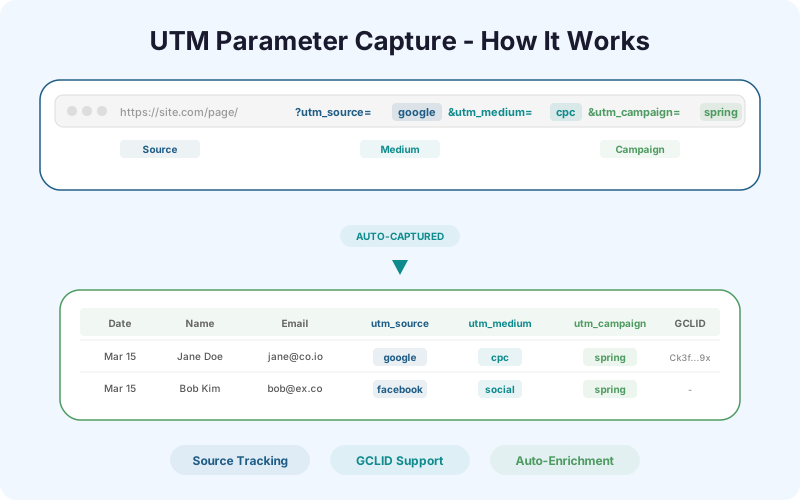
UTM parameters solve this by tagging URLs with source, medium, and campaign data. When a visitor clicks a tagged link and later submits a form, SheetLink captures those UTM values and includes them in the Google Sheets row alongside the form data.
How UTM Parameters Work
UTM parameters are tags added to the end of a URL. They follow a standard format:
https://yoursite.com/landing-page/?utm_source=google&utm_medium=cpc&utm_campaign=spring_sale
The five standard UTM parameters are: utm_source (where the traffic comes from - google, facebook, newsletter), utm_medium (the marketing medium - cpc, organic, email, social), utm_campaign (the specific campaign - spring_sale, product_launch), utm_term (the paid keyword - optional, used for search ads), utm_content (differentiates ad variations - optional, used for A/B testing).
When a visitor arrives via a UTM-tagged URL, their browser stores these parameters in the URL. SheetLink's enrichment module reads them from the page URL at the moment of form submission and appends them to the row.
Beyond UTM: GCLID, fbclid, and msclkid
Major ad platforms add their own click tracking parameters:
GCLID (Google Click ID): Automatically appended by Google Ads to every ad click. It's a unique identifier that lets you match a form submission back to the exact Google Ads click, keyword, and ad group. SheetLink captures this automatically.
fbclid (Facebook Click ID): Added by Facebook/Meta when someone clicks an ad. Links the form submission back to the specific Facebook campaign.
msclkid (Microsoft Click ID): Added by Microsoft Ads (Bing) clicks.
SheetLink captures all three automatically when they're present in the page URL. No configuration needed - the enrichment module detects and stores them.
Setting Up UTM Capture with SheetLink
SheetLink's UTM enrichment is built in - no hidden fields or custom code needed.
Step 1: Ensure SheetLink Forms is installed and your form-to-Sheets connection is working.
Step 2: Go to SheetLink > Settings > Enrichment. Toggle on "UTM Parameter Capture" and "Click ID Capture (GCLID/fbclid/msclkid)."
Step 3: That's it. New form submissions will now include additional columns in your Google Sheet: utm_source, utm_medium, utm_campaign, utm_term, utm_content, gclid, fbclid, msclkid, and page_referrer.
The columns only populate when the visitor arrived via a tagged URL. Organic visitors (no UTM tags) will have empty UTM columns but may still have a referrer value.
Building Attribution Reports in Google Sheets
With UTM data in your sheet, you can build marketing attribution reports using standard Google Sheets formulas:
Leads by source: =COUNTIF(utm_source_column, "google") counts all leads from Google. Create a summary row for each source.
Cost per lead: If you know your monthly ad spend per channel, divide it by the lead count. $2,000 on Google Ads / 45 Google leads = $44.44 cost per lead.
Conversion by campaign: Filter by utm_campaign and cross-reference with your Status column (if using the Sheets CRM approach). Which campaigns produce leads that actually close?
Time-to-conversion by channel: Compare the form submission date with the Won date in your CRM. Do Google Ads leads close faster than organic leads? This data drives budget allocation.
Practical Example: Google Ads Attribution
You're a dental office running three Google Ads campaigns: "dental implants" ($3,000/month), "teeth whitening" ($1,000/month), and "general dentistry" ($500/month).
Without UTM tracking, you know you got 30 new patient inquiries this month from your website. You don't know which campaign produced them.
With SheetLink's UTM capture, your Google Sheet shows: 12 leads from utm_campaign=dental_implants, 10 from utm_campaign=teeth_whitening, 8 from utm_campaign=general_dentistry.
Cost per lead: Implants = $250, Whitening = $100, General = $62.50. The general dentistry campaign produces the cheapest leads. But when you check conversion rates, implant leads convert at 50% (6 patients) while general leads convert at 25% (2 patients).
Revenue per campaign: Implant patients average $4,000 in treatment. General patients average $200. The implants campaign that looked expensive ($250/lead) actually produces $24,000 in revenue from a $3,000 spend (8x ROI). The cheap general leads produce $400 from $500 (0.8x ROI - a loss).
This is why UTM tracking matters. Without it, you'd optimize for the cheapest leads instead of the most profitable ones.
Frequently Asked Questions
Do I need to add hidden fields to my forms for UTM tracking?
Not with SheetLink Forms. The enrichment module captures UTM parameters from the page URL automatically at the moment of submission. No hidden fields, no custom JavaScript, no form builder modifications needed.
What happens if a visitor arrives via a UTM link but submits a form on a different page?
SheetLink stores UTM parameters in the visitor's browser session. If they arrive on your landing page via a UTM link and then navigate to your contact page to submit a form, the UTM data is still captured. It persists across page views within the same session.
Can I track UTM parameters for WooCommerce orders too?
Yes. SheetLink's WooCommerce module captures UTM parameters for orders the same way it does for form submissions. You can see which marketing campaign drove each purchase.
Does UTM tracking work with Google Analytics?
They complement each other. Google Analytics tracks aggregate traffic data (sessions, bounce rate, pages per session by source). SheetLink's UTM capture tracks individual lead-level attribution (which specific person came from which campaign). Use both for complete visibility.
More Lead Management guides
Know Where Every Lead Comes From
UTM tracking, GCLID capture, and referrer data - built into every form submission.