
WordPress forms to Google Sheets and Excel. Never lose a lead.
SheetLink Forms is a WordPress plugin that sends submissions from 12 form builders to Google Sheets, Excel Online, Airtable, or Notion, with automatic retries, full attribution, and no per-submission fees. The core plugin is free on unlimited sites; Pro is $79/year or $199 lifetime, Agency $199/year or $499 lifetime, and SheetLink Plus $29/month.
v1.18.2Released September 2026. Compatible with WordPress 7.1 and PHP 7.4+, per the WordPress.org listing.
14-day money-back guarantee with a full refund, no questions asked.
Use the Spreadsheet Your Team Already Knows
SheetLink connects every supported WordPress form to Google Sheets or Excel Online, and can mirror the same submission into Airtable or Notion for free. Keep your form plugin and choose where each submission belongs.
Google Sheets
Connect in one click with your Google account, or self-host delivery through your own Apps Script. There is no Google API project to set up.
- One-click Google connect with no code
- No Google API project required
- UTM and click ID attribution
- Automatic retry protection
- Included with the core connector
Excel Online
Real-time delivery straight into a Microsoft 365 workbook through Microsoft Graph.
- Secure Microsoft OAuth connection
- UTM and click ID attribution
- Automatic retry protection
- Free when mirroring alongside Google Sheets
- $29/mo when Excel is your sole destination
Airtable - free mirror
Mirror each submission into an Airtable base as a native record, with linked records and views on Airtable's side and your sheet as the archive. It writes direct to the Airtable API and needs no add-on.
WordPress form to Airtable →Notion - free mirror
Every submission becomes a page in your Notion database, with Email, Number, Date, and Select properties written as native types rather than plain text. It needs no add-on.
WordPress form to Notion →Sending to Google Sheets and mirroring the same submission into Excel Online, Airtable, or Notion is included free. Primary Destinations, included in the $29/month SheetLink Plus and delivered through the separate SheetLink Pro plugin, is only needed when you want Excel, Airtable, or Notion to be your only destination, with no Google Sheet.
Works With Your Form Plugin
SheetLink integrates with all 12 major WordPress form plugins out of the box.
Never Lose a Lead to a Hiccup
It's 2am and Google's Sheets API returns a 503. A prospect just filled out your client's contact form. With most connectors that submission is silently gone. SheetLinkWP catches it in a built-in retry queue and keeps retrying with exponential backoff until it lands, so the lead reaches the sheet even when Google is having a moment.
Every attempt is logged with payload, response, and status, so you can debug a delivery in seconds instead of wondering whether data was lost.
- Automatic retry with exponential backoff
- Full delivery logs with payload and response
- Manual re-send for permanently failed submissions
- No submissions silently dropped
Your Submissions Go Directly to Their Destination
Form submissions travel from your WordPress site straight to the destination you configure. Google Sheets delivery writes straight to the Google Sheets API (one-click connection) or through your own Google Apps Script endpoint (classic method); Excel Online delivery writes directly through Microsoft Graph. SheetLink is not a per-submission automation middleman, and your submission content does not sit on our servers.
For agencies with client privacy obligations, that is the difference between a plugin you can name in a data-processing agreement and one you cannot. No per-submission middleman means nothing extra to breach and no submission data leaving your clients' stack.
One nuance we state plainly: the one-click Google connection and Excel Online both use a SheetLink-hosted OAuth broker to establish and refresh the connection. The Google token is stored encrypted in your own WordPress database and is scoped to only the spreadsheets you pick (drive.file); the Microsoft refresh token is held by the broker, encrypted at rest. Either way, submission payloads travel directly from WordPress to Google or Microsoft and never through us. The classic Apps Script method involves no OAuth at all.
- Google Sheets: WordPress -> Google Sheets API (one-click) or your own Apps Script
- Excel Online: WordPress -> Microsoft Graph -> your workbook
- No per-submission automation platform and no task-based metering
- Retry queue protects submissions from transient destination failures
- The only WordPress-to-Sheets plugin that captures GCLID, wbraid, and gbraid for Google Ads offline conversion tracking
Start Free, Upgrade When Ready
The free plugin on WordPress.org gives you the whole delivery pipeline: retry queue, delivery logs, UTM capture, conditional routing and GDPR tools. Go Pro when you need sheet edits to flow back into WordPress, WooCommerce orders, or one submission delivered to several destinations.
Free Plugin
On WordPress.org
- All 12 form integrations
- Retry queue & delivery logs
- UTM & click-ID capture (gclid, fbclid, msclkid)
- Conditional routing
- GDPR tools & consent log
- Google Ads conversion tracking (GCLID + wbraid + gbraid)
Pro
/year, or $199 lifetime · premium features on 3 sites
- Everything in Free
- Two-Way Sync - sheet edits flow back into WordPress
- WooCommerce Sync - orders, customers & events
- 5 extra form builders (JetFormBuilder, Bricks, MetForm, Kali, HappyForms)
- Multi-Destination Routing - one submission to several destinations
How It Works
Four steps to connect your WordPress forms to Google Sheets.
Install the Plugin
Upload SheetLink Forms to your WordPress site and activate it.
Connect Google Sheets
Sign in with Google and pick your spreadsheet, or paste your own Apps Script URL.
Map Form Fields
Submit the form once and the columns are created from its own fields. Adjust the mapping only if you want to.
Data Flows Automatically
Every submission lands in Google Sheets in real time, with retry protection.
What Setup Looks Like
Real screens from the plugin, not mockups. Connect Google once, name a rule, and the rest is a delivery log.
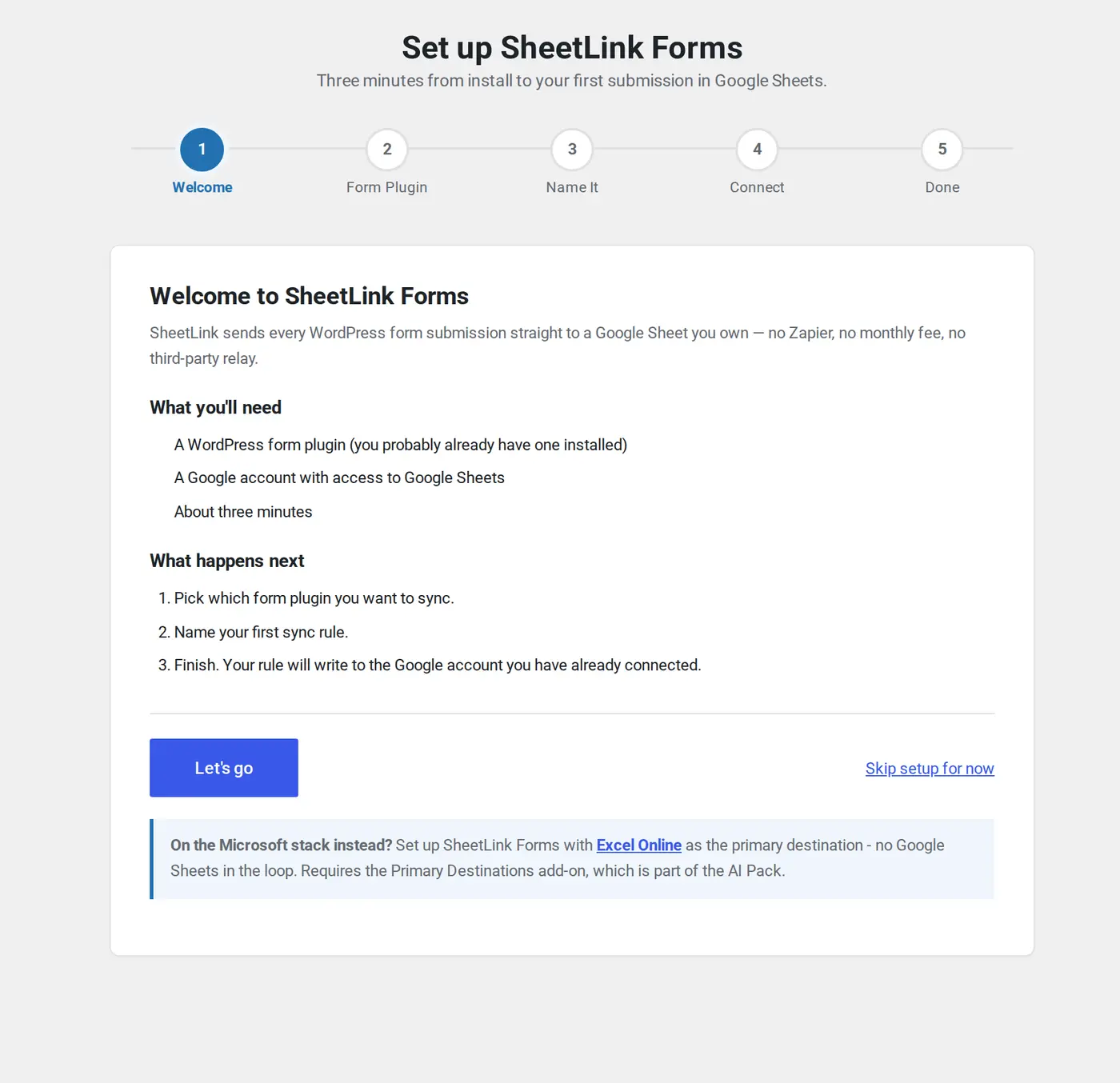
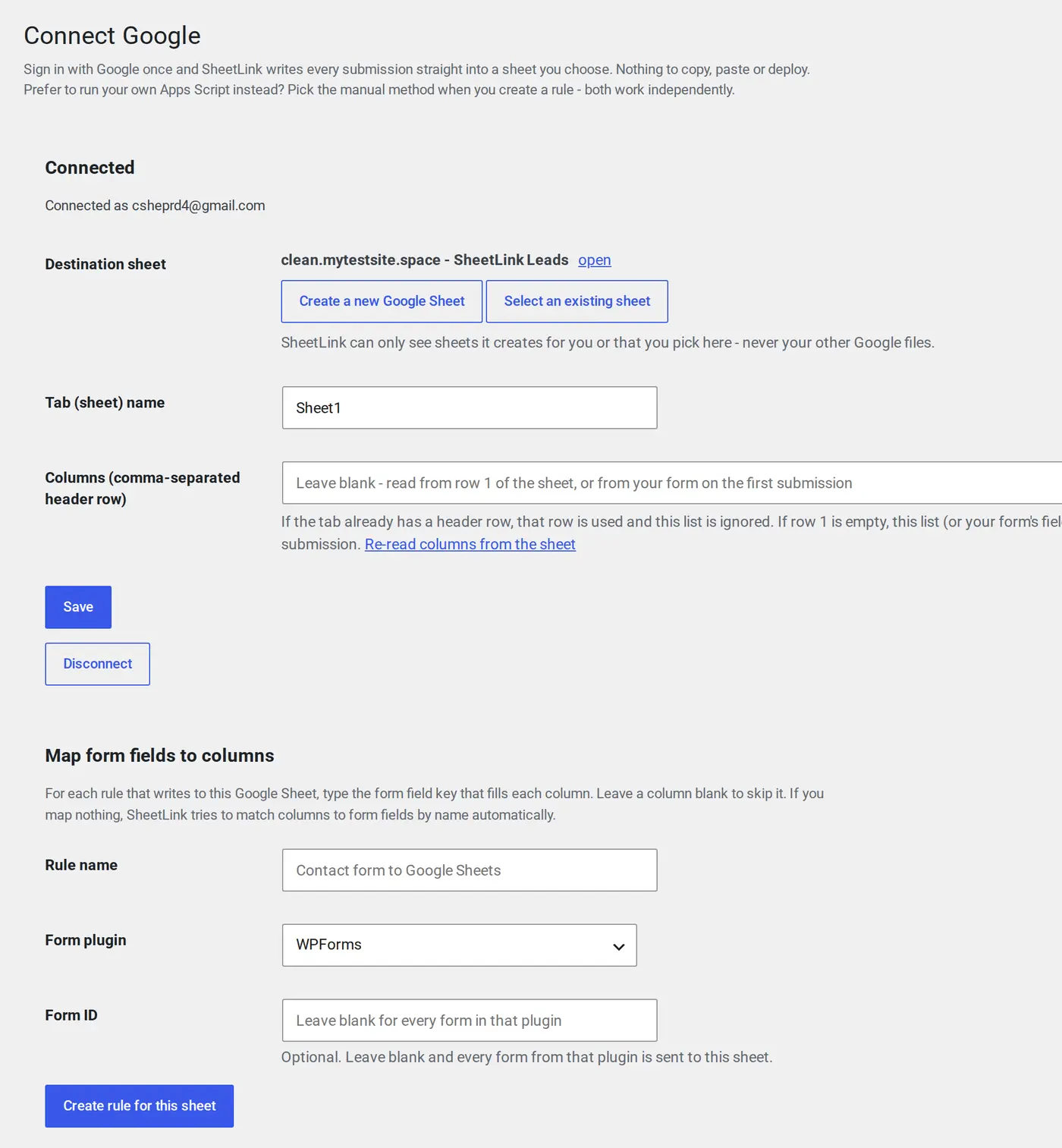
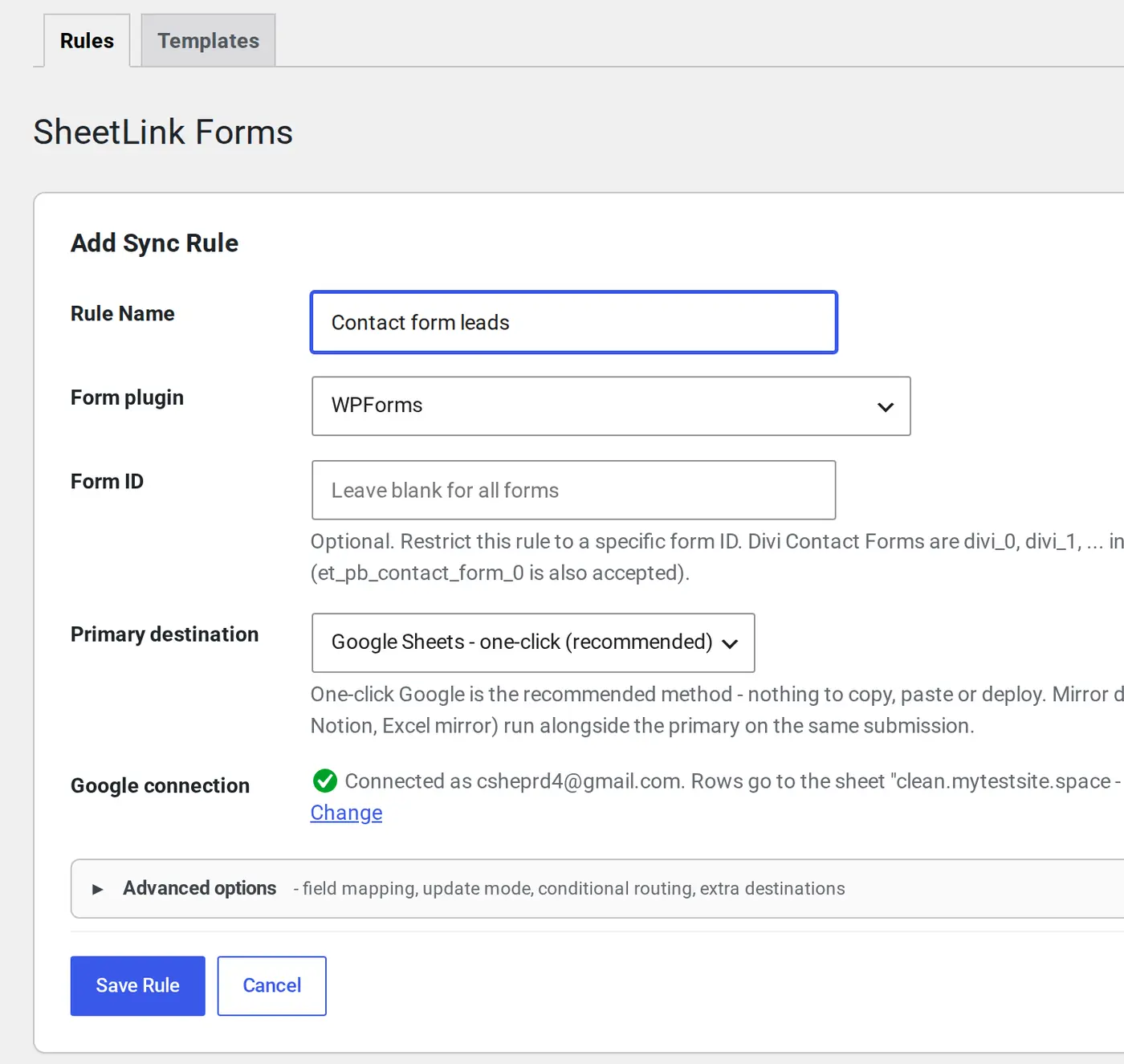
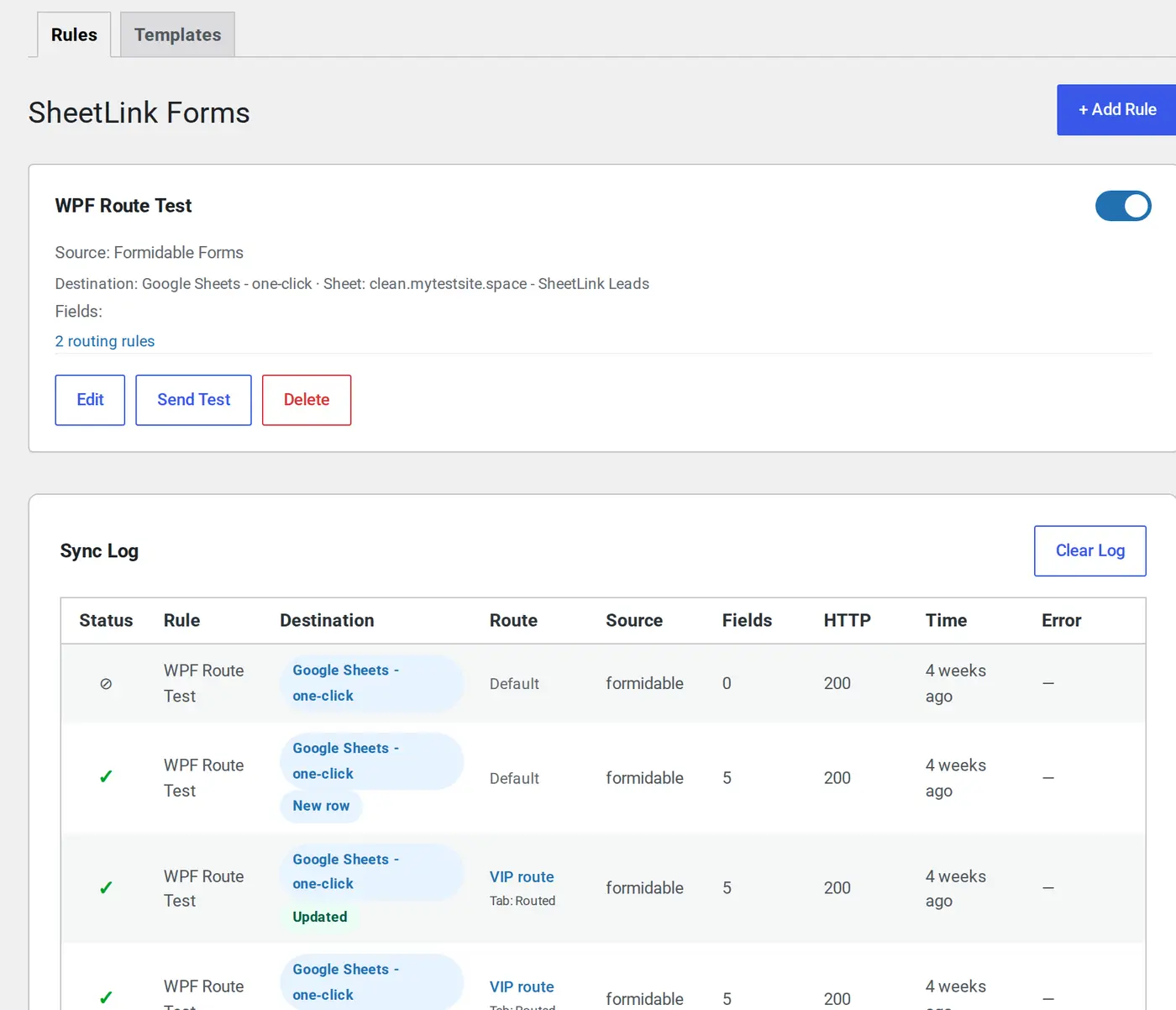
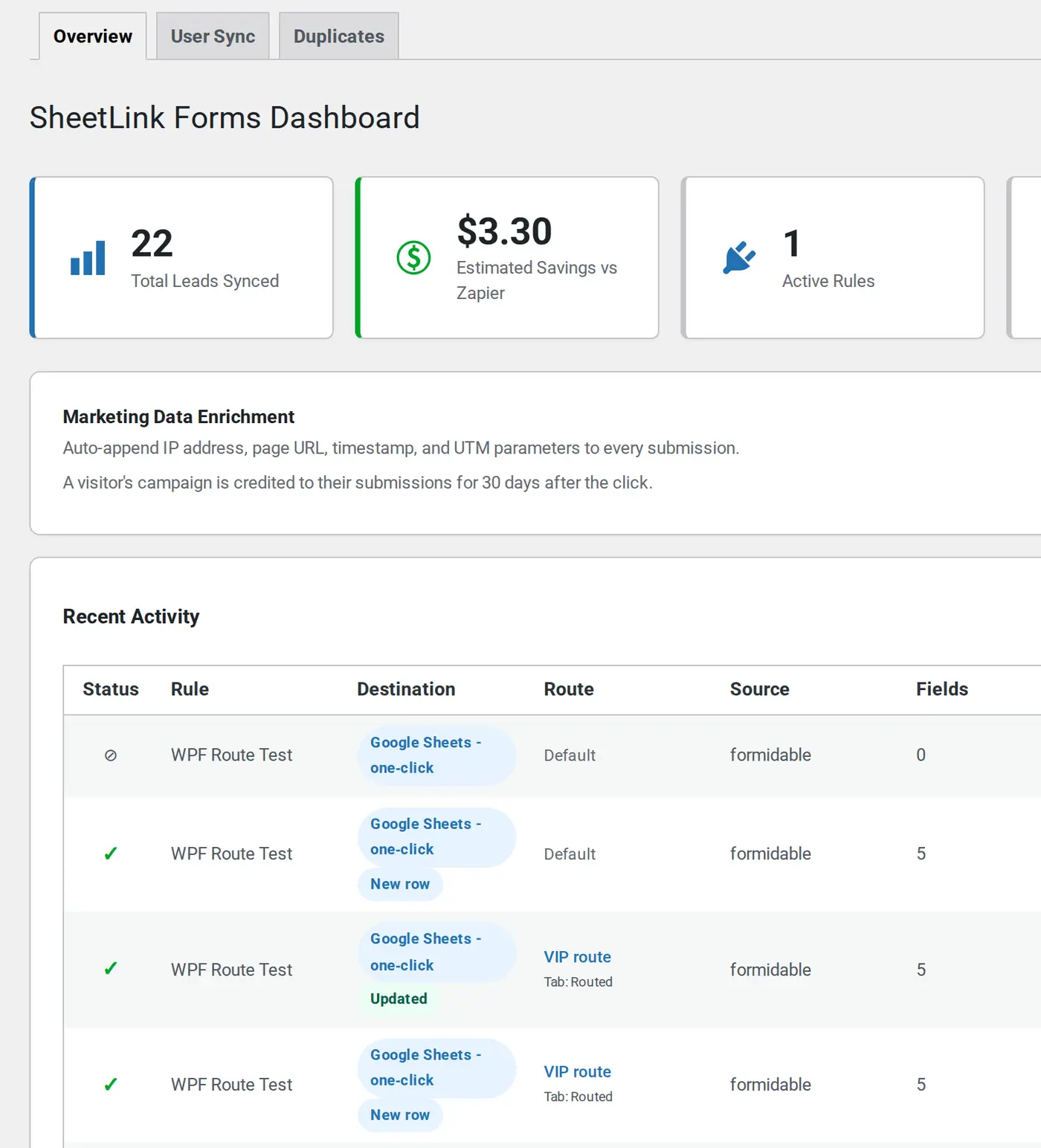
Captured on SheetLink Forms 1.17.4. The free plugin on WordPress.org includes every screen shown here.
For Agencies Managing Multiple WordPress Sites
Standardize form delivery across your client portfolio without per-client automation subscriptions.
Standardized Lead Routing
Route submissions from Elementor, Gravity Forms, WPForms, and more using the same workflow on every client site.
No Per-Client Zapier Accounts
One plugin handles form-to-sheet delivery for all sites, with no separate automation subscriptions eating into margins.
Visible Delivery Issues
Retry logs show exactly which submissions succeeded, failed, or are pending. Debug client delivery issues in seconds.
White-Label Workflows
Replace all SheetLink branding with your agency identity. Clients see your name in the WordPress admin.
Predictable Multi-Site Costs
One Agency license activates the premium features on 25 client sites, and the free core runs on unlimited sites. No per-submission fees regardless of client volume.
Client-Safe Configuration
Lock down settings so clients can view logs but not change routing rules. Prevent accidental misconfiguration.
What Pro, Agency and SheetLink Plus add
Free delivers your forms to Sheets and keeps doing it. These are the capabilities each paid tier adds on top.
Delivery Monitoring
- Delivery logs with payload history
- Failure notifications
- Submission retry visibility
Workflow Routing
- Multi-destination delivery
- Multi-CRM Routing to HubSpot, Salesforce, Mailchimp & more
- Conditional routing rules
Agency Operations
- White-label branding
- Multi-site management
- Centralized delivery logs
SheetLink Plus
- Optional AI-assisted lead scoring
- Submission trend analytics
- Quality classification
- Import past entries into your sheet
Core Plugin - Pay Once, Use Forever
Free forever, all twelve form integrations included. Upgrade to Pro, Agency or SheetLink Plus when you need more.
Free
Unlimited sites
- All 12 form integrations
- Basic field mapping
- Google Sheets connection
- Community support
Pro
or $199 lifetime · 3 activated sites
- Everything in Free
- Two-Way Sync
- WooCommerce Sync
- 5 extra form builders
- Multi-Destination Routing
- Multi-CRM Routing
- Import past entries
Agency
or $499 lifetime · 25 activated sites
- Everything in Pro
- White-Label
- Branded Reports
- Agency Dashboard
- Admin Menu Visibility
SheetLink Plus
all your sites · 1,500 AI submissions/mo
- AI Lead Scoring
- AI Analytics
- Primary Destinations
- Import past entries
- AI via OpenAI, or bring your own key
14-day money-back guarantee. Annual plans renew at the listed price with no teaser rates. Lifetime is one payment with updates included.
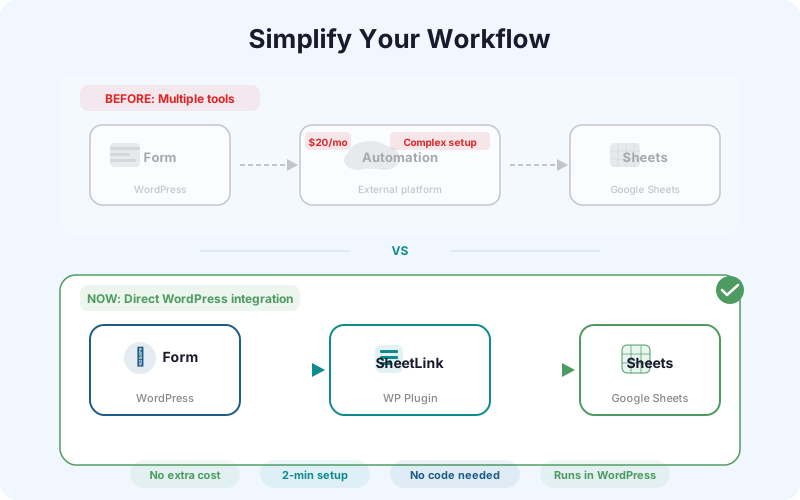
Cheaper and Simpler Than a Zapier Subscription
Zapier is not our main competition, but if you are weighing a general automation tool for this one job, the architecture and pricing are worth a side-by-side look.
| Capability | SheetLink | Zapier |
|---|---|---|
| Pricing model | One-time lifetime license from $0 | Monthly per-task subscription |
| Per-submission cost | $0 - submissions run inside WordPress | Counted against monthly task quota |
| Monthly volume limits | No artificial limit | 100 tasks/mo Free; 750-100K on paid tiers |
| Data path | WordPress -> Google Sheets (no third party) | WordPress -> Zapier cloud -> Google Sheets |
| Retry on failure | Automatic exponential backoff, logged | Manual replay from Zap history |
| UTM / click ID capture | Built in (GCLID, fbclid, msclkid) | Requires additional Zaps or filters |
| Conditional routing | 8 operators, native UI | Paths (paid tier) |
| Setup location | WordPress admin | Separate Zapier account + builder |
| WordPress Multisite | Supported | Not relevant (external service) |
Table reflects published plan rules at sheetlinkwp.com and zapier.com/pricing, April 2026. See full comparison hub.
"We built SheetLink because every Zapier alternative we tried still charged per submission or forced a separate account for each client. WordPress agencies running high-volume lead capture should not have to pay a per-task tax to move a row into a spreadsheet they already own."
Common Questions
Is the lifetime license really one-time?
Yes. Pro lifetime ($199) and Agency lifetime ($499) are a single payment for permanent access to that tier, with plugin updates included and no renewal fees. Pro activates the premium features on 3 sites and Agency on 25; the free core plugin runs on unlimited sites either way. Every purchase is covered by a 14-day money-back guarantee. See the lifetime deal page for the full breakdown.
What happens if Google Sheets is temporarily down?
SheetLink includes a built-in retry queue that automatically retries failed deliveries with exponential backoff (5 minutes, 30 minutes, 2 hours). Every attempt is logged so you are less likely to lose a lead.
Do I need Zapier or Make to use SheetLink?
No. SheetLink sends form submissions directly to Google Sheets via its own webhook, so you do not need Zapier, Make, or any other automation service. That also means there are no per-submission fees and no artificial rate limits.
Do I need to write code or deploy a script to connect Google Sheets?
No. Since v1.12.0 you can connect Google Sheets in one click: sign in with Google, then pick or create a spreadsheet in the Google file picker. SheetLink only gets access to the sheets you pick or create, and never sees the rest of your Drive. If you prefer a self-hosted connection, the classic Apps Script webhook method is still fully supported.
What do the paid tiers add?
Free delivers submissions from all twelve form plugins to Google Sheets, with conditional routing, a retry queue and delivery logs. Pro adds Two-Way Sync, WooCommerce Sync, Multi-Destination Routing and five more form builders. Agency adds White-Label, Branded Reports and the Agency Dashboard. SheetLink Plus adds AI Lead Scoring, AI Analytics, Primary Destinations and Import past entries. Nothing is taken away from Free when you upgrade.
Can SheetLink send WordPress forms to Excel?
Yes. SheetLink sends submissions from all 12 supported form plugins directly into an Excel Online workbook through Microsoft Graph. Mirroring a submission into Excel alongside Google Sheets is free; using Excel as your sole destination (no Google Sheet) needs SheetLink Plus ($29/month or $290/year), which includes Primary Destinations.
Can I send submissions to Google Sheets and Excel at the same time?
Yes. A single sync rule can deliver to Google Sheets and mirror the same submission into Excel Online at once, at no additional cost. This is the default way to use both platforms together.
Can I use Excel without Google Sheets?
Yes. Excel Online can be your only destination with SheetLink Plus ($29/month or $290/year), which includes Primary Destinations. A Google Sheet is not required in that mode, because submissions write straight to your Microsoft 365 workbook.
Is Excel delivery just a CSV export?
No. SheetLink writes directly into a live Excel Online workbook through Microsoft Graph. There are no CSV files to download or import and no manual steps. Each submission appears in the workbook as it arrives.
Start With the Core Plugin
Buy once for the connector. Subscribe for advanced workflow capabilities when you need them.