
The Hidden Cost of Zapier for WordPress Forms
We tracked actual Zapier bills across 12 WordPress sites over 6 months. Per-task pricing adds up faster than you think.
The Zapier Tax Is Real
Zapier is brilliant software. It connects 6,000+ apps with a drag-and-drop interface. For complex, multi-app workflows it's genuinely the best tool on the market.
But for one specific job - sending WordPress form submissions to Google Sheets - it's like hiring a moving company to carry a letter across the street. You're paying a recurring subscription for a task that a purpose-built plugin handles with a one-time purchase.
We tracked the actual Zapier costs across 12 WordPress sites over 6 months to quantify the difference. The numbers are worse than most people assume.
How Zapier Charges for Form Submissions
Zapier uses "task" based pricing. Every time a Zap runs an action, it consumes one task. A simple form-to-Sheets Zap uses 2 tasks per submission: one trigger (new form entry) and one action (create spreadsheet row).
Some form plugins (like Gravity Forms with the Zapier add-on) use a webhook trigger that costs 1 task instead of 2. But most setups - especially with multi-step Zaps that format data, filter submissions, or add conditional logic - consume 2-5 tasks per form submission.
Zapier's free plan includes 100 tasks per month. That's 50 form submissions if your Zap uses 2 tasks each. Most business sites exceed that within the first week.
Real Costs at Different Volumes
Here's what Zapier actually costs at common WordPress form volumes (assuming 2 tasks per submission):
At 250 submissions per month (small business): Zapier Starter at $29.99/mo = $360/year. The SheetLink Forms core plugin is free, so there is nothing to break even on.
At 1,000 submissions per month (growing business): Zapier Professional at $73.50/mo (for 2,000 tasks) = $882/year. SheetLink: still free. Annual savings: $882.
At 5,000 submissions per month (agency or e-commerce): Zapier Team at $103.50/mo minimum = $1,242/year. SheetLink Agency tier (premium features on 25 activated sites): $499 lifetime. Year-one savings: $743. Year-two savings: $1,242 (the full Zapier cost, since SheetLink is already paid for).
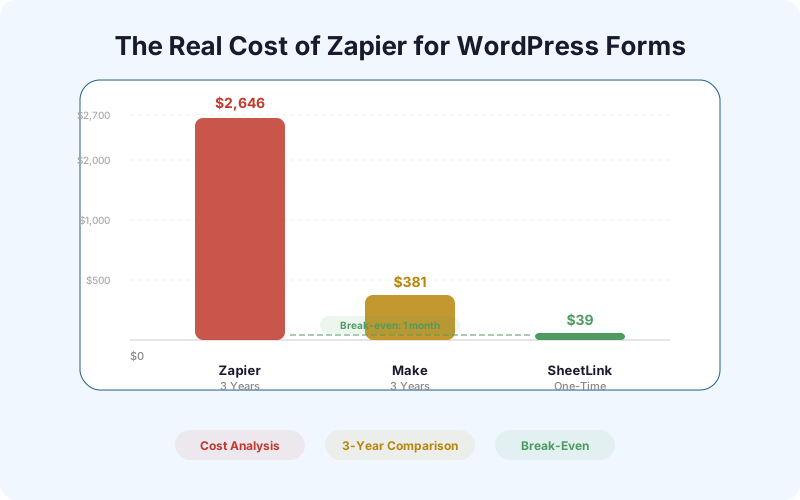
Over 3 years, even a small site saves $1,080 by switching from Zapier to a direct plugin. An agency saves $3,227.
When Zapier Actually Makes Sense
Zapier wins when your workflow is genuinely multi-app. If every form submission needs to go to Google Sheets AND Slack AND Mailchimp AND your CRM AND create a Trello card, Zapier's orchestration layer is worth paying for.
But if your primary need is form data in Google Sheets - which is the case for most WordPress site owners - you're paying for capabilities you don't use. A direct plugin handles the Sheets connection, and if you later need Slack notifications or CRM sync, SheetLink Forms supports those as optional add-ons without routing data through a third party.
How to Switch from Zapier to a Direct Plugin
The switch takes about 5 minutes:
1. Install SheetLink Forms on your WordPress site. 2. Connect Google Sheets - one click: Connect Google, approve the consent screen, and pick your sheet in the Google file picker (or deploy the classic Apps Script webhook if you prefer fully self-hosted). 3. Map your form fields to Sheets columns. 4. Test with a submission to verify data flows correctly. 5. Disable your Zapier Zap. 6. Downgrade or cancel your Zapier plan.
Your existing Google Sheet continues to work - you're just changing how data gets into it. Historical data already in the sheet is unaffected.
| Volume (monthly) | Zapier Annual Cost | SheetLink Cost | 3-Year Savings |
|---|---|---|---|
| 250 submissions | $360/yr | Free (core) | $1,080 |
| 1,000 submissions | $882/yr | Free (core) | $2,646 |
| 5,000 submissions | $1,242/yr | $499 lifetime (Agency) | $3,227 |
| 10,000 submissions | $1,788/yr | $499 lifetime (Agency) | $4,865 |
Frequently Asked Questions
How many Zapier tasks does a form-to-Sheets Zap use?
A basic form-to-Sheets Zap uses 2 tasks per submission: one for the trigger (new form entry) and one for the action (create row in Google Sheets). Multi-step Zaps with filters or formatting use more.
Can I use Zapier's free plan for WordPress forms?
Zapier's free plan includes 100 tasks per month. At 2 tasks per submission, that's 50 form submissions. Most business sites exceed this quickly. The free plan also has a 15-minute polling interval, meaning data can be delayed.
Is SheetLink Forms a full Zapier replacement?
For WordPress-to-Google Sheets, yes. SheetLink Forms handles the connection directly without a middleware. For complex multi-app workflows (Sheets + Slack + CRM + email), Zapier's orchestration is still valuable - but most sites don't need that for form data.
More Automation guides
Stop Overpaying for a Simple Connection
WordPress forms to Google Sheets. One-time payment. No task limits.