
How Agencies Set and Actually Hit a Lead-Response SLA
A practical playbook for defining a first-response-time target for client leads, measuring it honestly, and making the number stick every single day.
In This Guide
- What a Lead-Response SLA Actually Is
- Why Does an Agency Even Need a Response SLA?
- How Do You Pick a Realistic First-Response Target?
- Who Owns the Response Clock, Agency or Client?
- How Do You Measure First-Response Time?
- How Instant Notifications and a Visible Timer Make the SLA Stick
- What Should You Do About After-Hours Leads?
- How Do You Review SLA Performance With the Client?
- Setting Up Capture, Alerts, and a Live Timer
- Turning a Response Target Into a Daily Habit
- Frequently Asked Questions
What a Lead-Response SLA Actually Is
A lead-response SLA is a written promise about how quickly someone contacts a new lead, for example within 15 minutes during business hours. Agencies need one because speed decides outcomes: moving a first call from 5 to 30 minutes cuts the odds of qualifying a lead by 21x (InsideSales.com / MIT Lead Response Management Study, 2007).
SLA stands for service-level agreement. In this context it names three things: the target time to first human response, the hours that target applies, and who is accountable when the clock runs out. Without those three pieces written down, "we respond fast" is a feeling, not a commitment you can report on.
For an agency, the SLA sits between you and the client. You run the ads or the SEO that fills the form. Somebody, either your team or the client's sales rep, has to reply to each lead. The SLA is the shared rule that keeps a $60 click from dying in an inbox. This post covers how to pick a target, decide who owns the clock, measure the result, and review it. If you want the underlying urgency data first, our guide to speed to lead versus nightly sync lays it out.
Why Does an Agency Even Need a Response SLA?
Agencies need a response SLA because most businesses are shockingly slow, and slow kills the leads you paid to generate. An audit of 2,241 U.S. companies found the average first response took 42 hours, and firms that replied within an hour were nearly 7x more likely to qualify a lead than those waiting an hour, and 60x more than those waiting 24 hours or more (Harvard Business Review, 2011).
The problem has not improved with better tools. A 2024 test of 1,000 B2B companies found 63.5% never responded to a demo request at all (RevenueHero, 2024). Every ignored lead is spend that produced nothing, and the client blames the campaign, not the follow-up.
Here is the part agencies feel directly. When leads go cold, cost per acquisition rises, the client questions your retainer, and you lose the account for a reason that had nothing to do with your media buying. A written SLA reframes the conversation. It moves the discussion from "your ads are not working" to "we agreed on a 15-minute reply, so let's look at who missed it." That is a much healthier place to negotiate from, and it protects renewals.
How Do You Pick a Realistic First-Response Target?
Pick a target that is fast enough to matter and slow enough to survive real workdays. The data points at minutes, not hours: within the first hour after a lead comes in, the odds of contacting it drop more than 10x and of qualifying it more than 6x (InsideSales.com / MIT Lead Response Management Study, 2007). A 15-minute business-hours target is the common sweet spot.
Why 15 minutes and not 5? Because near-instant is rare and hard to sustain. In a test of 433 companies, only 7% responded within 5 minutes, while 55% did not respond within 5 business days (Drift Lead Response Report, 2017). A 5-minute promise you break daily is worse than a 15-minute promise you keep.
Set the target against three realities. First, staffing: who is actually at a desk during the covered hours? Second, channel: a phone-ready sales team can promise faster than an email-only client. Third, lead type: a high-intent demo request deserves a tighter SLA than a newsletter signup. Write down the hours the target applies to, usually the client's local business hours, and treat anything outside that window as a separate after-hours rule, covered later. Start with one target, prove you can hit it, then tighten.
Who Owns the Response Clock, Agency or Client?
Somebody has to own the clock, and the answer depends on where the reply happens. If your agency runs an inbound SDR team or a shared inbox, you own it. If the client's own sales reps call the leads, they own it, and your job is to hand the lead over instantly and hold them accountable with data. Ambiguity here is where SLAs quietly die.
The cleanest model names a single owner per lead. When a form comes in, one person is on the hook to make first contact, and the timer is tied to that person, not to a vague team. Rotation, round-robin, or territory rules are fine, as long as each lead resolves to one accountable name the moment it lands.
Write the handoff into the agreement explicitly. State that the agency delivers each lead to a named destination within seconds, and the client's rep responds within the SLA from that delivery timestamp. That split matters: if delivery is delayed, that is on you; if the reply is late after a fast delivery, that is on them. When clients see their own leads without needing WordPress access, ownership gets easier, which is exactly why some agencies move to giving clients their leads without wp-admin. A shared, timestamped record settles most "who dropped this" arguments before they start.
How Do You Measure First-Response Time?
You measure first-response time as the gap between two timestamps: when the lead arrived, and when the first genuine human reply went out. Without a captured arrival time you are guessing, and guessing is why the average company in the Harvard study sat at 42 hours (Harvard Business Review, 2011) while believing it was fast.
The arrival timestamp is the foundation, and it has to be automatic. SheetLink Forms captures each WordPress submission with a server-side timestamp, page URL, and source metadata the moment the form is sent to Google Sheets, so the clock starts from a fact, not a memory. From there you log the reply time and subtract.
A simple spreadsheet gets you surprisingly far. One column for received time, one for first-response time, and a formula for the difference gives you per-lead and average numbers you can chart. Our walkthrough on how to track lead response time in Google Sheets shows the exact formulas. Two rules keep the metric honest. First, count only real replies, not an autoresponder. Second, measure against business hours, not the raw wall clock, or after-hours leads will make a good team look terrible. For the setup itself, the getting-started docs cover capture in a few minutes.
How Instant Notifications and a Visible Timer Make the SLA Stick
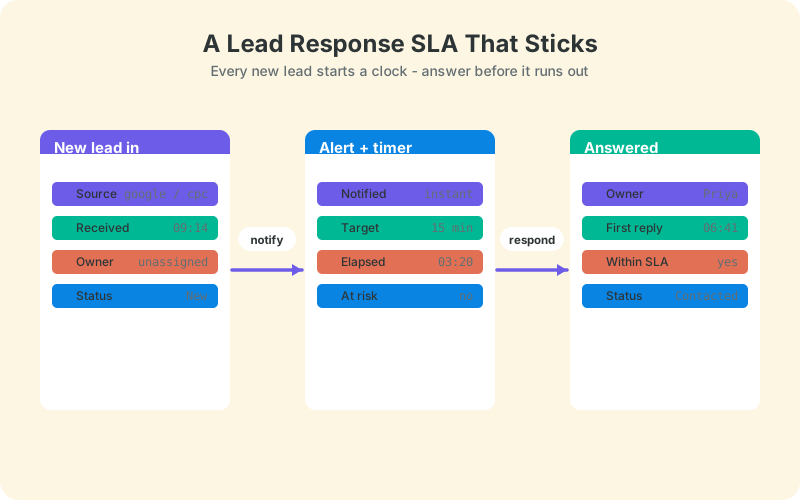
An SLA sticks when the responsible person knows a lead arrived within seconds and can see how long it has been waiting. Reporting after the fact tells you that you missed the target; a live timer stops you from missing it. Given that 63.5% of tested companies never responded at all (RevenueHero, 2024), most misses are simply leads nobody noticed in time.
Start with instant notification. The moment a form lands, the owner should get a push, an email, or a Slack ping with the lead's name and source, not a nightly digest. If the alert arrives with the lead already 12 hours old, the SLA was lost before anyone read it.
Then make the countdown visible. A number that everyone can see changes behavior, because a lead sitting at "9 minutes" with a 15-minute target creates useful pressure. This is where a coming-soon tool helps: the LeadOps client portal gives each lead a response timer against your target, so both the agency and the client watch the same clock turn from green to red. A visible target beats a buried report every time. Pair that with the alerting patterns in our speed-to-lead guide and slow replies become the rare exception rather than the norm.
What Should You Do About After-Hours Leads?
Handle after-hours leads with a separate, honest rule rather than pretending your SLA covers midnight. The urgency data still applies at 2 a.m., since qualifying odds drop more than 6x within the first hour (InsideSales.com / MIT Lead Response Management Study, 2007), but staffing rarely does. So define what "fast" means outside business hours and commit to that instead.
There are three workable patterns. First, an immediate automated acknowledgment that sets expectations and, ideally, offers self-service booking so a hot lead can grab a slot before it cools. Second, a defined first-thing-next-morning target, for example replied by 9:15 a.m. local, measured from opening rather than from arrival. Third, a genuine coverage extension, using an on-call rotation or an offshore team, when the client's economics justify it.
Whichever you choose, exclude after-hours arrivals from your business-hours SLA math and report them in their own bucket. Blending them punishes your team for the client's decision not to staff evenings. Make the choice explicit in the agreement, so a 7 p.m. lead answered at 9 a.m. is a met commitment, not a mysterious "14-hour response" that looks like failure on a chart. Clarity here prevents most of the finger-pointing that after-hours leads otherwise cause.
How Do You Review SLA Performance With the Client?
Review the SLA on a fixed cadence with one shared, timestamped record, so the numbers are not up for debate. This matters because slow response is the default everywhere: only 7% of tested companies replied within 5 minutes and 55% never replied within 5 business days (Drift Lead Response Report, 2017). A monthly review keeps your client from drifting into that majority.
Bring four numbers to every review. Median first-response time, percentage of leads answered within the SLA, count of breaches, and the slowest single lead with its story. Median beats average because one forgotten weekend lead can wreck an average and hide an otherwise strong month. Show the trend line, not just this month's figure.
The review's real purpose is joint problem-solving, not blame. If breaches cluster on Fridays, staffing is the fix; if they cluster on one rep, coaching is; if they cluster on one campaign, the lead volume may be outrunning capacity. Decide what belongs on the client's report before you build it, using our notes on what belongs in a client lead dashboard, and keep the format consistent so trends stay readable. Agencies that want a polished, repeatable format can borrow from our approach to white-label lead reports.
Setting Up Capture, Alerts, and a Live Timer
You can build the whole SLA stack from three layers: reliable capture, instant alerts, and a visible timer. The capture layer is the free foundation, because a target you cannot measure is just a wish, and 42-hour averages happen when nobody logs the arrival time (Harvard Business Review, 2011).
Start with capture. SheetLink Forms sends each submission from 12 major form plugins straight to Google Sheets in real time, stamping the arrival moment, source, and campaign on every row with no Zapier and no per-lead fees. That timestamped row is the start of your clock and the raw material for every report. The agency docs walk through a multi-client setup, and the agency client reporting use case shows the reporting side.
For the enforcement layer, add instant notifications so the owner sees each lead within seconds, then give clients a live view. The coming-soon LeadOps client portal is built for exactly this: each client gets a branded, no-login inbox where every lead carries a response timer against your SLA target, a simple New to Contacted to Qualified pipeline, and per-client reports including average response time. If a client-facing timer is where you are headed, the LeadOps portal page is worth a look, and the broader agency overview covers how it fits alongside the free plugin.
Turning a Response Target Into a Daily Habit
A lead-response SLA works when it is written, owned, measured, and reviewed, not when it is merely promised. The evidence for urgency is overwhelming: replying within an hour makes a lead nearly 7x more likely to qualify (Harvard Business Review, 2011), and most competitors simply do not do it.
Start small this week. Set one target, usually 15 minutes during business hours, name a single owner per lead, and begin capturing arrival timestamps so you have a baseline to improve against. Everything else builds on that record.
Your next step is measurement. Get every form submission landing in a timestamped sheet, then layer alerts and a visible timer on top so the target becomes a habit rather than a hope. The response-time tracking guide is the fastest place to begin, and once the numbers are clean, the client reviews take care of themselves.
Frequently Asked Questions
What is a good first-response-time SLA for leads?
For most agencies, 15 minutes during the client's business hours is a strong, sustainable target. The research pushes toward speed: moving a first call from 5 to 30 minutes cuts qualifying odds 21x (InsideSales.com / MIT, 2007). Start at 15 minutes, prove you hit it, then tighten if staffing allows.
Why is responding within an hour so important?
Because the odds collapse fast. An audit of 2,241 companies found firms replying within an hour were nearly 7x more likely to qualify a lead than those waiting an hour, and 60x more than those waiting a full day (Harvard Business Review, 2011). After an hour, most leads are effectively cold.
Who should own the response clock, the agency or the client?
Whoever actually makes first contact owns the clock. If your agency runs a shared inbox or SDR team, you own it; if the client's reps call the leads, they do. Either way, name one accountable owner per lead and start the timer from a captured delivery timestamp, not a memory.
How do I measure first-response time accurately?
Subtract the lead's arrival timestamp from the first genuine human reply, measured against business hours. Automatic capture is essential, since guessing is how the average company reached 42 hours (Harvard Business Review, 2011). Log received time and reply time in a sheet, then calculate the difference per lead and as a median.
Should an autoresponder count as a response?
No. An automated acknowledgment is useful for setting expectations, especially after hours, but it should not stop your SLA clock. First response means a real person engaging with the lead. Counting autoresponders inflates your numbers and hides the slow follow-up that actually loses deals.
How do I handle leads that arrive after business hours?
Give them a separate rule and exclude them from your business-hours SLA math. Send an instant automated acknowledgment, ideally with self-service booking, then set a first-thing-next-morning target measured from opening. Report after-hours leads in their own bucket so late-evening arrivals do not distort your team's numbers.
How often should I review the SLA with a client?
Monthly is the practical cadence for most retainers. Bring median response time, percentage answered within the SLA, breach count, and the slowest lead's story. Only 7% of tested companies reply within 5 minutes (Drift, 2017), so consistent reviews keep your client ahead of nearly everyone.
What tools do I need to enforce a response SLA?
Three layers: reliable capture, instant notifications, and a visible timer. SheetLink Forms handles timestamped capture to Google Sheets for free, alerts route each lead to its owner, and the coming-soon LeadOps portal adds a per-lead response timer against your target for both agency and client to see.
More Lead Management guides
Start the Clock on Every Client Lead
Capture every WordPress lead in Google Sheets with an automatic timestamp, no Zapier and no per-lead fees, so your SLA is measurable from day one.