
Speed-to-Lead: Why Instant CRM Fan-Out Beats Nightly Sync
The 5-minute speed-to-lead rule is decades old, yet most teams still batch leads into a nightly CRM sync. Here's why instant fan-out from your WordPress form wins.
In This Guide
- What Is the 5-Minute Speed-to-Lead Rule?
- Why Are Most Companies Still So Slow?
- What Does Delay Actually Cost You?
- Why Does Nightly or Scheduled Sync Fail Hot Leads?
- How Does Instant Fan-Out Work?
- Can You Route Hot Leads Differently?
- What's the Per-Task Math on Zapier Fan-Out?
- How Does Fan-Out Tame Tool Sprawl?
- Is Instant Delivery Reliable Enough?
- Can Leads Land in Sheets and Excel Together?
- The Verdict: Instant Fan-Out Wins on Speed and Cost
- Frequently Asked Questions
What Is the 5-Minute Speed-to-Lead Rule?
Contacting a web lead within 5 minutes rather than 30 makes you roughly 100x likelier to reach that person and about 21x likelier to qualify them, per the MIT/InsideSales Lead Response Management Study (HBR, 2011). The window is brutally short.
The logic is simple. A lead who just filled out your form is sitting at their desk, thinking about the problem you solve. Ten minutes later they've moved on. An hour later they've forgotten you and contacted three competitors.
That single finding reshapes how you should architect lead delivery. If the difference between a 5-minute response and a 30-minute one is 100x, then any system that adds delay between form submission and CRM arrival is quietly destroying pipeline.
Why Are Most Companies Still So Slow?
Despite the 5-minute rule being well known, most companies respond in hours, not minutes. In a study of 114 B2B companies, average email response was about 11 hours 54 minutes and average phone response about 14 hours 29 minutes, with essentially none responding within 5 minutes (Workato, 2019-2020).
The gap between knowing the rule and following it is almost always architectural, not motivational. Sales reps want to call fast. They simply don't see the lead in time.
Why? Because the lead is stuck in transit. It sat in a form database, waited for a scheduled export, queued behind a nightly middleware job, then finally landed in the CRM the next morning. By then the 5-minute window closed 14 hours ago. The reps aren't lazy. The plumbing is.
What Does Delay Actually Cost You?
Delay compounds two costs: the conversion penalty from the 5-minute rule and ongoing data decay. B2B contact databases decay around 22.5% per year (HubSpot, citing MarketingSherpa), so even a lead you eventually reach is worth less the longer it waits.
Think about the math on a single hot lead. If responding in 5 minutes makes you 100x likelier to make contact, then a 12-hour delay isn't a small tax. It's the difference between a sale and a ghost.
There's a quieter cost too. When form data trickles in on a nightly schedule, your attribution breaks. You can't tell which campaign drove the lead because the click context, the GCLID, the UTM tags, gets stale or lost in the batch. Capturing the Google Click ID with the lead at submission time is how you attribute and import offline conversions back to the campaign (Google Ads Help). Nightly sync routinely strips that signal.
Why Does Nightly or Scheduled Sync Fail Hot Leads?
Nightly sync was designed for a world where data freshness measured in hours was acceptable. For lead generation, where the contact window is 5 minutes (HBR, 2011), a batch job that runs once at midnight is structurally incapable of hitting the target.
Scheduled middleware has the same flaw at a smaller scale. A connector that polls every 15 minutes still introduces an average delay of 7-8 minutes before the lead even leaves WordPress. Add CRM processing time and you've blown the window.
Batch and poll-based models also fail silently. If a nightly export breaks, nobody notices until the morning report comes up short. By then a full day of leads aged past their useful life. Our experience building form-to-CRM pipelines is that the failures you don't see cost more than the ones you do. A model that delivers instantly, then logs and retries on failure, removes both the delay and the blind spot.
How Does Instant Fan-Out Work?
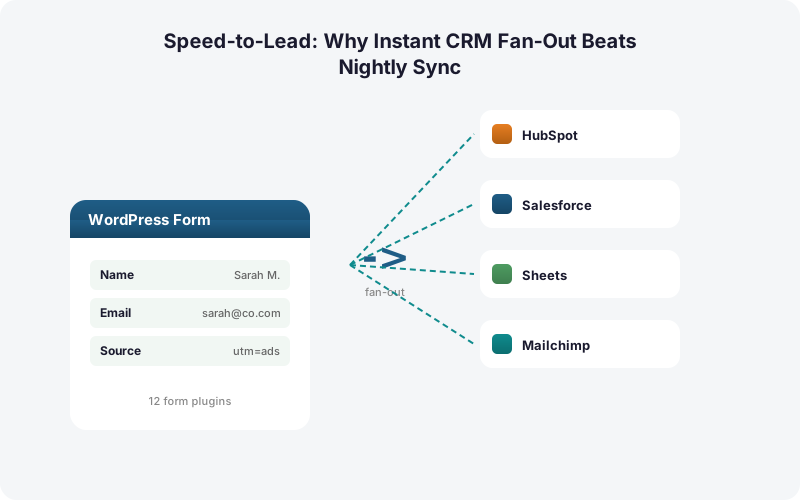
Instant fan-out delivers each submission to every destination the moment the form is submitted, in parallel, with no batching layer in between. SheetLink Forms fires the submission directly from WordPress to your spreadsheet and CRMs at once, typically within a second or two, not on a schedule.
The Multi-CRM Routing add-on fans a single submission out to HubSpot, Salesforce, Pipedrive, Zoho, Mailchimp, and ActiveCampaign simultaneously, alongside Google Sheets, with no intermediate queue waiting for a cron job.
Because delivery happens at submission time, the lead lands in the rep's CRM view while the prospect is still on your thank-you page. That's the whole point of the 5-minute rule made operational. There's no middleware account to poll, no nightly export to babysit, and no per-task meter ticking. The form fires, and every system updates together. For deeper setup detail, see our guide to using Google Sheets as a lightweight CRM.
Can You Route Hot Leads Differently?
Yes. Conditional routing sends each submission only to the destinations that match its field values, so a hot lead and a low-intent newsletter signup don't take the same path. The CRM market reached about $73.4B in 2024 and is projected to hit $163.16B by 2030 at 14.6% CAGR (Grand View Research, 2024/2025), which means most teams now run several CRMs at once and need rules to keep them tidy.
With conditional routing by field value, a form that asks budget or company size can push enterprise-tier leads straight to Salesforce and your sales Slack while routing smaller inquiries only to Mailchimp.
This is where instant fan-out earns its keep. A high-intent lead skips the general queue entirely and hits the priority CRM in real time, so your fastest reps get the freshest, best-qualified contacts first. See our walkthrough on conditional routing for WordPress forms for rule examples.
What's the Per-Task Math on Zapier Fan-Out?
Zapier meters by task, where one task equals one action, so fanning a single submission out to six CRMs in a multi-step Zap burns at least six tasks per lead, and overage bills at 1.25x (Zapier, 2026). The cost scales with both your traffic and your number of destinations.
Run the numbers. A site doing 1,000 leads a month, each fanned to six destinations, generates 6,000 tasks. That alone pushes you well past the free tier (100 tasks, 2-step only) and into a paid plan, since multi-step Zaps require one.
Direct fan-out has no per-task meter. SheetLink delivers to all six CRMs plus Sheets from one submission with no incremental fee per destination. The same lead that costs six Zapier tasks costs zero marginal dollars through the plugin. We dig into the full comparison in Make vs Zapier vs direct plugin and the true cost of Zapier for WordPress forms.
How Does Fan-Out Tame Tool Sprawl?
The average company ran about 106 SaaS apps in 2024 (BetterCloud State of SaaSOps via Statista, 2024), and lead data needs to reach a growing share of them. Adding a metered middleware layer on top of that sprawl multiplies both cost and points of failure.
Direct fan-out collapses the integration layer. Instead of one WordPress form feeding one Zap that branches to six tools, the form itself is the hub and pushes to every destination natively.
This matters most for agencies and multi-brand operators. One agency-managed setup can route each client's leads to that client's own CRM stack without a separate paid automation account per client. Fewer accounts, fewer monthly bills, fewer things that break at 2am. The data path lives inside WordPress where you can see and control it.
Is Instant Delivery Reliable Enough?
Instant delivery is only useful if it doesn't drop leads when a destination is down. SheetLink pairs real-time fan-out with a built-in retry queue that uses exponential backoff at 5 minutes, 30 minutes, and 2 hours, plus full delivery logs, so a temporary CRM outage delays a lead rather than losing it.
This is the answer to the obvious objection. Nightly sync feels safe because it's a single controlled batch. But a batch that fails takes the whole day's leads with it.
Instant fan-out with retry inverts that. Each lead is delivered on its own, the moment it arrives, and any destination that's briefly unavailable simply gets retried until it succeeds. You get the speed of real time and the durability of a queue, with logs that tell you exactly what landed where. That's a combination nightly sync and most poll-based middleware can't match.
Can Leads Land in Sheets and Excel Together?
Yes. SheetLink can deliver one submission to Google Sheets and Microsoft Excel Online at the same time, in real time, so analysts in either tool see the same fresh lead without a sync lag. The free mirror mode writes a single rule to both destinations at once.
This fits the fan-out philosophy. Your spreadsheet of record updates instantly alongside your CRMs, so reporting and sales work from identical, current data.
If your team standardizes on Microsoft 365, the Primary Destinations add-on makes Excel Online the sole destination with no Google account required. Either way, the dashboard is never a day behind your CRM. For a side-by-side, see Excel Online vs Google Sheets for form data.
The Verdict: Instant Fan-Out Wins on Speed and Cost
For lead generation, instant fan-out beats nightly and scheduled sync on the only axis that matters for hot leads: time. With the contact window at 5 minutes (HBR, 2011) and real-world response averaging nearly 12 hours (Workato, 2019-2020), batch delivery loses the lead before a rep ever sees it.
Instant fan-out closes that gap by delivering to every CRM, plus Sheets and Excel, the moment the form fires. Conditional routing sends hot leads to your priority systems first.
The cost story reinforces the speed story. Per-task metering punishes multi-destination fan-out, while a direct plugin charges nothing per destination. Faster, cheaper, and more durable thanks to a retry queue. For most WordPress sites running paid lead-gen, the choice isn't close. Compare licensing on the pricing page or browse the full add-on catalog.
| Capability | Instant Direct Fan-Out | Nightly / Scheduled Sync | Zapier Multi-Step |
|---|---|---|---|
| Lead delivery speed | 1-2 seconds, real time | Hours, once per batch | Polled, 1-15 min lag |
| Hits the 5-minute window | Yes | No | Often no |
| Fan-out to multiple CRMs | Parallel, all at once | Sequential or single | 1 task per destination |
| Cost per extra destination | No per-task fee | Varies / engineering | 1 task each, 1.25x overage |
| Failure handling | Retry queue + logs | Whole batch can fail | Vendor managed |
Frequently Asked Questions
What is the speed-to-lead rule?
It's the finding that contacting a web lead within 5 minutes rather than 30 makes you about 100x likelier to make contact and 21x likelier to qualify them, per the MIT/InsideSales study (HBR, 2011). The window for a hot lead is extremely short.
Why is nightly CRM sync bad for sales leads?
Nightly sync delivers leads hours after submission, long after the 5-minute contact window closes (HBR, 2011). Most firms already respond in nearly 12 hours on average (Workato, 2019-2020), and a once-a-day batch makes that delay structural rather than fixable by motivated reps.
How fast does instant fan-out deliver a lead?
SheetLink delivers each submission directly from WordPress to your CRMs and spreadsheets typically within a second or two of the form being submitted, in parallel. There's no scheduled export or polling middleware adding delay between submission and CRM arrival.
Can I send one lead to multiple CRMs at once?
Yes. The Multi-CRM Routing add-on fans a single submission out to HubSpot, Salesforce, Pipedrive, Zoho, Mailchimp, and ActiveCampaign simultaneously, alongside Google Sheets, with no per-task fees. Conditional routing lets you send each lead only to the destinations that match its field values.
How much does Zapier multi-step fan-out cost?
Zapier meters by task, where one action equals one task, so fanning a lead to six CRMs in a multi-step Zap burns at least six tasks per lead, with overage at 1.25x (Zapier, 2026). Multi-step Zaps require a paid plan. Direct fan-out has no per-task fee.
What happens to a lead if a CRM is temporarily down?
SheetLink's built-in retry queue uses exponential backoff at 5 minutes, 30 minutes, and 2 hours, with full delivery logs. A briefly unavailable destination delays that single lead and retries until it succeeds, rather than losing the lead the way a failed nightly batch can.
Does instant delivery preserve marketing attribution?
Yes. SheetLink captures UTM tags and click IDs like GCLID, fbclid, and msclkid at submission time. Capturing the Google Click ID with the lead is how you attribute and import offline conversions back to the campaign (Google Ads Help), which nightly batches often strip or stale.
Can hot leads be routed differently from cold ones?
Yes. Conditional routing by field value lets a budget or company-size field push enterprise leads straight to Salesforce while smaller inquiries route only to Mailchimp. With instant fan-out, high-intent leads skip the general queue and reach your priority CRM in real time.
Can leads land in both Google Sheets and Excel Online?
Yes. SheetLink's free mirror mode writes one rule to both Google Sheets and Microsoft Excel Online in real time at once. If you standardize on Microsoft 365, the Primary Destinations add-on makes Excel the sole destination, with no Google account required.
More Lead Management guides
Reach Every Lead Inside the 5-Minute Window
SheetLink Forms fans each submission out to every CRM and spreadsheet in real time. No nightly sync. No polling delay. No per-task fees.