
How to Automatically Enrich WordPress Leads in Google Sheets with Company Data
A name and an email aren't enough for B2B sales. Here's how to enrich every WordPress lead with company size, industry, revenue, and tech stack - automatically, in your sheet.
In This Guide
- Why Raw Form Data Isn't Enough for B2B Sales
- The Five Sources of Enrichment Data
- Free Enrichment Patterns
- The Enrichment Pipeline
- The Enrichment Columns Sales Actually Use
- Firmographic Scoring
- Cost Management for Enrichment
- GDPR and Privacy Considerations
- Beyond Enrichment: Routing and Personalization
- Recap
- Frequently Asked Questions
Why Raw Form Data Isn't Enough for B2B Sales
A B2B contact form typically captures three things: name, email, and message. That's the bare minimum to follow up.
It's also dramatically less than what your sales team needs to know. Is this lead from a 5-person startup or a 5,000-person enterprise? What industry? What's their tech stack? Are they currently using a competitor?
This data exists in public sources. The lead's email domain reveals their company. The company has a website. The website tells you their tech stack. LinkedIn (and aggregators) tell you size and industry. Revenue ranges are publicly estimated for most companies.
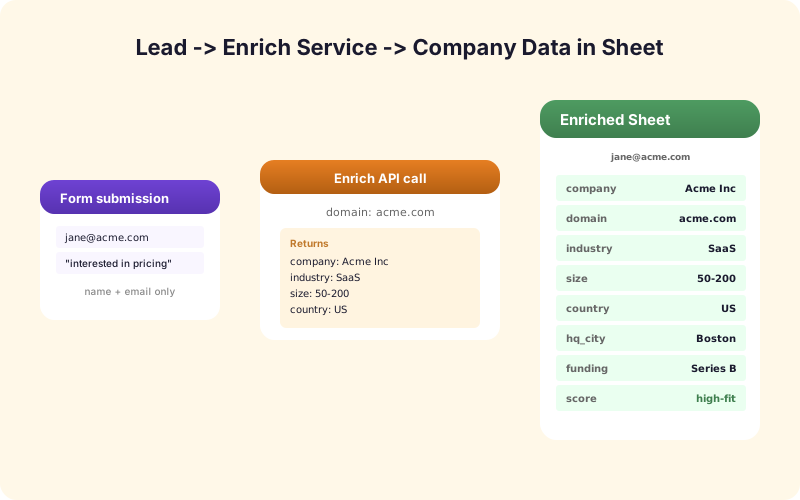
Enrichment is the process of taking the email and pulling all of that data into your sheet automatically, before the sales rep ever opens the lead. A 30-second phone call where the rep already knows the company size, industry, and stack converts dramatically better than one where they're asking those questions live.
The Five Sources of Enrichment Data
Clearbit - the canonical company enrichment API. Email or domain in, full company profile out (size, revenue range, industry, tags). Acquired by HubSpot but still available standalone.
Apollo.io - similar coverage with stronger contact-level data (job title, seniority). Free tier available.
Hunter.io - specializes in email finding and verification. Useful as a deliverability check on the email address itself.
ZoomInfo - enterprise-grade. Strong but expensive.
BuiltWith - tech stack detection. What CRM does the lead's company use? What ad tech? Useful for SaaS sales targeting customers of specific competitors.
Most teams pick one primary (Clearbit or Apollo) plus BuiltWith for stack visibility. Volume-based pricing - typical SMB sales teams pay $200-$500/month for enrichment.
Free Enrichment Patterns
Before paying for an enrichment API, get the free signal first.
Email domain parsing. Strip the part after @, look up the company website at that domain. Free.
Free vs. business email. Reject leads with @gmail.com, @yahoo.com, @hotmail.com if you only sell B2B. Free.
Webpage check. A simple HEAD request to the domain - is there a website? Some leads use a domain that doesn't resolve, often spam. Free.
Public WHOIS. Domain registration date tells you if the company is new (potential signal for buying stage).
LinkedIn search URL. A clickable link in your sheet to "linkedin.com/search/?keywords=domain" gives sales reps a one-click research path. Free.
These five free signals already give you a 70% picture. Paid enrichment fills in the remaining 30% - revenue, employee count, vertical tags, founder names.
The Enrichment Pipeline
A working enrichment pipeline runs after the form submission but before the sales rep ever sees the lead.
Step 1: form submission writes a row to Sheets. Standard fields populated.
Step 2: an Apps Script trigger or webhook fires on the new row. The script reads the email field.
Step 3: the script extracts the domain, checks the free signals (free vs. business email, domain valid), and writes those columns.
Step 4: if the lead passes the free filters, the script calls the paid enrichment API and writes the company columns.
Step 5: optionally, an AI model is called with all the enriched data to produce a Lead Score (0-100).
Total time: 2-5 seconds per lead. By the time the sales rep checks their queue, the data is already there.
SheetLink Forms' Lead Scoring add-on implements this pipeline end-to-end with built-in support for major enrichment APIs.
The Enrichment Columns Sales Actually Use
Don't add 40 enrichment columns. Sales reps will scan 8-10 of them and ignore the rest.
The high-value columns:
1. Company name - the canonical version, not whatever the user typed. 2. Domain - extracted, used for joins. 3. Industry - from enrichment. 4. Employee count - or range (1-10, 11-50, 51-200, 201-1000, 1001+). 5. Annual revenue - or range. 6. HQ location - city/country. 7. LinkedIn URL - one-click research. 8. Tech stack tags - 3-5 tags max (e.g., Salesforce, AWS, HubSpot).
Everything else (founder name, full description, social media links, founding year) goes in a Notes column or a separate "Enrichment Detail" tab if anyone needs it.
Firmographic Scoring
Once you have firmographic data (industry, size, revenue) on every lead, you can score lead fit automatically.
Define the ideal customer profile (ICP). Example: SaaS company, 50-500 employees, $5M-$50M revenue, US or Canada based.
Score each lead against the ICP. SaaS industry: +30 points. 50-500 employees: +30 points. $5M-$50M revenue: +20 points. North America: +20 points. Total possible: 100. A lead scoring 80+ is a Fit; 50-79 is Maybe; below 50 is Not Fit.
Apply this score in the sheet via a formula or via SheetLink Forms' AI Lead Scoring (which combines firmographic and behavioral signals). Sales prioritizes Fit leads first. Marketing nurtures Maybe leads. Not Fit leads get a polite auto-reply.
Cost Management for Enrichment
Enrichment APIs charge per lookup. For a site doing 1,000 leads per month at $0.20-$0.50 per enrichment, that's $200-$500/month. Real money.
Three ways to manage cost.
Pre-filter with free signals. Reject obvious junk (free email, invalid domain) before paying for enrichment. Cuts paid lookups by 30-50%.
Cache by domain. The same company shows up multiple times across multiple leads. Look up once per domain per month and reuse the result. Cuts paid lookups by another 20%.
Tier the enrichment. Use a cheap basic enrichment (free domain lookup, Hunter for email validation) for all leads. Reserve the expensive deep enrichment (Clearbit, Apollo full profiles) for leads that pass an initial AI score threshold.
With all three, your enrichment cost can drop by 50-70% with minimal impact on data quality.
GDPR and Privacy Considerations
Enriching personal data has GDPR implications. Some safe guidelines:
- Enrich the company, not the person. Company data (size, industry, revenue) is generally public. Personal enrichment (their LinkedIn profile, their previous employers) is more sensitive. - Document the legal basis. Legitimate interest is the typical basis for B2B enrichment under GDPR. - Allow opt-out. If a lead requests their data not be enriched, honor it. - Keep enrichment data current or delete it. Stale enrichment is both inaccurate and a retention problem.
For a fuller treatment, see GDPR-compliant form data in Sheets.
Beyond Enrichment: Routing and Personalization
Once leads are enriched, the data drives downstream automation.
Routing: assign Enterprise leads to a different sales rep than SMB leads, automatically. The Multi-Node Routing add-on reads the Employee Count column and routes accordingly.
Personalization: the auto-reply email pulls in the company name, industry, and a relevant case study based on the enriched data. Higher reply rates than generic auto-replies.
CRM sync: enriched leads land in your CRM with all the firmographic fields populated, saving sales reps from manual data entry. The Multi-CRM Routing add-on handles this.
Recap
B2B sales without enrichment is a competitive disadvantage. The pipeline is straightforward: free signals first, paid enrichment for qualified leads, firmographic scoring, downstream routing and personalization.
Keep the columns lean (8-10), manage cost with caching and pre-filtering, respect GDPR. The result is a sales team that opens every lead already knowing what kind of company they're talking to - and a measurable lift in conversion rate as a result.
Frequently Asked Questions
What's the best lead enrichment API?
Clearbit (now part of HubSpot) and Apollo.io are the most-used. Clearbit has stronger company-level data; Apollo has stronger contact-level data. Both have free tiers worth testing.
Can I do enrichment for free?
Partially. Free signals (email domain parsing, business vs. free email check, domain validity) cover ~70% of basic enrichment. The remaining 30% (employee count, revenue, industry tags) typically requires a paid API.
How fast is enrichment?
Typically 2-5 seconds from form submission to enriched columns in Sheets. Most enrichment APIs respond in under 2 seconds; Sheets writes the result immediately.
How much does enrichment cost?
$0.20-$0.50 per enrichment is typical. For 1,000 leads per month, that's $200-$500/month. With pre-filtering, domain caching, and tiered enrichment, you can cut this 50-70%.
Is enrichment GDPR-compliant?
Company-level enrichment is generally fine under legitimate interest. Person-level enrichment (LinkedIn profile, employment history) is more sensitive. Document your legal basis, honor opt-out requests, and keep data current.
Can I score leads automatically based on enriched data?
Yes. Define your ICP (ideal customer profile) and score each lead against it. SheetLink Forms' AI Lead Scoring add-on combines firmographic data with behavioral signals to produce a quality score.
What if the lead uses a free email like Gmail?
Free emails generally indicate consumer use or low-quality leads in B2B contexts. Filter them out with a pre-check, or run reduced enrichment (no company data, just deliverability check) to keep costs down.
Should I enrich every lead or only high-value ones?
Tier it. Run cheap enrichment (free signals + Hunter validation) on every lead. Run expensive enrichment (Clearbit, Apollo full profile) only on leads that pass an initial fit check. This cuts cost without losing data on the leads that matter.
More Lead Management guides
Enrich Every Lead Automatically
Free signals first, paid enrichment for qualified leads, firmographic scoring at the end. SheetLink Forms ties it together.