
How to Give Clients Their Leads Without WordPress Access
Your client wants their leads, fast, in a format they understand. They do not need wp-admin to get them. Here are three clean handoffs and how to set one up.
In This Guide
- Give clients their leads, not a login
- Why is sharing wp-admin with clients a bad idea?
- What do clients actually want from their leads?
- How a messy handoff leaks leads
- Option 1: forward the email notifications
- Option 2: a shared Google Sheet
- Option 3: a dedicated client lead portal
- How to set this up with SheetLink Forms
- How do you onboard a client onto their leads cleanly?
- Next step: pick the handoff, then automate it
- Frequently Asked Questions
Give clients their leads, not a login
Give each client a read-only view of their own leads - by email, a shared Google Sheet, or a dedicated lead portal - and never hand over wp-admin. That handoff matters because leads leak fast when it is messy: a 2024 test of 1,000 B2B companies found 63.5% never responded to a demo request at all (RevenueHero, 2024).
A WordPress login is the wrong lever to pull. Agencies build on WordPress because it is everywhere - it powers 41.2% of all websites (W3Techs, 2026) - but the client does not need to touch the admin panel to benefit from what you built. They need their leads, and they need them the moment a form is submitted.
This guide covers why sharing wp-admin is risky, what clients actually want, the three realistic handoff options with their trade-offs, and how to onboard a client cleanly.
Why is sharing wp-admin with clients a bad idea?
Sharing wp-admin is a bad idea because a login built for site management exposes far more than leads, and one wrong click can break the site you maintain. A client who logs in to check inquiries can deactivate a plugin, edit a live page, or change a theme setting without meaning to, and you own the cleanup.
The problems stack up quickly:
- Security surface. Every extra admin account is a new password to phish, reuse, or leave on a shared laptop. You cannot control how a client stores their credentials.
- Accidental breakage. A curious click in Plugins, Appearance, or Settings can take a page down. Even a read-only intent turns into an emergency support ticket.
- Support burden. Once clients live in wp-admin, they ask you where things moved after every update. You become their WordPress helpdesk, not their marketing partner.
- Over-exposure. Users, posts, media, analytics plugins, other clients on a multisite - wp-admin shows all of it. Leads are a tiny slice of what you are handing over.
Contributor or editor roles do not fix this. They still expose the dashboard, and they still do not give the client a clean lead view. The right answer is to move the leads out of WordPress entirely and share only that.
What do clients actually want from their leads?
Clients want three things: their leads, fast, in a form they already understand. They do not care that a form plugin captured a submission or that a theme rendered the page. They care that a real person asked to buy, and that they can call them back before the interest cools.
Speed is the whole game. In a 2007 study of lead-driving companies, only about 20% of firms called a new lead within an hour, and 38% either did not know, did not measure, or did not respond when asked how fast they made first contact (Kellogg / InsideSales.com Lead Response Management Study, 2007). When the handoff runs through a login the client rarely opens, that lag gets worse.
So the target is simple. The client sees each lead the moment it arrives, in a tool they open every day - their inbox, a spreadsheet, or a portal - with the contact details and the source. No training, no WordPress vocabulary, no password reset tickets. If you also want to prove your value, tracking lead response time in Google Sheets turns speed into a number you can report.
How a messy handoff leaks leads
A messy handoff leaks leads because nobody clearly owns the first reply. If a lead sits in a WordPress database the client never checks, or in an email thread that gets buried, no one calls it back. The 63.5% of B2B firms that never responded to a demo request (RevenueHero, 2024) rarely decided to ignore that buyer - the lead simply fell through a gap.
Among the firms in that same 2024 test that did reply, the average response time was 1 day, 5 hours, and 17 minutes (RevenueHero, 2024). More than a day is far past the point where most buyers have moved on to a competitor who answered first.
Every hop in your handoff adds delay and adds a place to lose the lead. Form to database, database to a login nobody opens, login to a client who forgot the password - each step is a leak. The fix is to shorten the chain: send the lead straight to where the client already works, in real time, so the only remaining question is who picks up the phone.
Option 1: forward the email notifications
Forwarding form notification emails is the fastest handoff to set up and the easiest to outgrow. You point the form plugin's notification at the client's address, and every submission lands in their inbox. Zero new tools, zero training - the client already lives in email.
The trade-offs show up fast. Emails have no structure, so there is no pipeline, no status, and no way to see this month's leads at a glance. They land in spam, get buried under newsletters, or go to one person who is on vacation. There is no report you can pull, and no shared record if the client disputes how many leads you sent.
Use email forwarding for a low-volume client who just needs a heads-up, or as a backup notification alongside a structured store. For anything you want to measure or report on, email alone is not enough. It answers speed but fails on organization, ownership, and proof - which is exactly why most agencies graduate to a spreadsheet or a portal.
Option 3: a dedicated client lead portal
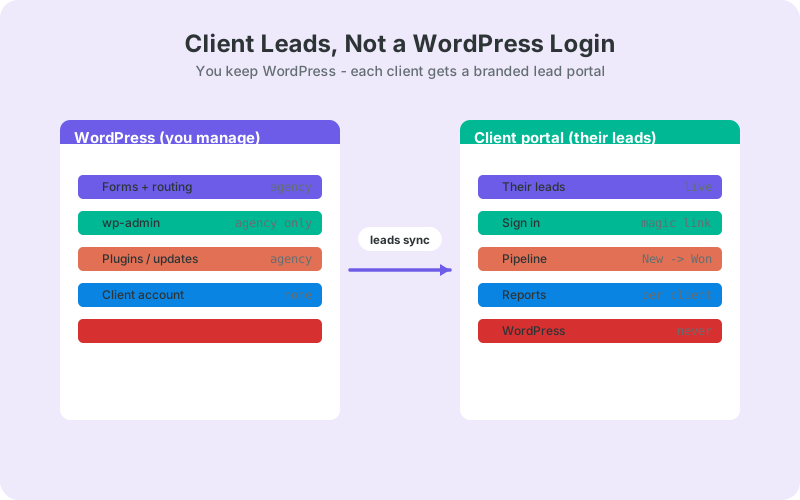
A dedicated lead portal is the most polished handoff: each client signs in to a branded space that shows only their leads, with a pipeline and reports built in. It removes the two weak spots of a shared sheet - per-client privacy and a real status workflow - without ever exposing WordPress.
A portal gives each client their own sign-in, a New to Contacted to Qualified to Won or Lost pipeline, full attribution per lead (source, campaign, UTM, click ID), and per-client reports on pipeline, won revenue, and average response time. Because it tracks speed to a target, it also nudges the client to call fast, which is the whole point given how many firms answer late.
The trade-off is that a portal is another product to run, so it fits agencies past a handful of clients rather than a one-off site. This is where LeadOps, our coming-soon client lead portal, is built to slot in: a branded per-client inbox layered on the same form capture you already use, with magic-link sign-in and no wp-admin. It is not generally available yet, so treat it as the direction of travel while you ship with a shared sheet today.
How to set this up with SheetLink Forms
Set it up by sending your WordPress form submissions straight to a Google Sheet, then sharing that sheet with the client. SheetLink Forms is a free WordPress.org plugin that pushes each submission into Google Sheets in real time - via one-click Google connect (v1.12.0) or a classic Google Apps Script receiver you deploy in your own Google account - no Zapier, no per-task fees, and no login handed to the client.
The flow is short:
- Install SheetLink Forms and connect it to a Google Sheet - one-click Connect Google with the Google file picker, or the classic deployed Apps Script URL. The full walkthrough lives in the no-Zapier setup guide.
- Submit one test entry - the header row builds itself from your form's own fields, with no column names to type. SheetLink works with 12 major form plugins, so Contact Form 7, WPForms, Gravity Forms, Elementor, and the rest all feed the same sheet.
- Add the metadata that makes a lead useful: timestamp, page URL, and UTM or click-ID enrichment append automatically, so the client sees the source, not just the name.
- Share the sheet view-only with the client. That is your handoff - live leads, zero wp-admin.
Because WordPress holds 59.1% market share among sites that use a known CMS (W3Techs, 2026), this same capture works across nearly every client site you manage. When you are ready to move from a shared sheet to a branded per-client portal, the same captured data feeds LeadOps, and the agency overview shows where it fits.
How do you onboard a client onto their leads cleanly?
Onboard cleanly by deciding the handoff before the first lead arrives, then confirming the client can see a test submission. Do the plumbing on your side so the client's first experience is a real lead in a tool they already open, not a setup task or a password reset.
A repeatable onboarding checklist:
- Pick the handoff. Email for a light client, a shared sheet for most, a portal once volume justifies it. Match the tool to how the client already works.
- Wire capture first. Connect the forms to your destination and confirm fields, source, and timestamp all land correctly before you invite anyone.
- Send a test lead. Submit the live form yourself and watch the row or notification appear. Fix mapping gaps now, not after a real buyer is lost.
- Share read-only access. View-only sheet link or a portal sign-in. Never an admin, editor, or contributor role in WordPress.
- Set the response expectation. Agree on who calls new leads and how fast, and give them a place to see it. The agency client reporting use case shows how to frame that in a report.
Document the handoff in one short page per client so a new team member can repeat it, and lean on the agency form-sync playbook once you run it across many sites. Clean onboarding is what keeps the handoff from becoming a support channel.
Next step: pick the handoff, then automate it
Give clients their leads, never your admin panel. Choose email for the lightest clients, a shared Google Sheet for most, and a branded portal once volume justifies it - and in every case, keep wp-admin off the table. The handoff you choose decides whether leads get answered or leak, and with 63.5% of firms never replying at all (RevenueHero, 2024), a clean handoff is a real edge.
Start today with the free path: send each client's WordPress form submissions straight to a Google Sheet, share it view-only, and confirm a test lead lands. That alone beats a login most clients never open. When you outgrow shared sheets, the same captured data is ready for a per-client portal, so nothing has to be rebuilt. Pick one client this week, wire the capture, and send them their first live lead without a WordPress password ever changing hands.
Frequently Asked Questions
Can I give a client access to only their leads in WordPress?
Not cleanly through WordPress roles alone. Even an editor or contributor role exposes the dashboard, other content, and settings, and still shows leads in a raw admin table. The better approach is to send leads out of WordPress to a shared Google Sheet or a portal the client accesses without any login.
Is it safe to give a client a WordPress admin login?
No, an admin login is risky and usually unnecessary. It exposes plugins, themes, users, and settings, so one accidental click can break the live site you maintain. Every extra credential is also a new security and support liability. Share only the leads through a read-only handoff instead of a login.
What is the easiest way to share leads with a client?
Forwarding the form notification email is the fastest to set up, since clients already live in their inbox. It has no structure, pipeline, or reporting, though, and messages get buried or land in spam. Use it for low-volume clients or as a backup alongside a structured store like a Google Sheet.
Should I use a shared Google Sheet or a client lead portal?
Use a shared Google Sheet for most clients and a portal once volume grows. A sheet is fast, cheap, and gives the client durable ownership of their data. A portal adds per-client sign-in, a pipeline, and reports. Both avoid wp-admin, so start with a sheet and upgrade when the client needs a workflow.
How do I send WordPress form leads to Google Sheets for free?
Install the free SheetLink Forms plugin and connect it to a Google Sheet - one-click Google connect, or a classic Apps Script receiver you deploy in your own account. Submissions land in real time with no Zapier and no per-task fees, and the plugin covers 12 major form plugins so one method fits every client site.
Why does lead response speed matter so much for clients?
Speed decides whether a lead converts or disappears. In a 2007 study, only about 20% of firms called a new lead within an hour (Kellogg / InsideSales.com, 2007). A handoff that runs through a login nobody opens adds hours of delay and lets warm leads cool before anyone calls back.
Will this work across all my client sites?
Yes, because nearly every client site runs the same platform. WordPress holds 59.1% market share among sites using a known CMS (W3Techs, 2026), so one capture-to-Sheets method repeats across your whole roster. Build the handoff once, then reuse the same steps on every client site you onboard.
What is LeadOps and is it available now?
LeadOps is a coming-soon branded client lead portal for agencies, built on the same SheetLink Forms capture. Each client gets a magic-link sign-in, a lead pipeline, and reports without any WordPress access. It is pre-launch, so it is not generally available yet - treat it as the direction of travel while you ship with a shared Google Sheet today.
More Lead Management guides
Send Client Leads to Sheets, Not wp-admin
Push WordPress form submissions straight to a shared Google Sheet in real time - free, no Zapier, and no login to hand over.