
Nonprofit Donation Tracking Spreadsheet in Google Sheets
Turn your donation form into a living donor register in Google Sheets: campaign attribution, recurring flags, retention cohorts, and thank-you tracking - built for small nonprofits without a CRM budget.
In This Guide
- A Donor Register That Updates Itself
- Why Track Donations in a Spreadsheet Instead of a CRM?
- What Columns Does a Donation Tracking Spreadsheet Need?
- How Do You Attribute Donations to Campaigns?
- How Do You Flag Recurring vs One-Time Gifts?
- How Do You Build Donor Retention Cohorts in Sheets?
- How Do You Track Thank-You Follow-Ups?
- Getting Donation Forms Into the Sheet Automatically
- How Do You Keep the Board and Team in the Loop?
- Handle Donor Data Responsibly
- Start With This Month's Gifts
- Frequently Asked Questions
A Donor Register That Updates Itself
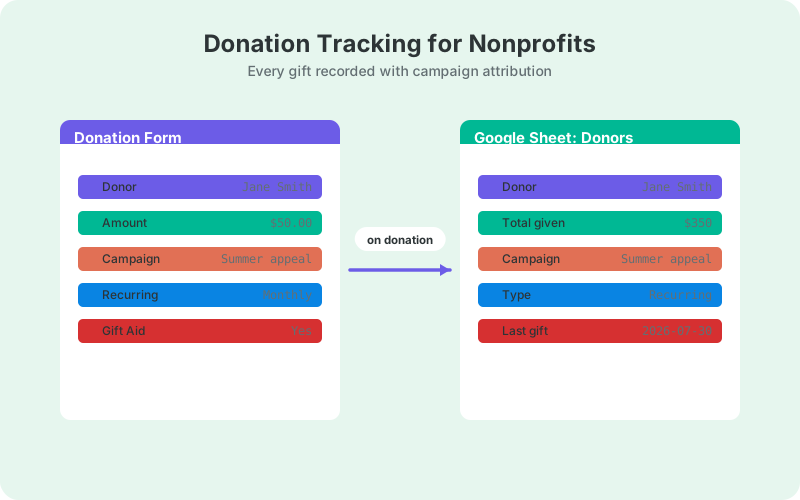
A nonprofit donation tracking spreadsheet works best as a living donor register: every gift from your website lands in Google Sheets the moment it happens, tagged with donor, campaign, and gift type. Online giving is growing - average nonprofit online revenue rose 15% in 2025 (M+R Benchmarks, 2026) - and a live register keeps up without data entry.
This setup is built for small nonprofits without a CRM budget. The donation form on your WordPress site feeds the sheet automatically, and columns for UTM attribution, recurring flags, and thank-you tracking turn raw gifts into retention insight a two-person development team can act on.
Below: the column template, campaign attribution, the cohort math, and follow-up tracking, plus how to wire the form to the sheet in an afternoon.
Why Track Donations in a Spreadsheet Instead of a CRM?
Because a spreadsheet you actually maintain beats a CRM you cannot afford or never open. Small nonprofits often run development on volunteer hours, and Google Sheets is free, shareable, and familiar to every board member. The register handles gift logging, attribution, and retention math until your volume genuinely demands more.
The classic trap with spreadsheets is manual entry - retyping gifts from email receipts is where donor registers go to die. That problem disappears when the donation form writes rows itself. The sheet stays current without anyone on staff owning data entry, which is the difference between a register and a graveyard.
And when you do outgrow it, the same sheet exports cleanly into any donor CRM. In the meantime it can behave like one: our guide to running a Google Sheets CRM from WordPress shows how far the pattern stretches.
What Columns Does a Donation Tracking Spreadsheet Need?
About a dozen columns cover a small nonprofit's needs: gift facts, donor identity, campaign attribution, gift type, and follow-up status. The form fills most of them automatically, and your team maintains only the follow-up columns. Set the structure once and every future gift files itself.
- Timestamp - date and time of the gift
- Donor name and email - the identity you match repeat gifts on
- Amount - a numeric column so totals and averages work
- Gift type - one-time or recurring
- Campaign columns - utm_source, utm_medium, utm_campaign
- Page URL - which appeal page converted
- First-time donor flag - a formula, covered below
- Thank-you sent - date sent, and by whom
- Matching gift flagged - whether you prompted an employer match
- Notes - board connection, in memory of, restrictions
In practice the tab layout reads left to right by ownership. Columns A through F fill automatically from the form: timestamp, name, email, amount, gift type, and campaign. G and H are formulas: the first-time flag and cohort year. I through K are the only cells a human touches: thank-you date, follow-up owner, and notes. One glance tells a volunteer exactly where their work starts and where the machine's ends.
Keep raw form data on one tab and reporting formulas on another, so an accidental edit never touches the record of a gift. Protect the raw tab and give edit access only to the follow-up columns.
How Do You Attribute Donations to Campaigns?
With UTM columns captured at submission time. Only 1.6% of nonprofit website visitors make a donation, and the average visitor is worth $1.33 in revenue (M+R Benchmarks, 2026), so knowing which email, ad, or social post produced each gift decides where your limited outreach time goes.
Tag every appeal link with utm_source, utm_medium, and utm_campaign. When the donation form syncs to the sheet, those parameters can arrive as extra columns on the same row, giving every gift its origin. Spring appeal versus Giving Tuesday versus a board member's Facebook share stops being a guess.
A pivot table by campaign then shows gift count, revenue, and average gift per appeal. The tagging discipline is the hard part; the technical setup is in UTM tracking for WordPress forms in Google Sheets.
How Do You Flag Recurring vs One-Time Gifts?
With a Gift type column, because the two behave like different donor bases. Monthly givers are retained at 71% after 12 months, versus 24% for new online donors (M+R Benchmarks, 2026). Blending them into one average hides your most important number.
Both streams are growing - one-time online revenue rose 17% in 2025 and monthly giving revenue rose 12% (M+R Benchmarks, 2026) - but the retention economics clearly favor monthly. Every donor you upgrade from one-time to monthly moves into your stickiest cohort.
The practical use: filter Gift type to one-time, sort by amount descending, and you have this month's monthly-upgrade ask list. In the other direction, a recurring donor whose expected row stops appearing deserves a personal check-in, not a mass email.
Catching those lapses is one formula. Compute each monthly giver's most recent gift with MAXIFS keyed on email, and flag anyone whose latest gift is older than about six weeks - one missed cycle plus grace. That flag column is your save-the-subscription list, and it is worth working before anything else on the follow-up board.
How Do You Build Donor Retention Cohorts in Sheets?
Group donors by the year of their first gift, then count how many gave again. Overall donor retention sits at 43.3%, and only about 19% of first-time donors ever give a second gift, versus 69% of repeat donors (Fundraising Effectiveness Project, AFP). The second gift is the whole game.
The formulas are ordinary spreadsheet work. On a Donors tab, list each unique donor with =UNIQUE(Raw!C2:C), assuming column C holds emails. Next to it, the first gift date: =MINIFS(Raw!A:A, Raw!C:C, A2). Cohort year is just =YEAR(B2).
The retained flag counts any later gift from the same donor: =IF(COUNTIFS(Raw!C:C, A2, Raw!A:A, ">"&B2)>0, 1, 0). For a strict 12-month window, add a second date condition to the COUNTIFS using EDATE(B2, 12) as the upper bound. Average that flag by cohort year and you have annual retention; pull each donor's gift type in as a pivot column and the same table splits monthly givers from one-time donors, so you can watch the two cohorts separately.
What to do with the numbers: treat every first-time donor as a now-or-never follow-up, because prior online donors retain at 66% once you get them to gift two (M+R Benchmarks, 2026). The returns on earning that second gift compound year after year.
How Do You Track Thank-You Follow-Ups?
With two columns: a Thank-you sent date and a follow-up owner. The register makes gratitude auditable - filter for blank thank-you dates older than 48 hours and you have today's call list. Given that only about 19% of first-time donors ever give again (Fundraising Effectiveness Project, AFP), the thank-you is retention work, not admin.
Add a Matching gift flagged column while you are at it. Mentioning matching gifts in appeals raises response rates by 71% and average donation size by 51% (Double the Donation). A simple follow-up asking "does your employer match donations?" is often the cheapest revenue a small nonprofit will ever find.
If you want follow-up emails to go out automatically when a new row lands, the pattern in automating follow-up emails from Google Sheets adapts directly to thank-yous and match prompts.
Getting Donation Forms Into the Sheet Automatically
The register only works if rows write themselves. SheetLink Forms sends WordPress form submissions to Google Sheets in real time - connect with one-click Google Sheets connect (pick or create the register in the Google file picker) or through the classic Apps Script receiver in your own Google account. No Zapier tasks and no monthly per-task fees, which matters on a nonprofit budget.
The free core supports 12 major form plugins, including the builders most donation forms run on: Gravity Forms, WPForms, Fluent Forms, and Formidable among them. UTM parameters and the page URL are appended to each row automatically, which is exactly what powers the attribution columns above.
Setup takes about a minute with one-click connect (or 15 minutes on the classic route) following the getting started guide, and the general pattern in tracking leads in Google Sheets maps one-to-one onto gifts: a lead register and a donor register are the same machine with different columns.
How Do You Keep the Board and Team in the Loop?
Share a view-only report tab, and send a short weekly digest. Boards do not want the raw register; they want gifts this month, top campaign, and the retention trend on one screen. A weekly email carrying those three numbers keeps development visible between meetings without another status document.
You can schedule that digest straight from the spreadsheet. Our walkthrough of weekly digests from Google Sheets by email covers the timer setup - swap "leads" for "gifts" and the template holds as-is. Volunteers checking the sheet on Monday morning beats a quarterly surprise at the board meeting.
Handle Donor Data Responsibly
Donor records are personal data, and often sensitive: gift histories reveal the causes people care about. Restrict the register's sharing to the people who genuinely need it, keep the raw tab protected, and set a retention schedule for lapsed donor records rather than keeping everything forever.
Consent and deletion requests apply to the sheet exactly as they apply to your website. Our guide to GDPR-compliant form data in Google Sheets covers consent logging, export requests, and retention schedules - and most of it is simply good practice for donor data even outside the EU.
Start With This Month's Gifts
Create the sheet, add the column set above, and connect your donation form today. Backfill this month's gifts from receipts so the register starts with momentum, then let every new gift file itself in real time.
Within a quarter you will have your first real retention number. With overall donor retention averaging 43.3% across the sector (Fundraising Effectiveness Project, AFP), simply knowing yours - and working the thank-you list every week - puts a small nonprofit ahead of most of its peers.
Frequently Asked Questions
Can a spreadsheet really replace a donor CRM for a small nonprofit?
For gift logging, campaign attribution, and retention tracking, yes - especially when the donation form writes rows automatically so nobody does data entry. A CRM earns its cost once you need grant pipelines, major-gift moves management, or multiple seats with permissions. Until then, the register does the job for free.
What is a good donor retention rate for a nonprofit?
Overall donor retention averages 43.3% across the sector (Fundraising Effectiveness Project, AFP), so beating that is already above average. Monthly givers set the ceiling: they retain at 71% after 12 months (M+R Benchmarks, 2026). Track your own rate by first-gift-year cohort to see the trend.
How do I know which campaign a donation came from?
Tag every appeal link with utm_source, utm_medium, and utm_campaign, and capture those parameters as columns when the form submission syncs to the sheet. Each gift row then carries its origin, and a pivot table by campaign shows revenue and average gift per appeal.
How do I flag first-time donors automatically in Google Sheets?
Use a formula that compares each gift's date to that donor's earliest gift. MINIFS over the email column returns the first gift date; if the current row's timestamp equals it, the row is a first gift. Filter on that flag for your priority thank-you list.
Do matching gift prompts actually work for small nonprofits?
Yes. Mentioning matching gifts in appeals raises response rates by 71% and average donations by 51% (Double the Donation). A single follow-up email asking whether the donor's employer matches gifts costs nothing to send and requires only one extra tracking column in the register.
Is it safe to store donor information in Google Sheets?
Yes, with basic discipline: restrict sharing to named accounts, protect the raw data tab, use view-only links for the board, and delete lapsed records on a schedule. Sheets version history also shows who changed what, which is useful accountability for a shared register.
How many donation records can one Google Sheet hold?
Up to 10 million cells per spreadsheet (Google Drive Help). With a dozen columns, that is hundreds of thousands of gifts - years of history for a small nonprofit. If the sheet ever slows down, archive older years to a second spreadsheet.
What percentage of nonprofit website visitors actually donate?
About 1.6%, with the average visitor worth $1.33 in revenue (M+R Benchmarks, 2026). Those small numbers are why attribution matters: when so few visitors convert, knowing which campaigns produce the gifts you do get is the highest-value analysis a small team can run.
More Lead Management guides
Turn Donation Forms Into a Living Donor Register
SheetLink Forms sends donation form entries to your Google Sheet in real time - no Zapier tasks, no monthly fees, no CRM budget needed.