
Real-Time Excel Reporting for Agencies
Deliver every client site's WordPress form data into per-client Excel Online workbooks on OneDrive in real time, so client dashboards stay current and shareable through Teams - no manual CSV exports.
In This Guide
- Why Do Agency Clients Still Want Excel Reports?
- What's Wrong With Manual CSV Exports?
- How Do Per-Client Excel Workbooks Work?
- How Fast Does the Data Actually Reach Excel?
- Can You Deliver Excel Reports Under Your Own Brand?
- How Do You Manage Reporting Across Many Client Sites?
- Which Form Plugins Does This Work With?
- Free Excel Mirror vs Paid Excel-Primary: What's the Difference?
- Why Skip Zapier and Power Automate?
- How Do You Roll This Out Across a Portfolio?
- Recap: Real-Time Excel Reporting for Agencies
- Frequently Asked Questions
Why Do Agency Clients Still Want Excel Reports?
Most agency clients live in Microsoft 365 already. Microsoft reports more than 400M paid commercial seats (Microsoft FY2024 earnings, SEC 8-K (2024)), and 58% of finance leaders name Excel their primary tool (Rossum (2024)). Your reports land where they already work.
Clients do not want a login to yet another dashboard. They want a workbook they can open in Excel, share in a Teams channel, and filter themselves. When that workbook updates the moment a lead comes in, the agency looks proactive instead of reactive.
The friction has always been getting WordPress form data into Excel without a brittle export step. That is the problem this guide solves, at agency scale, across many client sites at once.
What's Wrong With Manual CSV Exports?
Manual CSV exports break reporting because the data is stale the moment you download it, and every hand-edit invites mistakes. Panko's research found up to 88% of audited spreadsheets contain errors, with a ~3.9% average cell error rate (Panko (2016)). Every manual copy-paste compounds that risk.
The weekly export ritual is also expensive in time. Someone logs into each WordPress site, exports form entries, opens the file, reformats columns, then pastes into the client's master workbook. Multiply that by ten clients and the agency burns hours on a task that adds zero strategic value.
Worse, the client only ever sees a snapshot. By the time the report lands, three new leads have arrived that nobody acted on. Real-time delivery removes the export step entirely and keeps the workbook live.
How Do Per-Client Excel Workbooks Work?
Per-client workbooks mean each client site streams its own form submissions into its own Excel Online file on OneDrive, in real time, through Microsoft Graph. With Microsoft 365 holding 400M+ paid seats (Microsoft FY2024, SEC 8-K (2024)), most clients can open that workbook with the license they already pay for.
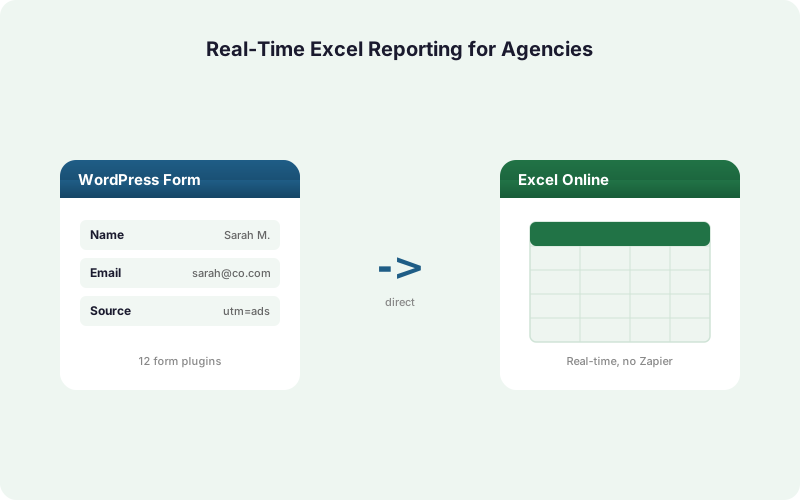
The setup is simple. On each client's WordPress site, you connect SheetLink Forms to Excel Online, point a sync rule at a specific workbook and worksheet, then map form fields to columns. From that point on, every submission appends a new row automatically.
Because each rule targets a single workbook, you keep client data cleanly separated. There is no shared spreadsheet, no risk of one client seeing another's leads, and no manual sorting after the fact.
How Fast Does the Data Actually Reach Excel?
Submissions reach the Excel workbook in real time, typically within a second or two, because SheetLink writes directly through Microsoft Graph instead of polling. There is no Zapier task queue and no scheduled batch job sitting between the form and the file, so the client's view is effectively always current.
When Microsoft's API is briefly unavailable, the plugin's built-in retry queue holds the row and retries with exponential backoff at 5 minutes, 30 minutes, and 2 hours. Nothing is dropped, and full delivery logs show exactly what landed and when.
Real-time delivery is what makes the per-client workbook genuinely useful. A client can keep the file open in Excel Online during a campaign and watch leads appear, rather than waiting for a Monday-morning export that is already out of date.
Can You Deliver Excel Reports Under Your Own Brand?
Yes. The agency angle is white-label delivery: the client sees a polished Excel workbook in their own OneDrive and Teams, with no third-party tool branding in the way. The data path stays invisible, so the reporting looks like it came from the agency, not from a plugin or a SaaS connector.
Inside WordPress, the White-Label add-on lets you rebrand the plugin admin, so when you hand off a site or give a client editor access, they do not see SheetLink references. Combined with Excel Online as the destination, the entire reporting stack carries your identity.
This matters for retainer relationships. Clients pay agencies for outcomes and presentation. A clean, branded, always-current workbook reinforces that the agency owns the reporting, not some tool the client could buy themselves.
How Do You Manage Reporting Across Many Client Sites?
Agencies manage multi-site reporting by licensing once and repeating one simple rule per site. WordPress powers about 43% of all websites (W3Techs (2026)), so most client sites you onboard already run it, and the same SheetLink workflow applies to each.
The Agency license covers 25 activated sites at $199/yr or $499 lifetime, and the free core plugin has no site limit at all. There are no per-task fees and no per-submission metering, so a high-traffic client costs the same as a quiet one.
Each site gets its own Excel destination workbook. Onboarding a new client is a five-minute job: install the plugin, connect Excel Online once, create the sync rule, map fields. The pattern is identical every time, which is what makes it scale across a portfolio.
Which Form Plugins Does This Work With?
SheetLink works with 12 major form plugins out of the box, and 17 with the Pro tier, so you rarely have to standardize clients onto one form tool. That breadth matters because Contact Form 7 alone has 10+ million installs and WPForms has 6+ million (WordPress.org (2026)).
Core support covers Elementor Pro, Contact Form 7, Gravity Forms, WPForms, Fluent Forms, Formidable, Ninja Forms, Forminator, Everest Forms, Beaver Builder, Divi, and WS Form. The add-on extends that to JetFormBuilder, Bricks, MetForm, Kali Forms, and HappyForms.
For an agency, this means you inherit whatever form plugin a client already uses. You do not migrate forms or retrain the client. You just connect their existing setup to Excel. See the full integrations list for specifics.
Free Excel Mirror vs Paid Excel-Primary: What's the Difference?
The free mirror mode sends one submission to Google Sheets AND Excel Online at the same time, at no extra cost. The paid Excel-primary mode makes Excel the sole destination with no Google account involved, as part of SheetLink Plus ($29/mo). Both write in real time through Microsoft Graph.
Mirror mode suits agencies that keep an internal Google Sheet for their own analysis while handing the client a live Excel workbook. The client never touches Google; the agency keeps both views in sync automatically.
Excel-primary mode suits Microsoft-only clients. There is no Google dependency at all, which is often a procurement or compliance requirement in corporate environments. The Primary Destinations add-on is part of SheetLink Plus, which covers every site on the account, so portfolio agencies pay once for the whole book.
Why Skip Zapier and Power Automate?
Skipping middleware saves money and removes a failure point. Zapier meters by task at 1 task per action (Zapier (2026)), and Power Automate began enforcing premium-connector licensing on April 1, 2025 with documented per-flow throttling limits (Microsoft Learn (2025)). Both costs scale with client volume.
A direct integration writes form data straight to Excel with no per-task charge and no extra connector to maintain. For an agency running ten busy client sites, per-task pricing turns a fixed reporting cost into a variable one that grows every month.
The reliability story is better too. Each middleware hop is another service that can throttle, change pricing, or go down. SheetLink's path is WordPress to Microsoft Graph, full stop, with a local retry queue if Microsoft hiccups. Fewer moving parts means fewer 2 a.m. support tickets.
How Do You Roll This Out Across a Portfolio?
Roll out by treating Excel reporting as a repeatable onboarding checklist applied to each client. Start with one site, prove the workbook updates live, then clone the process. Because there are no per-submission fees, scaling across your whole client book changes nothing about the per-client cost on an Agency license.
For each client: install SheetLink, connect Excel Online once via the hosted OAuth flow, create a sync rule pointed at that client's workbook, map fields to columns, then submit a test entry to confirm the row lands. Document the workbook link in your client wiki.
Add White-Label, an Agency-tier feature, if you hand clients admin access, and consider SheetLink Plus if you want Primary Destinations on top. The whole rollout is process, not engineering.
Recap: Real-Time Excel Reporting for Agencies
Per-client Excel Online workbooks turn reporting from a manual chore into a live feed. With Microsoft 365 at 400M+ paid seats (Microsoft FY2024, SEC 8-K (2024)), the destination is already in your clients' hands, and direct delivery keeps it always current.
The agency wins on three fronts. You eliminate manual CSV exports and the error risk that comes with them. You deliver clean, branded workbooks under your own identity. And you scale across a whole portfolio on a one-time license with no per-task tax.
Start with one client, confirm the workbook updates in real time, then repeat. The free mirror mode lets you test the path before committing to the Primary Destinations add-on, so there is no reason not to try it on your next onboarding.
| Delivery method | Real time | Per-task fees | Per-client workbooks | White-label |
|---|---|---|---|---|
| SheetLink to Excel Online | Yes, via Graph | None | Yes | Yes, add-on |
| Manual CSV export | No, stale snapshot | None | Manual only | Manual only |
| Zapier | Polled | Per task | Manual setup | No |
| Power Automate | Flow-based | Premium licensing | Manual setup | No |
Frequently Asked Questions
Do my clients need a Microsoft 365 subscription?
To edit a workbook in Excel Online, yes, and the account SheetLink connects to must be a work or school Microsoft 365 account - personal Outlook.com accounts are not supported by Microsoft's Excel API. Most agencies and clients already qualify: Microsoft reports 400M+ paid commercial seats (SEC 8-K, 2024). The workbook lives on your or the client's OneDrive for Business and can be shared via a link or Teams channel.
Is the Excel delivery actually real time?
Yes. SheetLink writes each submission to Excel Online through Microsoft Graph within a second or two of the form submit. There is no polling or scheduled batch. If Microsoft's API is briefly down, a retry queue with exponential backoff holds the row until it lands.
Can each client have a separate workbook?
Yes, and that is the recommended setup. Each client site uses its own sync rule pointed at its own Excel workbook on OneDrive. Client data stays fully separated, with no shared spreadsheet and no risk of one client seeing another's leads.
Does sending to Excel cost extra?
Mirroring to Excel alongside Google Sheets is free in the core plugin. Making Excel the sole destination with no Google account uses Primary Destinations, part of SheetLink Plus ($29/mo), which covers all sites on the account. Both modes deliver in real time.
How many client sites does one license cover?
The Agency license covers 25 activated sites at $199/yr or $499 lifetime, and the free core plugin has no site limit. There are no per-task or per-submission fees, so a busy client costs the same as a quiet one. See the pricing page for tier details.
Can I white-label the reporting for clients?
Yes. The White-Label add-on rebrands the plugin admin so clients with editor access see no SheetLink references. Combined with an Excel workbook in the client's own OneDrive and Teams, the entire reporting stack carries your agency's identity rather than a tool's.
What if a client uses a form plugin I haven't set up before?
SheetLink supports 12 major form plugins in core and 17 with the Pro tier, covering Elementor Pro, Gravity Forms, WPForms, Fluent Forms, and more. You inherit whatever the client already uses, so there is no form migration or client retraining required.
How is this different from Power Automate or Zapier?
It is a direct integration with no middleware. Power Automate enforces premium-connector licensing as of April 1, 2025 (Microsoft Learn, 2025), and Zapier meters per task. SheetLink writes straight to Microsoft Graph with no per-task charge and a local retry queue.
Can I keep an internal Google Sheet and still give the client Excel?
Yes, that is exactly what free mirror mode does. One sync rule delivers each submission to both Google Sheets and Excel Online at once. The agency analyzes data in Sheets while the client sees a live Excel workbook, with both staying in sync automatically.
More Lead Management guides
Give Every Client a Live Excel Dashboard
Stream WordPress form leads into per-client Excel Online workbooks in real time. White-label, multi-site, one-time license. No CSV exports, no per-task fees.