
Real Estate Lead Tracker: Building the Sheet Your Agents Actually Use
Real estate teams collect leads from a dozen sources. Most lead trackers go unused because they're built for managers, not agents. Here's the structure agents actually open every day.
In This Guide
- Why Most Real Estate Lead Trackers Get Abandoned
- Consolidating Lead Sources Into One Sheet
- The 10 Columns Agents Use
- A Status Workflow Agents Will Actually Update
- The Follow-up Queue
- Listing Matching: Property to Lead
- Seller Leads Are Different
- Commission and Closing Tracking
- Beyond Tracking: Drip, Nurture, Automation
- Recap
- Frequently Asked Questions
Why Most Real Estate Lead Trackers Get Abandoned
Walk into a real estate office and ask agents about their team's lead tracker. Most will tell you it exists but they don't open it. They text leads from their phone, save numbers in their personal contacts, and forward email inquiries to themselves.
The tracker fails because it was built for managers. It has 40 columns. It requires double-entry. The agent has to switch from their CRM to a different tool to update it.
A tracker agents actually use is the opposite. It has 8-10 columns. It updates automatically when leads come in. The status field has 5 options, not 25. And the follow-up queue is one filter view away.
SheetLink Forms' real estate workflow targets this gap.
Consolidating Lead Sources Into One Sheet
A typical real estate team gets leads from a dozen sources: IDX search alerts, contact forms on the site, Facebook lead ads, Zillow inquiries, open house sign-ins, walk-ins logged manually, referrals from past clients.
The consolidation problem is that each source has a different format. IDX leads have property MLS IDs. Facebook ads have campaign IDs. Open house leads have a venue and date.
The right pattern is one sheet with a Source column and source-specific extra columns kept narrow. Don't create one giant sheet with every possible field - create a "Leads" sheet with the common 10 columns plus a "Notes" column where source-specific context goes.
WordPress forms (your IDX inquiry form, your contact form, your open house RSVP form) all flow through SheetLink Forms with one consistent structure. Facebook leads import via webhook. Zillow forwards to a dedicated email that gets parsed.
The 10 Columns Agents Use
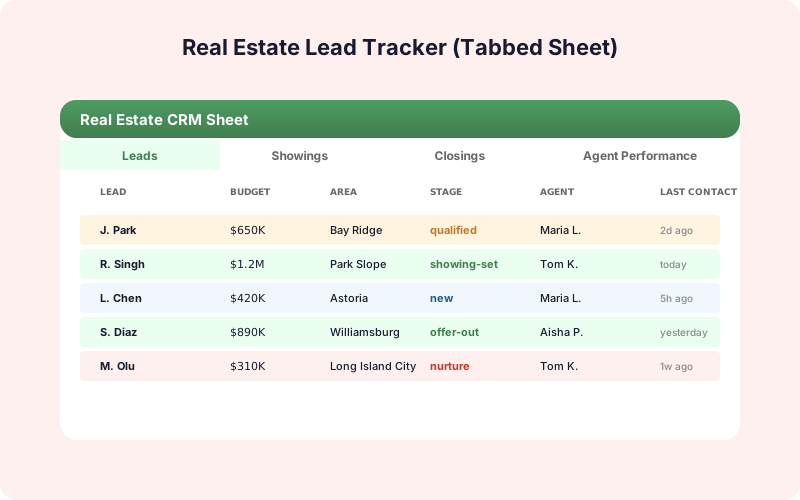
A working real estate lead tracker has these columns and very few others.
1. Created - timestamp. 2. Name - first and last. 3. Phone - cleaned, with country code. 4. Email - validated. 5. Source - IDX, Form, FB Ad, Zillow, Open House, Referral, Walk-in. 6. Property of Interest - MLS ID or freeform area. 7. Buyer or Seller - dropdown. 8. Status - New, Contacted, Qualified, Showing Scheduled, Active, Lost. 9. Owner - which agent is assigned. 10. Next Action - free text field for "Call back Tuesday."
That's it. Anything else (preapproved? timeline? budget?) goes in a Notes column. Agents will fill in 8 of these 10 in under a minute. They will not fill in 30 of 40 in five minutes.
A Status Workflow Agents Will Actually Update
Status fields die when they have too many options. Six is the right number for real estate.
New - just came in, no contact yet. Default for every lead. Contacted - agent reached out. Phone, text, or email. Qualified - lead responded, meets basic criteria. Showing Scheduled - on the calendar to see properties. Active - in active negotiation or under contract. Lost - no further pursuit. Reason in Notes.
Apply conditional formatting per status (color-coded badges). Make Status a dropdown so it can't be free-typed. Filter views per status give each agent their daily lists: "My New leads," "My Contacted leads needing follow-up."
The Follow-up Queue
A New lead with no Contacted timestamp after 60 minutes is at risk. A Contacted lead with no follow-up after 3 days is at risk. A Showing Scheduled lead with no Active update after the showing date is at risk.
A Follow-up Queue tab pulls these out automatically. Use a QUERY formula or Apps Script trigger to populate it daily.
=QUERY(Leads!A:K, "select * where (H = 'New' and A < now() - 0.04) or (H = 'Contacted' and A < now() - 3) or (H = 'Showing Scheduled' and ...) order by A asc")
Now your team manager has a daily action list of leads that need attention. The agent owners have a personal version filtered by Owner.
This is the single highest-ROI thing you can do for a real estate sales team. The leads that fall through cracks are 80% of churn. A follow-up queue puts them back in front of agents before they go cold.
Listing Matching: Property to Lead
When a new listing hits the market, which existing leads should hear about it first?
Add buyer-side criteria to your tracker: Price Range Min, Price Range Max, Beds Min, Bedrooms preference, Areas of interest. When a new listing posts, run a match query: leads whose price range covers the listing, whose beds requirement is met, whose areas include the listing's area.
The match output is a "New Listing Match" sheet that lists the top 5-10 leads to contact about each new listing. Agents work that sheet first thing each morning.
This is the kind of differentiated service that turns a transactional agent into one that gets referrals. The data was always there - you just needed the structure to use it.
Seller Leads Are Different
Most real estate trackers conflate buyer leads and seller leads, which is wrong. A seller lead is a different process: home valuation request, listing presentation, listing agreement.
Run seller leads in the same sheet but with a Buyer/Seller dropdown that drives a different status workflow. Sellers have status values like Valuation Requested, Presentation Booked, Listed, Under Contract, Sold, Withdrawn. Filter views per Buyer or Seller give each path its own focus.
For seller-side data capture, the WordPress home valuation form (typically a multi-step form with property details and contact info) flows through SheetLink Forms the same as any other form, with seller-specific fields added to the field map.
Commission and Closing Tracking
Once a lead becomes a deal, the relevant data shifts: contract date, closing date, sale price, commission split, agent commission.
Keep this in a "Closings" tab joined to "Leads" via a Lead ID column. The Closings tab has the deal-level economic data; the Leads tab has the relationship and status data. Pivot Closings by month, agent, or source to see commission flow.
With both tabs populated, the team manager can answer questions like "what's our average days-from-lead-to-close per source?" and "which agent is converting Zillow leads at the highest rate?" These are the questions that drive marketing budget allocation - and they're a SUMIF away when the data is structured right.
Beyond Tracking: Drip, Nurture, Automation
A consolidated leads sheet enables three workflows that move the needle beyond manual tracking.
Auto-drip: New leads automatically receive a welcome email and a 5-email nurture sequence. Mailchimp or similar reads the sheet via Zapier or a direct API connection and triggers sends.
AI lead scoring: Each new lead gets a quality score so agents focus on the highest-priority ones first. SheetLink Forms' AI Lead Scoring add-on handles this.
Multi-CRM Routing: The sheet stays the source of truth, and a CRM (Follow Up Boss, Chime, kvCORE) gets a copy via the Multi-CRM Routing add-on. Agents who prefer the CRM keep using it; managers who prefer Sheets keep using Sheets. Both stay in sync.
Recap
A real estate lead tracker that agents use is short, automated, and built around their actual daily workflow. Ten columns. Six statuses. Filter views for "my leads needing follow-up." Listing matching that gives agents a morning action list.
Get the structure right and the rest follows: drip campaigns, AI scoring, CRM sync, commission tracking, manager dashboards. Get the structure wrong and your team will go back to texting from their phones, just like they did before you bought the CRM.
Frequently Asked Questions
Why don't real estate teams use the lead tracker their broker provided?
Most broker-provided trackers have too many columns and too many status options. Agents abandon them because the time-cost of updating exceeds the perceived value. A lean 10-column sheet with 6 status options is what gets used.
How do I consolidate leads from IDX, Facebook, Zillow, and form submissions?
Route all sources to one Sheet via webhooks. WordPress forms flow through SheetLink Forms. Facebook lead ads use a webhook integration. Zillow forwards to a parsing email. IDX exports to a webhook. The sheet has a Source column to distinguish them.
What status options should I use?
Six max: New, Contacted, Qualified, Showing Scheduled, Active, Lost. Anything more and agents stop maintaining it. Add a Notes column for context that doesn't fit a status.
How do I stop leads from falling through the cracks?
Build a Follow-up Queue tab using QUERY or Apps Script. It pulls leads that are New (no contact within 60 minutes), Contacted (no follow-up within 3 days), or Showing Scheduled (no update after the showing date). Agents work the queue daily.
Should I separate buyer and seller leads?
Use one sheet with a Buyer/Seller column that drives different filter views. Sellers have a different status workflow but most other columns are shared. Two separate sheets makes consolidation harder for your manager view.
How do I match new listings to existing leads?
Capture buyer criteria (Price Range, Beds, Areas) on every buyer lead. When a new listing posts, run a match query that returns leads whose criteria the listing satisfies. Agents work the match results first thing each morning.
Can I sync this sheet with Follow Up Boss or kvCORE?
Yes. Use the SheetLink Forms Multi-CRM Routing add-on to mirror sheet rows to your CRM. The sheet stays the master; the CRM stays in sync. Agents who prefer the CRM keep using it.
Is this enough or should I use a real estate-specific CRM?
For teams under ~10 agents, this sheet plus a few formulas is often enough. Above that scale, layering a CRM on top makes sense - but Sheets remains valuable as the cross-team manager view that CRMs struggle to replicate cleanly.
More Lead Management guides
Build a Tracker Your Agents Will Use
Consolidate every source. Auto-route follow-ups. Match listings to leads. SheetLink Forms is the foundation.