
Send WordPress Forms to Google Sheets and Excel at the Same Time
How to mirror every WordPress form submission into a Google Sheet and an Excel Online workbook simultaneously, so marketing and finance each work in the tool they actually open every morning.
In This Guide
- Can WordPress Forms Feed Google Sheets and Excel at Once?
- Why Do Teams End Up Split Between Sheets and Excel?
- How Does Dual Delivery Work?
- What Does the Google Sheets Side Look Like?
- What Does the Excel Online Mirror Look Like?
- How Do You Keep Both Copies Consistent?
- What Does a Mirrored Week Look Like in Practice?
- What Happens When One Destination Fails?
- Setting Up the Mirror With SheetLink Forms
- Sheets Only vs Excel Only vs Both Mirrored
- Next Steps
- Frequently Asked Questions
Can WordPress Forms Feed Google Sheets and Excel at Once?
Yes. One WordPress form submission can land in a Google Sheet and an Excel Online workbook at the same moment, with no middleware relaying it. The demand is structural: Microsoft 365 passed 450 million commercial paid seats in January 2026 (Microsoft, 2026), while marketing teams overwhelmingly collaborate in Google Workspace.
The usual workaround is ugly. Someone exports a CSV from one tool every Friday, pastes it into the other, and hopes the columns still line up. The copy is stale by Monday, the export step gets skipped during busy weeks, and two departments quietly argue about whose numbers are right.
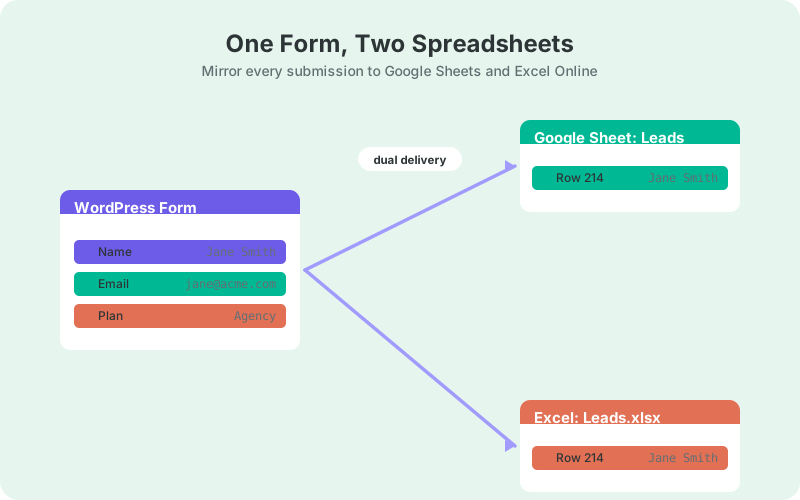
Dual delivery replaces that chore with two independent real-time writes from the same submission event: one row to the Google Sheet, one mirrored row to the Excel workbook. This guide covers when mirroring makes sense, how each delivery path works, how to keep the copies consistent, and what happens when one destination has a bad day.
Why Do Teams End Up Split Between Sheets and Excel?
Teams split because each tool won a different department, and both departments are rational. Finance runs models, budgets, and audit workflows in Excel; marketing collaborates on shared Google Sheets dashboards with agencies and freelancers. Neither side is wrong, and a forced company-wide standard usually just breeds unofficial shadow copies.
Spreadsheets are not a legacy habit either; they remain primary infrastructure. 47% of large organizations still use spreadsheets as their main tool for ESG data (KPMG via ESG Today, 2024), and 47-64% of companies run planning and budgeting in stand-alone spreadsheets (EBSCO, 2025). The spreadsheet is where decisions get made.
So the pragmatic question is not "which spreadsheet wins" but "how does form data reach both without manual exports". For a deeper feature-by-feature look at the two tools, see Excel Online vs Google Sheets for WordPress form data.
How Does Dual Delivery Work?
Dual delivery hooks the form submission event once, then writes to each destination on its own independent path. The Google Sheets write and the Excel write do not share a pipeline, a queue position, or a failure mode. One submission triggers two parallel deliveries, and each succeeds or retries on its own.
The Sheets path connects one of two ways: the one-click Google Sheets connect (v1.12.0) - click Connect Google, then pick or create the sheet in the Google file picker, with a drive.file scope limited to the sheets you choose - or the classic Apps Script receiver deployed in your own Google account, the OAuth-free option. Either takes only minutes and is walked through in the Google Sheets setup guide, and submission payloads travel straight from your server to Google.
The Excel path appends the same row to a OneDrive workbook through Microsoft Graph. You connect your Microsoft account once through a secure OAuth sign-in, and the refresh token is stored encrypted at rest. From then on, rows appear in the workbook as submissions arrive, without anyone touching an export button.
What Does the Google Sheets Side Look Like?
The Google Sheet receives a new row in real time for every submission, in exactly the column order you mapped. This is typically the marketing team's working copy: the sheet where leads pick up status columns, owner assignments, follow-up notes, and the formulas that turn raw rows into a pipeline view.
Useful metadata arrives automatically alongside the form fields: a timestamp, the page URL the form was submitted from, and appended UTM and click-ID columns such as _utm_source and _gclid. That turns the sheet into an attribution record rather than a bare contact list, and it costs no configuration.
Because the sheet is live, downstream formulas update the moment a row lands, so response-time trackers and source summaries stay current all day. If your lead sheet does not have those yet, start with the formulas every lead sheet needs.
What Does the Excel Online Mirror Look Like?
The Excel Online mirror is a workbook in your OneDrive that receives the same rows, in the same column order, as the Google Sheet. Mirroring is part of the free core: the sheet acts as the primary destination, and the workbook is the always-current copy that never waits for an export.
That copy is what finance and operations actually want. It is a workbook they can point PivotTables, charts, and month-end reporting at, inside the Microsoft tenant they already govern, without asking marketing for a file. The setup details are covered in sending WordPress form submissions to Excel Online.
One distinction matters here. If your organization is Microsoft-only and wants no Google account in the loop at all, Excel as the primary destination is part of SheetLink Plus ($29/mo). That standalone path is explained in WordPress forms to Excel without Google; the free mirror described in this post assumes the Google Sheet stays primary.
How Do You Keep Both Copies Consistent?
Consistency comes from one field map feeding both destinations. Because a single mapping defines both writes, the column order, headers, and values match by construction, and any field you add later propagates to both copies at the same time. There is no second configuration to drift.
Two habits keep it that way. First, declare one copy the source of truth, usually the Google Sheet, and confine human edits, status columns, and notes to it. Second, never insert, rename, or reorder columns by hand inside the mirror workbook; let the field map own the structure on both sides.
Then verify cheaply. Once a week, compare row counts between the sheet and the workbook; a thirty-second check. Matching counts plus an untouched mirror structure means the two copies cannot silently diverge, and any gap you ever find points straight at a delivery worth inspecting in the log.
Header alignment deserves one extra note. Keep the header row identical in both destinations, and when you add a form field later, add it at the end of the map so both copies append a new final column rather than shifting existing ones. Downstream formulas and PivotTables survive new columns at the end; they break when columns move underneath them.
What Does a Mirrored Week Look Like in Practice?
A working example makes the division of labor obvious. Marketing opens the Google Sheet every morning, finance opens the Excel workbook on Friday, and nobody exports anything in between. The same rows serve both rhythms because each copy updates itself the moment a submission arrives on the site.
Monday through Thursday, marketing works the sheet. New leads get an owner in a status column, response times get logged next to the timestamp, and the UTM columns show which campaign produced each lead. Every one of those edits stays in the sheet, because it is the declared source of truth from the previous section.
On Friday, finance opens the workbook and refreshes a PivotTable that reads the mirrored table: leads by week, by source, by product interest. There is no export to chase and no version question to settle, because the workbook already holds every row through Thursday night, delivered as each submission happened.
The week ends without a single CSV changing hands. That is the entire pitch of the mirror: two teams, two tools, one field map, zero manual synchronization.
What Happens When One Destination Fails?
The failed destination retries on its own schedule while the healthy one carries on. If Microsoft's API has a bad hour, the Google Sheet still gets its row instantly, and the Excel write sits in a retry queue with exponential backoff until it lands. Neither destination can block the other.
That design follows established webhook practice. Svix, a managed webhook service, retries failed deliveries eight times over roughly 28 hours before dead-lettering them (Svix docs), and the widely accepted pattern is 6-8 attempts spread across 24-48 hours with exponential backoff and jitter (Hookdeck).
A delivery log records every attempt per destination, with a manual Retry Now button for impatient moments. Practitioners treat delivery success below 99% as a signal worth investigating (Hookdeck, 2025), and the per-destination log is exactly how you would notice before anyone misses a lead.
Setting Up the Mirror With SheetLink Forms
SheetLink Forms ships dual delivery in the free core: the real-time Google Sheets destination plus the Excel Online mirror, across 12 major form plugins including Contact Form 7, WPForms, Gravity Forms, Elementor Pro, Fluent Forms, and Ninja Forms. No middleware account is involved on either path.
- Install the plugin and run the setup wizard to connect your Google Sheet.
- Connect your Microsoft account once to enable the OneDrive workbook mirror. This must be a work or school Microsoft 365 account; personal Outlook.com accounts are not supported by Microsoft's Excel API.
- Map your form fields; the same map drives both destinations.
- Submit a test entry and confirm the row appears in both the sheet and the workbook.
Agencies get particular mileage from the mirror. Client-facing reports can live in whichever tool each client opens, Sheets for one account and Excel for the next, without anyone re-keying data. That workflow is laid out in real-time Excel reporting for agencies.
Sheets Only vs Excel Only vs Both Mirrored
Sheets only suits Google-native teams, Excel only suits Microsoft-only organizations, and the mirror suits any company where both ecosystems have real daily users. The honest cost of mirroring is not money, since the mirror is free, but attention: a second surface that needs the discipline described above.
If a single team consumes your form data today, skip the mirror and keep life simple. Add it the day a second department starts requesting weekly exports; that request is the reliable signal that a live mirror will repay its small maintenance overhead many times over.
The comparison table below summarizes the three setups across team fit, cost, and failure isolation, so you can match the architecture to your org chart rather than to tool preference.
Next Steps
Set up the Google Sheets destination first and confirm rows land in real time. Then connect the Microsoft account, switch on the mirror, and send one test submission to watch the same row appear in both places. Total setup time is comfortably under half an hour, and nothing recurs monthly.
From there, give marketing the sheet, give finance the workbook, and retire the Friday CSV export for good. When both copies update themselves, the argument about whose numbers are right simply stops happening.
| Factor | Sheets only | Excel only | Both mirrored |
|---|---|---|---|
| Marketing workflows | Native fit | Awkward | Native fit |
| Finance workflows | Awkward | Native fit | Native fit |
| Cost | Free core | SheetLink Plus $29/mo (Excel primary) | Free (Sheets + mirror) |
| Failure isolation | Single path | Single path | Independent retries per destination |
| Surfaces to maintain | One sheet | One workbook | Two, one field map |
Frequently Asked Questions
Can one WordPress form submission go to Google Sheets and Excel at the same time?
Yes. Dual delivery sends each submission to a Google Sheet in real time and mirrors the identical row to an Excel Online workbook. The two writes run independently, so a hiccup on one side never blocks the other destination from receiving its copy of the row.
Is the Excel Online mirror free?
Yes. Mirroring submissions to a OneDrive workbook is part of the free SheetLink Forms core. Only Excel as the primary destination, with no Google Sheet in the loop at all, is part of SheetLink Plus ($29/mo).
Do I need a Microsoft 365 subscription for the Excel mirror?
You need a Microsoft 365 work or school account on a tenant with a SharePoint Online licence. Personal Microsoft accounts - Outlook.com, Hotmail, Live.com or consumer OneDrive - are not supported by Microsoft's Excel API, which only reaches workbooks held on the business platform, so this is a Microsoft limitation rather than a SheetLink one. Most business tenants already qualify: Microsoft 365 passed 450 million commercial paid seats in January 2026 (Microsoft, 2026). You connect the account once through a secure OAuth sign-in. The Google Sheets side has no such restriction - a free Google account is fine.
What happens if the Excel delivery fails but Sheets succeeds?
The Google Sheet row lands normally, and the failed Excel write enters its own retry queue with exponential backoff. Retries run per destination, so each copy recovers independently. The delivery log shows both outcomes, and you can trigger a manual Retry Now at any time.
Can Excel Online be the only destination, without Google?
Yes. Excel-as-primary delivery, part of SheetLink Plus ($29/mo), writes submissions straight to your OneDrive workbook with no Google account involved anywhere. It suits Microsoft-only organizations; the free path described in this post keeps a Google Sheet as the primary destination with Excel as the mirror.
Which copy should be the source of truth?
Pick one, usually the Google Sheet, and treat the Excel workbook as a read-and-report mirror. Make edits, notes, and status columns in the primary copy only. That single discipline prevents the two copies from drifting apart and keeps your weekly row-count checks meaningful.
Does the Excel mirror include UTM and metadata columns?
Yes. The same field map feeds both destinations, so timestamps, page URLs, and appended UTM or click-ID columns such as _utm_source and _gclid arrive in the workbook exactly as they do in the sheet, and the column order stays identical across both copies.
Which form plugins support dual delivery?
All 12 major form plugins in the free core, including Contact Form 7, WPForms, Gravity Forms, Elementor Pro, Fluent Forms, and Forminator. Paid add-ons extend the same dual delivery to WooCommerce orders, WordPress user registrations, and other site data sources.
More Automation guides
Mirror Every Submission to Sheets and Excel
One submission, two spreadsheets - real-time delivery to Google Sheets plus a free Excel Online mirror, no Zapier tasks.