
Send WordPress Form Submissions Straight to Excel Online
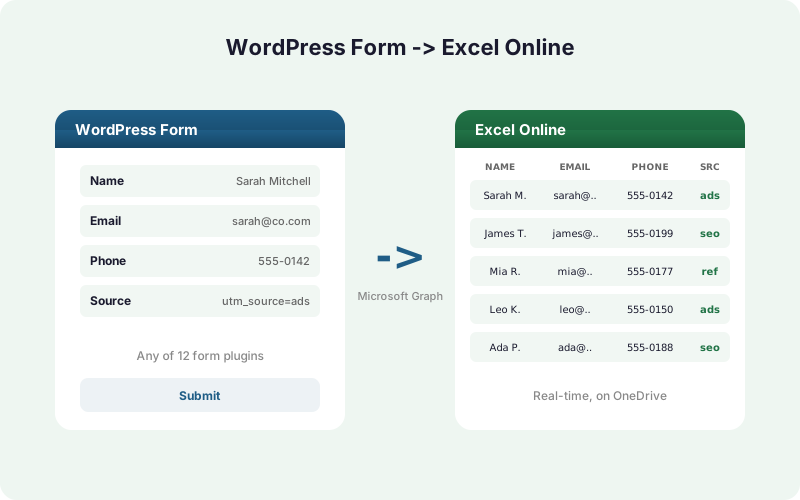
Pipe every WordPress lead into an Excel workbook on OneDrive in real time, with no Zapier, no CSV exports, and no copy-paste. Here's the full setup, step by step.
In This Guide
- Why Send Forms Directly to Excel Instead of CSV or Zapier?
- What Do You Need Before You Start?
- Step 1: Install SheetLink Forms
- Step 2: Connect Excel Online with OAuth
- Step 3: Pick Your Workbook and Table
- How Do You Map Form Fields to Excel Columns?
- Step 4: Test a Real Submission
- How Does Real-Time Delivery and Retry Work?
- Which Form Plugins Work with Excel Online?
- Is Excel Online Delivery Free or Paid?
- Recap and Next Steps
- Frequently Asked Questions
Why Send Forms Directly to Excel Instead of CSV or Zapier?
Microsoft 365 has more than 400 million paid commercial seats (Microsoft, 2024), so a huge share of teams already live in Excel. A direct integration writes each WordPress submission into your workbook the moment it arrives - no manual export, no middleware tax.
The two old paths both leak. Manual CSV export is slow and error-prone: research by Panko found manual data-entry error rates of 18 to 40 percent (Panko, 2016), and up to roughly 88 percent of spreadsheets contain errors (Panko, 2008). Zapier charges per task, billing each submission against your monthly quota.
A direct plugin skips both problems. It writes rows over the Microsoft Graph API instantly, captures every field, and never meters your traffic. You can read the full feature breakdown on the Excel Online destination page.
What Do You Need Before You Start?
You need three things: a WordPress site running any supported form plugin, a SheetLink Forms install, and a Microsoft account with access to Excel Online. That's the whole prerequisite list. No Azure app registration and no developer credentials are required on your side.
The Microsoft account must be a work or school Microsoft 365 account. Personal Outlook.com accounts are not supported by Microsoft's Excel API.
The form plugin can be any of the 12 supported tools, including Contact Form 7, which has 10+ million active installs (WordPress.org, 2026). See the full list on the integrations page.
SheetLink Forms itself is free on WordPress.org, with premium tiers from $79/yr or $199 lifetime. The full plan menu lives on the pricing page.
Step 1: Install SheetLink Forms
Installation takes about two minutes. From your WordPress dashboard, go to Plugins -> Add New, search for "SheetLink Forms," then click Install and Activate. The free version handles the Excel Online mirror mode covered later in this guide.
Once active, a new SheetLink menu item appears in your sidebar. This is your control center for connecting destinations, building sync rules, and mapping fields.
If you already capture leads to Google Sheets, you don't have to choose. SheetLink runs as a direct integration alongside any existing setup, and the same submission can land in both Sheets and Excel. We'll cover that dual delivery in the mirror-mode section. For now, just confirm the plugin is active and the menu appears.
Step 2: Connect Excel Online with OAuth
Connecting Excel uses a standard Microsoft OAuth handshake that takes under a minute. Go to SheetLink Forms -> Destinations -> Excel Online, then click Connect Excel. You'll be redirected to Microsoft's sign-in page to authorize access.
Sign in with a work or school Microsoft 365 account. Microsoft shows you exactly which permissions the connection requests, then returns you to WordPress with the link established.
Here's the security part that matters. The Azure client secret never ships inside the plugin. OAuth token refresh runs through SheetLink's hosted broker, and your Microsoft refresh token is encrypted at rest with AES-256-GCM. So even with full database access, an attacker cannot read your token. Most form-to-spreadsheet tools store credentials in plaintext options rows; encrypting at rest closes a real WordPress attack surface.
Step 3: Pick Your Workbook and Table
After connecting, you choose where rows land. SheetLink reads your OneDrive over the Microsoft Graph API and lists available workbooks. Pick the Excel file you want, then select the table inside it that will receive form rows.
Why a table and not just a sheet? Excel tables give the API a stable target with named columns, so rows append cleanly even as the file grows. If your workbook doesn't have a table yet, create one in Excel first: select your header row and press Ctrl+T.
In our experience, the single most common setup snag is pointing a rule at a bare sheet instead of a defined table. Spend the extra ten seconds to format your headers as a table, and the field mapping in the next step becomes far cleaner.
How Do You Map Form Fields to Excel Columns?
Field mapping is per-rule, so each form can write a different shape of data into Excel. In your sync rule, SheetLink lists every field from the source form on the left and your Excel table columns on the right. You match them by dropdown - name to Name, email to Email, and so on.
Unmapped fields simply don't write, so you control exactly what reaches the workbook. You can also map metadata, not just visible inputs.
Automatic UTM and click-ID capture is the underrated part here. SheetLink records UTM parameters plus GCLID, fbclid, and msclkid alongside each submission, so your Excel rows carry full campaign attribution without adding hidden form fields. That click-ID capture turns a plain lead list into an ad-attribution dataset you can pivot on directly in Excel.
Step 4: Test a Real Submission
Always confirm the pipe before you trust it. Save your sync rule, then open the live form on your site and submit a genuine test entry. Within a second or two, a new row should appear in your Excel table on OneDrive.
Open the workbook in Excel Online and check that each value landed in the right column. If something's off, return to the field mapping and adjust the matched columns.
SheetLink also keeps full delivery logs inside WordPress. Every attempt is recorded with its status, so you can confirm success or diagnose a failure without leaving the dashboard. If a submission failed, you can trigger a manual re-fire from the log once you've fixed the cause. This visibility is what separates a real integration from a fire-and-forget webhook.
How Does Real-Time Delivery and Retry Work?
Delivery happens in real time over the Microsoft Graph API, the same official interface Microsoft exposes for programmatic access to Excel and OneDrive. When a form submits, SheetLink writes the row immediately rather than polling on a schedule the way many SaaS connectors do.
Networks fail sometimes, so the plugin has a safety net. Failed writes enter a retry queue with exponential backoff at 5 minutes, 30 minutes, and 2 hours. Retries run automatically, so a brief Microsoft hiccup just delays a row instead of losing a lead.
This matters because the cost of a lost lead is high and silent. With Zapier's per-task metered pricing (Zapier, 2026), by contrast, you'd also be paying for every one of those retries. SheetLink never meters your submissions.
Which Form Plugins Work with Excel Online?
SheetLink works across 12 major form plugins out of the box, covering the tools most WordPress sites already run, and 17 with the Pro tier. WordPress itself powers about 43 percent of all websites (W3Techs, 2026), so this breadth covers the vast majority of form setups.
The core 12 include Elementor Pro, Contact Form 7, Gravity Forms, WPForms, Fluent Forms, Formidable, Ninja Forms, Forminator, Everest Forms, Beaver Builder, Divi, and WS Form. WPForms alone has 6+ million active installs (WordPress.org, 2026).
The Excel mapping flow is identical no matter which form plugin fires the submission. You connect once, then point any supported form at your workbook. For the complete supported list, see the integrations page.
Is Excel Online Delivery Free or Paid?
It depends on whether Excel is a mirror or the sole destination. Mirror mode is free. A single sync rule can send each submission to Google Sheets and simultaneously mirror it into Excel Online, with no add-on required. If you already use Sheets and just want a Microsoft copy, you pay nothing extra.
Excel-primary mode is paid. When Excel Online is the only destination, with no Google Sheet and no Google account in the loop, it's part of SheetLink Plus ($29/mo), which covers every site on the account. This mode suits Microsoft-365-only teams who never touch Google.
The split is simple: keep Sheets in the flow and mirroring to Excel is free; drop Sheets entirely and you need the Primary Destinations add-on. New to Sheets setup? Start with the Google Sheets setup guide.
Recap and Next Steps
You now have the full path: install SheetLink Forms, connect Excel over OAuth, pick a workbook and table, map your fields, and test a real submission. From there, every lead flows into Excel Online in real time over the Microsoft Graph API, with a retry queue and full logs behind it.
Remember the cost rule. Mirroring into Excel alongside Google Sheets is free; making Excel the sole destination needs the Primary Destinations add-on.
If you're weighing Excel against other Microsoft-centric routes, compare the options in Excel vs CSV vs Power Automate, Microsoft-365-only setup without Google, and Excel Online vs Google Sheets for form data. For deeper Excel workflows, see 7 things that get easier with form data in Excel and the true-cost breakdown in Make vs Zapier vs direct plugin.
| Method | Real-time | Captures UTM | Per-task fees | Setup time |
|---|---|---|---|---|
| SheetLink direct | Yes | Yes (auto) | None | Under 5 min |
| Zapier | Polled / webhook | Manual setup | Per task | 15-30 min |
| Manual CSV export | No | No | None | Recurring effort |
Frequently Asked Questions
Do I need a Microsoft 365 subscription to use Excel Online delivery?
Yes. Excel Online delivery needs a work or school Microsoft 365 account, because Microsoft's Excel API supports only workbooks stored in OneDrive for Business or SharePoint. A personal Outlook.com account signs in successfully but cannot open a workbook.
Is sending WordPress form data to Excel free?
Mirror mode is free. One sync rule can write each submission to Google Sheets and mirror it into Excel Online with no add-on. Making Excel the sole destination, with no Google account in the loop, requires Primary Destinations, part of SheetLink Plus ($29/mo).
Does this use Zapier or other middleware?
No. SheetLink Forms is a direct integration that writes rows straight to your Excel workbook over the Microsoft Graph API. There is no Zapier, Make, or other middleware in the path, which means no per-task fees and no extra service to maintain or pay for.
How fast does a submission reach Excel?
In real time, typically within a second or two. SheetLink writes the row over the Microsoft Graph API the moment the form submits, rather than polling on a schedule. If a write fails, a retry queue with exponential backoff at 5 minutes, 30 minutes, and 2 hours covers it automatically.
What happens if Microsoft is temporarily unavailable?
The submission is not lost. Failed writes enter a retry queue with exponential backoff, retrying at 5 minutes, 30 minutes, and 2 hours until delivery succeeds. Full delivery logs let you confirm status, and you can trigger a manual re-fire from the dashboard if needed.
Is my Microsoft account secure with this plugin?
Yes. Your Microsoft refresh token is encrypted at rest using AES-256-GCM, and the Azure client secret never ships inside the plugin. OAuth token refresh runs through SheetLink's hosted broker, so credentials are never exposed even with full database access to your WordPress site.
Which WordPress form plugins are supported?
Twelve major plugins out of the box: Elementor Pro, Contact Form 7, Gravity Forms, WPForms, Fluent Forms, Formidable, Ninja Forms, Forminator, Everest Forms, Beaver Builder, Divi, and WS Form. The Pro tier raises that total to 17. The Excel mapping flow is identical across all of them.
Can I capture UTM parameters and ad click IDs in Excel?
Yes, automatically. SheetLink records UTM parameters plus the GCLID, fbclid, and msclkid click IDs alongside each submission. You map them to Excel columns like any other field, so every row carries full campaign attribution without adding hidden inputs to your forms.
Can I keep Google Sheets and add Excel at the same time?
Yes, and it's free in mirror mode. A single sync rule sends each submission to Google Sheets and mirrors it into Excel Online simultaneously. This suits teams transitioning to Microsoft 365 or those who want a Microsoft copy without abandoning their existing Sheets workflow.
More Tutorial guides
Get Every Lead Into Excel Online Automatically
SheetLink Forms writes WordPress submissions straight to your Excel workbook in real time. No Zapier, no CSV exports, no per-task fees.