
Microsoft 365 Teams: Collect WordPress Form Data in Excel - No Google Account
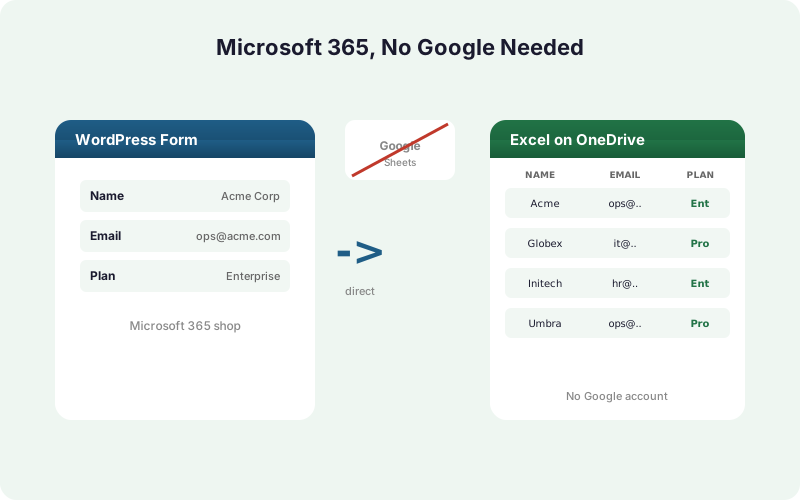
Some organizations live entirely inside Microsoft 365 and never want a Google Sheet in the loop. Here's how to send WordPress form submissions straight into an Excel Online workbook on OneDrive - no Google account required.
In This Guide
- Who Is This For?
- Why Do Governed Teams Prefer Microsoft 365?
- Free Mirror vs Paid Excel-Primary: What's the Difference?
- What Do You Need Before Starting?
- How Do You Connect Excel via OAuth?
- How Do You Pick a Workbook and Table?
- How Do You Set Excel as the Primary Destination?
- How Do You Map Form Fields to Columns?
- Is the Microsoft Connection Secure?
- What Happens If a Submission Fails to Deliver?
- Recap
- Frequently Asked Questions
Who Is This For?
Microsoft reported more than 400M+ paid commercial Microsoft 365 seats (Microsoft, 2024). Many of those organizations standardize on Microsoft 365 and never touch Google Workspace. This post is for them: WordPress sites that need form data in Excel, with no Google account anywhere in the flow.
Think agencies serving enterprise clients, finance teams, and IT-governed shops where every byte must stay inside the company's Microsoft tenant.
If you already use Google Sheets and just want a copy in Excel too, you don't need any of this - the free mirror mode covers that. This guide centers on going fully Google-free, which uses the paid Primary Destinations add-on.
Why Do Governed Teams Prefer Microsoft 365?
Governance is the short answer. When a finance or IT team has already vetted Microsoft 365, OneDrive, and their compliance posture, adding a second cloud vendor means a fresh data-protection review. Keeping form data inside the existing Microsoft tenant avoids that.
Spreadsheets are not going away either. 58% of finance leaders use Excel as their primary tool (Rossum, 2024), and 90% of financial-ops firms still rely on spreadsheets (AutoRek via PR Newswire, 2025).
For these teams, the destination workbook lives in OneDrive where existing access controls, retention policies, and audit logging already apply. No new vendor, no new review, no Google login on anyone's desk.
Free Mirror vs Paid Excel-Primary: What's the Difference?
There are two ways to get WordPress form data into Excel, and only one of them removes Google entirely. Getting this right matters before you start.
Free mirror mode. One rule delivers to a Google Sheet and mirrors the same row into an Excel Online workbook at the same time. This costs nothing beyond the core license, but it still keeps a Google Sheet in the loop, so a Google account is still required.
Excel-primary mode (paid). Excel Online becomes the sole destination. No Google Sheet, no Google account, no Google login anywhere. This is the mode governed teams want, and it requires the Primary Destinations add-on, part of SheetLink Plus ($29/mo).
The rest of this guide assumes the paid Excel-primary mode.
What Do You Need Before Starting?
You need three things: a WordPress site, a Microsoft account, and an Excel workbook on OneDrive. WordPress powers about 43% of all websites (W3Techs, 2026), so the platform side is rarely the blocker.
The Microsoft account must be a work or school account (an M365 tenant). Personal Outlook.com accounts are not supported by Microsoft's Excel API.
On the WordPress side, install SheetLink Forms (the free core plugin) plus the Primary Destinations add-on for Google-free delivery. You also need one of the 12 supported form plugins already collecting submissions. Create or open the Excel workbook in OneDrive, add a sheet, and format your header row as a table - Excel destinations write into a named table, not loose cells.
How Do You Connect Excel via OAuth?
Connecting takes about two minutes and never asks you to paste a client secret. Go to SheetLink Forms -> Destinations -> Excel Online -> Connect Excel. You'll be redirected to Microsoft's own sign-in page through Microsoft Graph.
Sign in with the work or school account that owns the workbook, then approve the requested permissions. Microsoft sends you back to WordPress with the connection established.
Behind the scenes, the OAuth refresh runs through SheetLink's hosted broker, so the Azure client secret never ships inside the plugin on your server. Your site holds only an encrypted refresh token. This separation is what lets a self-hosted plugin talk to Microsoft Graph without exposing app credentials in your wp-content folder.
How Do You Pick a Workbook and Table?
After connecting, the destination screen lists the workbooks SheetLink can see in your OneDrive. Pick the workbook, then pick the worksheet, then pick the named table inside it. The table is the actual write target.
If your sheet has no table yet, open the workbook in Excel Online, select your header row plus a blank row, and use Insert -> Table. Give it a clear name. Refresh the destination screen and the new table appears in the dropdown.
Why a table and not raw cells? Tables give Microsoft Graph a stable structure to append rows to, so new submissions always land in the right columns even as the sheet grows. It also keeps your formulas, filters, and PivotTables pointed at a consistent range.
How Do You Set Excel as the Primary Destination?
This single setting is what makes the flow Google-free. Open the sync rule for your form, find the primary destination selector, and switch it from Google Sheets to Excel Online. With the Primary Destinations add-on active, no Google Sheet is created or written to.
Without the add-on, the primary destination stays locked to Google Sheets and Excel can only run as a free mirror alongside it.
Think of the primary destination as the answer to "where does this row actually live?" In mirror mode the answer is "Google first, Excel as a copy." In Excel-primary mode the answer is simply "Excel." No Google account ever signs in. See the WordPress form to Excel destination guide for the full rule walkthrough.
How Do You Map Form Fields to Columns?
Field mapping is per-rule, so each form can write to a different layout. In the rule editor, each form field gets a dropdown that points to a column in your Excel table. Match "Email" to your Email column, "Message" to Notes, and so on.
Manual entry is exactly where errors creep in - Panko's research found 18-40% manual data-entry error rates (Panko, 2016). Direct field mapping removes the human keystroke entirely, which is much of the point.
Unmapped fields are simply skipped, so you control exactly what reaches the workbook. SheetLink also captures UTM parameters and click IDs automatically, so you can map those to dedicated columns for attribution without adding hidden fields to your form.
Is the Microsoft Connection Secure?
Security is the reason governed teams can approve this at all. Two design choices matter most. First, the Microsoft refresh token is encrypted at rest with AES-256-GCM in your WordPress database, so a database dump alone does not expose a usable token.
Second, the Azure client secret never ships in the plugin. Token refresh happens through SheetLink's hosted OAuth broker, which means the sensitive app credential lives on infrastructure you don't have to secure yourself.
The permissions you grant are scoped to files you choose, not your whole tenant. Because the workbook lives in OneDrive, your existing Microsoft 365 retention, sharing, and audit policies apply to the data automatically. For a side-by-side with Google, see Excel Online vs Google Sheets for form data.
What Happens If a Submission Fails to Deliver?
Nothing gets lost. If Microsoft Graph is briefly unavailable or rate-limits a request, the submission goes into a local retry queue with backoff at 5 minutes, 30 minutes, and 2 hours. Delivery resumes automatically once Excel responds, and every attempt is recorded.
This matters because a dropped lead is a dropped sale. With a queue, a transient Microsoft outage delays a row rather than deleting it.
You can watch all of this in the delivery logs, which show each submission, its destination, and its status. If something needs attention, you'll see it there rather than discovering a gap weeks later in a half-empty workbook. For a broader workflow walkthrough, see sending WordPress form submissions to Excel Online.
Recap
Going fully Google-free is a paid mode - the Primary Destinations add-on, part of SheetLink Plus ($29/mo). The free mirror mode still keeps a Google Sheet (and a Google account) in the loop. Don't confuse the two.
The setup is short: connect Excel via OAuth with a work or school Microsoft account, pick your workbook and table, set the rule's primary destination to Excel, then map fields.
For the 400M+ Microsoft 365 seats in governed organizations, this keeps form data inside the existing tenant with encrypted tokens, no client secret on your server, and a retry queue so nothing drops. Review the Excel Online feature page and pricing to confirm which tier fits your team.
| Capability | Free Excel Mirror | Primary Destinations add-on |
|---|---|---|
| Google Sheet required | Yes | No |
| Google account needed | Yes | No |
| Excel receives data | Yes (mirror copy) | Yes (sole destination) |
| Best for | Teams using both Google and Excel | Microsoft-365-only, governed teams |
| Price | Free with the core plugin | SheetLink Plus, $29/mo |
Frequently Asked Questions
Do I need a Google account to send WordPress forms to Excel?
Not with Excel-primary mode. The paid Primary Destinations add-on makes Excel Online the sole destination, so no Google account or Google Sheet is involved. The free mirror mode, by contrast, still writes to a Google Sheet and does require a Google account.
Is mirroring to both Google Sheets and Excel free?
Yes. Mirror mode is included with the core SheetLink Forms license at no extra cost. One rule writes to a Google Sheet and copies the same row into Excel Online. Going Google-free, where Excel is the only destination, requires the paid Primary Destinations add-on.
How much does Excel-primary mode cost?
Primary Destinations is part of SheetLink Plus at $29/mo or $290/yr, covering all sites on the account. The core SheetLink Forms plugin is free. Check the pricing page for the current breakdown across tiers.
Can I use a personal Outlook.com account instead of a work account?
No. It needs a work or school Microsoft 365 account. A personal Outlook.com account completes the sign-in and can even list your files, but selecting a workbook fails, because Microsoft's Excel API supports only OneDrive for Business and SharePoint.
Where is the Microsoft refresh token stored?
The refresh token is encrypted at rest with AES-256-GCM inside your WordPress database. The Azure client secret never ships in the plugin; token refresh runs through SheetLink's hosted broker, so the sensitive app credential never lives on your own server.
Why does Excel delivery require a table instead of plain cells?
Microsoft Graph appends rows to a named Excel table, which gives a stable structure so submissions always land in the correct columns as the sheet grows. Format your header row as a table via Insert -> Table, name it, and select it on the destination screen.
What happens if Microsoft Graph is temporarily down?
The submission enters a local retry queue with backoff at 5 minutes, 30 minutes, and 2 hours. Delivery resumes automatically once Excel is reachable, and no data is lost. Delivery logs record every attempt so you can confirm each row landed.
Which form plugins can send data to Excel Online?
SheetLink Forms supports 12 major form plugins in the core, expanding to 17 with the Pro tier. Any of those forms can write to Excel Online once you create a sync rule and set Excel as the destination.
Does this capture UTM and click-ID data automatically?
Yes. SheetLink Forms captures UTM parameters and click IDs automatically with each submission. You can map those values to dedicated columns in your Excel table for attribution reporting, without adding any hidden fields to the form itself.
More Tutorial guides
Keep Form Data Inside Microsoft 365
Send WordPress submissions straight to Excel Online on OneDrive - no Google account, encrypted tokens, and a retry queue so nothing drops.