
How to Send WordPress Form Data to Multiple Google Sheets Simultaneously
One submission, multiple sheets. The patterns and pitfalls of multi-destination routing for WordPress forms.
In This Guide
- When You Actually Need More Than One Sheet
- Three Architectures for Multi-Destination Writes
- Pattern 1: Sales + Marketing Split
- Pattern 2: Multi-Brand WordPress Site
- Pattern 3: Master Sheet + Per-Team Replicas
- Deduplication Across Multiple Destinations
- When One Destination Fails
- Practical Limits on Multi-CRM Routing
- When Sheets Aren't Enough
- Recap
- Frequently Asked Questions
When You Actually Need More Than One Sheet
For most WordPress sites, one Google Sheet per form is plenty. Submissions land in one place, the right team has access, the team works the data. Adding a second sheet just adds another thing to keep in sync.
But some real situations call for multi-destination routing. A lead-gen form that goes to a Sales sheet (for follow-up) and a Marketing sheet (for attribution analysis). A WooCommerce order that goes to an Operations sheet (for fulfillment) and a Finance sheet (for reconciliation). A contact form on a multi-brand site where the same form serves five brands and each brand owns its own sheet.
In these cases, you need the same submission to land in two or more sheets at the same time, with different field subsets, different formatting, and possibly different access controls.
Three Architectures for Multi-Destination Writes
There are three real ways to route a submission to multiple destinations to multiple sheets.
Architecture 1: Multiple webhooks at the form level. The form plugin posts to N webhook URLs in parallel, each tied to a different Apps Script and sheet. Simple but every additional destination doubles the failure surface.
Architecture 2: Single webhook with a multi-destination script. One Apps Script receives the submission and writes to multiple sheets within the script. Easier error handling and atomic writes, but you're stuck with Apps Script's execution limits.
Architecture 3: WordPress-side multi-destination routing. A WordPress plugin queues the submission and delivers to multiple destinations, with retry, deduplication, and ordering guarantees. Most reliable, requires the right plugin.
SheetLink Forms' Multi-Node Routing add-on implements Architecture 3 because it gives you the strongest reliability guarantees.
Pattern 1: Sales + Marketing Split
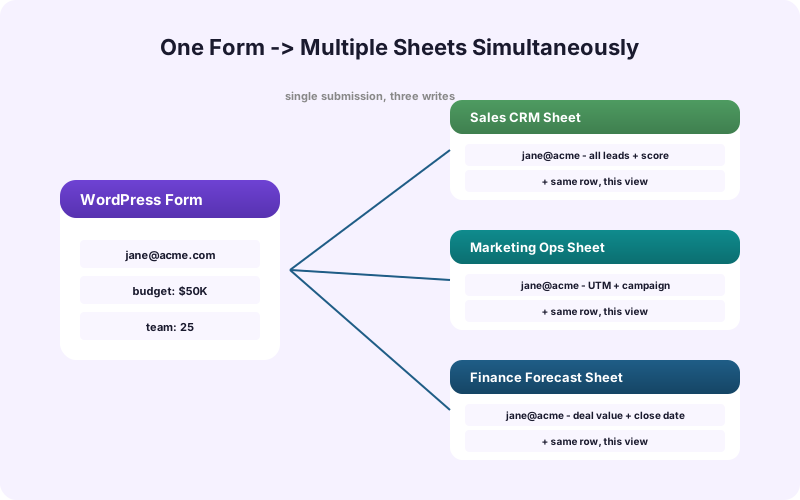
The most common multi-destination case is a single lead-gen form serving two teams.
Sales needs the contact details, the message, and the timestamp - just enough to follow up. They'll add their own status, owner, and disposition columns over time.
Marketing needs the UTM parameters, the page URL, the form ID, and timestamp - the attribution context. They don't need the message or the contact details.
Both sheets get the same submission, but with different field subsets. SheetLink Forms lets you define a unique field map per destination, so Sales gets its 5 columns and Marketing gets its 8, all from the same submission.
Pattern 2: Multi-Brand WordPress Site
Some WordPress sites serve multiple brands or subsidiaries from a single install. Same theme, same forms, but each brand has its own sales team and its own data privacy boundaries.
In this case, you need conditional routing - the contact form on brand-a.com should land in Brand A's sheet, and the contact form on brand-b.com should land in Brand B's sheet, even though it's the same form ID in WordPress.
The routing key is usually the page URL or a hidden field set by the brand-specific page template. SheetLink Forms' Multi-Node add-on supports both. We cover the full pattern in conditional routing for WordPress forms.
Pattern 3: Master Sheet + Per-Team Replicas
Compliance and audit teams often want a single master sheet that captures every submission, even when day-to-day work happens in team-specific replicas.
The master sheet has every column, every submission, no filters. It's the source of truth and the audit trail. Replicas have only the columns each team needs and only the submissions relevant to that team.
This is especially common in regulated industries - a healthcare intake form might write to a master sheet (for HIPAA audit) and a clinical sheet (for clinicians), with the master held in a locked-down Google Drive folder. GDPR-compliant form workflows often use this pattern too.
Deduplication Across Multiple Destinations
When the same submission lands in multiple sheets, you need a unique ID per submission so you can join across sheets later. Without it, you can't reconcile "is the lead on the Sales sheet the same as row 42 on the Marketing sheet?"
SheetLink Forms generates a UUID for every submission and writes it as the first column of every destination. The UUID is consistent across all destinations - Sales, Marketing, and Master all see the same ID for the same submission.
This also helps with retries. If a write to one destination fails and retries succeed, you don't end up with two rows on that destination - the plugin checks for the UUID before appending. We dive deeper on this in our guide to automatic deduplication.
When One Destination Fails
Multi-destination routing means more places to fail. Google Sheets API has occasional outages. An Apps Script can hit a quota. A sheet permission can change.
The right pattern is partial-success delivery with retry. If a submission writes successfully to two of three destinations, the plugin doesn't treat it as a failure - it commits the two successful writes and queues the third for retry. The user sees a success message either way.
This is harder than it sounds. Architecture 1 (multiple form-level webhooks) tends to give you all-or-nothing semantics, and a failure on one destination can roll back the others. Architecture 3 (plugin-side multi-destination routing) handles partial success cleanly because the plugin tracks each destination separately.
Practical Limits on Multi-CRM Routing
How many destinations is too many? In practice, three to five is fine. Above that, you're probably solving the wrong problem - you actually need a CRM or a data warehouse, not five copies of the same sheet.
Apps Script's daily quota for URL fetches is 20,000 on free Google accounts and 100,000 on Workspace. Multi-destination writes consume one fetch per destination. A site doing 1,000 submissions per day to three destinations uses 3,000 fetches - well within free-tier limits. Ten destinations starts to nibble at the quota, but it's still rarely the bottleneck. (These quotas apply to destinations using the classic Apps Script webhook; sheets connected via SheetLink's one-click Google connect write to the Sheets API directly and are governed by its own generous per-minute limits instead.)
When Sheets Aren't Enough
Multi-destination Google Sheets routing solves a class of problems. It does not solve everything.
If you find yourself wanting six destinations, complex transforms per destination, and bidirectional sync to a CRM, you're past the point where Sheets is the right primary tool. Promote your sheet to a database (or a real CRM) and use Sheets for reporting only.
A good middle ground: keep the fan-out architecture but add a CRM destination via the Multi-CRM Routing add-on. The CRM becomes the primary destination, and Sheets become read-only reporting layers. You get CRM features without losing the team-friendly Sheets interface.
Recap
Multi-destination routing is a real and common need: sales/marketing splits, multi-brand sites, master/replica patterns, regulated industries needing audit copies. The right architecture - WordPress-side multi-destination routing with per-destination field maps, UUIDs, and retry - solves it cleanly.
Keep destinations to a small number (three to five), use UUIDs to join across sheets, and don't treat one failed destination as a global failure. When Sheets isn't enough, layer a CRM on top instead of growing the sheet count.
One operational note worth keeping in mind: monitor delivery success per destination, not just at the form level. A quiet failure on one of three destinations can mean the marketing team is missing 30% of their data while sales sees everything as normal. SheetLink Forms' admin includes a per-destination success dashboard - check it weekly until you trust the integration is solid.
Frequently Asked Questions
Can I send the same WordPress form submission to two Google Sheets?
Yes. SheetLink Forms' Multi-Node Routing add-on supports any number of destinations, each with its own field mapping. The submission is delivered to all destinations in parallel.
What happens if one destination fails?
The plugin treats each destination independently. Successful destinations are committed; failed destinations are queued for retry with exponential backoff. You don't lose data, and one failure doesn't roll back the others.
How do I tell if a row in Sheet A is the same submission as a row in Sheet B?
SheetLink Forms generates a UUID for every submission and writes it as a column on every destination. You can join across sheets on this UUID using VLOOKUP or QUERY.
Can different destinations have different field subsets?
Yes. Each destination has its own field map. A Sales sheet might receive 5 columns and a Marketing sheet might receive 8, all from the same submission.
How many destinations can I have?
There's no hard limit, but in practice 3-5 is common. Above that you're usually solving the wrong problem and should consider a CRM as the primary destination with Sheets as reporting.
Will this hit Google Apps Script quota limits?
Only if your destinations use the classic Apps Script webhook. Each such destination consumes one URL fetch; at 1,000 submissions per day to 3 destinations, that is 3,000 fetches against a 20,000 daily limit on free accounts. Sheets connected via one-click Google connect write to the Sheets API instead. Quota is rarely the bottleneck either way.
Can I route based on form field values?
Yes. Conditional routing is supported - send Enterprise leads to a Sales sheet and Self-Serve leads to a Marketing sheet based on a field value. See our guide on conditional routing for the full pattern.
Is this the same as Zapier multi-step Zaps?
Functionally similar, but cheaper and faster. Zapier charges per task per destination - 3 destinations means 3 tasks. The direct webhook approach has no per-task fees and delivers in seconds instead of minutes.
How do I monitor success per destination?
SheetLink Forms' admin includes a per-destination success dashboard showing delivery rate, retry queue depth, and last-error timestamp. Check it weekly until you trust the setup, then move to alerts if any destination falls below 99% delivery.
More Automation guides
Route Submissions to Multiple Sheets
SheetLink Forms' Multi-Node Routing add-on. Per-destination field maps, automatic deduplication, partial-success retries.