
Client Lead Portal vs Shared Google Sheet: Which Should You Give Clients?
Emailed CSV, a shared Google Sheet, or a branded client portal? A practical, balanced look at how agencies hand clients their leads, and which one your client actually needs.
In This Guide
- How should an agency hand a client their leads?
- What are the three ways to deliver leads to a client?
- What does an emailed CSV or PDF get right and wrong?
- What does a shared Google Sheet do well?
- Where does a shared Google Sheet fall short for a non-technical client?
- How do the three options compare side by side?
- When is a shared Google Sheet genuinely enough?
- When is a dedicated client lead portal worth it?
- What stays the same no matter which surface you choose?
- The bottom line and your next step
- Frequently Asked Questions
How should an agency hand a client their leads?
The best way to hand a client their leads is whichever method gets them acting fastest, not the one that looks nicest in a slide. Contacting a web lead is 100x more likely to succeed when the first call is placed at 5 minutes instead of 30 (InsideSales.com / MIT Lead Response Management Study, 2007). Speed decides the outcome.
Agencies have three realistic options: an emailed CSV or PDF, a shared Google Sheet, or a dedicated client lead portal. This post compares them honestly. A well-built shared Sheet is genuinely enough for many agencies. A portal earns its keep only when clients must move on leads fast and you need per-client access plus branding.
Underneath all three sits the same thing: a WordPress form submission. Get that capture right and the delivery surface becomes a choice, not a constraint. There is no universally correct answer here, only the right fit for this client's volume, urgency, and comfort with tools.
What are the three ways to deliver leads to a client?
Agencies deliver leads three ways, and each trades effort for control. A static export (CSV or PDF) is emailed on a schedule. A shared Google Sheet gives the client a live view of the same file you work in. A dedicated portal gives each client a branded login that shows only their leads. Most of these leads begin on WordPress, which powers 41.2% of all websites and 59.1% of sites on a known CMS (W3Techs, 2026).
The order above runs from least to most capable, and from least to most work to set up. Email is a five-minute habit. A shared Sheet takes an afternoon to structure well. A portal is a product you stand up once and reuse across every client. Picking the right rung depends entirely on how fast the client has to act on what lands in front of them.
What does an emailed CSV or PDF get right and wrong?
An emailed CSV or PDF is the simplest handoff and the weakest for speed. It is a snapshot, already stale the moment it sends. In an audit of 2,241 U.S. companies, the average first response to a web lead was 42 hours (Harvard Business Review, 2011), and a batched report only widens that gap.
Email does have real uses. It is a clean record, easy to archive, and fine for a monthly summary a client reads at leisure. Nobody needs training to open an attachment, and it leaves a paper trail everyone can find later.
The problem is timing and duplication. By the time a weekly CSV lands, the hottest leads have gone cold, and the client has no way to mark who they called. If you mainly want a durable copy of the data, treat email as a backup, not a workflow. Our guide on form data ownership and spreadsheet backups covers that role in depth.
How do the three options compare side by side?
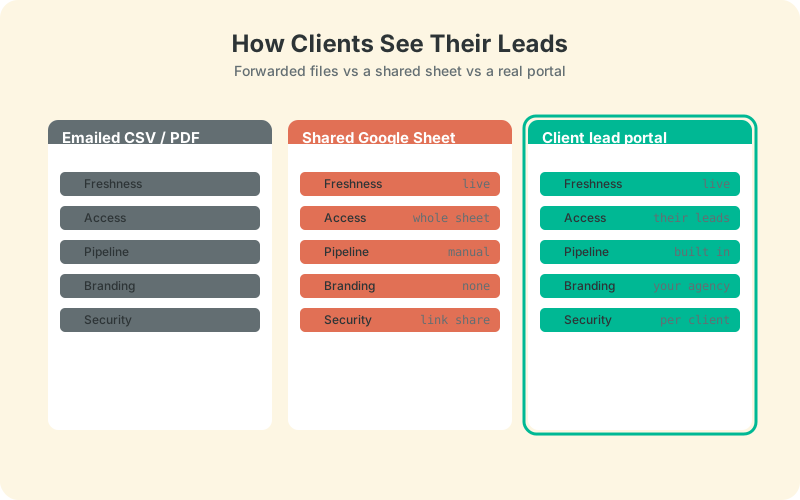
Side by side, the three options separate cleanly on scope, workflow, and speed. Email wins on simplicity and loses on everything time-sensitive. A shared Sheet wins on cost and familiarity. A portal wins on per-client access, branding, and built-in speed-to-lead prompts. The table below sums up the trade-offs.
Read it as a ladder, not a verdict. Plenty of agencies stop at the middle column and are right to. Notice which column each strength lands in, though. Freshness is solved the moment you leave email behind, but per-client scoping and speed-to-lead alerts only appear in the portal column, and those are exactly the two things a busy, non-technical client needs most. The point is to choose deliberately rather than defaulting to a spreadsheet because it happened to be open already.
When is a dedicated client lead portal worth it?
A dedicated portal earns its keep when clients must act on leads within minutes and you serve several clients who should each see only their own. This is where the response-time data bites hardest. Contacting a lead is 100x more likely to succeed at 5 minutes than at 30, and the odds of qualifying it drop 21x over that same gap (InsideSales.com / MIT Lead Response Management Study, 2007). A portal builds the nudge in so nobody has to remember.
A real client lead portal gives each client a branded login, a simple New to Contacted to Qualified to Won or Lost pipeline, a response-time target, and full attribution per lead. Crucially, they see only their leads and never touch wp-admin.
This is the gap LeadOps is built to fill. LeadOps is our coming-soon client lead portal: a branded per-client inbox with speed-to-lead tracking and per-client reports, sitting on top of the same capture layer. Agencies weighing it up can preview it on the LeadOps portal page or the wider agency overview. The aim is simple: keep clients out of the 63.5% who never respond.
What stays the same no matter which surface you choose?
The capture layer never changes, whatever surface you pick. Every lead, whether it ends up in an email, a Sheet, or a portal, starts as a WordPress form submission, so the reliable part is getting that data out cleanly and instantly. SheetLink Forms sends submissions straight to Google Sheets in real time - connect with the one-click Google connect or the classic self-hosted Apps Script receiver: no Zapier, no per-task fees.
Because it captures from 12 major form plugins and appends metadata like UTM tags, timestamp, and page URL automatically, the same feed powers all three delivery methods without rework. A retry queue with backoff means a failed send is re-attempted, not lost.
That is the deliberate order: capture once, cleanly, then decide how the client sees it. Our agency tools documentation covers wiring this up across multiple client sites so the data model stays consistent no matter which surface each client gets.
The bottom line and your next step
Match the delivery to the client, not to habit. Email is a record, not a workflow. A shared Google Sheet is the right call for a single trusted client with time to act, and it stretches surprisingly far with a little structure. A branded portal is worth it when speed and per-client access decide whether leads convert.
Start from capture. Get every WordPress lead landing in Google Sheets in real time, then pick the surface your client actually needs. When several clients each need their own fast, branded view, that is the moment a portal stops being overkill and starts paying for itself. Until then, a well-built spreadsheet is nothing to apologise for.
| Emailed CSV / PDF | Shared Google Sheet | Client lead portal | |
|---|---|---|---|
| Freshness | Stale | Live | Live |
| Client sees | Attachment | Whole sheet | Only their leads |
| Workflow + pipeline | None | Manual | Built in |
| Branding | None | None | Your agency |
| Access control | Link share | Per client | |
| Speed-to-lead alerts | No | No | Yes |
Frequently Asked Questions
Can a client see only their own leads in a shared Google Sheet?
Not reliably. A single shared Sheet shows everyone with the link every row, and separate tabs are organisation rather than security. Protecting ranges per person is fragile and easy to break. True per-client scoping is where a portal, which shows each client only their own leads, has a clear edge.
Is a shared Google Sheet secure enough to give a client?
For a single trusted client, usually yes. Share to specific Google accounts rather than 'anyone with the link', and keep the file to that one client's data. Risk rises fast when you put several clients in one workbook, since link sharing is all-or-nothing and easy to misconfigure.
Do I really need a client portal, or is a spreadsheet fine?
A spreadsheet is fine when leads are not time-critical and one client uses one file. You need a portal when clients must respond in minutes, or when several clients each require their own branded view. Contacting a lead is 100x likelier at 5 minutes than 30 (InsideSales.com / MIT, 2007).
How fast should a client respond to a new web lead?
Within five minutes if possible. Only 7% of companies in one study responded that fast, and 55% failed to reply within five business days (Drift, 2017). The odds of qualifying a lead drop 21x between a 5-minute and 30-minute first call, so minutes genuinely matter.
Can I brand a Google Sheet with my agency's identity?
Only lightly. You can add a logo image and colours to a tab, but the client still sees a raw Google Sheets interface with your working columns. Full branding, a client-facing inbox under your agency's name with no spreadsheet chrome, is something a dedicated portal provides rather than a Sheet.
What is a client lead portal?
A client lead portal is a branded web app where each of an agency's clients logs in to view, follow up with, and report on only their own leads, with no WordPress account. It typically adds a pipeline, response-time tracking, and per-client reports on top of your existing form capture.
Does a client portal replace Google Sheets?
No. The portal is a delivery surface; Google Sheets can still hold the underlying data and your own analysis. SheetLink Forms captures leads into Sheets first, and a portal reads from that same clean feed. You keep the spreadsheet and add a client-facing layer on top.
How do leads get into a Sheet or portal in the first place?
They start as WordPress form submissions. A connector like SheetLink Forms sends each submission to Google Sheets in real time, with UTM tags and timestamps attached. That single clean feed can then power an emailed report, a shared Sheet, or a branded portal without any duplicate setup.
More Lead Management guides
Give each client their own branded lead view
SheetLink Forms sends every WordPress lead to Google Sheets in real time, with no Zapier and no monthly task fees. Choose your surface from there.