
Contractor Quote Request Tracking in Google Sheets
Most contractors lose quotes to slow replies, not bad pricing. Build a quote request tracker in Google Sheets that logs every enquiry, response time, photo, and win rate automatically.
In This Guide
- Why Does Contractor Quote Request Tracking Matter?
- How Big Is the Response-Time Gap, Really?
- What Columns Should a Quote Tracking Sheet Have?
- How Do Quote Requests Get Into the Sheet Automatically?
- How Do You Track Response Time Per Quote?
- What About Photo Uploads From Quote Forms?
- Can You Route Different Job Types to Different Tabs?
- How Do You Measure Win Rate by Lead Source?
- Paper, Field-Service Software, or a Quote Sheet?
- Start Tracking Your Next Quote Request
- Frequently Asked Questions
Why Does Contractor Quote Request Tracking Matter?
Contractor quote request tracking matters because customer expectations have outrun contractor habits. 28% of customers now expect an immediate response to a quote request, and another 28% expect one within the hour (Jobber, 2026). That is more than half of your prospects judging you before lunch. A shared Google Sheet with a timestamp on every request is the cheapest way to keep up.
The same report found that only 20% of home-service pros actually respond within the hour, and 60% take until the end of the day (Jobber, 2026). That gap is where jobs quietly disappear. The homeowner who filled in your quote form at 9 am has usually filled in two competitors' forms by the time you call back, and the first decent quote often wins by default.
This guide builds a quote request tracker in Google Sheets: automatic capture from your WordPress form, response-time columns, photo links, job-type tabs, and win-rate reporting by source. It is the same system we describe in tracking leads in Google Sheets, tuned for the trades.
How Big Is the Response-Time Gap, Really?
The response-time gap is measured in hours, sometimes days. A 2011 Harvard Business Review audit of 2,241 companies found an average lead response time of 42 hours, and 23% of companies never responded at all (Harvard Business Review, 2011). That study is fifteen years old now, but the behaviour it documented is still easy to find in trade businesses.
Put that 2011 baseline next to current expectations and the mismatch gets uncomfortable. More than half of customers expect a reply within the hour (Jobber, 2026), yet only one pro in five hits that mark. Nobody is ignoring quote requests on purpose. They arrive by email, voicemail, and web form while you are on a roof or under a sink, and the mental queue overflows by Wednesday.
The fix is not more willpower. It is one place where every request lands with a timestamp, so the delay becomes visible, measurable, and assignable. You cannot shorten a response time you never measure, and an inbox never measures it for you.
What Columns Should a Quote Tracking Sheet Have?
A working quote tracker needs roughly a dozen columns: timestamp, name, phone, email, job type, address, job description, photo links, lead source, first response, quote amount, and outcome. That covers capture, speed, and results. Resist adding columns nobody will fill in - empty fields kill spreadsheet habits faster than anything else.
- Timestamp - when the form was submitted, not when you noticed it. This must be automatic to be honest.
- Job type - a dropdown on the form (roofing, plumbing, electrical, general). It drives routing and reporting later.
- Photo links - URLs to the customer's uploaded images, one click away from the row.
- Lead source - the channel that produced the request, captured from UTM parameters where possible.
- First response - the date and time a human actually replied. Fill it in every single time.
- Quote amount and outcome - Won, Lost, or No reply. These two columns power every report you will ever want.
Keep raw submissions on one tab and reports on another. Formulas that read the raw tab keep working as new rows arrive at the bottom, and nobody accidentally sorts a customer's phone number away from their name.
How Do Quote Requests Get Into the Sheet Automatically?
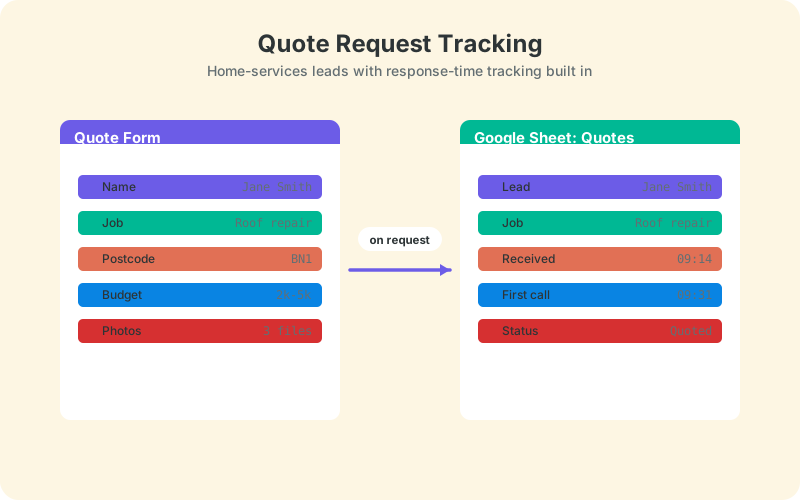
Automatic capture means no copy-paste, no CSV exports, and no per-task automation fees. SheetLink Forms, a free WordPress plugin, sends form submissions straight to Google Sheets in real time - connect with one click (Connect Google, then pick your sheet in the Google file picker) or through a small classic Apps Script receiver that you deploy in your own Google account. It supports 12 major form plugins, including Contact Form 7, WPForms, Gravity Forms, and Elementor Pro, so your existing quote form almost certainly qualifies.
- Install SheetLink Forms from the WordPress plugin directory.
- Create your quotes spreadsheet with the columns from the previous section.
- Connect Google Sheets - one-click Connect Google, or the classic Apps Script receiver - following the Google Sheets setup guide.
- Map your form fields (name, phone, job type, description) to sheet columns and submit a test.
From then on, every submission appears as a new row within seconds, timestamp included. A built-in retry queue with exponential backoff re-sends any delivery that fails, so a hosting hiccup does not silently cost you a job lead. For a trade business where one job can be worth four figures, that reliability detail matters more than any dashboard.
How Do You Track Response Time Per Quote?
Track response time with two columns and one formula. Column A already holds the automatic submission timestamp. Add a 'First response' column that you fill in when you call or email back, then a third column that subtracts one from the other. Format it as a duration and every quote now carries an honest speed-to-lead number.
The formula is simple: =IF(J2="","",J2-A2), formatted as hours and minutes. Add conditional formatting so anything over one hour turns amber and anything over a day turns red - those are the thresholds your customers already hold you to, whether you like it or not. Our guide to tracking lead response time in Google Sheets extends this with team averages and a weekly trend line.
Quotes that sit at 'No reply' for 48 hours deserve an automatic nudge. A short script can email you a digest of stale rows each morning, a pattern we walk through in automating follow-up emails from Google Sheets. The goal is that nothing ages silently.
What About Photo Uploads From Quote Forms?
Store photos as links, not attachments. Spreadsheet cells cannot hold image files at any useful scale, so the reliable pattern is: the form saves the upload to your WordPress media library, and the sheet receives the file URL plus metadata such as filename and size. The row stays light, and the photo is one click away.
Photos matter more in the trades than in almost any other industry. Four clear pictures of a roof, a fuse box, or a leaking joint often replace a site visit entirely, which means you can quote the same day instead of next week. With the links sitting in the row, your estimator opens the images straight from the sheet, prices the job, and logs the quote amount two columns over - no digging through email attachments from three days ago.
The full setup, including which form plugins handle uploads well and what metadata you can capture alongside each file, is in our guide to file upload fields and Google Sheets.
Can You Route Different Job Types to Different Tabs?
Yes. Conditional routing sends each submission to a different tab, or a different spreadsheet entirely, based on a field value. When the 'Job type' dropdown says Roofing, the row lands on the Roofing tab. Plumbing goes to Plumbing. Each crew lead watches one tab instead of scanning a shared inbox for the jobs that concern them.
Routing turns a passive log into an assignment system. The roofing estimator owns every row on their tab, which makes the first-response column personal rather than communal. Communal columns never get filled in; personal ones usually do, especially once the weekly averages are visible.
Rules are simple field-value matches, so you can go further than trade type. An 'Emergency' value in an urgency field can route to a priority tab that someone checks hourly, while routine repainting enquiries flow to the standard queue. Setup details and rule examples are in conditional routing for WordPress forms.
How Do You Measure Win Rate by Lead Source?
Win rate is won quotes divided by quotes sent, and the version worth watching is win rate per lead source. 69% of home-service pros report a quote win rate above 50% (Jobber, 2026). If yours sits below that overall, a per-source breakdown usually reveals one channel dragging down the average rather than a pricing problem across the board.
The source column can fill itself. UTM parameters on your ads and links are appended to each submission automatically as extra fields like _utm_source, so a request that came from a Google ad is labelled the moment it arrives. See UTM tracking for WordPress forms for the tagging setup.
Then one formula per source: =COUNTIFS(Source,"google",Outcome,"Won")/COUNTIF(Source,"google"). Or build a pivot table with sources as rows and outcomes as columns and read the whole picture at once. After a couple of months you will know which channel deserves more budget and which one produces tyre-kickers - knowledge most competitors simply do not have.
Paper, Field-Service Software, or a Quote Sheet?
A quote sheet is the middle path: more structure than a clipboard and an inbox, less cost and commitment than field-service software. Paper works until the first lost sticky note or the first week your phone dies. Field-service platforms are genuinely good, but they are priced per user on paid plans, and a two-person outfit often uses a tenth of the features it pays for.
The comparison table below sums it up. The sheet wins on cost, ownership, and time-to-value. Dedicated software wins once you need dispatching, invoicing, GPS, and payroll in one place, which is a real need - just usually not in year one.
A reasonable rule: start with the sheet, and graduate to a platform when scheduling crews becomes your bottleneck rather than tracking quotes. By then your sheet history doubles as clean import data, and you will already know your response times and win rates before the sales rep quotes you theirs.
Start Tracking Your Next Quote Request
Start with the next quote request, not a grand migration. Create a sheet with the columns from this guide, connect your quote form so submissions arrive automatically, and fill in the first-response column for one week. The number will probably sting - the average across industries was 42 hours in the last major audit (Harvard Business Review, 2011) - but it falls quickly once it is visible.
More than half of customers now expect an answer within the hour, and only one pro in five delivers (Jobber, 2026). A free plugin, a free spreadsheet, and one honest column are enough to put you in that 20%. The tools were never the hard part; seeing the delay was.
| Paper and inbox | Field-service SaaS | Google Sheets + direct sync | |
|---|---|---|---|
| Cost | Free, but leaky | Paid plans, per user | Free |
| Setup time | None | Days to weeks | About 5 minutes |
| Response-time tracking | None | Built in | Timestamp + one formula |
| Photo handling | Prints and texts | Built in | File links + metadata |
| Data ownership | Scattered | Vendor's database | Your Google account |
Frequently Asked Questions
How fast should a contractor respond to a quote request?
Within the hour if you want to match expectations: 28% of customers expect an immediate response and another 28% expect one within an hour (Jobber, 2026). Same-day is the realistic floor, and even that beats the 40% of pros who take longer.
Can I track quote requests in Google Sheets for free?
Yes. Google Sheets is free, and the SheetLink Forms core plugin sends WordPress form submissions to your sheet at no cost, using one-click Google connect or a classic Apps Script receiver in your own Google account. There are no per-submission fees and no middleware subscription involved.
Do photo uploads from a quote form go into the spreadsheet?
They arrive as links plus metadata, not embedded images. The photo is stored in your WordPress media library, and the sheet row receives the file URL, filename, and size. Your estimator clicks through from the row to view the job photos and price the work.
How do I know which lead source wins the most jobs?
Add a source column that captures UTM parameters automatically, plus an outcome column with Won or Lost. A COUNTIFS formula or a pivot table then gives you win rate per channel, so you can compare Google ads against referrals with real numbers.
What is a good quote win rate for contractors?
69% of home-service pros report a win rate above 50% (Jobber, 2026), so above half is a reasonable target. If you are below that, check win rate per source before touching prices - one weak channel often drags down an otherwise healthy average.
Can different trades on one form go to different tabs?
Yes. Conditional routing reads a field value, such as a job-type dropdown, and sends each submission to a matching tab or spreadsheet. Roofing enquiries land on the roofing tab, plumbing on plumbing, so each estimator owns one clean list.
Is a spreadsheet enough, or do I need field-service software?
A spreadsheet handles quote tracking well for solo operators and small crews. Field-service software earns its fee once dispatching, invoicing, and payroll need to live in one system. Start with the sheet; its history imports cleanly if you graduate later.
What happens if a submission fails to reach Google Sheets?
Failed deliveries enter an automatic retry queue with exponential backoff, and a delivery log shows every attempt. You can also trigger a manual retry. That means a hosting outage delays a row instead of losing a quote request permanently.
More Lead Management guides
Send Every Quote Request Straight to Sheets
SheetLink Forms syncs WordPress quote forms to Google Sheets in real time - no Zapier, no per-task fees, no middleware bill.