
WordPress to Salesforce: Route Leads Without Middleware
Send WordPress form leads straight into Salesforce in real time, no Zapier or Make in the middle. Capture attribution, route by field value, and keep a Google Sheets copy at the same time.
In This Guide
- Why Speed Beats Everything in Lead Routing
- What Does Routing Leads Without Middleware Mean?
- How Much Do Middleware Per-Task Fees Really Cost?
- How Do You Connect a WordPress Form to Salesforce?
- How Do You Capture UTM and GCLID for Salesforce Attribution?
- How Does Conditional Routing Work?
- Can You Send Leads to Salesforce and Other Tools at Once?
- Why Keep a Google Sheets Copy in Parallel?
- What Happens When Salesforce Is Unavailable?
- Is Direct Routing Worth It for Agencies?
- Putting It Together
- Frequently Asked Questions
Why Speed Beats Everything in Lead Routing
Contacting a web lead within 5 minutes instead of 30 minutes makes you about 100x likelier to reach that person and 21x likelier to qualify them, per the MIT/InsideSales Lead Response Management Study (HBR, 2011). When a WordPress form fills, every minute the lead sits in a queue is decay.
The problem is most teams are nowhere close. In a study of 114 B2B companies, average email response was about 11 hours 54 minutes and phone about 14 hours 29 minutes, with essentially none responding inside 5 minutes (Workato, 2019-2020).
The gap is rarely the sales team. It's the plumbing. A lead that waits on a nightly CRM sync or a polled automation job has already aged past the window where contact rates are highest.
The fix is a direct path from the form to Salesforce, firing the instant someone hits submit.
What Does Routing Leads Without Middleware Mean?
Routing without middleware means your WordPress form writes the lead straight into Salesforce over the API, with no Zapier or Make sitting between them. The submission triggers the push server-side on your own site, so there's no third-party polling delay and no per-task meter.
Middleware adds a hop. With Zapier, a form fill becomes a webhook into Zapier, then a step that creates the Salesforce record, and each action is a metered task (Zapier, 2026). The lead's journey now depends on a vendor's infrastructure and pricing tier.
A direct integration removes that hop. The SheetLink Forms Multi-CRM Routing add-on listens to your form's submit hook inside WordPress and calls Salesforce itself. One fill, one direct write, no task fees.
In our experience, this also makes debugging far simpler. When delivery fails, the log lives in your own WordPress admin, not buried in a SaaS dashboard you rent.
How Much Do Middleware Per-Task Fees Really Cost?
Fanning one submission out to several CRMs through Zapier burns a task per action, so a lead routed to 6 destinations in a multi-step Zap is 6+ tasks, and multi-step Zaps require a paid plan (Zapier, 2026). The free tier caps at 100 tasks per month and only allows 2-step Zaps.
That math punishes exactly what good lead routing needs: sending the same lead to multiple places at once. Salesforce plus a backup sheet plus a marketing tool is three tasks before you've routed a single conditional branch.
Here's the part teams underestimate. Paid Zapier starts around $19.99/month annually for 750 tasks, and overages bill at 1.25x (Zapier, 2026). A site doing a few thousand fan-out actions a month escalates fast.
Multi-CRM Routing is included in Pro ($79/yr or $199 lifetime) with no per-task fees. The number of destinations doesn't change the price. See the full breakdown on the pricing page.
How Do You Connect a WordPress Form to Salesforce?
The setup runs through three steps and takes roughly five minutes once your form exists. SheetLink Forms supports 12 core form plugins, so the form you already use - Gravity Forms, WPForms, Elementor Pro, Contact Form 7, Fluent Forms and others - works without rebuilding anything.
First, install SheetLink Forms and enable the Multi-CRM Routing add-on. Second, authorize Salesforce so the plugin can create Lead or Contact records on your behalf. Third, map your form fields to Salesforce fields: email to Email, name to Last Name, message to Description, and so on.
That field map is where the lead becomes a clean record. Map once per rule and every future submission lands structured, no manual cleanup.
You can see the same field-mapping pattern in the Google Sheets CRM guide, which uses the identical rule model. The setup docs walk through the first connection end to end.
How Do You Capture UTM and GCLID for Salesforce Attribution?
Capturing the Google Click ID alongside a lead is how you attribute that lead and import offline conversions back to the originating campaign (Google Ads Help). Without it, Salesforce shows you closed deals but not which ad spend created them.
SheetLink Forms captures UTM parameters and click IDs automatically: GCLID, fbclid, and msclkid. They ride along with every submission, no hidden fields to wire up in the form builder by hand.
The payoff is closed-loop reporting. When a lead becomes Closed Won in Salesforce, you push that conversion back to Google Ads using the stored GCLID, and the campaign that drove the lead finally gets credit. Marketing stops guessing.
We've found this is the single most common reason teams move off middleware. Many automation flows quietly drop URL parameters, and the attribution data is gone by the time the record lands. The deep dive lives in our UTM and GCLID attribution guide.
How Does Conditional Routing Work?
Conditional routing sends each lead to the right destination based on a field value, so a single form can feed several Salesforce workflows. The Multi-CRM Routing add-on evaluates a rule per submission and decides where the record goes before it writes anything.
A practical example: a contact form with a dropdown for budget. Leads over $10,000 route to your Salesforce enterprise queue, everyone else to the standard queue. Or route by region, by product interest, or by which form was used.
This matters because data decays fast. B2B contact databases lose about 22.5% of their accuracy per year (HubSpot), so getting a lead to the correct owner immediately, while the data is fresh, protects its value.
Conditional routing also reduces noise in Salesforce. Junk and test submissions can be branched to a holding sheet instead of polluting your pipeline. The mechanics mirror our conditional routing for Google Sheets walkthrough.
Can You Send Leads to Salesforce and Other Tools at Once?
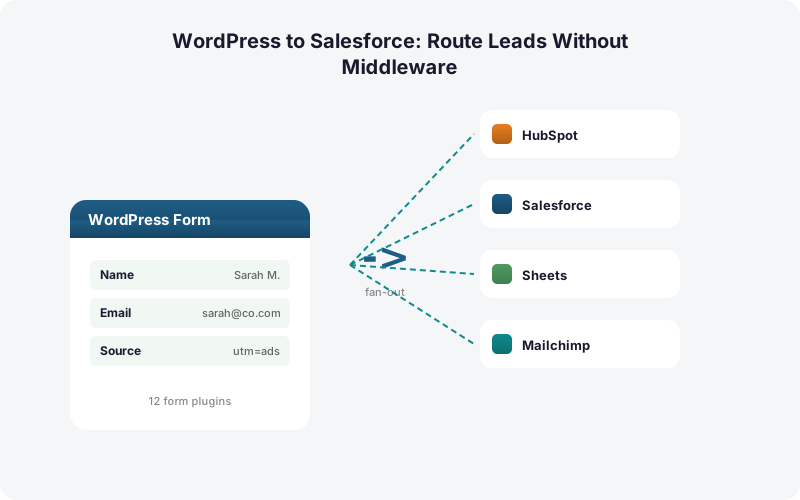
Yes. The Multi-CRM Routing add-on fans a single submission out to Salesforce, HubSpot, Pipedrive, Zoho, Mailchimp, and ActiveCampaign simultaneously, with no per-task fees for any of them. The same lead reaches your CRM, your email platform, and your sheet in one direct pass.
That's the architectural difference from middleware. Through Zapier, each of those destinations is a separate metered action (Zapier, 2026). The cost climbs with every tool you add.
Tool sprawl makes this real: companies run an average of about 106 SaaS apps (BetterCloud via Statista, 2024). Your lead data probably needs to reach more than one of them.
Direct fan-out keeps that affordable and instant. Add a destination and the price stays flat. Airtable and Notion are also supported destinations, and the full tier breakdown sits on the pricing page.
Why Keep a Google Sheets Copy in Parallel?
A parallel Google Sheets copy is your safety net and your audit log. With SheetLink Forms, every routed lead can also land in a sheet at the same instant it hits Salesforce, at no extra cost, because Sheets delivery is free - one-click Google connect or a one-time classic Apps Script webhook.
Why bother when the lead is already in the CRM? Because CRMs lose data to mapping errors, deduplication merges, and permission rules. A raw sheet is the unfiltered record of exactly what the form sent.
It's also faster for triage. A salesperson can scan a sheet, sort by UTM source, or build a quick dashboard without waiting on Salesforce report permissions. We cover that in the lead data dashboards guide.
If a Salesforce write ever fails, the sheet still has the lead, and the built-in retry queue re-attempts delivery with exponential backoff at 5 minutes, 30 minutes, and 2 hours. Nothing is lost. The full Sheets path is in our WordPress forms to Google Sheets guide.
What Happens When Salesforce Is Unavailable?
When a destination is briefly unavailable, the lead is not lost. SheetLink Forms uses a local retry queue in WordPress with exponential backoff, re-attempting delivery at 5 minutes, 30 minutes, and 2 hours, and it keeps full delivery logs you can inspect from your own admin.
This is a real reliability edge over middleware. With a hosted automation tool, a failure or outage on the vendor's side can silently delay or drop leads, and the queue lives in infrastructure you don't control.
Given that the 5-minute window drives roughly 100x higher contact odds (HBR, 2011), a queue that protects delivery without losing data is worth more than it looks. A delayed lead still converts. A lost one never does.
The difference between a polled middleware sync and a direct write with local retry is the difference between hoping a lead arrived and knowing it did. The cost case for owning that path is in our true cost breakdown.
Is Direct Routing Worth It for Agencies?
For agencies, direct routing compounds. The CRM market sits around $73.4B in 2024 and is projected to reach roughly $163.16B by 2030 at a 14.6% CAGR (Grand View Research, 2024/2025), so clients increasingly expect a CRM connection as table stakes, not an upsell.
Middleware doesn't scale gracefully across a client roster. Each client site means another metered account or a shared task pool that escalates as volume grows (Zapier, 2026). Agency ($199/yr) includes Multi-CRM Routing on 25 client sites, so the fee doesn't move with each new client.
There's a delivery-quality angle too. Setting up a new direct connection takes about 5 minutes per client, and the field map is reusable across similar sites.
Agencies managing many sites can centralize all of it. The agency page covers multi-site licensing and white-label options for branding the integration as your own.
Putting It Together
Direct WordPress-to-Salesforce routing wins on the dimensions that decide whether a lead converts: speed, attribution, and reliability. The 5-minute rule rewards instant delivery, and a direct write fires the moment a form submits, not on a polled middleware cycle (HBR, 2011).
You capture GCLID and UTM automatically for closed-loop campaign attribution, route conditionally to the right Salesforce queue, fan out to other tools without per-task fees, and keep a free Google Sheets copy as your audit log.
Middleware still earns its place for genuinely cross-platform workflows that span Stripe, Calendly, and a dozen non-WordPress sources. For the specific job of getting a WordPress form lead into Salesforce fast and intact, the direct path is cheaper, quicker, and more durable.
Start with the free version, then add Multi-CRM Routing when Salesforce enters the picture. The pricing page has the details.
| Capability | Direct (SheetLink Forms) | Zapier / Make to Salesforce |
|---|---|---|
| Per-task fees | None, Pro $79/yr | Metered per action, multi-step needs paid plan |
| Real-time delivery | Instant on submit | Webhook or polled, often delayed |
| Attribution capture | UTM + GCLID automatic | Manual, often dropped in transit |
| Conditional routing | Built in, by field value | Extra steps, more tasks billed |
| Sheets backup in parallel | Free, same submission | Counts as another task |
Frequently Asked Questions
Does this really avoid Zapier and Make completely?
Yes. SheetLink Forms is a direct integration. The Multi-CRM Routing add-on calls the Salesforce API from inside WordPress when a form submits. There is no middleware hop, no third-party polling delay, and no per-task fees on any destination.
How fast does a lead reach Salesforce?
Delivery fires server-side the instant the form submits, not on a polled cycle. That matters because contacting a web lead within 5 minutes makes you roughly 100x likelier to reach them (HBR, 2011). Direct routing keeps you inside that window.
Will UTM and GCLID data make it into Salesforce?
Yes. SheetLink Forms captures UTM parameters and click IDs (GCLID, fbclid, msclkid) automatically and maps them into Salesforce. Storing the GCLID is how you import offline conversions back to the originating campaign (Google Ads Help) for closed-loop reporting.
Can one form route leads to different Salesforce queues?
Yes. Conditional routing evaluates a field value per submission and sends each lead to the matching destination. Route by budget, region, or product interest. This gets fresh leads to the right owner fast, which matters since B2B data decays about 22.5% per year (HubSpot).
What does the Multi-CRM Routing add-on cost?
Multi-CRM Routing is included in Pro ($79/yr or $199 lifetime) with no per-task fees. The price stays the same no matter how many destinations you fan out to. Compare that with Zapier, where each action is a metered task and multi-step routing requires a paid plan (Zapier, 2026).
Can I send leads to Salesforce and a Google Sheet at once?
Yes. A single rule can write to Salesforce and Google Sheets simultaneously. Sheets delivery is free (one-click Google connect or a classic Apps Script webhook), giving you an unfiltered audit log alongside the CRM record at no extra cost and no additional task fees.
What happens if a Salesforce write fails?
The built-in retry queue re-attempts delivery with exponential backoff at 5 minutes, 30 minutes, and 2 hours, all tracked in delivery logs you can inspect from your WordPress admin. The lead is never silently lost, and a parallel Sheets copy keeps a backup.
Which form plugins does this support?
SheetLink Forms supports 12 core form plugins, including Gravity Forms, WPForms, Elementor Pro, Contact Form 7, Fluent Forms, Formidable, and Ninja Forms, and 17 with the Pro tier. The form you already use connects to Salesforce without rebuilding it.
Is direct routing a good fit for agencies?
Yes. Agency ($199/yr) includes Multi-CRM Routing on 25 client sites, so the fee does not escalate with each new client, unlike metered middleware that scales per account (Zapier, 2026). With a CRM market heading toward roughly $163.16B by 2030 (Grand View Research), clients increasingly expect a direct connection.
More Automation guides
Route WordPress Leads Into Salesforce in Real Time
No Zapier. No Make. No per-task fees. Fan out to Salesforce and your other tools at once, capture attribution, and keep a free Sheets backup.