
Why Send WordPress Form Data to Google Sheets
Every method compared: plugins, Zapier, Apps Script, Make, and custom code. Which approach fits your site, budget, and technical comfort level.
In This Guide
- Why Send Form Data to Google Sheets?
- The 6 Methods (Overview)
- Side-by-Side Comparison
- Method 1: Direct WordPress Plugin (Recommended)
- Method 2: Zapier / Make / Pabbly
- Method 3: Google Apps Script (DIY)
- Method 4: n8n / Self-Hosted Automation
- Method 5: Custom REST API Code
- Method 6: Google Sheets API with OAuth
- Which Method Should You Choose?
- Advanced: AI Lead Scoring, UTM Tracking, and Multi-CRM Routing
- Frequently Asked Questions
Why Send Form Data to Google Sheets?
Every WordPress site with a contact form, lead gen form, or order form collects data. That data usually sits in two places: your WordPress database and your email inbox. Both are terrible for analysis, sharing with a team, or building any kind of workflow.
Google Sheets solves this because it's collaborative, filterable, formula-powered, and free. Your sales team can see leads in real time. Your operations team can track orders. Your marketing team can run pivot tables on UTM sources. No one needs a WordPress login.
The problem is getting the data there. WordPress doesn't have a native "send to Google Sheets" button. You need a bridge. This guide covers every bridge available in 2026, with honest trade-offs for each.
The 6 Methods (Overview)
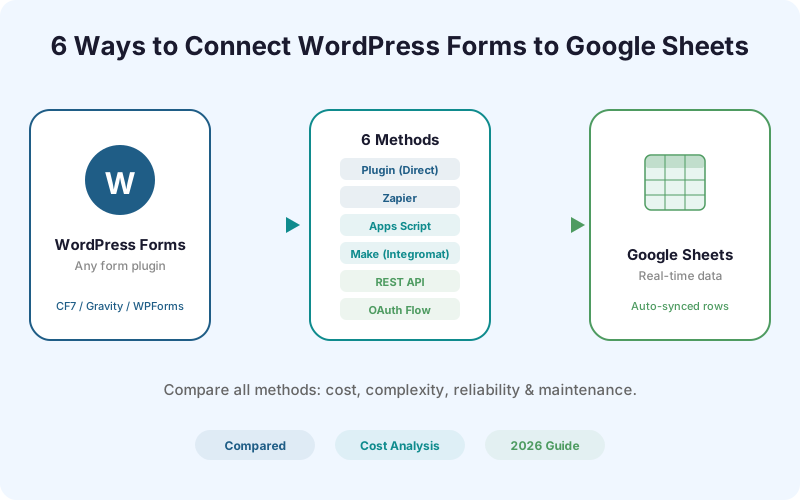
There are six distinct ways to connect WordPress forms to Google Sheets. They differ in cost, complexity, reliability, and how much control you retain over your data:
1. Direct WordPress plugin - A plugin that hooks into your form builder and sends data straight to Sheets, via a one-click Google connection or a Google Apps Script webhook. No middleware. One-time cost. 2. Zapier, Make, or Pabbly - Cloud automation platforms that watch for form submissions and push rows to Sheets. Per-task or monthly pricing. 3. Google Apps Script (DIY) - Write your own Apps Script that receives webhook POSTs and appends rows. Free but requires JavaScript comfort. 4. n8n or self-hosted automation - Open-source Zapier alternative you host yourself. Free software, but you pay for the server. 5. Custom REST API code - Build a custom WordPress REST endpoint that calls the Sheets API. Full control, maximum effort. 6. Google Sheets API with OAuth - Authenticate directly with Google's API from your server. Most complex, most flexible.
Side-by-Side Comparison
The comparison table below breaks down every method by cost, setup time, technical skill required, reliability, and data privacy.
Method 1: Direct WordPress Plugin (Recommended)
This is the approach we recommend for most WordPress site owners. A purpose-built plugin hooks directly into your form builder's submission event and sends the data to Google Sheets - either through a one-click Google connection or through a Google Apps Script webhook you host yourself.
Since SheetLink Forms v1.12.0 (July 2026), the default setup is one click: press Connect Google, approve a standard Google consent screen, then pick an existing spreadsheet (or create a new one) in the Google file picker. The permission scope is drive.file, so the plugin can only see the spreadsheets you pick or create, never the rest of your Drive. Submit one entry and you are done in about a minute: the first delivery seeds the header row from your form's own fields, so there are no column names to type. Each sync rule gets its own tab, so a second form never lands in the first form's columns.
Prefer a fully self-hosted path with no OAuth? The classic Apps Script webhook method still works and is fully supported: copy-paste the receiver script provided by the plugin into your own Google account (about 30 seconds), then paste the webhook URL into the settings page. Either way, every form submission is sent directly from your WordPress server to your Google Sheet. No middleware, no third-party data processing of your submissions on the delivery path (the optional AI add-ons, off by default, process submission content via disclosed AI providers).
Supported form builders include Elementor Pro, Contact Form 7, Gravity Forms, WPForms, Fluent Forms, Formidable Forms, Ninja Forms, and WooCommerce orders.
Why this method wins: No recurring cost - pay once, use forever. No data middleman - your form data goes directly from your server to Google Sheets. No single point of failure - if Zapier has an outage, your forms keep working with local queuing and retry. And the entire setup takes about a minute with one-click connect (a few minutes if you choose the self-hosted Apps Script route), without writing a single line of code.
Method 2: Zapier / Make / Pabbly
Cloud automation platforms are the most popular way to connect WordPress forms to Google Sheets. They work by polling for new submissions (via a WordPress plugin or webhook) and then running a "Zap" or "Scenario" that appends a row to your sheet.
The cost problem: Zapier charges per "task." Every form submission is one task. At 1,000 submissions per month, Zapier Starter costs $29.99/month (750 tasks included). Make (Integromat) runs $10.59/month for 10,000 operations. Pabbly Connect is $25/month for 12,000 tasks.
For a single WordPress-to-Sheets connection, you're paying $120-$360/year for something the free SheetLink core plugin does permanently. If you have multiple forms or multiple sites, the gap widens fast.
When Zapier makes sense: Zapier makes sense when you need to connect many different apps in a complex workflow - for example, form submission to Google Sheets to Slack notification to Mailchimp tag to Trello card. If Google Sheets is your only destination, a direct plugin is simpler and cheaper.
Method 3: Google Apps Script (DIY)
Google Apps Script is a JavaScript runtime built into Google Workspace. You can write a script that acts as a web app - it receives HTTP POST requests and appends data to a spreadsheet.
The DIY approach: You write the Apps Script yourself, deploy it as a web app, then configure your WordPress form builder to send a webhook to that URL. The script parses the incoming data and calls SpreadsheetApp.getActiveSpreadsheet().appendRow().
This approach is free and gives you full control. The downsides are maintenance and error handling. You need to handle field mapping, data validation, retry logic, and schema changes yourself. When your form fields change, you update the script manually. There's no admin UI, no retry queue, and no logging unless you build them.
For a developer comfortable with JavaScript, this can work well for simple, single-form setups. For agencies managing multiple clients or non-technical site owners, a plugin wraps this complexity for you.
Method 4: n8n / Self-Hosted Automation
n8n is an open-source workflow automation tool you can self-host. Think of it as "Zapier you own." You install it on a VPS, create a workflow that listens for WordPress form webhooks, and route submissions to Google Sheets.
The software is free, but you need a server ($5-$20/month for a VPS), and you're responsible for uptime, updates, and security. This approach suits agencies or developers who already run their own infrastructure and want unlimited automations without per-task pricing.
Method 5: Custom REST API Code
If you're a WordPress developer, you can write a custom REST endpoint that fires on form submission and calls the Google Sheets API directly. This gives you maximum flexibility - you control every aspect of the data pipeline.
The downside is time. You need to handle OAuth token refresh, rate limits, error retries, field mapping, and multi-site support yourself. For a production-grade implementation, expect 4-8 hours of development plus ongoing maintenance. This only makes sense for highly custom use cases where no existing plugin meets your requirements.
Method 6: Google Sheets API with OAuth
The most "enterprise" approach. You create a Google Cloud project, enable the Sheets API, set up OAuth 2.0 credentials, and authenticate your WordPress server with Google. Your PHP code then calls the Sheets API directly using Google's official client library.
This is the most reliable and scalable method - it's what Google recommends for server-to-server integrations. But the setup complexity is significant: service account creation, JSON key management, Sheets API scoping, and library dependencies. For most WordPress sites, this is overkill. (SheetLink's one-click Google Sheets connect gives you the same OAuth-direct delivery without any of this: no Google Cloud project, no API keys, and a drive.file scope limited to the sheets you pick.)
Which Method Should You Choose?
Here's our honest recommendation based on who you are:
- Non-technical site owner: Use a direct plugin like SheetLink Forms. One-click Google connect, about a minute of setup, no code, no recurring fees. - Small business with existing Zapier account: If you already pay for Zapier for other integrations, adding a WordPress-to-Sheets Zap is fine. But if Sheets is your only destination, switch to a plugin and cancel the Zapier plan. - Developer building a one-off integration: Google Apps Script (Method 3) is free and takes 30 minutes. Good for prototyping. - Agency managing 10+ client sites: A direct plugin with multi-site licensing eliminates per-task costs across all clients. - Developer who wants full control: n8n or custom REST API. Budget time for maintenance.
Advanced: AI Lead Scoring, UTM Tracking, and Multi-CRM Routing
Once your form data is flowing to Google Sheets, you can layer on advanced workflows:
- AI Lead Scoring: Run each submission through an AI model that scores lead quality based on form fields, behavior, and company data. - UTM Enrichment: Capture the UTM parameters (source, medium, campaign) and GCLID/fbclid from the page URL and append them to every form submission. Know exactly which ad or blog post generated each lead. - Multi-CRM Routing: Send form data to Google Sheets and simultaneously to HubSpot, Salesforce, Slack, or your CRM of choice. SheetLink Forms supports multi-destination routing. - Conditional Routing: Route different forms (or different field values) to different Google Sheets tabs or entirely different spreadsheets.
| Method | Cost | Setup Time | Technical Skill | Reliability | Data Privacy |
|---|---|---|---|---|---|
| Direct Plugin (SheetLink) | Free (core plugin) | ~1 min | None | High | Direct to Sheets |
| Zapier | $30+/mo | 10 min | None | Medium | Third-party |
| Make (Integromat) | $10+/mo | 15 min | Low | Medium | Third-party |
| Apps Script (DIY) | Free | 30 min | JavaScript | Medium | Direct to Sheets |
| n8n (self-hosted) | Server cost | 1-2 hours | DevOps | High | Self-hosted |
| Custom REST API | Free | 2-4 hours | PHP + JS | High | Direct |
| Sheets API (OAuth) | Free | 4+ hours | OAuth + PHP | High | Direct |
Frequently Asked Questions
What is the easiest way to send WordPress forms to Google Sheets?
A purpose-built WordPress plugin like SheetLink Forms is the easiest method. Install the plugin, click Connect Google, pick or create your spreadsheet in the Google file picker, and map your form fields - about a minute. Prefer a self-hosted setup? The classic Apps Script webhook method is still fully supported. No coding, no third-party automation accounts, and no per-submission fees.
Do I need Zapier to connect WordPress forms to Google Sheets?
No. Zapier works but charges per task. For WordPress-to-Sheets specifically, a direct plugin is simpler and cheaper. SheetLink Forms connects your forms to Sheets with a one-time purchase and no recurring per-submission costs.
Which WordPress form plugins work with Google Sheets?
Most major form plugins can connect to Google Sheets. SheetLink Forms supports 12 form plugins in the core: Elementor Pro, Contact Form 7, Gravity Forms, WPForms, Fluent Forms, Formidable Forms, Ninja Forms, Forminator, Everest Forms, Beaver Builder Forms, Divi Contact Form, and WS Form - plus WooCommerce checkout forms. The Pro tier extends this to 17 with JetFormBuilder, Bricks Builder Forms, MetForm, Kali Forms, and HappyForms.
Is Google Apps Script free for WordPress form data?
Yes, Google Apps Script is free for personal Google accounts and included with Google Workspace. There are daily quotas (e.g., 20,000 URL fetch calls per day for free accounts), but most WordPress sites never hit them.
Can I send WooCommerce orders to Google Sheets?
Yes. SheetLink Forms has a WooCommerce module that sends order data (customer info, products, totals, status) to Google Sheets on every new order. It works alongside form submissions from the same plugin.
More Tutorial guides
Stop Paying the Zapier Tax
Send WordPress form data directly to Google Sheets. One-time payment. No per-submission fees.