
The Best Zapier Alternatives for WordPress Forms in 2026
An honest tour of five ways to automate WordPress form data without Zapier: Make, Pabbly Connect, self-hosted n8n, native form connectors, and direct plugins - with the real tradeoffs of each route.
In This Guide
- What Are the Best Zapier Alternatives for WordPress Forms?
- Why Look Beyond Zapier at All?
- Is Make a Cheaper Zapier for WordPress Forms?
- Is Pabbly Connect Worth It for Form Automation?
- Should You Self-Host n8n for Form Syncing?
- What About Native Form Plugin Connectors?
- Direct WordPress Plugins: Built for the Form to Sheet Job
- Which Route Wins for Which Job?
- A Decision Checklist Before You Switch
- Next Steps
- Frequently Asked Questions
What Are the Best Zapier Alternatives for WordPress Forms?
The best Zapier alternative depends on the shape of the job. For form to spreadsheet or CRM delivery, a direct WordPress plugin is cheaper and faster; for long multi-app chains, Make or self-hosted n8n earns its keep. The average tech company already pays for about 275 SaaS apps (SaaStr, 2026), so add another one deliberately.
This post walks five routes honestly: Make, Pabbly Connect, self-hosted n8n, native form-plugin connectors, and direct WordPress plugins. Each gets judged on the same four axes: pricing model, latency, data path, and maintenance burden. Those four axes, not feature checklists, are what you will actually live with a year from now.
One spoiler up front: there is no single winner. There is a best tool per job shape, and pretending otherwise is how teams end up paying for three overlapping automation platforms at once.
Why Look Beyond Zapier at All?
Zapier's per-task pricing punishes exactly the workload WordPress sites run most: high-volume, low-complexity form syncing. The free tier stops at 100 tasks per month, Professional starts at $19.99 per month billed annually, about $29.99 billed monthly, and Team plans start at $69 per month (Zapier, 2026).
The multiplier is what stings. Every action in a multi-step Zap consumes a task, so a three-step flow triples the cost of each submission, and a busy contact form alone can push a site out of the free tier in a week. The full arithmetic, with worked examples at realistic lead volumes, is in our Zapier cost breakdown for WordPress forms.
Then there is the data path. Every submission, including names, emails, and whatever else your forms collect, routes through Zapier's cloud before reaching your spreadsheet or CRM. That adds a data processor to your privacy disclosures, and for many GDPR conversations, removing a processor is worth more than the subscription savings.
Is Make a Cheaper Zapier for WordPress Forms?
Usually, yes. Make's free plan includes 1,000 credits per month across two scenarios, and the Core plan costs $12 per month billed monthly, from about $10.59 billed annually, with Pro at $21 and Teams at $38 (Make, 2026). Make now bills in credits, where one module action consumes one credit.
The credit model carries the same failure mode as tasks: a five-module scenario burns five credits per submission, so complex flows steadily erode the price advantage. The visual scenario builder is genuinely more capable than Zapier's editor, with branching, iterators, and error handlers, but it comes with a steeper learning curve that someone on your team has to climb.
The data path still runs through Make's cloud, and scenarios execute on schedules unless you configure instant webhook triggers, so "near real time" needs setup. For the direct head-to-head, see SheetLink Forms vs Make.
Is Pabbly Connect Worth It for Form Automation?
Pabbly Connect competes on pricing structure rather than catalog size. Triggers and internal steps do not consume tasks, only real action steps do, and the top paid tier removes task limits entirely; the free plan includes 100 tasks per month (Pabbly, 2026).
Pabbly also runs lifetime deals periodically, which appeals to agencies tired of stacking monthly line items. The tradeoffs are real, though: a smaller integration catalog than Zapier or Make, a less polished builder, and the same fundamental architecture, meaning your form data still routes through a third-party cloud on its way to the spreadsheet.
For simple form to sheet flows at volume, the task accounting is legitimately generous, and for multi-app work on a budget it deserves a look. How it stacks up against skipping middleware entirely is covered in our Pabbly Connect comparison.
Should You Self-Host n8n for Form Syncing?
Only if someone on the team enjoys running servers. Self-hosted n8n has no per-task fees, an open codebase, and complete control of the data path, which makes it the strongest privacy story among the middleware options. The cost simply arrives as maintenance instead of subscription.
Be honest about what that maintenance means. Someone must patch the host, upgrade n8n versions, rotate credentials, and notice when an execution silently fails at 2 a.m. For an engineering team already running infrastructure, that is Tuesday. For a marketer with a WordPress site and no ops support, it is a part-time job nobody asked for.
n8n shines on complex branching workflows that would cost a fortune in tasks or credits, and its self-hosted privacy posture is genuinely hard to beat. For a single form to sheet flow, though, it is a lot of machinery for one small job; the tradeoffs are detailed in our n8n comparison.
What About Native Form Plugin Connectors?
Most major form plugins sell their own Google Sheets connector as a paid add-on, and these are real Zapier alternatives: data goes from your site toward the spreadsheet without middleware, latency is effectively real time, and setup lives inside the form plugin you already know.
The catch is fragmentation. Each connector is priced, configured, and maintained per form plugin. A site running two form tools needs two subscriptions and two configurations, an agency running five client stacks multiplies that again, and switching form plugins later means rebuying and rebuilding the connector from scratch.
On a single-form-plugin site with budget for the add-on, they work perfectly well, and their vendors support them properly. If you want one connector that spans form plugins instead, the field is ranked in the best WordPress Google Sheets plugins.
Direct WordPress Plugins: Built for the Form to Sheet Job
A direct plugin moves the automation into WordPress itself: the submission event fires, and the row posts straight to your spreadsheet in real time. No tasks, no credits, no third-party processor in the data path, and no lock-in to a single form plugin's ecosystem.
SheetLink Forms is the implementation we maintain. The free core covers 12 major form plugins, delivers rows via one-click Google connect (drive.file scope - only the sheets you pick) or a classic Apps Script receiver deployed in your own Google account, and ships an automatic retry queue with exponential backoff plus a delivery log for failed deliveries. Setup is documented in the getting started guide.
The honest limit: a direct plugin is not a general automation canvas. It will not chain six unrelated SaaS apps with branching logic, and it should not pretend to. Its job is moving WordPress form, order, and user data into spreadsheets and CRMs, done in real time and done free at the core.
Which Route Wins for Which Job?
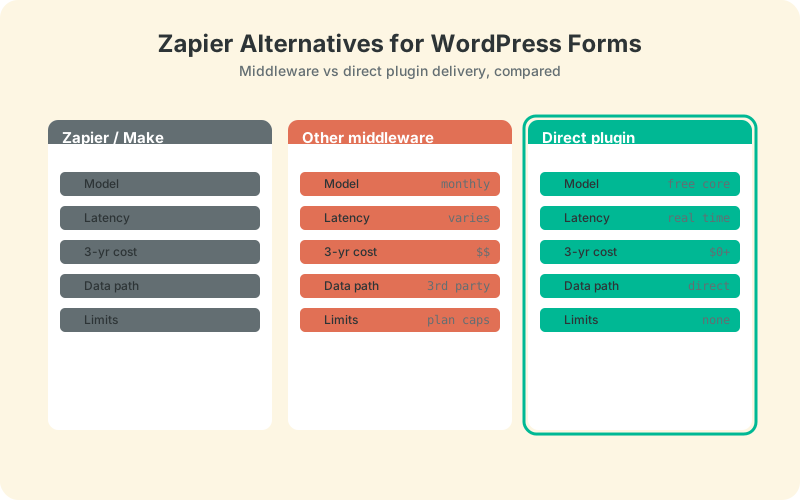
For form to spreadsheet and form to CRM delivery, the direct plugin wins on cost, latency, and data path. For long multi-app chains, middleware wins, with Make as the value pick and self-hosted n8n as the control pick. Native connectors fit single-plugin sites with room in the budget.
Many real sites land on a hybrid, and that is fine. The direct plugin absorbs the high-volume form traffic for free, which often drops middleware usage into a cheaper tier that now handles only the genuinely complex chains. The full cost modeling behind that split is in Make vs Zapier vs a direct plugin.
The comparison table below puts all five routes side by side on the four axes that matter. Read it with your own volume number in hand: the right row looks different at 50 submissions a month than it does at 5,000, and the table only settles the argument once your numbers are in it.
A Decision Checklist Before You Switch
Five questions settle the choice in about ten minutes. Answer them before opening any pricing page, because the answers determine which pricing model can hurt you later, and which routes are disqualified before features even enter the conversation.
- Volume: how many submissions per month, multiplied by steps per flow?
- Destinations: a spreadsheet and a CRM, or six unrelated apps with branching?
- Data path: is personal data allowed to transit a third-party cloud?
- Maintenance: who owns this when it breaks on a Saturday?
- Exit cost: what does leaving the tool cost in two years?
Chain length and latency deserve the most honesty. A two-step flow, form to sheet, has no business on a per-task or per-credit meter, and it deserves real-time delivery rather than a scenario that runs every fifteen minutes. A seven-step chain across five apps is the opposite case: that is middleware's whole reason to exist, and a direct plugin should not pretend to cover it.
Data-path sensitivity is often decided for you. If your forms collect health details, legal inquiries, or anything a client's data processing agreement covers, routing submissions through a third-party cloud creates disclosure work that no subscription discount repays. That single answer can eliminate three of the five routes before price even comes up.
Budget shape matters as much as budget size. A flat or free cost stays boring as traffic grows; a metered cost turns every good marketing month into a bigger automation bill. Maintenance appetite is the quiet filter: self-hosting looks free until you price your own hours, while a managed plugin or middleware plan trades money for someone else's pager.
Volume times steps is the number that surprises people; it is how a modest site outgrows a free tier in a month. And the macro picture argues for restraint: median SaaS spend now runs $9,455 per employee per year, with 36% of licenses going unused (Zylo, 2026). The cheapest automation platform is the subscription you never add.
Next Steps
Start with the job you actually have, not the platform you might someday need. If the job is forms to a spreadsheet or CRM, install a direct plugin this week, point one form at one sheet, and see whether middleware still has a role in your stack by Friday.
If complex chains remain, keep the smallest middleware plan that covers them and let the free direct path carry the volume. That split, matching each tool to its job shape rather than picking a side, is what keeps automation spend rational as the site grows.
| Route | Pricing model | Latency | Data path | Maintenance |
|---|---|---|---|---|
| Zapier | Per-task tiers, from $19.99/mo annual | Instant or polling, plan-dependent | Site -> Zapier cloud -> destination | Low |
| Make | Credits, Core $12/mo monthly | Scenario runs, webhooks for instant | Site -> Make cloud -> destination | Medium |
| Pabbly Connect | Flat tiers, lifetime deals | Webhook-triggered | Site -> Pabbly cloud -> destination | Low |
| Native form connectors | Paid add-on per form plugin | Real time | Site -> spreadsheet | One connector per plugin |
| Direct plugin (SheetLink Forms) | Free core | Real time | Site -> your sheet | One plugin, 12 form integrations |
Frequently Asked Questions
What is the cheapest Zapier alternative for WordPress forms?
For form to spreadsheet delivery, a direct plugin with a free core costs nothing monthly. Among middleware, Make's Core plan at $12 per month billed monthly (Make, 2026) undercuts Zapier Professional at $19.99 per month billed annually (Zapier, 2026).
Is Make better than Zapier for WordPress form automation?
Make is usually cheaper, and its visual scenario builder is more flexible, but it bills in credits, one per module action, so long scenarios still add up quickly. For a plain form to sheet flow, both platforms are more machinery than the job requires.
Does Pabbly Connect really have unlimited tasks?
Its top paid tier removes task limits, and triggers plus internal steps do not consume tasks on any plan (Pabbly, 2026). The free plan includes 100 tasks per month. Your form data still routes through Pabbly's cloud, which matters for privacy-sensitive forms.
Is n8n free for WordPress form syncing?
The self-hosted community edition has no per-task fees, but you pay in infrastructure and attention: a server to run, versions to upgrade, credentials to rotate, and executions to monitor. It rewards teams with engineers and punishes teams without them, so budget real maintenance time.
Do I still need middleware if I use a direct plugin?
Only for genuine multi-app chains, such as form to CRM to Slack to invoicing with branching logic. Many sites run a hybrid: the direct plugin handles form to spreadsheet delivery free, while a small middleware plan keeps only the complex chains alive.
Can a direct plugin send leads to a CRM as well as a sheet?
Yes. SheetLink Forms offers a multi-CRM fan-out add-on that pushes submissions to HubSpot, Salesforce, Pipedrive, or Zoho alongside the spreadsheet row, with conditional routing to send hot leads one way and everything else another. No middleware sits in the path.
How do native form plugin connectors compare on price?
They are typically paid add-ons sold per form plugin, so costs multiply if you run more than one form tool or manage several client stacks. They suit single-plugin sites; a plugin-agnostic direct connector covers 12 major form plugins under one free core instead.
Why does the data path matter for form automation?
Middleware routes every submission through a third-party cloud, which adds a data processor to your privacy disclosures and another point of failure to your stack. A direct site to spreadsheet path keeps personal data between systems you already control, which simplifies GDPR conversations with clients.
More Automation guides
Skip the Middleware for Form to Sheet Syncing
Send WordPress form submissions straight to Google Sheets free - no task caps, no credits, no third-party data path.