
WordPress to Zoho CRM Without Zapier
Route WordPress form leads straight into Zoho CRM, no Zapier task fees, no nightly sync. Create leads or contacts instantly, keep UTM and GCLID attribution, and copy every submission to Google Sheets at the same time.
In This Guide
- Why Send WordPress Leads Straight to Zoho CRM?
- What Does 'Without Zapier' Actually Mean Here?
- Create Zoho Leads or Contacts From a Form
- How Do You Keep UTM and GCLID Attribution?
- Route Leads Conditionally by Field Value
- Keep a Parallel Google Sheets Copy
- Why Instant Fan-Out Beats a Nightly CRM Sync
- What Happens If Zoho Is Briefly Unavailable?
- How Do You Set It Up?
- Is This a Good Fit for Agencies?
- Frequently Asked Questions
Why Send WordPress Leads Straight to Zoho CRM?
Speed is the whole game. Contacting a web lead within 5 minutes instead of 30 makes you about 100x likelier to reach them and 21x likelier to qualify the lead, per the MIT/InsideSales study published by HBR (2011). A direct WordPress-to-Zoho path puts the lead in your reps' hands in seconds.
Most teams miss that window badly. In a study of 114 B2B companies, the average phone response was 14 hours 29 minutes and almost none replied within 5 minutes, according to Workato (2019-2020).
A direct integration removes the middleman that creates that lag. SheetLink Forms writes the lead into Zoho the moment the form is submitted, with no Zapier polling and no nightly batch sync in between.
What Does 'Without Zapier' Actually Mean Here?
It means no per-task billing and no third-party hop. Zapier meters every action: fanning one submission to several destinations in a multi-step Zap burns a task per action, and multi-step Zaps require a paid plan, per Zapier (2026). A direct plugin sends the same lead with zero task fees.
With SheetLink Forms, your WordPress form talks to the Zoho CRM API directly. There's no Zapier account, no Make scenario, and no webhook relay that can rate-limit you or change pricing.
Multi-CRM Routing, included in Pro ($79/yr), handles the Zoho connection. There is no per-task metering, which matters since tool sprawl is real: the average company runs about 106 SaaS apps, per BetterCloud via Statista (2024). Direct routing is one fewer subscription to manage.
Create Zoho Leads or Contacts From a Form
You choose the Zoho module per rule. The CRM market reached roughly $73.4B in 2024 and is projected to hit $163.16B by 2030 at a 14.6% CAGR, per Grand View Research (2024). That growth means clean, structured intake matters more than ever, and field mapping is where it happens.
In the Multi-CRM Routing add-on you map each form field to a Zoho field. A contact form's name, email, phone, and company map to the matching Zoho Leads module fields. A demo-request form might write to Contacts or Deals instead.
The mapping is per rule, so different forms can populate different Zoho modules from the same WordPress site. You set it once in the admin, and every future submission follows that map automatically without touching the form.
How Do You Keep UTM and GCLID Attribution?
Capture the click IDs at submission and pass them into Zoho. Capturing the Google Click ID with a lead is the supported way to attribute and import offline conversions back to the campaign, per Google Ads Help. Without it, your sales pipeline can't tell paid search from organic.
SheetLink Forms captures UTM parameters plus GCLID, fbclid, and msclkid automatically on every submission. You map those captured values to custom fields in Zoho, so each lead arrives tagged with its source, medium, campaign, and click ID.
That closes the loop. When a Zoho lead converts to a won deal, the GCLID lets you push the offline conversion back to Google Ads. For a deeper walkthrough, see our guide on UTM and GCLID attribution for WordPress forms.
Route Leads Conditionally by Field Value
Not every lead belongs in the same place. Conditional routing sends a submission to Zoho only when a field matches a rule you set, so a $500K budget enquiry and a free-trial signup don't land in the same bucket. This keeps your CRM clean as data decays at about 22.5% per year, per HubSpot (citing MarketingSherpa).
You define conditions on any field. For example, route to Zoho only when Country equals US, or when Plan equals Enterprise, or when a budget dropdown exceeds a threshold.
Low-intent submissions can skip Zoho entirely and go to Google Sheets alone, keeping your CRM focused on real opportunities. Our post on conditional routing for WordPress forms covers the field-matching logic in detail.
Keep a Parallel Google Sheets Copy
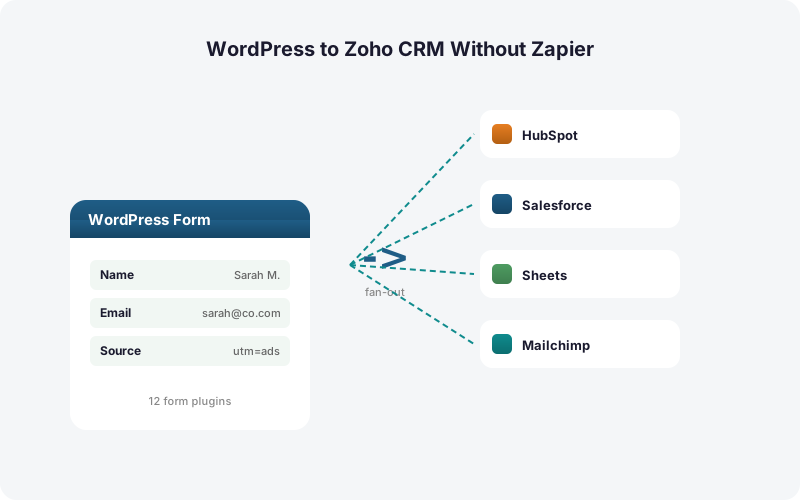
You don't have to choose between Zoho and Sheets. SheetLink Forms fans each submission out to Zoho and Google Sheets simultaneously, with no extra task cost, since direct routing has no per-action billing like the per-task model in Zapier (2026). One submission, two destinations, one flat price.
The Sheets copy gives your marketing team a live, queryable record while sales works the lead in Zoho. It's also a safety net: if a Zoho field changes or a rep deletes a record, the raw submission still sits in your sheet.
Google Sheets delivery is free in the core plugin - one-click Google connect or a one-time Apps Script webhook. See the Google Sheets setup docs, and our Google Sheets as a lightweight CRM post for teams that want both.
Why Instant Fan-Out Beats a Nightly CRM Sync
A nightly sync is slow enough to lose the deal. The 5-minute response window drives a ~100x lift in contact rate and ~21x in qualification, per the MIT/InsideSales study via HBR (2011). A batch job that runs once a day cannot meet that window for any lead submitted after the last run.
Instant fan-out writes the lead the second the form is submitted, so a rep can call while the prospect is still on the page. Compare that to the real-world average phone response of 14 hours 29 minutes documented by Workato (2019-2020).
The gap between "instant" and "nightly" is the gap between winning and losing the lead. Direct routing is the only model that consistently hits the 5-minute mark.
What Happens If Zoho Is Briefly Unavailable?
Submissions still queue safely. SheetLink Forms uses a built-in retry queue with exponential backoff at 5 minutes, 30 minutes, and 2 hours, so a temporary Zoho API hiccup doesn't lose the lead. The submission sits locally in WordPress and retries until delivery succeeds, with full delivery logs for every attempt.
This matters because a lost lead is unrecoverable. With Zapier or Make, the queue lives in someone else's infrastructure and a vendor outage can drop data silently.
The local queue also means your WordPress form never blocks the visitor. The form confirms instantly, the lead delivers in the background, and you keep an auditable record of every send. For a side-by-side look at the trade-offs, read Make vs Zapier vs direct plugin.
How Do You Set It Up?
Setup takes a few minutes, not a Zapier afternoon. Onboarding a new direct connection is far faster than wiring a metered SaaS scenario, which matters as costs scale: Zapier's multi-step Zaps require a paid plan and meter every action, per Zapier (2026). The direct path skips all of that.
First, install SheetLink Forms and activate the Multi-CRM Routing add-on. Connect your Zoho account via OAuth in the plugin admin. Then create a sync rule: pick your WordPress form, choose the Zoho module (Leads, Contacts, or Deals), and map each form field.
Add UTM and click-ID fields to the map, set any conditional routing rules, and optionally add a Google Sheets destination to the same rule. Save, submit a test lead, and confirm it appears in Zoho. See the full plugin list on the integrations page.
Is This a Good Fit for Agencies?
Yes, especially for agencies running Zoho across many clients. With the average company running about 106 SaaS apps per BetterCloud via Statista (2024), removing per-client Zapier subscriptions cuts both cost and sprawl. One flat add-on price covers unlimited submission volume.
Multi-CRM Routing is included in Pro and Agency, and Agency covers 25 client sites, so the same direct-to-Zoho flow runs on every client site an agency manages.
There are no per-task overages to forecast and no surprise bills when a client's campaign spikes. See the agency page and our full pricing breakdown for the multi-site tiers.
| Approach | Speed to Zoho | Per-Task Fees | UTM/GCLID Capture | Parallel Sheets Copy |
|---|---|---|---|---|
| SheetLink Forms (direct) | Seconds, on submission | None (Pro, $79/yr) | Automatic | Yes, same rule |
| Zapier | Polled, can lag | Per task, multi-step paid | Manual setup | Counts as extra tasks |
| Zoho web forms | Instant but Zoho-only | None | Limited | No |
Frequently Asked Questions
Can I send WordPress form leads to Zoho CRM without Zapier?
Yes. SheetLink Forms connects your WordPress form directly to the Zoho CRM API through Multi-CRM Routing, included in Pro ($79/yr). There's no Zapier account, no per-task billing, and no third-party relay. The lead is created in Zoho the moment the form is submitted.
How fast does the lead reach Zoho?
Within seconds, on submission. That matters because contacting a web lead within 5 minutes versus 30 makes you about 100x likelier to reach them, per the MIT/InsideSales study via HBR (2011). A nightly CRM sync cannot hit that window; direct routing does.
Can I create both Zoho Leads and Contacts?
Yes. You choose the Zoho module per rule, so one form can write to Leads while another writes to Contacts or Deals. Field mapping is set once in the admin and applies to every future submission from that form automatically, with no further setup.
Does it capture UTM parameters and GCLID for attribution?
Yes. SheetLink Forms automatically captures UTMs plus GCLID, fbclid, and msclkid on each submission. You map them to Zoho custom fields. Capturing the GCLID is the supported way to import offline conversions back to the campaign, per Google Ads Help.
Can I route only some leads to Zoho?
Yes, with conditional routing. You set conditions on any field, so a lead reaches Zoho only when, for example, Plan equals Enterprise. This keeps your CRM clean as B2B contact data decays at about 22.5% per year, per HubSpot citing MarketingSherpa.
Can I keep a Google Sheets copy at the same time?
Yes. The same rule can fan a submission out to Zoho and Google Sheets simultaneously at no extra cost, since direct routing has no per-task fees. The Sheets copy serves as a queryable marketing record and a safety net if a Zoho record is changed or deleted.
What happens if the Zoho API is briefly down?
The submission queues locally in WordPress and retries with exponential backoff at 5 minutes, 30 minutes, and 2 hours until delivery succeeds. Full delivery logs record every attempt, so a temporary Zoho outage delays the lead rather than losing it.
How is this cheaper than Zapier at scale?
Zapier meters every action, so fanning one lead to several destinations burns a task per action and multi-step Zaps require a paid plan, per Zapier (2026). Multi-CRM Routing is included in Pro ($79/yr) with no per-task metering, so cost stays predictable as traffic grows.
Does this work for agencies managing many client sites?
Yes. Agency ($199/yr) covers 25 client sites, letting agencies run the same direct-to-Zoho flow on every client. There are no per-task overages to forecast, which removes a recurring source of SaaS sprawl.
More Automation guides
Put Every Lead in Zoho in Seconds
Route WordPress form leads straight into Zoho CRM with no Zapier, no per-task fees, and a parallel Google Sheets copy. Multi-CRM Routing ships in Pro at $79/yr.