
WordPress to Pipedrive Without Zapier: Direct Lead Routing That Beats the Clock
Push WordPress form leads straight into Pipedrive as persons and deals, no Zapier in the middle. Capture UTM and GCLID, route by field value, and keep a parallel Google Sheets copy.
In This Guide
- Why Route WordPress Leads Straight to Pipedrive?
- How Does Direct WordPress-to-Pipedrive Routing Work?
- How Do You Set Up the Pipedrive Connection?
- How Do You Create Persons and Deals Automatically?
- How Do You Capture UTM and GCLID for Source Attribution?
- How Does Conditional Routing by Field Value Work?
- Why Keep a Parallel Google Sheets Copy?
- How Does Direct Routing Improve Speed-to-Lead?
- Direct vs Zapier vs Pipedrive Web Forms: Which Wins?
- What About Agencies Managing Many Clients?
- Frequently Asked Questions
Why Route WordPress Leads Straight to Pipedrive?
Speed is the whole game. Contacting a web lead within 5 minutes instead of 30 makes you roughly 100x likelier to reach them and about 21x likelier to qualify, per the MIT and InsideSales study published by HBR (2011). A direct WordPress-to-Pipedrive path puts new leads in front of reps in seconds.
Most teams miss that window badly. A study of 114 B2B companies found an average email response of nearly 12 hours and almost none replying inside 5 minutes (Workato, 2019-2020). When a form submission triggers a Pipedrive deal instantly, your reps work fresh leads instead of cold ones.
Direct routing also removes a fragile middle layer. With SheetLink's Multi-CRM Routing add-on, each submission lands in Pipedrive without a third-party automation hub deciding when, or whether, your lead arrives.
How Does Direct WordPress-to-Pipedrive Routing Work?
SheetLink's Multi-CRM Routing, included in Pro ($79/yr), sends each WordPress form submission straight to Pipedrive over its API, with no Zapier or Make in the path. The plugin maps your form fields to Pipedrive person and deal properties, then fires the call the moment the form is submitted.
There are no per-task fees. By contrast, Zapier meters every action: fanning one submission to several destinations in a multi-step Zap burns a task per action, and multi-step Zaps need a paid plan starting at $19.99/month with only 750 tasks (Zapier, 2026). Direct routing is flat-rate.
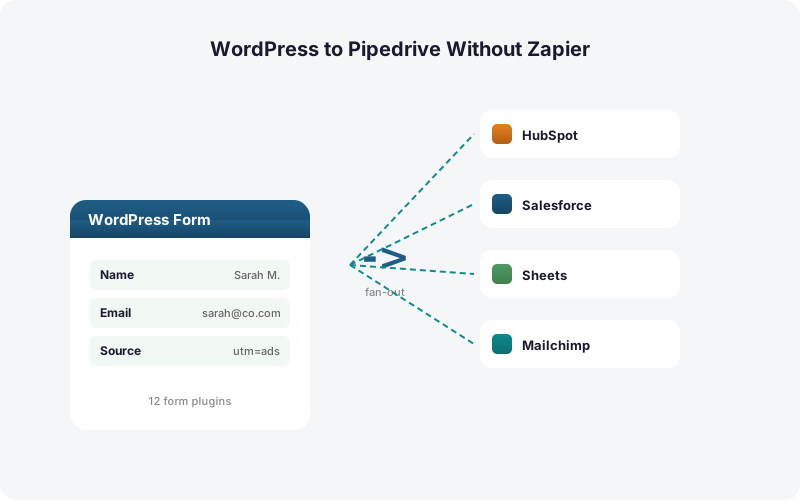
The flow is simple. Your visitor submits any supported form, the plugin reads the fields, builds the Pipedrive payload, and creates the records. SheetLink already works with 12 core form plugins, so most sites need zero new tooling. See the full list on the integrations page.
How Do You Set Up the Pipedrive Connection?
Setup takes about five minutes and three steps. First, generate a Pipedrive API token in your account settings. Second, paste it into SheetLink's Multi-CRM Routing screen in WordPress. Third, map your form fields to Pipedrive properties and pick which forms route to which pipeline. No code, no webhook server.
Field mapping is where the value lives. Map the email field to the Pipedrive person email, the name field to the person name, and any custom fields (budget, company size, message) to matching Pipedrive custom fields.
Keep your existing spreadsheet workflow too. The same rule that creates a Pipedrive record can write the lead to a Google Sheets CRM in parallel. If you have not set that up yet, the Google Sheets setup guide walks through the one-time setup - one-click Google connect or the classic Apps Script deploy.
How Do You Create Persons and Deals Automatically?
One submission can create two linked Pipedrive records at once: a person and a deal. The plugin first creates or matches the person by email, then attaches a new deal to that person inside the pipeline stage you choose. This mirrors how a rep would manually log an inbound lead, only it happens in seconds.
The matching step matters because data ages fast. B2B contact databases decay around 22.5% per year (HubSpot, citing MarketingSherpa), so feeding clean, fresh leads in real time keeps your Pipedrive instance healthier than a quarterly bulk import.
You control the deal defaults: title template, pipeline, stage, owner, and value. A demo-request form might open a deal titled "Demo - {company}" at $0 in your Sales pipeline, while a pricing form opens one in a higher-intent stage. Each form can map to its own deal recipe.
How Do You Capture UTM and GCLID for Source Attribution?
SheetLink captures UTM parameters and click IDs (GCLID, fbclid, msclkid) automatically, then writes them into Pipedrive custom fields alongside the lead. Capturing the Google Click ID with a lead is exactly how you tie a closed deal back to its campaign and import offline conversions, per Google Ads Help.
Without this, attribution breaks. A lead arrives in Pipedrive with a name and email but no trace of which ad, keyword, or campaign drove it. Once the deal closes, you cannot tell marketing which spend actually worked.
With capture on, every Pipedrive person carries its source. You can filter deals by utm_campaign, report won revenue per channel, and push GCLID-backed conversions to Google Ads. For a deeper walkthrough, see our guide on UTM and GCLID attribution for WordPress forms.
How Does Conditional Routing by Field Value Work?
Conditional routing sends each lead to the right place based on what the visitor entered. SheetLink evaluates a field value, then decides which CRM, which Pipedrive pipeline, or which owner receives the deal. One contact form can feed several routing paths without duplicate forms or extra plugins.
The logic is rule-based and readable. For example: if the budget field is over $10,000, create the deal in the Enterprise pipeline and assign it to a senior rep; otherwise create it in the SMB pipeline. If country equals "Canada," route to the Canadian sales owner.
This keeps high-intent leads out of a generic queue. Because contacting fast is worth roughly 21x in qualification odds (HBR, 2011), routing the hot ones to the right rep instantly is a direct revenue lever. Learn the pattern in conditional routing for WordPress forms.
Why Keep a Parallel Google Sheets Copy?
Routing to Pipedrive and Google Sheets at the same time gives you a CRM record plus an auditable raw log, from one rule, with no extra task fees. The Sheet becomes your backup of truth, your reporting canvas, and your safety net if a Pipedrive field mapping ever needs review.
This matters when you average around 106 SaaS apps per company (BetterCloud via Statista, 2024). A simple shared Sheet stays accessible to anyone, even teammates without a Pipedrive seat, so finance or ops can pull lead numbers directly.
The Sheet also powers fast dashboards. You can build pivot tables and sparkline charts over your raw lead feed without paying for CRM reporting seats. Our guide on Google Sheets dashboards for lead data shows the setup, and the full pipeline lives in the WordPress-to-Sheets guide.
How Does Direct Routing Improve Speed-to-Lead?
Direct routing collapses the gap between submit and first contact to seconds, which is where money is made. The 5-minute rule is unforgiving: respond within 5 minutes versus 30 and you are roughly 100x likelier to make contact (HBR, 2011). A lead sitting in a Zapier queue or a nightly CRM sync misses that window entirely.
In our experience, the worst delays come from polling-based automation that checks for new submissions every several minutes. By the time the lead reaches the CRM, the 5-minute clock has already run out.
Instant fan-out beats nightly sync, full stop. The plugin also runs a built-in retry queue with exponential backoff (5 minutes, 30 minutes, 2 hours), so if Pipedrive's API hiccups, the lead is retried automatically instead of lost. Speed without reliability is just fast failure.
Direct vs Zapier vs Pipedrive Web Forms: Which Wins?
For WordPress sites, direct routing wins on cost, speed, and field control. Zapier meters every action, so a multi-step Zap fanning one lead to several places burns a task per action and needs a paid plan from $19.99/month (Zapier, 2026). At scale that bill grows with your traffic.
Pipedrive web forms are free but limited. They live on Pipedrive's domain or in an iframe, lack your WordPress form builder's logic and styling, and do not write a parallel Google Sheets copy or capture click IDs the same way.
Direct routing keeps your existing WordPress forms, adds conditional logic and UTM/GCLID capture, and comes in Pro ($79/yr) with no per-lead tax. The comparison table below summarizes the trade-offs. For the broader cost picture, see Make vs Zapier vs direct plugin and Zapier costs for WordPress forms.
What About Agencies Managing Many Clients?
Agencies feel the per-task tax hardest because every client multiplies the volume. With direct routing, the CRM market's growth (around $73.4B in 2024, heading toward $163.16B by 2030 at 14.6% CAGR, per Grand View Research) means more clients want Pipedrive integration every year.
A flat-rate add-on lets an agency wire up unlimited leads per client without watching a task meter. Each site keeps its own Pipedrive token, its own field mappings, and its own conditional routing rules.
This is where owning the data path pays off. You are not re-architecting client integrations every time a SaaS automation tool changes its pricing tiers. Resources for this model live on the agencies page and the pricing page.
| Capability | Zapier | Pipedrive Web Forms | Direct Routing (SheetLink) |
|---|---|---|---|
| Keep your WordPress form builder | Yes | No | Yes |
| Per-task fees | Yes (1 task/action) | No | No (Pro, $79/yr) |
| Create person + deal | Yes | Lead only | Yes |
| Capture UTM / GCLID | Manual setup | Limited | Automatic |
| Conditional routing by field | Paid multi-step | No | Yes |
| Parallel Google Sheets copy | Extra tasks | No | Same rule |
| Speed to lead | Polled / queued | Instant | Instant |
Frequently Asked Questions
Can I send WordPress form leads to Pipedrive without Zapier?
Yes. SheetLink's Multi-CRM Routing, included in Pro ($79/yr), sends each submission directly to Pipedrive over its API, with no Zapier or Make in between. It creates persons and deals, captures UTM and GCLID, and routes conditionally, all at a flat rate with no per-task fees.
Does direct routing create both a Pipedrive person and a deal?
Yes. One submission can create or match a person by email, then attach a new deal to that person in the pipeline stage you choose. Each form can use its own deal recipe, including title template, pipeline, stage, owner, and value, so high-intent forms open higher-intent deals.
How does SheetLink capture UTM and GCLID for Pipedrive?
The plugin captures UTM parameters and click IDs (GCLID, fbclid, msclkid) automatically and writes them into Pipedrive custom fields. Capturing the Google Click ID is how you attribute closed deals to campaigns and import offline conversions, per Google Ads Help. Every person record then carries its true source.
How fast does a lead reach Pipedrive?
Within seconds of submission, because routing fires on the form's submit event rather than polling. That speed matters: contacting a web lead within 5 minutes versus 30 makes you roughly 100x likelier to make contact (HBR, 2011), so instant routing beats a nightly CRM sync decisively.
Can I route different leads to different Pipedrive pipelines?
Yes. Conditional routing evaluates a field value and decides the CRM, pipeline, owner, or stage. For example, a budget over $10,000 can open an Enterprise deal assigned to a senior rep, while smaller budgets land in an SMB pipeline, all from one contact form.
Can I keep a Google Sheets copy at the same time?
Yes. A single rule can write to Pipedrive and Google Sheets simultaneously with no extra task fees. The Sheet becomes an auditable raw log and a reporting canvas accessible to teammates without a Pipedrive seat, and it powers pivot tables and dashboards over your raw lead feed.
How is this cheaper than Zapier?
Zapier meters every action, so fanning one lead to several destinations burns a task per action and requires a paid plan from $19.99/month for 750 tasks (Zapier, 2026). Direct routing is included in Pro ($79/yr) with no per-task fees, so the bill stays predictable as traffic grows.
What happens if Pipedrive's API is temporarily down?
The plugin uses a built-in retry queue with exponential backoff (5 minutes, 30 minutes, 2 hours). If a Pipedrive call fails, the lead is retried automatically and logged, rather than lost. That reliability matters since B2B databases decay around 22.5% per year (HubSpot, citing MarketingSherpa).
More Automation guides
Route WordPress Leads to Pipedrive in Seconds
Create persons and deals, capture UTM and GCLID, route by field value, and keep a parallel Google Sheets copy. Included in Pro ($79/yr), no Zapier, no per-task fees.