
Send WordPress Form Leads to HubSpot Without Zapier
Route WordPress form submissions straight into HubSpot in real time, keep a copy in Google Sheets, and skip the per-task fees. Here's how direct fan-out works and why it beats a multi-step Zap.
In This Guide
- Why Should a New Lead Reach HubSpot in Seconds?
- What Does Routing Leads Through Zapier Actually Cost?
- How Does Direct Fan-Out to HubSpot Work?
- Can You Keep a Copy in Google Sheets at the Same Time?
- How Do You Send Only Qualified Leads to HubSpot?
- How Do You Get UTM and GCLID Attribution Into HubSpot?
- What Happens If HubSpot Is Briefly Unreachable?
- Does Removing Zapier Reduce Tool Sprawl?
- What Should Agencies Managing Many CRMs Do?
- How Do You Set This Up in Practice?
- Frequently Asked Questions
Why Should a New Lead Reach HubSpot in Seconds?
Speed wins deals. Contacting a web lead within five minutes instead of thirty makes you about 100x likelier to reach that person and roughly 21x likelier to qualify them, per the MIT lead-response study published by Harvard Business Review (2011). Every minute a lead waits in a queue, it cools.
The gap between best practice and reality is brutal. In a study of 114 B2B companies, average email response was around 11 hours 54 minutes and essentially none replied inside five minutes, according to Workato (2019).
A direct WordPress-to-HubSpot path closes that gap. The submission lands in your CRM the instant the form is submitted, not on the next polling cycle. Your sales team sees the lead while intent is still hot.
What Does Routing Leads Through Zapier Actually Cost?
Zapier meters every action. One task equals one action, and a multi-step Zap that fans a single submission to six CRMs burns a task per action, so six or more tasks per lead, per Zapier (2026). The free tier caps at 100 tasks per month and only allows two-step Zaps.
The math escalates fast. Multi-step routing requires a paid plan starting at $19.99/month annually for 750 tasks, with overage billed at 1.25x. At six tasks per lead, 750 tasks covers just 125 leads.
That per-task model punishes exactly the behavior you want: more leads, more destinations, more attribution data. We dug into the full five-year math in our true-cost breakdown and the Zapier cost guide. A direct integration removes the meter entirely.
How Does Direct Fan-Out to HubSpot Work?
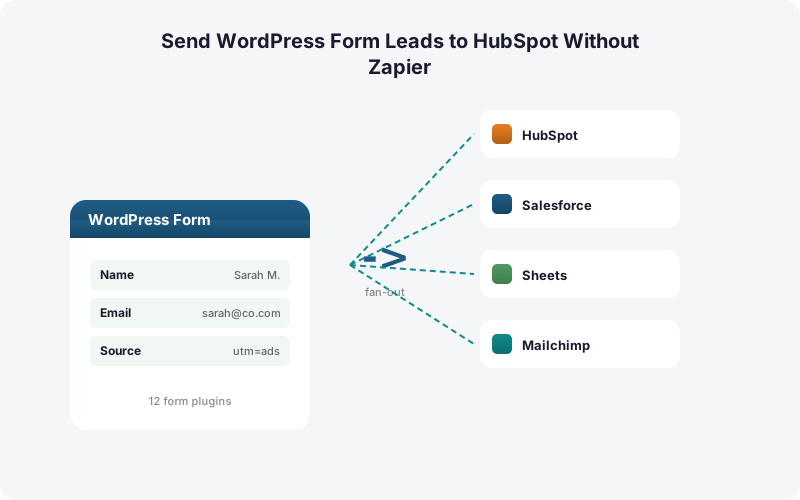
Direct fan-out skips the middleware. SheetLink's Multi-CRM Routing, included in Pro ($79/yr), takes each WordPress form submission and pushes it straight to HubSpot, Salesforce, Pipedrive, Zoho, Mailchimp, or ActiveCampaign at the same time, with no per-task fees and no Zapier account in the loop.
The flow is simple. A visitor submits a Gravity Forms, WPForms, Elementor, or Contact Form 7 entry. The plugin maps your fields to HubSpot contact properties and fires an API call within a second or two. No polling, no queue in someone else's cloud.
This matters because the CRM market is enormous and growing, roughly $73.4 billion in 2024 and projected to reach about $163.16 billion by 2030 at a 14.6% CAGR, per Grand View Research (2024). Owning the path into that CRM is worth getting right.
Can You Keep a Copy in Google Sheets at the Same Time?
Yes, and you should. SheetLink fans each submission out to HubSpot while writing the same row to Google Sheets in the same pass, so your spreadsheet stays a complete, queryable record even when the CRM is the system of record. One submission, two destinations, no duplicate task charges.
Why keep both? Your CRM decays. B2B contact databases lose roughly 22.5% of their records to decay every year, per HubSpot (citing MarketingSherpa). A raw Sheets log gives you an untouched source of truth to re-import, audit, or dedupe against.
Sheets is also where reporting lives. You can build pivot dashboards on the same data, as covered in our guide to Sheets lead dashboards, and run a lightweight Sheets CRM for leads that never warrant a paid HubSpot seat. Setup is free - use one-click Google Sheets connect or the classic Apps Script connector.
How Do You Send Only Qualified Leads to HubSpot?
Conditional routing keeps your CRM clean. SheetLink lets you route by field value, so only submissions that match a rule, say a budget over $5,000 or a country in your service area, fan out to HubSpot, while everything else still lands in Sheets for review. You decide what counts as qualified.
This protects your HubSpot data quality and your seat count. Spam, tire-kickers, and out-of-region inquiries never pollute the sales pipeline. They sit in a Sheets tab you can scan later.
The payoff compounds with speed. When a genuinely qualified lead arrives, it reaches a rep instantly instead of buried under junk. We walk through rule logic in detail in our piece on conditional routing for WordPress forms. Multi-step conditional logic in Zapier, by contrast, multiplies your task count on every branch.
How Do You Get UTM and GCLID Attribution Into HubSpot?
Attribution data has to ride along with the lead. SheetLink automatically captures UTM parameters and click IDs (GCLID, fbclid, msclkid) at submission and maps them into HubSpot properties, so marketing knows which campaign produced each contact. Capturing the GCLID is exactly how you tie a lead back to a Google Ads campaign and import offline conversions, per Google Ads Help.
Without this, HubSpot sees a name and email but no source. You lose the ability to optimize ad spend against actual closed revenue.
With automatic capture, the chain stays intact: ad click to form fill to HubSpot contact to closed deal, all stamped with the original campaign. Our deep dive on UTM and GCLID attribution shows the full setup. The same values land in your Sheets copy too, giving analysts a clean attribution table to pivot on.
What Happens If HubSpot Is Briefly Unreachable?
Leads do not vanish. SheetLink uses a built-in retry queue with exponential backoff, retrying at 5 minutes, 30 minutes, and 2 hours, with full delivery logs you can audit. If HubSpot's API hiccups, the submission sits in the local WordPress queue and delivers when the connection recovers.
This is structurally different from a polled Zap. A direct integration with local queuing keeps your data inside WordPress until delivery confirms, so a transient outage delays a lead by minutes rather than dropping it.
Given how slowly most teams already respond, an average email reply near 11 hours 54 minutes per Workato (2019), a few minutes of retry is invisible. What you avoid is the silent data loss that turns a hot lead into a number nobody ever called. The delivery log proves every submission's fate.
Does Removing Zapier Reduce Tool Sprawl?
Fewer moving parts means fewer failure points. The average company ran around 106 SaaS apps in 2024, per BetterCloud via Statista (2024), and every middleware layer adds a subscription, a login, and a thing that can break between your form and your CRM.
A direct WordPress-to-HubSpot path collapses that chain. The form, the routing logic, and the delivery all live in one plugin you already manage, instead of spanning WordPress plus Zapier plus a billing relationship that escalates with volume.
In our experience, the hidden cost of middleware is not just the invoice. It is the debugging time when a Zap silently fails and nobody notices for days. SheetLink works across 12 form plugins (17 with the Pro tier), so one tool covers your whole stack. See the full add-on lineup for what each tier unlocks.
What Should Agencies Managing Many CRMs Do?
Agencies feel the per-task tax hardest. Ten client sites, each fanning leads to a HubSpot plus a backup Sheet, multiply task counts and subscriptions across every account. A direct plugin with multi-site licensing turns that into a flat, predictable cost per site instead of a metered bill that grows with every client's traffic.
The operational win is bigger than the dollars. Each client's routing rules, field maps, and attribution capture live in their own WordPress install, configured once and owned outright.
This also sidesteps vendor pricing risk. With per-task billing, a price change ripples across every client at once. We built the agency model around fixed per-site cost. Browse full pricing to see how the Agency tiers bundle Multi-CRM Routing with white-label and analytics for shops running many client pipelines.
How Do You Set This Up in Practice?
Setup takes minutes, not a workflow build. You install SheetLink Forms, enable the Multi-CRM Routing add-on, connect HubSpot with an API key, then map your form fields to HubSpot contact properties and set any conditional rules. Add the Google Sheets destination to the same rule and you have fan-out plus a backup in one pass.
Compare that to a multi-step Zap, where each branch and each action is its own configured step, its own task line, and its own potential break point.
If you are starting from a spreadsheet-only setup, our complete WordPress-to-Sheets guide covers the base layer, then layering HubSpot on top is a single add-on toggle. Many teams also mirror to Excel Online at the same time for stakeholders who live in Microsoft 365.
| Capability | SheetLink Direct Fan-Out | Zapier Multi-Step Zap |
|---|---|---|
| Per-task fees | None | 1 task per action (6+ per lead) |
| Delivery to HubSpot | Real time, 1-2 seconds | Polled or stepped, can lag |
| Conditional routing | By field value, no extra cost | Adds tasks on every branch |
| Copy alongside Google Sheets | Same pass, one rule | Counts as another task |
| UTM / GCLID capture | Automatic | Manual mapping per step |
| Pricing model | Pro $79/yr, no metering | From $19.99/mo + overage 1.25x |
Frequently Asked Questions
Do I need Zapier to send WordPress form leads to HubSpot?
No. SheetLink's Multi-CRM Routing add-on pushes each submission straight to HubSpot via API, with no Zapier account and no per-task fees. The lead lands in HubSpot within a second or two of the form being submitted, not on a polling cycle.
Why does speed to first contact matter so much?
Contacting a web lead within five minutes instead of thirty makes you about 100x likelier to reach them and roughly 21x likelier to qualify them, per Harvard Business Review (2011). Direct fan-out delivers the lead instantly so reps act while intent is hot.
How much does Zapier cost to fan one lead out to several CRMs?
Zapier charges one task per action, so fanning a single submission to six CRMs burns six or more tasks per lead, per Zapier (2026). Multi-step Zaps need a paid plan from $19.99/month for 750 tasks, with overage at 1.25x. Direct fan-out has no per-task fee.
Can I keep a Google Sheets copy while sending to HubSpot?
Yes. SheetLink writes the same submission to Google Sheets in the same pass it sends to HubSpot, with no extra task charge. The Sheets log gives you an untouched backup, useful since B2B databases decay around 22.5% per year, per HubSpot.
How do I send only qualified leads to HubSpot?
Use conditional routing by field value. Only submissions matching your rule, such as a minimum budget or a target country, fan out to HubSpot, while everything else stays in Google Sheets for review. This keeps your CRM clean and protects pipeline data quality.
Will UTM and GCLID data reach HubSpot?
Yes. SheetLink automatically captures UTM parameters and click IDs including GCLID, fbclid, and msclkid, then maps them into HubSpot properties. Capturing the GCLID is how you attribute leads to Google Ads campaigns and import offline conversions, per Google Ads Help.
What happens if HubSpot's API is briefly down?
Nothing is lost. SheetLink's retry queue uses exponential backoff at 5 minutes, 30 minutes, and 2 hours, holding the submission in the local WordPress queue until delivery succeeds. Full delivery logs let you audit exactly when each lead reached HubSpot.
Which form plugins does this work with?
SheetLink supports 12 core form plugins including Gravity Forms, WPForms, Elementor Pro, Contact Form 7, and Fluent Forms, rising to 17 with the Pro tier. Multi-CRM Routing (included in Pro) works across all of them, so one tool covers your whole form stack.
Is direct fan-out cheaper than Zapier for agencies?
Generally yes. Zapier's per-task billing multiplies across every client site and every CRM destination, while a direct plugin with multi-site licensing is a flat per-site cost. It also sidesteps vendor price changes that would ripple across all client accounts at once.
More Automation guides
Route Leads Straight to HubSpot, No Task Meter
SheetLink's Multi-CRM Routing fans every WordPress submission out to HubSpot and Google Sheets at once, with conditional routing and automatic attribution. No Zapier, no per-task fees.