
Two-Way Sync Google Sheets WordPress: Edit Rows Both Ways
Edit a row in Google Sheets and watch the matching WordPress record update itself. Here is how two-way sync works, why ops teams want it, and how value fingerprinting stops infinite update loops.
In This Guide
- Why Edit WordPress Data From a Google Sheet?
- What Does Two-Way Sync Actually Mean?
- Why Do Ops Teams Live in Spreadsheets?
- What Can You Update From the Sheet?
- How Does a Row Edit Reach WordPress?
- What Stops an Infinite Update Loop?
- One-Way Export vs Manual Re-Entry vs Two-Way Sync
- How Do You Set Up Two-Way Sync With SheetLink?
- Which Guardrails Keep Sheet Edits Safe?
- Next Step: Make the Sheet the Real Control Panel
- Frequently Asked Questions
Why Edit WordPress Data From a Google Sheet?
Two-way sync between Google Sheets and WordPress means an edit in the sheet flows back to your site automatically, and site changes flow into the sheet. It exists because records go stale fast: 76% of CRM users say less than half of their CRM data is accurate and complete (Validity, 2025).
The usual setup is one-way. Forms push submissions into a sheet, your team works the leads there, and every correction they make - a fixed phone number, a new status, a follow-up note - stays trapped in the spreadsheet. WordPress keeps serving the old version of reality, and the two systems drift further apart every week.
This guide explains what two-way sync actually does, why ops teams want it, how the return path is secured with HMAC signatures, and how value fingerprinting prevents the two systems from echoing updates at each other forever. If you are still building the sheet side of your workflow, start with our step-by-step Sheets CRM guide and come back.
What Does Two-Way Sync Actually Mean?
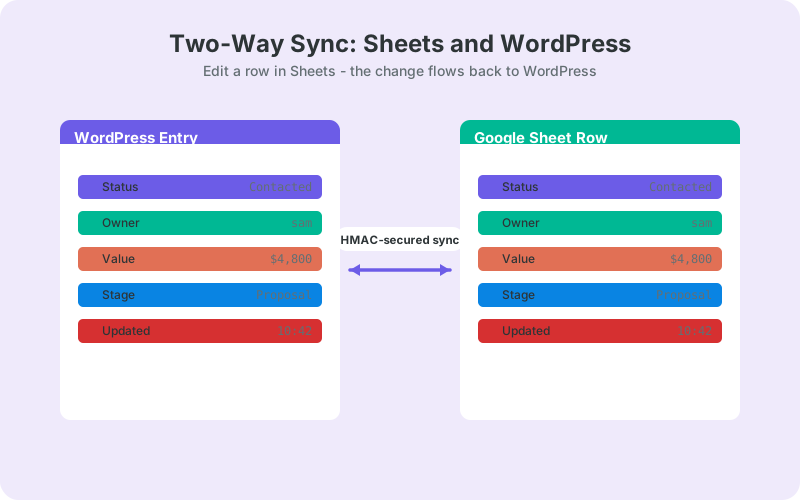
Two-way sync means data moves in both directions between the same pair of records. Direction one: WordPress pushes new submissions and record changes into the sheet. Direction two: when someone edits a mapped cell in the sheet, that change travels back over HTTPS and updates the matching record inside WordPress. Neither side needs an export, an import, or a human courier.
The word "matching" is doing real work there. Every row carries a stable key, typically the submission or entry ID, written when the row was first created. The sync uses that key to find exactly one WordPress record to update. No key match, no write. That single rule prevents an edit in row 40 from ever landing on the wrong lead.
Scope matters too. A sane two-way setup only writes back columns you explicitly mark as editable, such as status or owner. Formula columns, metadata columns like _utm_source, and anything you did not map stay read-only from WordPress's point of view, so your reporting layer cannot accidentally overwrite source data.
Why Do Ops Teams Live in Spreadsheets?
Because spreadsheets are already the operating system of most back offices. Between 47% and 64% of companies run planning and budgeting on stand-alone spreadsheets (EBSCO, 2025). Your sales and ops people are in Sheets all day anyway, so the lead list that lives there is the one that actually gets worked.
WP-admin is the opposite of that. Giving a part-time assistant or an external VA a WordPress login means role management, plugin screens they should not touch, an interface nobody trained them on, and one more credential that can leak. Most non-technical staff find WP-admin intimidating, and honestly, they are right to.
A shared sheet solves the access problem cleanly. Sorting, filtering, comments, colored tabs, and mobile editing all come free with Google Sheets. The only thing missing is a way for those edits to count on the website side, which is exactly the gap two-way sync closes.
What Can You Update From the Sheet?
The high-value write-backs are status fields, owner assignment, follow-up notes, and corrected contact details. Change "New" to "Contacted" in a dropdown, and WordPress records the same status. Reassign a lead by typing a teammate's name in the owner column. Fix a typo in an email address once, in one place, and both systems agree.
Status updates from the sheet are the killer use case. Teams already run their pipeline as rows and columns, so a kanban-style pipeline board in Sheets becomes the actual source of truth instead of a decorative copy. When a deal moves stages in the sheet, the site-side record moves with it, and anything downstream that reads WordPress data stays honest.
It also stops the slow rot that kills lead databases. Gartner estimates poor data quality costs organizations an average of $12.9 million per year (Gartner). Corrections made where people actually work are corrections that actually happen; corrections that require logging into a second system mostly never happen at all.
How Does a Row Edit Reach WordPress?
A small script attached to the spreadsheet watches for edits. When a mapped cell changes, it bundles the row key, the changed columns, and the new values into a payload and sends it over HTTPS to an endpoint on your WordPress site. WordPress verifies the request, looks up the record by key, and applies only the mapped fields.
Verification is where HMAC comes in. An HMAC is a signature computed from the payload plus a secret that only your sheet and your site share. The sheet signs every payload; WordPress recomputes the signature on arrival and compares the two. If they differ by a single byte, the request is rejected before any data is touched. Somebody who merely discovers the endpoint URL cannot forge an update, because they do not hold the secret.
The same check defeats tampering in transit. A payload altered anywhere between the sheet and the site no longer matches its own signature, so it gets dropped instead of applied. You get authentication and integrity from one mechanism, with nothing extra to manage day to day.
What Stops an Infinite Update Loop?
Value fingerprinting stops the loop. Whenever one side writes a value, it stores a fingerprint - a short hash of exactly what it wrote. When an update arrives, the receiver first compares the incoming values against the last fingerprint it recorded for that row. An identical fingerprint means "this is my own write coming back," and the update is silently dropped.
Why is that necessary? Picture the naive version. WordPress writes a new status into the sheet. The sheet's edit watcher sees a changed cell and dutifully pushes it back to WordPress. WordPress applies it, syncs the record to the sheet again, the watcher fires again, and the two systems ping-pong the same value forever, burning API quota and flooding logs with non-events.
Fingerprinting lets genuine changes through while filtering echoes. If a human later edits that same cell to a different value, the new content no longer matches the stored fingerprint, so the sync correctly treats it as a real change and forwards it. Simple idea, and it is the difference between a stable sync and a runaway one.
One-Way Export vs Manual Re-Entry vs Two-Way Sync
One-way export keeps the sheet fresh but leaves WordPress stale. Manual re-entry keeps both sides fresh in theory and neither side fresh in practice, because humans reliably skip boring duplicate work. Two-way sync is the only option where both systems converge on the same values without anyone retyping anything.
The comparison table below summarizes the trade-offs. The pattern worth noticing: every alternative to two-way sync quietly assigns a human to be the sync engine. That job is unpaid, unglamorous, invisible when done well, and always the first thing dropped in a busy week.
That is how CRM decay starts, and it is why we wrote a whole piece on keeping WordPress lead data fresh. Most sync problems are process problems wearing a technical costume, and the fix is removing the human courier from the loop entirely.
How Do You Set Up Two-Way Sync With SheetLink?
SheetLink Forms handles the WordPress-to-Sheets direction in the free core, and the two-way sync add-on adds the secured return path. Setup is a one-time job: install the plugin, connect your sheet, enable the add-on, and mark which columns are allowed to write back to WordPress.
- Install the free plugin and connect your form to a Google Sheet.
- Enable the two-way sync add-on - see pricing for plans and bundles.
- Choose the key field that identifies each row, usually the entry ID.
- Mark writable columns, such as status, owner, and notes.
- Edit a test cell in the sheet and confirm the WordPress record updates.
Every write-back is HMAC-signed and echo-filtered out of the box, so you get the security and loop-prevention behavior described above without configuring either one yourself. The full walkthrough, including key-field selection and column mapping details, lives in the two-way sync documentation.
Which Guardrails Keep Sheet Edits Safe?
Four guardrails cover most of the risk: restrict writable columns to the few that matter, add data validation dropdowns so statuses come from a fixed list, protect the key column so nobody re-keys a row by accident, and review the delivery log periodically so odd write-backs get noticed early instead of months later.
Validation is the one teams skip and then regret. A status column that accepts free text will eventually contain "contacted", "Contacted!", and "called, no answer", and your reports will treat those as three different pipeline stages. Locking inputs down with in-sheet validation rules is cheap insurance, and our guide to cleaning lead data with Sheets validation covers the exact setup.
Finally, treat write-back scope as a permission system. If marketing only needs to change status and owner, map only status and owner. Fewer writable columns means fewer ways for a stray paste, a dragged fill handle, or an overenthusiastic intern to reach production data.
Next Step: Make the Sheet the Real Control Panel
Start small. Pick one field, usually status, make it writable, and let the team run a week of updates from the sheet. You will find out quickly whether the workflow sticks, and a one-column rollout keeps the blast radius close to zero while everyone builds trust in the round trip.
Then expand to owner and notes, wire in validation dropdowns, and retire the WP-admin logins your ops team never wanted in the first place. With the return path HMAC-secured and echoes filtered by value fingerprinting, the spreadsheet your team already lives in finally becomes what they always treated it as: the control panel.
| One-way export | Manual re-entry | Two-way sync | |
|---|---|---|---|
| Direction of data flow | WordPress to sheet only | Human copies both ways | Both directions, automatic |
| Effort to update WordPress | Log in to WP-admin | Retype every change | Edit the row |
| Risk of stale records | High on the WordPress side | High on both sides | Low |
| Who can make updates | WP-admin users only | Whoever has patience | Anyone with sheet access |
| Loop protection needed | Not applicable | Not applicable | Built in via fingerprinting |
Frequently Asked Questions
Is two-way sync included in the free plugin?
No. The free core handles one-way delivery from WordPress forms into Google Sheets in real time. Two-way sync, where sheet edits flow back and update WordPress records, ships as a paid add-on. Current plans and bundle options are listed on the pricing page.
Can anyone with access to my Google Sheet change my WordPress site?
Only within limits you set. Write-backs apply solely to columns you map as editable, on rows with a valid key, and every payload must carry a correct HMAC signature. Unmapped columns never write back, so edits outside the allowed scope simply do not reach WordPress.
What is value fingerprinting in two-way sync?
It is the echo filter. Each side stores a hash of the values it last wrote. When an incoming update matches that stored fingerprint, the system recognizes its own write bouncing back and drops it, so only genuine human or system changes cross between Sheets and WordPress.
Do I need Zapier or Make for two-way sync between Sheets and WordPress?
No. The sync runs directly between your WordPress site and your spreadsheet over HTTPS, with HMAC-signed payloads on the return path. There is no middleware account, no per-task fees, and no third-party service holding a copy of your lead data in between.
What happens if two people change the same cell at nearly the same time?
The later genuine edit wins, much like concurrent editing inside Google Sheets itself. Because write-backs are scoped to specific columns on keyed rows, real collisions are rare in practice. Assigning ownership per column, such as ops owning status, makes conflicts mostly disappear.
What is an HMAC signature and why does the sync need one?
An HMAC is a cryptographic signature computed from the payload plus a secret shared only by your sheet and your site. WordPress recomputes it on arrival and rejects any mismatch. That proves an update really came from your sheet and was not altered in transit.
Which fields should I make editable from the sheet first?
Start with status only. It delivers the most operational value with the least risk, since it is usually a dropdown with fixed values. Add owner and notes once the team trusts the workflow, and keep contact-detail columns writable only if someone actively maintains them.
Why is my CRM data inaccurate in the first place?
Mostly because corrections happen where people work, not where the data lives. 76% of CRM users say less than half of their CRM data is accurate and complete (Validity, 2025). Two-way sync fixes the structural half: sheet edits stop being throwaway work.
More Automation guides
Turn Your Sheet Into a Two-Way Control Panel
Edit rows in Google Sheets and WordPress updates itself. No Zapier, no per-task fees, no WP-admin training for your ops team.