
Send WordPress Form Submissions to a Notion Database
Push every contact, demo request, and lead from your WordPress forms straight into a Notion database - with smart property mapping, conditional routing, and no Zapier per-task fees.
In This Guide
- Why Do Teams Use Notion as a Lightweight CRM?
- What Breaks When You Manually Move Leads Into Notion?
- How Does SheetLink Send Form Data to Notion?
- How Do You Connect a WordPress Form to a Notion Database?
- How Does Smart Property-Type Mapping Work?
- Can You Route Submissions to Different Notion Databases?
- Does Notion Get UTM and Click-ID Data Too?
- SheetLink Direct vs Zapier vs Notion Forms: Which Is Better?
- What Happens if Notion's API Is Down?
- Is This a Good Fit for Agencies Managing Many Clients?
- Frequently Asked Questions
Why Do Teams Use Notion as a Lightweight CRM?
Notion has become the default lightweight CRM and ops hub for small teams because it blends a database, a wiki, and a project board in one workspace. The wider CRM market reached roughly $73.4 billion in 2024 and is projected to hit about $163.16 billion by 2030 at a 14.6% CAGR (Grand View Research, 2024).
Not every team needs Salesforce. A consultant tracking 40 leads, an agency managing client intake, or a startup logging demo requests often just wants a clean Notion table with a status column, an owner, and a follow-up date.
The problem is getting form data into Notion. People retype submissions by hand, paste from email, or wire up a brittle automation. SheetLink Forms removes that step entirely by writing each submission into your Notion database the moment it lands.
What Breaks When You Manually Move Leads Into Notion?
Manual lead entry breaks because speed and accuracy both collapse. Contacting a web lead within 5 minutes rather than 30 makes you about 100x likelier to reach them and 21x likelier to qualify them (HBR, 2011). Hand-copying submissions guarantees you miss that window.
The reality is worse than most teams admit. Across 114 B2B companies, average email response time was 11 hours 54 minutes and essentially none replied within 5 minutes (Workato, 2020).
There's also a quieter cost: data decay. B2B contact databases decay around 22.5% per year (HubSpot, citing MarketingSherpa), so a lead you retype a day late is already worth less. Direct, instant delivery into Notion keeps the record fresh and the clock short.
How Does SheetLink Send Form Data to Notion?
SheetLink writes submissions to Notion through a direct API integration, with no Zapier or Make in the middle. The Notion destination is built into the core plugin. Mirroring each submission into Notion alongside your Google Sheet is free; making Notion a rule's sole destination - no Google Sheet in the loop - is part of the SheetLink Plus (Primary Destinations). Either way there are no per-task fees, ever. (The Pro tier separately extends form-plugin coverage from 12 form plugins to 17.)
The flow is simple. A visitor submits one of your WordPress forms. SheetLink captures the fields, maps them to your Notion database properties, and creates a new page (row) in that database within a second or two.
Because it's a first-class destination, the same submission can land in Notion and Google Sheets at once. Many teams keep Sheets as the raw archive and use Notion as the working board. You configure both destinations on one rule, so you never duplicate setup or pay twice for the same lead.
How Do You Connect a WordPress Form to a Notion Database?
Connecting a form to Notion takes about five minutes. SheetLink supports 12 form plugins in core (17 with the Pro tier), including Elementor Pro, Gravity Forms, WPForms, Fluent Forms, and JetFormBuilder.
The steps are short:
1. Install SheetLink Forms - the Notion destination is built in (free as a mirror alongside Google Sheets; Notion-only rules come with SheetLink Plus). 2. Create a Notion internal integration token and share your target database with it. 3. In SheetLink, add a new sync rule, choose your form, and pick Notion as the destination (or enable it as a mirror on a Google Sheets rule). 4. Select the database, then map each form field to a Notion property. 5. Submit a test entry and confirm the row appears.
If you've followed our Google Sheets setup guide, the Notion flow will feel familiar. You're choosing a destination, then mapping fields - the plugin handles the API calls and authentication for you.
How Does Smart Property-Type Mapping Work?
Smart property mapping matches each form field to the correct Notion property type so your database stays clean and filterable. Notion is strict about types: a Date column rejects plain text, and a Select column expects defined options. SheetLink converts values to the right shape automatically.
Notion supports many property types, and SheetLink maps the common ones for form data:
- Title: the primary column, often the lead's name. - Email and Phone: typed fields that stay clickable. - Rich Text: longer message or notes fields. - Select / Multi-select: dropdown and checkbox answers become tags. - Date: submission timestamps and requested dates. - Number: budget, quantity, or score fields. - URL: a website field or a captured landing-page link.
This matters because a misaligned type means a broken database. In our experience, the difference between a Notion CRM people actually use and one they abandon is whether the Status, Date, and Owner columns are real properties you can filter and sort - not free text. Mapping at the source keeps every row queryable from day one.
Can You Route Submissions to Different Notion Databases?
Yes. Conditional routing sends each submission to a different destination based on a field value, so one form can feed several Notion databases. Speed-to-lead research shows the 5-minute window is decisive (HBR, 2011), and routing the right lead to the right board instantly is how you protect it.
A few patterns we see often:
- A "Service interest" dropdown routes SEO leads to one database and web-design leads to another. - Enterprise-budget submissions go to a sales board; everyone else lands in a nurture database. - Region or language fields split intake across team-specific workspaces.
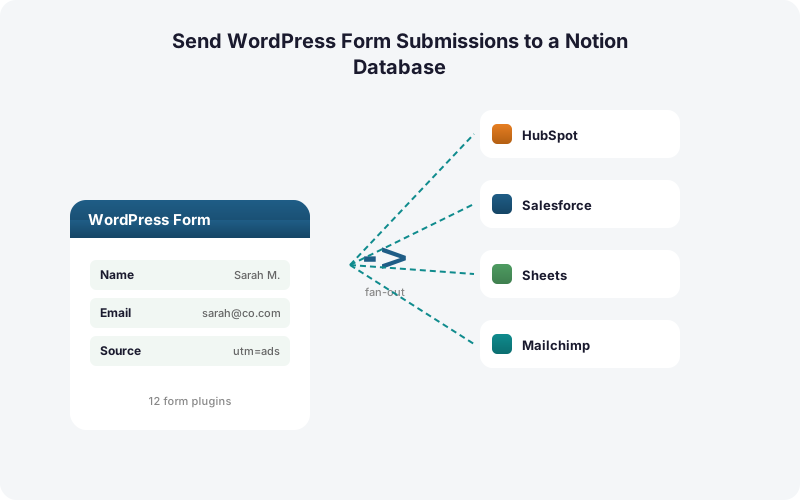
You can layer this with multi-destination delivery. A high-value lead might write to a Notion sales database, mirror to Google Sheets for reporting, and (with Multi-CRM Routing, included in Pro) fan out to HubSpot at the same time. For a deeper look at the routing engine, see our guide on conditional routing for WordPress forms.
Does Notion Get UTM and Click-ID Data Too?
Yes. SheetLink captures UTM parameters and ad click IDs automatically and writes them into your Notion properties alongside the form fields. Capturing the Google Click ID with each lead is exactly how you attribute and import offline conversions back to the campaign that produced them (Google Ads Help).
The plugin records GCLID, fbclid, and msclkid plus the standard UTM source, medium, and campaign values. You map them to Number, Rich Text, or URL properties just like any other field.
This turns a plain Notion intake table into an attribution-aware board. You can see which campaign produced each lead, filter by source, and later push that click ID back to Google Ads as an offline conversion. We cover the full setup in our UTM and GCLID attribution guide.
SheetLink Direct vs Zapier vs Notion Forms: Which Is Better?
Direct delivery wins on cost and reliability for the WordPress-to-Notion path. Zapier is metered per task, where one task equals one action, so fanning a single lead to several places burns a task each time, and Professional starts at $19.99/month for 750 tasks (Zapier, 2026).
The three common approaches compare like this. SheetLink sends data straight from WordPress with no middleware and no per-task fees. Zapier adds a metered SaaS layer between your form and Notion. Notion's own form feature can collect responses but only into one Notion table, with no native WordPress form integration.
There's a quieter advantage to owning the path. With around 106 SaaS apps in use at the average company in 2024 (BetterCloud via Statista, 2024), every automation you remove is one fewer subscription, vendor outage, and price hike to manage. See the full math in our true-cost breakdown.
What Happens if Notion's API Is Down?
SheetLink protects every submission with a built-in retry queue, so a Notion API hiccup never loses a lead. If a write fails, the plugin queues it locally and retries with exponential backoff at 5 minutes, 30 minutes, and 2 hours until it succeeds, then logs the result.
This matters because hosted automation tools store your in-flight data on their infrastructure during an outage. With a direct plugin, the queue lives in your WordPress site and you keep full delivery logs.
The reliability gap is the real reason direct delivery beats hand entry and brittle automations. A lead that fails silently is a lead you never follow up on, and given how rarely teams hit the 5-minute response window already (Workato, 2020), you cannot afford a delivery path that drops records. Local queuing plus automatic retries means the row reaches Notion even if the API blinks.
Is This a Good Fit for Agencies Managing Many Clients?
Yes. Agencies benefit most because Notion intake boards plus direct delivery scale without per-seat or per-task SaaS costs. Where the average company already runs about 106 SaaS apps (BetterCloud via Statista, 2024), a one-time licensed plugin avoids stacking another subscription onto every client.
The practical wins for agencies are clear. Each client form can route to that client's own Notion workspace. You manage every integration from one WordPress admin instead of separate Zapier accounts. Onboarding a new client is a five-minute mapping job, not a fresh automation build.
Many agencies pair Notion intake with reporting in Sheets, so leads land in a client-facing Notion board while a raw copy flows to a spreadsheet for dashboards. Our agency page and pricing tiers cover multi-site licensing in detail.
| Capability | SheetLink Direct | Zapier | Notion Forms |
|---|---|---|---|
| Sends from WordPress forms | Yes, 12 form plugins (17 with Pro) | Via connector setup | No WP integration |
| Per-task / metered fees | None | Yes, per action | None |
| Smart property-type mapping | Yes, automatic | Manual per step | Single table only |
| Conditional routing by field | Yes | Paid multi-step | No |
| Notion + Sheets at once | Yes, one rule | 2x tasks | No |
| Retry queue if API down | Local queue + backoff | Vendor managed | N/A |
Frequently Asked Questions
Do I need Zapier to send WordPress forms to Notion?
No. SheetLink connects WordPress forms to Notion through a direct API integration with no Zapier, Make, or middleware. There are no per-task fees. Zapier is metered per action and starts at $19.99/month for 750 tasks (Zapier, 2026), which adds up fast at volume.
Do I need an add-on for the Notion destination?
It depends on how you use it. The Notion destination ships in the core plugin, and mirroring submissions into Notion alongside your Google Sheet is free. Making Notion a rule's only destination - no Google Sheet involved - is Primary Destinations, part of SheetLink Plus ($29/mo or $290/yr). Either way you can map fields to native Notion property types and route to multiple databases. The Pro tier separately extends form-plugin coverage from 12 to 17. See the pricing page for details.
Can the same submission go to Notion and Google Sheets at once?
Yes. Notion is a first-class destination, so one sync rule can deliver to a Notion database and a Google Sheet simultaneously. Many teams keep Sheets as the raw archive and use Notion as the working board, configuring both on a single rule with no duplicate setup or extra cost per lead.
How does property-type mapping keep my Notion database clean?
SheetLink converts each form value to the correct Notion property type before writing. Dates become Date properties, dropdowns become Select tags, emails stay clickable, and numbers stay numeric. This keeps every column filterable and sortable, which is the difference between a Notion CRM your team uses and one they abandon.
Can I route different leads to different Notion databases?
Yes. Conditional routing sends each submission to a destination based on a field value. An interest dropdown can route SEO leads to one database and design leads to another, or send enterprise-budget submissions to a sales board. Routing the right lead instantly protects the decisive 5-minute window (HBR, 2011).
Does Notion get UTM and click-ID data from my ads?
Yes. SheetLink automatically captures GCLID, fbclid, msclkid, and UTM values, then maps them to your Notion properties. Storing the Google Click ID with each lead is how you attribute and import offline conversions back to the campaign (Google Ads Help).
What happens to a submission if Notion's API is unavailable?
Nothing is lost. SheetLink queues the failed write locally and retries with exponential backoff at 5 minutes, 30 minutes, and 2 hours until it succeeds, then records the result in the delivery log. The queue lives in your WordPress site, not a third-party tool's infrastructure.
Is Notion better than a CRM like HubSpot for small teams?
For small teams it often is, because Notion blends a database, notes, and a board in one place. Larger pipelines may need a dedicated CRM, and the market reflects that scale at roughly $73.4 billion in 2024 (Grand View Research, 2024). SheetLink can also fan out to HubSpot when you outgrow Notion.
More Automation guides
Turn Notion Into Your Lead Inbox
Send every WordPress form submission straight into a Notion database with smart property mapping, conditional routing, and no per-task fees.