
How to Migrate From Zapier to a Direct WordPress to Google Sheets Connection
A practical, low-risk migration plan: audit your Zaps, run a direct plugin in parallel, verify every row, then decommission - with a rollback plan and verified 2026 pricing for the before-and-after math.
In This Guide
- Why Migrate From Zapier to a Direct Connection?
- What Does a Zapier Migration Actually Involve?
- Step 1: How Do You Audit Your Existing Zaps?
- Step 2: Map Each Form to Sheet Flow
- Step 3: Run the Direct Plugin in Parallel
- Step 4: How Do You Verify Rows Match?
- Step 5: Pause Zaps, Then Decommission
- What Is the Rollback Plan If Something Breaks?
- What Does the Migration Save? Cost Before and After
- Next Steps
- Frequently Asked Questions
Why Migrate From Zapier to a Direct Connection?
Migrating from Zapier to a direct WordPress to Google Sheets connection removes a paid relay from a job your site can do itself. Zapier's free tier caps at 100 tasks per month, and its Professional plan starts at $19.99 per month billed annually, about $29.99 billed monthly (Zapier, 2026).
That price buys real value when you orchestrate ten different apps. It buys very little when the only thing a Zap does is copy form submissions into a spreadsheet. For the form to sheet job specifically, a direct plugin is faster, has no task meter, and keeps your data on a path you control end to end.
The bigger problem is quiet overspend. The median company now spends $9,455 per employee per year on SaaS (Zylo, 2026). Form-sync Zaps are exactly the kind of subscription that survives long after a better option exists, because nobody wants to risk losing a lead during the switch.
This guide removes that risk. The migration runs in six steps - audit, map, parallel run, verify, pause, decommission - and the old path stays alive until the new one is proven on real traffic. There is also a rollback plan, because good migrations assume something will go sideways. For background on where the money goes, see our Zapier cost breakdown for WordPress forms.
What Does a Zapier Migration Actually Involve?
A safe migration is six small steps run over roughly two weeks: audit every Zap, map each form to sheet flow, run the direct plugin in parallel with Zapier, verify rows match, pause the Zaps, then decommission. At no point does the old path switch off before the new one is proven.
- Audit: list every Zap that touches your WordPress site or Google Sheets.
- Map: document form fields, target spreadsheets, tabs, column order, and any filters or formatters.
- Parallel run: install the direct plugin alongside the running Zaps, writing to a separate tab.
- Verify: compare rows from both paths for several days of real traffic.
- Pause: turn the migrated Zaps off, but leave them intact.
- Decommission: downgrade or cancel the plan once you trust the new path.
The parallel window is the heart of the plan. Both systems record rows at the same time, so you compare outputs on live submissions instead of a handful of test entries. If anything looks wrong, Zapier is still doing its job and nothing was ever at risk. Calendar time is mostly observation, not work: the hands-on effort across all six steps is a few hours.
Step 1: How Do You Audit Your Existing Zaps?
Start with an inventory, not with software. Open your Zapier dashboard, list every Zap involving your WordPress site, and record four things per Zap: its trigger, its actions, its monthly task usage, and who relies on its output. Most sites discover they run far fewer distinct flows than they assumed.
Sort the list into two buckets. Bucket one: simple form to spreadsheet flows, which are your migration candidates. Bucket two: genuine multi-app chains, for example form to CRM to Slack to invoicing, which may stay on middleware for now. Migrating the first bucket alone often drops total task usage below a cheaper Zapier tier, so the savings arrive even if bucket two stays put.
Note task consumption per Zap carefully, because that number is your strongest argument for a plan downgrade. A multi-step Zap burns one task per action step, so a three-step chain triples the cost of every single submission. Our true-cost comparison of Make, Zapier, and a direct plugin shows how quickly that multiplication compounds at normal lead volumes.
Step 2: Map Each Form to Sheet Flow
For every migration candidate, write down four things: the form plugin and form ID, the destination spreadsheet and tab, the exact column order, and any transformations the Zap performs along the way. This one-page map is the specification the direct plugin has to reproduce, so make it precise now and the rest of the migration becomes mechanical.
Watch for hidden logic. Zaps often do quiet extras: filters that skip spam, formatters that reshape dates, static values that tag a lead source. List each one explicitly. Most translate cleanly - direct plugins typically write timestamps, page URLs, and UTM fields natively, and conditional routing can replace simple filter steps without any extra tooling.
Finally, decide where the new rows will land during testing. Keep the existing spreadsheet as production, and plan a separate parallel tab for the direct path. Keeping the two outputs physically separate makes the verification step in a few days trivially easy, because you can compare tab against tab without untangling interleaved rows.
Step 3: Run the Direct Plugin in Parallel
Install the direct plugin while every Zap stays on. With SheetLink Forms (v1.12.0+), connecting takes about a minute: click Connect Google, approve the consent screen, and pick or create your sheet in the Google file picker - no Google Cloud project, no API keys, and a drive.file scope limited to the sheets you pick. Prefer a fully self-hosted path with no OAuth? The classic Apps Script receiver in your own Google account is still fully supported. Either way, submission payloads post straight from your site to your sheet with no per-submission middleman. The getting started guide covers both setups.
Point each rule at the parallel tab you planned in Step 2, not the production tab. Recreate the field map exactly, including UTM columns and metadata. The free core supports 12 major form plugins, so Contact Form 7, WPForms, Gravity Forms, Elementor Pro, Fluent Forms, and the rest connect without buying anything.
Send one test submission per form and confirm the row lands with the correct columns in the correct order. Then leave both paths running on live traffic. Nothing about your Zaps changes yet; you have only added a second, independent recorder to the same events. The full walkthrough lives at WordPress forms to Google Sheets without Zapier.
Step 4: How Do You Verify Rows Match?
Run both paths for three to seven days of real traffic, then compare. The verification question is simple: did every submission that produced a Zapier row also produce a direct row, with the same field values in the agreed columns? Row counts answer the first half, spot checks answer the second.
A quick method: add a COUNTA over the email column in both tabs and check the totals each morning. For contents, sample five rows per form per day and compare them field by field. Mismatches are almost always a field-mapping slip, fixed in one edit to the rule, and the parallel setup means a mismatch costs you nothing.
Also test the failure path once, on purpose. Rename the destination tab temporarily, submit a test entry, and confirm the plugin's retry queue catches the failed delivery and lands it after you restore the name. Webhook practitioners treat delivery success below 99% as a problem worth investigating (Hookdeck, 2025), and the verification window is exactly the right time to prove your new path clears that bar.
Step 5: Pause Zaps, Then Decommission
Once verification passes, pause the migrated Zaps - do not delete them. A paused Zap consumes no tasks but preserves its full configuration, which is your instant rollback for the next stage. Leave everything paused for two more weeks while the direct path runs alone on production traffic.
After that quiet fortnight, decommission properly. Point the plugin at your production tabs, or promote the parallel tab to production, and archive the Step 2 mapping document somewhere findable. Then downgrade the Zapier plan: if bucket-two Zaps remain, drop to the smallest tier that covers their task volume; if nothing remains, the free 100-task tier or a full cancellation finishes the job (Zapier, 2026).
Finally, set a calendar reminder to delete the paused Zaps after 60 days. Old automations left half-alive are exactly how duplicate rows and mystery task charges sneak back into a stack a year later, usually the week someone clicks the wrong toggle.
What Is the Rollback Plan If Something Breaks?
Rollback is one click at every stage before deletion: unpause the Zaps. Because you paused rather than deleted, the old path resumes exactly as configured within a minute, tasks and all. That is the entire reason this sequence keeps Zapier intact until the very end of the process.
- During the parallel run: nothing to roll back; Zapier never stopped running.
- After pausing: unpause the affected Zap, then debug the direct rule calmly.
- After downgrading: plans can be re-upgraded immediately; your Zap configurations are still stored.
- After deletion: rebuild from the archived Step 2 mapping document, which is why you archived it.
In practice, the common failure is not total breakage but a single mis-mapped field discovered late. Fix the field map, use the retry queue's manual retry to resend anything held, and carry on. Keep the parallel tab around for a month after cutover as a cheap audit trail; it has answered more "did we lose a lead?" questions than any log file.
What Does the Migration Save? Cost Before and After
For a form to sheet workload, the after-cost is zero in monthly fees; the before-cost is whatever plan your task volume forced. Zapier Professional starts at $19.99 per month billed annually, around $29.99 billed monthly, and the free tier stops at 100 tasks (Zapier, 2026).
Middleware alternatives shrink the line item but do not remove it. Make's Core plan runs $12 per month billed monthly and now bills in credits, with one module action consuming one credit (Make, 2026), so a five-module scenario still burns five credits per submission. We compare that route in detail in SheetLink Forms vs Make.
Run the arithmetic on your own numbers. Two hundred submissions a month through a three-step Zap is 600 tasks: past the free tier, into paid territory, every month, forever. The same 200 submissions through a direct plugin cost nothing monthly, deliver in real time, and never queue behind a task cap. With 36% of paid SaaS licenses already going unused across the industry (Zylo, 2026), a subscription that a free plugin fully replaces is the easiest cut on the whole invoice.
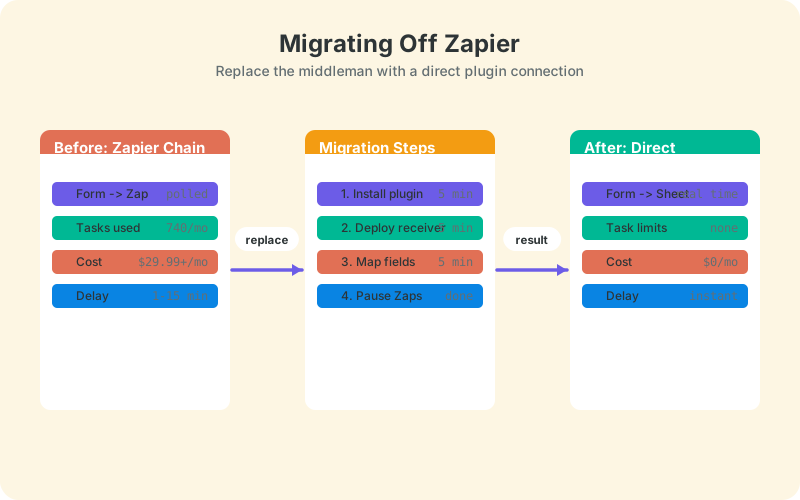
The table below summarizes the before and after across latency, task limits, cost, and data path.
Next Steps
Start the audit today; it takes an hour and costs nothing. Then install the direct plugin, run one form in parallel this week, and let the row counts make the decision for you. Every step is reversible until you choose to delete, so the downside is bounded at zero lost leads.
If you want the broader context before committing, read the complete guide to WordPress forms to Google Sheets first, then come back and run the six steps. Two weeks from now the form-sync line item is gone and the rows arrive faster than they ever did.
| Factor | Zapier chain (before) | Direct plugin (after) |
|---|---|---|
| Latency | Polling delay or instant, plan-dependent | Real time on submit |
| Task limits | 100 free tasks/mo, then paid tiers | None |
| Monthly cost | From $19.99/mo annual (~$29.99 monthly) | $0 for the Sheets path |
| Data path | Site -> Zapier cloud -> Google | Site -> your sheet (one-click connect or your Apps Script) |
Frequently Asked Questions
How long does it take to migrate from Zapier to a direct WordPress plugin?
Plan for about two weeks end to end: an hour for the audit, about a minute of plugin setup with one-click Google connect, three to seven days of parallel running, then a quiet fortnight with Zaps paused before you downgrade. The calendar time is mostly observation; hands-on work totals a few hours.
Will I lose form submissions during the migration?
No. The parallel-run approach keeps Zapier fully active while the direct plugin writes to a separate tab, so every submission is recorded twice during the switch. You only pause Zaps after days of matching row counts, and a paused Zap can be unpaused in seconds if needed.
Do I need to cancel my Zapier account completely?
Only if nothing else uses it. Many teams keep genuine multi-app chains on Zapier and migrate just the form to spreadsheet Zaps. Removing those high-volume flows often drops task usage under a cheaper tier, or under the free plan's 100 tasks per month (Zapier, 2026).
Does the direct plugin need Google API keys or OAuth?
No API keys or Google Cloud setup either way. The default one-click Google connect uses SheetLink's own verified app: you approve a standard consent screen and the drive.file scope limits access to the sheets you pick or create. If you want no OAuth at all, the classic Apps Script receiver deployed in your own Google account remains fully supported. Submission payloads never pass through SheetLink's servers on either path.
What happens if a delivery fails after I have cancelled Zapier?
Failed deliveries enter an automatic retry queue with exponential backoff, alongside a manual Retry Now button and a delivery log. That mirrors industry practice: managed webhook services like Svix retry eight times over roughly 28 hours before dead-lettering a message (Svix docs).
Can I migrate a Zap that has filters or formatting steps?
Usually, yes. Simple spam filters map to conditional routing, and most formatting needs disappear because the plugin writes timestamps, page URLs, and UTM fields natively. List every filter and formatter during your Step 2 mapping, then confirm each behavior during the parallel run before pausing anything.
Should I keep my existing Google Sheet or start a new one?
Keep the existing sheet as production and point the direct plugin at a parallel tab during verification. Once row counts match for several days, promote the new path to the production tab. Keep the parallel tab for a month afterward as a cheap audit trail.
How much does the direct approach cost after migration?
The Sheets path costs nothing in monthly fees: the plugin core is free, and both connection methods - one-click Google connect and the classic Apps Script receiver in your own Google account - are included. Compare that with Zapier Professional from $19.99 per month billed annually (Zapier, 2026), charged forever for the same job.
More Automation guides
Ready to Retire Your Form Zaps for Good?
Send WordPress form submissions straight to Google Sheets in real time - no Zapier tasks, no monthly middleware bill.