
Gym Lead Tracking Spreadsheet for Fitness Studios
Trial bookings leak between WhatsApp and memory. Build a trials sheet that captures every booking, shows which channel fills classes, and schedules day-2 and day-7 follow-ups automatically.
In This Guide
- Why Do Fitness Studios Need a Gym Lead Tracking Spreadsheet?
- Why Do Trial Enquiries Go Cold So Fast?
- What Columns Does a Trials Sheet Need?
- How Do Trial Bookings Land in the Sheet Automatically?
- Which Channel Actually Fills Your Classes?
- How Do You Run Day-2 and Day-7 Follow-Ups From the Sheet?
- How Do You Track Join Rates and Outcomes?
- What Is a Retention Watch Column?
- Do Independent Studios Need Gym Management Software?
- Start With the Next Trial Booking
- Frequently Asked Questions
Why Do Fitness Studios Need a Gym Lead Tracking Spreadsheet?
A gym lead tracking spreadsheet earns its keep twice: first when trials convert, and again when members stay. The long-running IHRSA benchmark puts average health club retention at 71.4% a year, with roughly half of new members quitting within six months (IHRSA benchmark, via GymMaster). Both problems start at the trial stage, and both are visible in one sheet.
Independent studios rarely lose trials to bad coaching. They lose them to leaks: the booking that lived in a WhatsApp thread, the trial nobody followed up because the front desk changed shifts, the no-show that was never rebooked. Each leak is small, but a studio running twenty trials a month loses real revenue to them every single week.
This guide builds a trials sheet fed automatically by your booking form, with a source column that shows which channel fills classes, day-2 and day-7 follow-up columns, a join/no-join outcome, and a retention watch for the first six months. It is the skeleton from our lead tracking in Google Sheets use case, adapted for studios.
Why Do Trial Enquiries Go Cold So Fast?
Because interest in a gym trial is impulsive, and impulses fade in hours. A 2007 MIT-led study found that contacting a lead within 5 minutes rather than 30 made reps 21 times more likely to qualify that lead (2007 MIT-led study). The study is old and cross-industry, but the direction has held up: the person who booked a trial at 9 pm on their phone is at peak motivation right then, not on Thursday.
Note carefully what that number measures: qualifying the lead - getting a real conversation started - not closing a sale. For a studio, the equivalent is confirming the trial quickly and getting the person through the door once. Nearly everything else in the funnel follows attendance, which is why a fast, warm confirmation message is worth more than any discount.
That is why the trials sheet leads with two timestamps: when the booking arrived and when someone confirmed it. The gap between them is your speed-to-lead, and tracking response time in Google Sheets shows how to measure it with a single formula and a bit of conditional formatting.
What Columns Does a Trials Sheet Need?
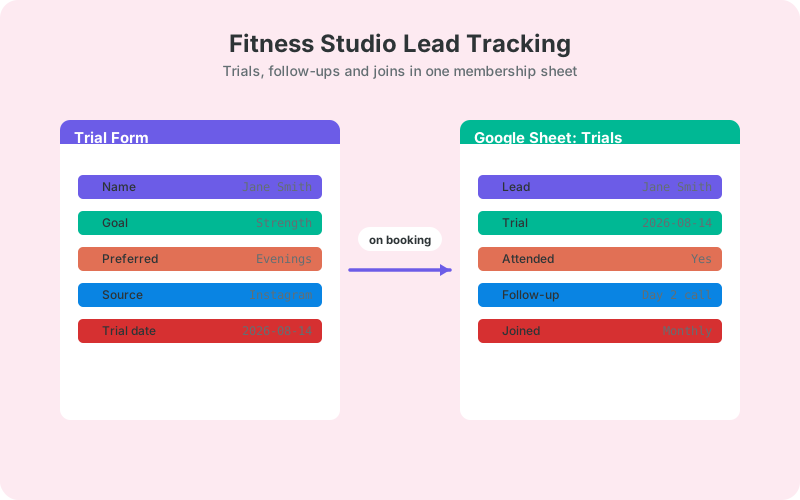
Eleven columns run the whole funnel: timestamp, name, contact, source, class or trial type, trial date, confirmed, attended, day-2 follow-up, day-7 follow-up, and outcome. Add a retention-watch column after someone joins and the same sheet covers the first six months of membership too.
- Source - which channel produced the booking. This fills itself if you capture UTM parameters on your links.
- Trial date and Attended - a no-show is not a lost lead, it is a rebooking task with a name attached.
- Day-2 follow-up - the 'how was your first class' touch, logged with a date, never left to memory.
- Day-7 follow-up - the join conversation, logged the same way.
- Outcome - Joined, Not yet, or No. 'Not yet' rows get a next-action date instead of being forgotten.
- Retention watch - for joined members, check-in dates at month one, three, and six.
Notice the pattern: every column is either filled automatically or represents a task with a date. That is the difference between a system and a list. Lists get admired once and abandoned; systems get opened every Monday because they contain that week's work.
How Do Trial Bookings Land in the Sheet Automatically?
Directly from your website form, in real time. SheetLink Forms, a free WordPress plugin, sends form submissions straight to Google Sheets - connect with one-click Google Sheets connect (pick or create your trials sheet in the Google file picker) or through the classic Google Apps Script receiver deployed in your own Google account. No Zapier subscription, no per-booking task fees, no middleware between your form and your data. It supports 12 major form plugins, so whether your trial form runs on WPForms, Elementor Pro, or Contact Form 7, the connection works the same way.
Follow the Google Sheets setup guide to connect (either method) and map your fields: name, email, phone, preferred class, preferred time. Each booking then appears as a timestamped row within seconds, with UTM fields appended automatically, and a retry queue re-sends anything that fails so no booking is silently lost.
If your trial form takes real bookings against class slots rather than just enquiries, our guide to booking forms with Google Sheets covers slot handling, capacity, and follow-up columns in more depth.
Which Channel Actually Fills Your Classes?
The source column answers the only marketing question that matters for a studio: where do joining members come from? Instagram may produce the most bookings while a local running club produces the most joins. Without a source column you are guessing and probably funding the loudest channel; with one, a simple pivot table settles the argument with your own data.
Capture the source automatically rather than asking 'how did you hear about us'. Tag every link you control - Instagram bio, Google Business Profile, flyer QR codes, partner newsletters - with UTM parameters, and they arrive with each submission as fields like _utm_source. The full tagging walkthrough is in UTM tracking for WordPress forms.
After a month, pivot bookings and joins by source, and judge channels on joins. Studios usually find one channel with mediocre volume and an outstanding join rate. That channel is underfunded. Move budget and attention there before spending more on the one that merely generates form fills.
How Do You Run Day-2 and Day-7 Follow-Ups From the Sheet?
Make follow-ups columns, not intentions. The day-2 column holds the date of the 'how was your first session' message; the day-7 column holds the date of the join conversation. Blank cells next to a past trial date are today's task list, visible to whoever opens the sheet, regardless of who worked the desk that morning.
Two small formulas do the scheduling: day-2 due is the trial date plus two, day-7 due is the trial date plus seven, with conditional formatting turning overdue blanks red. No app, no subscription, no login for the team to forget.
If you want the messages themselves automated, a short Apps Script can send the day-2 email from a template and log the send date back into the row; we cover that pattern, including opt-outs, in automating follow-up emails from Google Sheets. Keep day-7 human, though. The join conversation converts far better as a call or an in-person chat after class than as another email in an inbox.
How Do You Track Join Rates and Outcomes?
With one outcome column and two formulas. The outcome column takes Joined, Not yet, or No, and trial conversion is =COUNTIF(Outcome,"Joined")/COUNTA(Outcome). Run it overall and per source, put both on a small dashboard tab, and check it weekly. That number is the studio's real growth engine, more than any follower count.
'Not yet' deserves its own treatment. Someone who attended a trial, enjoyed it, and did not join is your warmest possible list, and they deserve a next-action date rather than a shrug. Sort by that date every Monday and work the top of the list before lunch.
If volume grows past what you can follow up personally, prioritise instead of dropping people. Attendance, source quality, and class type make a decent priority score with nothing but spreadsheet formulas - the approach is in a simple lead scoring formula for Google Sheets.
What Is a Retention Watch Column?
A retention watch column extends the trials sheet past the join, because joining is not the finish line. The long-running IHRSA benchmark puts annual member retention at 71.4%, and roughly 50% of new members quit within six months (IHRSA benchmark, via GymMaster). The first half-year is where memberships are won or lost, so the sheet should not stop caring at 'Joined'.
The mechanics are identical to trial follow-ups: month-1, month-3, and month-6 check-in columns, with due dates computed from the join date and overdue blanks highlighted. A blank month-1 cell past its date means a new member has gone weeks without anyone asking how it is going - which is precisely the member most likely to lapse quietly and cancel by email.
You do not need attendance-tracking software to start this. You need three columns, one date formula, and the habit of opening the sheet on Mondays. If the check-ins surface a pattern - new members drifting after their intro block ends, say - that insight is worth more than the benchmark itself.
Do Independent Studios Need Gym Management Software?
Eventually, maybe; on day one, no. Gym management platforms bundle billing, access control, scheduling, and member apps, and they are genuinely useful at scale. But a single-location studio often pays a monthly fee largely for a lead-tracking module it could replace with a free sheet, while the billing and door-access features sit unused until the member count justifies them.
The lean stack is: your WordPress site, the form plugin you already have, a free sync plugin, and Google Sheets. Additional software cost: nothing. Setup: an afternoon. The comparison table below shows how it sits between memory-and-WhatsApp on one side and full SaaS on the other.
The graduation trigger is operational, not marketing. When recurring billing, door access, or class scheduling become the bottleneck, buy software for those jobs. Your sheet history exports cleanly into any platform, and by then you will know your join rate per channel and your six-month retention - which makes you a much sharper buyer in the sales demo.
Start With the Next Trial Booking
Build the sheet before your next trial booking arrives, not after the next quiet month. Set up the columns from this guide, connect your booking form so rows arrive automatically, and put UTM tags on your Instagram link. That is one afternoon. Then work the blanks: confirm bookings fast, log attendance, hit the day-2 and day-7 follow-ups, and mark outcomes honestly.
The benchmarks are blunt: 71.4% average annual retention, and about half of new members gone within six months (IHRSA benchmark, via GymMaster). The studios that beat those numbers are rarely the ones with the fanciest software. They are the ones that follow up on time, every time, because the follow-up was a dated cell in a sheet instead of a hope.
| Memory and WhatsApp | Gym management SaaS | Google Sheets + direct sync | |
|---|---|---|---|
| Cost | Free | Paid monthly plans | Free |
| Trial follow-up | Whoever remembers | Built-in sequences | Day-2 / day-7 columns |
| Source tracking | None | Varies by platform | UTM captured automatically |
| Setup time | None | Days, plus migration | About 15 minutes |
| Data ownership | Scattered chats | Vendor's database | Your Google account |
Frequently Asked Questions
How quickly should I follow up on a gym trial booking?
As close to immediately as you can manage. A 2007 MIT-led study found contacting a lead within 5 minutes rather than 30 made reps 21 times more likely to qualify the lead. For a studio, that means confirming the trial while the booking impulse is still warm.
What is a good gym membership retention rate?
The long-running IHRSA benchmark puts average health club annual retention at 71.4%. Independent studios vary widely around that figure, so the more useful move is tracking your own monthly number in the sheet and watching the trend rather than chasing the average.
How many new gym members quit in the first six months?
Roughly half, according to the same long-running IHRSA benchmark. That is why the trials sheet should extend past the join with month-1, month-3, and month-6 check-in columns - the early months are where memberships are actually won or lost.
How can I tell which marketing channel fills my classes?
Tag every link you control with UTM parameters and capture them with each booking as a source column. Then pivot joins, not just bookings, by source. Channels that generate form fills and channels that generate members are often different, and only the sheet knows which.
Do I need gym management software for a single studio?
Not for lead tracking. A free sheet with follow-up and outcome columns handles trials well. Gym management software earns its fee when recurring billing, door access, or class scheduling become the bottleneck, and your sheet history imports cleanly when that day comes.
How do I calculate trial-to-member conversion in Google Sheets?
Divide joined outcomes by total trials: =COUNTIF(Outcome,"Joined")/COUNTA(Outcome). Run the same formula filtered per source to see which channel converts best. A small dashboard tab with both numbers, checked weekly, is enough reporting for most studios.
Can trial bookings from my WordPress form go to Google Sheets automatically?
Yes. A free plugin sends submissions to your sheet in real time - via one-click Google Sheets connect or a classic Apps Script receiver in your own Google account - and it works with 12 major form plugins. A retry queue re-sends failed deliveries, so bookings are not lost to hosting hiccups.
What should a day-2 follow-up message say?
Ask about their first session and invite them to a specific next class - short, personal, and warm. Log the send date in the day-2 column so it is never skipped. Save the membership conversation for day 7, ideally as a call or an in-person chat.
More Lead Management guides
Get Trial Bookings Into Sheets Automatically
SheetLink Forms syncs your booking form to Google Sheets in real time - no Zapier tasks, no monthly middleware fees for your studio.