
Follow Up Boss and Google Sheets: The Honest Integration Guide
Follow Up Boss has no native Google Sheets sync. Here is the reliable pattern for WordPress real estate leads: capture to Sheets first, then route into FUB.
In This Guide
- Does Follow Up Boss connect to Google Sheets?
- Does Follow Up Boss integrate with Google Sheets directly?
- How do new leads actually get into Follow Up Boss?
- Why capture WordPress leads to Google Sheets first?
- How does a spreadsheet help you respond faster?
- Should Google Sheets or Follow Up Boss be your source of truth?
- How do you capture WordPress form leads to Google Sheets?
- How do you send those Google Sheets leads into Follow Up Boss?
- How do you run a simple pipeline in the sheet?
- Putting it together
- Frequently Asked Questions
Does Follow Up Boss connect to Google Sheets?
Not natively. Follow Up Boss has no built-in Google Sheets sync, and the only bridge is Zapier, which runs one direction per Zap. For WordPress real estate leads, the dependable pattern is to capture every form submission into Google Sheets in real time, then feed those leads into Follow Up Boss. Speed is the reason to bother: contacting a web lead within 5 minutes instead of 30 gives 100x greater odds of making contact and 21x greater odds of qualifying it (Lead Response Management Study, 2007).
This guide is written for agents and teams who run a WordPress site with a contact or valuation form. You will see exactly how leads get into Follow Up Boss, why a spreadsheet belongs in front of your CRM, and how to wire the two together without pretending an integration exists that does not. For a broader setup, our real estate lead tracker in Google Sheets covers the reporting side.
Does Follow Up Boss integrate with Google Sheets directly?
No. Follow Up Boss does not offer a native Google Sheets connection. The only supported path between the two is Zapier, and every Zapier connection moves data one direction only (Zapier, 2024). A Zap can push new sheet rows into FUB, or copy new FUB contacts into a sheet, but a single Zap never keeps both sides in sync at once.
That matters for expectations. If a vendor or blog implies a live, two-way spreadsheet living inside Follow Up Boss, that is not how the product works. You can build a reliable spreadsheet layer around FUB, but you build it yourself. A raw webhook will not help either: Follow Up Boss does not accept an arbitrary or HubSpot-style webhook payload, so plans that assume "just point a webhook at FUB" fail. The good news is the real routes are well documented, and one of them is genuinely easy.
How do new leads actually get into Follow Up Boss?
Follow Up Boss accepts new leads through five real routes, and it recommends email parsing for most leads (Follow Up Boss, 2024). Knowing these routes stops you from chasing an integration that does not exist and points you at the one that fits where your leads come from.
| Route | How it works | Best for |
|---|---|---|
| Email / Lead Inbox parsing | Forward lead emails, or use your FUB lead-routing email address, and FUB parses the fields | Most leads (FUB's recommended method) |
| REST API (POST /v1/events) | Your system POSTs FUB's JSON format with HTTP Basic auth (API key as the username) | Custom pipelines and developers |
| Native lead-source integrations (~200) | Portals and IDX providers connect straight to FUB | Zillow, Realtor.com, IDX leads |
| FUB Pixel | Tracks site visitor activity and inquiry behavior | Website engagement signals |
| Zapier | One-directional Zaps move records in or out | Apps with no native support |
For most WordPress forms, email parsing is the shortest route. The /v1/events API gives you more control when you need structured data and reliable field mapping.
Why capture WordPress leads to Google Sheets first?
Because a spreadsheet you own is the most durable lead record you can keep. Real estate runs on relationships: 88% of buyers and 90% of sellers used an agent or broker in 2024 (NAR 2024 Profile of Home Buyers and Sellers). Every one of those relationships starts with a first contact, and losing that first contact to a flaky sync or a lapsed subscription is expensive.
A Google Sheets record gives you three things a CRM alone does not. First, ownership: the data sits in your Google account, not behind a vendor's export button. Second, attribution: source, campaign, and UTM values land next to each lead so you can see which listing page or ad produced it. Third, a timestamp for speed-to-lead reporting. Our guide on form data ownership and backup explains why this backup layer pays off the first time a tool goes down.
How does a spreadsheet help you respond faster?
It makes response time visible, and response time decides who wins the deal. Contacting a web lead within 5 minutes rather than 30 gives 100x greater odds of making contact and 21x greater odds of qualifying it (Lead Response Management Study, 2007). A CRM buries that clock; a sheet with a timestamp column puts it in front of you.
Here is the practical setup. When a submission lands in the sheet, a timestamp column records the exact arrival time. A simple formula compares that to your first-contact time and flags anything past your target. Agents can see at a glance which leads are aging. Teams can hold each other to a first-response standard. Want the exact formulas? Our walkthrough on tracking lead response time in Google Sheets shows the columns and conditional formatting that make slow follow-ups impossible to ignore.
Should Google Sheets or Follow Up Boss be your source of truth?
Use both, with clear roles. Google Sheets is your source of truth, backup, and reporting layer; Follow Up Boss is your long-cycle nurture CRM. This split works because each tool does one job well: the sheet captures and preserves the raw lead with full attribution, and FUB runs the drip campaigns, calls, and action plans that carry a buyer or seller across months.
Keeping the two separate also protects you. If a Zap breaks or you change CRMs, your lead history stays intact in the sheet. Reporting is cleaner too, because a spreadsheet lets you slice leads by source or campaign without CRM licensing limits. You can even build a lightweight pipeline in the sheet itself, as our Google Sheets pipeline board post demonstrates, so the whole team sees status before anything reaches FUB.
How do you capture WordPress form leads to Google Sheets?
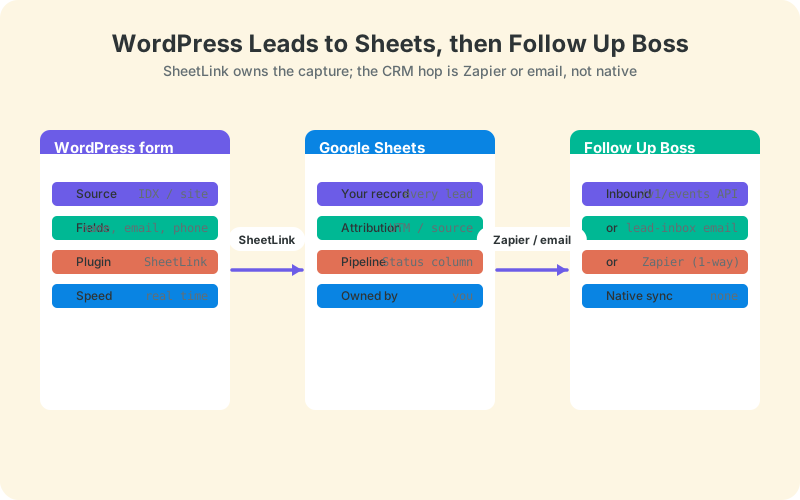
Use a WordPress plugin that sends submissions straight to your own sheet, with no middleware in between. SheetLink Forms captures submissions from 12 major form plugins - Contact Form 7, WPForms, Gravity Forms, Elementor Pro, Fluent Forms and more - and delivers them to Google Sheets in real time - one-click Google connect or a classic Apps Script receiver you deploy in your own Google account. No Zapier, no per-task fees, no Google API keys.
One point of honesty: SheetLink Forms is WordPress-only. It captures leads from your WordPress forms. It is not a Follow Up Boss connector, and it does not touch non-WordPress sources. Your Zillow, portal, and IDX leads should go straight into FUB through FUB's own native integrations, not through SheetLink. What SheetLink handles is the lead your website form produces, which it timestamps and enriches with UTM and click-ID data automatically. Follow the Google Sheets setup docs or the no-Zapier how-to to connect your form in a few minutes.
How do you send those Google Sheets leads into Follow Up Boss?
Pick one of FUB's three real inbound routes, and email parsing is the easiest to start with. Because Follow Up Boss recommends email as the best method for most leads (Follow Up Boss, 2024), you can have WordPress email each new lead to your FUB lead-routing address so it parses into the CRM while the same submission lands in your sheet.
You have two other options. Zapier can watch for new sheet rows and create a matching FUB contact - remember the Zap is one direction only (Follow Up Boss, 2024). For full control, the POST /v1/events API accepts FUB's JSON format with HTTP Basic auth. If you route different lead types to different destinations, our conditional lead routing guide and the CRM fan-out docs show how to send hot leads to the CRM while everything else stays in the sheet.
Whichever route you pick, always send a stable identifier such as the lead's email so Follow Up Boss can dedupe against an existing contact rather than create a duplicate - FUB matches new leads on email and phone. A solo agent taking a handful of leads a day is well served by email parsing; a team pushing hundreds of leads a month gets more predictable control from the /v1/events API.
How do you run a simple pipeline in the sheet?
Add a Status column and a small set of stages, then let color coding do the work. A basic New, Contacted, Qualified, Won, and Lost pipeline turns a flat list of submissions into a working board that any agent can read in seconds. This is the same discipline that speed-to-lead demands, since a lead sitting on New for an hour is a lead you are about to lose.
Keep the pipeline light. One dropdown column for status, one for the assigned agent, and one timestamp for first contact are enough to run daily standups and weekly reviews. Conditional formatting flags aging leads in red. Because the sheet holds attribution alongside status, you can answer which source produces the most qualified leads without touching the CRM. For agents building this from scratch, the real estate lead tracker template is a ready starting point.
Putting it together
The honest takeaway: Follow Up Boss and Google Sheets do not share a native integration, so build the bridge deliberately. Capture every WordPress lead into a sheet you own for attribution, backup, and speed-to-lead visibility, then route those leads into FUB through email parsing, Zapier, or the /v1/events API. Let your portal and IDX leads flow straight into FUB through its native integrations.
That structure gives you a durable lead record and a CRM working together, without pretending a sync exists that does not. Your next step is to get WordPress submissions flowing into Google Sheets in real time, which is the foundation everything else sits on. Connect your form using the step-by-step how-to, add your Status column, and set a 5-minute response target for the whole team.
Frequently Asked Questions
Does Follow Up Boss integrate with Google Sheets?
Not natively. Follow Up Boss has no built-in Google Sheets sync. The only connection is through Zapier, and each Zap runs one direction only, either into FUB or out to a sheet. For a live, owned spreadsheet of your leads, you build that layer around FUB yourself.
Can SheetLink send leads straight to Follow Up Boss?
No. SheetLink Forms captures WordPress form leads into Google Sheets. It is not a native Follow Up Boss connector. From your sheet, you route leads into FUB using email parsing, Zapier, or the /v1/events API. SheetLink handles the WordPress capture, not the CRM handoff.
What is the best way to get leads into Follow Up Boss?
Email parsing is the method Follow Up Boss recommends for most leads. You forward lead emails or use your FUB lead-routing address, and FUB parses the fields automatically. Portal and IDX leads should use FUB's native integrations, while custom pipelines can use the /v1/events API.
Does the Zapier Google Sheets and Follow Up Boss Zap sync both ways?
No. Every Zapier connection moves data one direction. A Zap can create FUB contacts from new sheet rows, or copy new FUB contacts into a sheet, but never both at once. To sync both directions you would build two separate Zaps, which adds cost and complexity.
Do my Zillow and IDX leads go through SheetLink?
No. Zillow, Realtor.com, and IDX leads should flow straight into Follow Up Boss through its roughly 200 native lead-source integrations. SheetLink Forms only captures leads submitted through your WordPress forms. Keep portal leads on FUB's native routes and use SheetLink for website form submissions.
Why keep a Google Sheet if I already use Follow Up Boss?
A sheet gives you data you own, full attribution, and speed-to-lead visibility that a CRM buries. If a sync breaks or you change tools, your lead history stays intact. With 88% of buyers using an agent in 2024 (NAR), that durable record protects every relationship you start.
How fast should I respond to a new web lead?
Within 5 minutes. Contacting a web lead at 5 minutes instead of 30 gives 100x greater odds of making contact and 21x greater odds of qualifying it, per the Lead Response Management Study. A timestamp column in your sheet makes that clock visible so no lead ages unnoticed.
Does SheetLink need Zapier or API keys for Google Sheets?
No. SheetLink Forms sends submissions to Google Sheets directly - via one-click Google connect (SheetLink's own OAuth app, no Google API keys or Cloud project) or the classic Apps Script receiver in your own account, which uses no OAuth at all. There is no Zapier and no per-task fee, and your data goes directly from WordPress to your sheet.
More Lead Management guides
Capture every WordPress lead to Google Sheets
Send real estate form leads straight to your own Google Sheet in real time - no Zapier, no per-task fees, then route them into Follow Up Boss.