
Send WordPress Form Signups to Mailchimp and Google Sheets at the Same Time
One form submission, two destinations. Push newsletter signups straight into Mailchimp for automation and into Google Sheets as a master record - no Zapier task fees, no nightly export.
In This Guide
- Why Send Signups to Both Mailchimp and Google Sheets?
- Why Does Instant Delivery Matter So Much?
- How Does Dual Delivery Work From One Submission?
- How Do You Set Up Mailchimp and Sheets Delivery?
- Can You Send Only Newsletter Opt-Ins to Mailchimp?
- How Do Tags and Segments Carry Over?
- Does Campaign Attribution Survive the Trip?
- What Does Doing This With Zapier Actually Cost?
- SheetLink vs Zapier vs Mailchimp's Native Form
- Is This Worth It for Agencies Managing Many Clients?
- Frequently Asked Questions
Why Send Signups to Both Mailchimp and Google Sheets?
Marketers want Mailchimp for email automation and Google Sheets as a permanent master record. Mailchimp triggers the welcome series and segments your list; Sheets keeps a flat, exportable archive you fully own. The two jobs don't overlap, so most teams need both rather than choosing one.
There's a data-quality reason too. B2B contact databases decay around 22.5% per year, per HubSpot (2024). A clean Sheets archive lets you audit, dedupe, and re-import when your email tool's copy drifts. Mailchimp drives the campaigns; Sheets is your source of truth.
Doing this from one submission, instead of exporting nightly, means your list and your archive never fall out of sync. For a deeper look at the spreadsheet side, see our complete guide to WordPress forms and Google Sheets.
Why Does Instant Delivery Matter So Much?
Speed-to-lead is the reason. Contacting a web lead within five minutes instead of thirty makes you roughly 100x likelier to reach them and 21x likelier to qualify them, per the MIT lead-response study reported by HBR (2011). A signup that lands in Mailchimp instantly can fire a welcome email in seconds.
Most companies miss this badly. A study of 114 B2B companies found average email response of about 11 hours 54 minutes, with essentially none replying inside five minutes, per Workato (2019-2020).
A nightly CRM export guarantees you lose that window. Direct, real-time delivery from the form submission closes it. The signup hits Mailchimp's automation and your Sheet at the same moment the visitor clicks submit.
How Does Dual Delivery Work From One Submission?
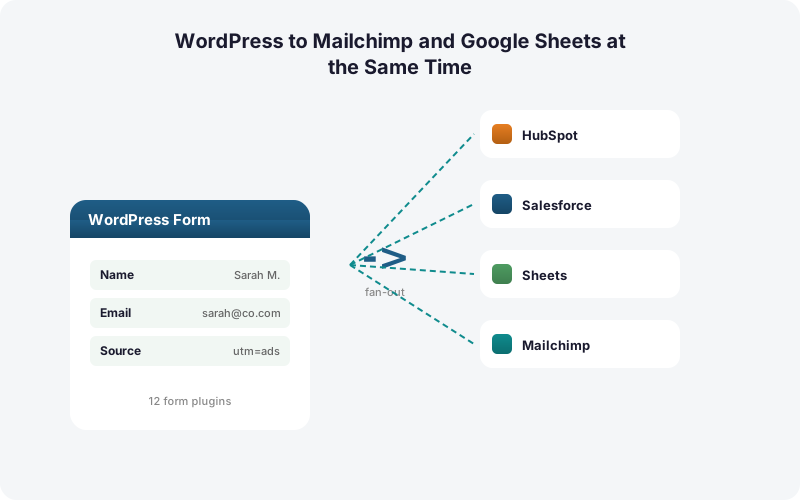
SheetLink Forms delivers a single WordPress form submission to multiple destinations at once, no middleware in between. Multi-CRM Routing, included in Pro ($79/yr), fans each submission out to Mailchimp, HubSpot, Salesforce, Pipedrive, Zoho, and ActiveCampaign simultaneously, alongside your free Google Sheets delivery.
The flow is direct. Your form plugin fires the submission, SheetLink writes the row to Google Sheets through its one-click Google connection or classic Apps Script webhook, and in the same pass it calls the Mailchimp API to subscribe the contact. No task counter ticks because there is no Zapier or Make sitting in the path.
The CRM market reached roughly $73.4 billion in 2024 and is projected to hit $163.16 billion by 2030, per Grand View Research (2024). With that much tooling in play, owning a clean source-of-truth Sheet matters more, not less.
How Do You Set Up Mailchimp and Sheets Delivery?
Setup takes one form, one Google Sheets connection, and one Mailchimp connection. SheetLink supports 12 core form plugins including Elementor Pro, Contact Form 7, Gravity Forms, WPForms, and Fluent Forms, so you map fields once and both destinations receive them.
Connect Google Sheets first. The one-click path (v1.12.0+) takes about a minute: click Connect Google, approve the consent screen, and pick or create your sheet in the Google file picker. Prefer fully self-hosted? Deploy the classic Google Apps Script webhook once and paste its URL into SheetLink instead. Either way, every matching submission writes a row in real time, free. Our Google Sheets setup docs walk through both paths step by step. This becomes your permanent master record.
Then connect Mailchimp. In the Multi-CRM Routing add-on, add Mailchimp as a destination, authenticate, and pick the audience. Map your form's email field to the subscriber email, then map name and any custom fields. Choose the subscribe status (subscribed or pending double opt-in). Now the same submission that fills your Sheet also subscribes the contact.
Can You Send Only Newsletter Opt-Ins to Mailchimp?
Yes. Conditional routing sends a submission to Mailchimp only when a field meets a rule, while every submission still goes to Sheets. This keeps your email list clean and compliant: contacts who never ticked the opt-in box never reach Mailchimp, but you still keep a full record in your spreadsheet.
A common setup uses a checkbox like "Subscribe to our newsletter." You set the rule so Mailchimp fires only when that field equals yes. A demo-request form might route sales leads to HubSpot and newsletter checkers to Mailchimp from the same submission.
This matters because list hygiene compounds. With databases decaying around 22.5% per year per HubSpot (2024), you don't want to pad Mailchimp with non-consenting contacts. For more patterns, read our guide to conditional routing for WordPress forms.
How Do Tags and Segments Carry Over?
Tags and merge fields drive Mailchimp segmentation, and SheetLink can set both at the moment of subscribe. With around 106 SaaS apps per company in 2024 per BetterCloud via Statista (2024), automated tagging at the source saves real cleanup time downstream.
You can apply a static tag (every webinar-form signup gets the "webinar-2026" tag) or a dynamic one based on a field value. A pricing-page form might tag "high-intent" while a blog footer form tags "reader." Mailchimp then segments and automates off those tags without manual sorting.
Those same tags also land as columns in Google Sheets, so your master record stays as rich as your email tool. You can pivot, filter, and dedupe in the Sheet, then trust the tags you see there. Our Sheets dashboards guide shows how to chart that data.
Does Campaign Attribution Survive the Trip?
Yes, and it should travel to both destinations. SheetLink captures UTM parameters and click IDs (GCLID, fbclid, msclkid) automatically and writes them alongside the contact. Capturing the Google Click ID is how you later attribute and import offline conversions back to the campaign, per Google Ads Help (current).
In practice, the GCLID and UTMs land as merge fields in Mailchimp and as columns in Sheets. Your email automation can branch on traffic source, and your spreadsheet ties revenue back to the ad that drove the signup.
This is hard to do with middleware unless you build extra steps that each cost a task. Doing it at the source costs nothing extra. For the full method, see our deep dive on UTM and GCLID attribution for WordPress forms.
What Does Doing This With Zapier Actually Cost?
Zapier meters every action as a task, so one submission to two destinations burns at least two tasks, and fanning to six tools burns six or more. Zapier's free plan allows 100 tasks/month on two-step Zaps only; multi-step needs a paid plan from $19.99/mo (annual) for 750 tasks, with overages billed at 1.25x, per Zapier pricing (2026).
Do the math on a growing list. A form sending to Mailchimp and Sheets at 1,000 signups a month is 2,000 tasks before you add a single CRM. Add HubSpot and a Slack ping and you're at 4,000 tasks, well into a higher tier.
SheetLink charges no per-task fee. The submission fans out as many times as your rules dictate for the same flat add-on price. We break the numbers down further in our analysis of Zapier costs for WordPress forms.
SheetLink vs Zapier vs Mailchimp's Native Form
Three approaches exist, and each fits a different need. SheetLink delivers to Mailchimp and Sheets directly from your existing WordPress form. Zapier chains the two as metered steps. Mailchimp's native embedded form skips your form plugin entirely but only feeds Mailchimp, leaving no Sheets archive.
The table below compares them on the points marketers actually weigh: dual delivery, conditional routing, per-task fees, and whether you keep a master record. The native Mailchimp form is fine if Mailchimp is your only destination, but it can't write to Sheets and it replaces the form you already built.
For the broader build-vs-buy math across automation tools, our Make vs Zapier vs direct plugin cost breakdown runs five-year totals.
Is This Worth It for Agencies Managing Many Clients?
For agencies, dual delivery scales without scaling cost. Per-task tools charge more as every client's volume grows, while a flat add-on price covers fan-out across all the forms you manage. With a CRM market projected to reach $163.16 billion by 2030 per Grand View Research (2024), clients increasingly expect tight email-plus-record pipelines.
The agency benefit is uniformity. You set up the same Mailchimp-plus-Sheets pattern on every client site, with conditional routing tuned per client, and never watch a task counter.
If a client later wants HubSpot or ActiveCampaign added, it's a new destination on the existing rule, not a new billable workflow. See our agency overview and the full pricing page for multi-site licensing details.
| Capability | SheetLink Dual Delivery | Zapier Two-Step | Mailchimp Native Form |
|---|---|---|---|
| Sends to Mailchimp + Sheets at once | Yes, one pass | Yes, 2 metered tasks | No, Mailchimp only |
| Per-task fees | None | Per action billed | None |
| Conditional routing by field | Yes | Paid plan only | No |
| Keeps a Sheets master record | Yes, free | Yes, costs tasks | No |
| Uses your existing form | Yes | Yes | No, replaces it |
| UTM + GCLID capture | Automatic | Manual extra steps | Limited |
Frequently Asked Questions
Can one WordPress form submission really hit Mailchimp and Google Sheets at once?
Yes. SheetLink Forms delivers a single submission to both destinations in the same pass, with no middleware. Google Sheets delivery is free; Mailchimp delivery uses Multi-CRM Routing, included in Pro ($79/yr). Both fire in real time the moment the visitor submits the form.
Do I need Zapier or Make for this?
No. SheetLink is a direct integration that calls Mailchimp and writes to Sheets itself. Zapier meters each action as a task, so two destinations cost at least two tasks per submission. SheetLink has no per-task fees, per Zapier's own pricing showing tasks billed per action.
How do I send only newsletter opt-ins to Mailchimp?
Use conditional routing. Set a rule so Mailchimp fires only when your opt-in checkbox equals yes, while every submission still writes to Google Sheets. Contacts who never consented stay out of your email list but remain in your master record for auditing and compliance.
Will tags and segments transfer to Mailchimp?
Yes. SheetLink can apply static or field-driven tags and merge fields at the moment of subscribe, so Mailchimp segments and automations work immediately. Those same tags also land as columns in Google Sheets, keeping your spreadsheet archive as detailed as your email platform's records.
Does UTM and GCLID attribution carry to both destinations?
Yes. SheetLink automatically captures UTMs and click IDs (GCLID, fbclid, msclkid). Capturing the GCLID is how you attribute and import offline conversions, per Google Ads Help. The data lands as merge fields in Mailchimp and as columns in Sheets, with no extra automation steps to build.
Why keep a Google Sheets copy if Mailchimp already stores contacts?
Because contact data decays around 22.5% per year, per HubSpot (2024). A flat, fully-owned Sheets archive lets you audit, dedupe, and re-import when Mailchimp's copy drifts. Mailchimp drives campaigns; Sheets is the source of truth you control and export anytime.
How fast does the signup reach Mailchimp?
In real time, on submission. That speed matters: reaching a web lead within five minutes makes you roughly 100x likelier to make contact, per the MIT study reported by HBR (2011). A nightly export forfeits that window; instant delivery lets a welcome automation fire in seconds.
Which form plugins work with this?
SheetLink supports 12 core form plugins, including Elementor Pro, Contact Form 7, Gravity Forms, WPForms, and Fluent Forms, rising to 17 with the Pro tier. You map fields once, and both Mailchimp and Google Sheets receive them from the same submission regardless of which form builder you use.
What does the Mailchimp routing cost compared to Zapier?
Mailchimp delivery uses Multi-CRM Routing in Pro ($79/yr), with no per-task fees on fan-out. Zapier charges per action: 1,000 signups to two destinations is 2,000 tasks monthly, pushing you past the 750-task starter tier, per Zapier pricing (2026).
More Automation guides
Two Destinations, One Submission, Zero Task Fees
Send every WordPress signup to Mailchimp for automation and Google Sheets for safekeeping, in real time, with conditional routing and no per-task spiral.