
Law Firm Client Intake Tracking in Google Sheets
Most firms lose clients before the first consult. Build a matter intake tracker in Google Sheets that logs every enquiry, conflict check, consult, and engagement letter - without a case management suite.
In This Guide
- Why Does Law Firm Client Intake Tracking Matter?
- How Many Enquiries Do Law Firms Actually Answer?
- What Columns Does a Matter Intake Sheet Need?
- How Do Website Enquiries Reach the Sheet Automatically?
- How Do You Track Conflict Checks Without Practice Management Software?
- How Do You Move an Enquiry From Consult to Engagement Letter?
- Is a Google Sheet Confidential Enough for Client Intake?
- How Do You Stop Enquiries Going Cold?
- Does Intake Tracking Actually Pay Off?
- Set Up Your Intake Tracker This Week
- Frequently Asked Questions
Why Does Law Firm Client Intake Tracking Matter?
Law firm client intake tracking matters because most firms lose prospective clients before anyone opens a file. When Clio's researchers posed as potential clients and contacted 500 law firms, only 33% of firms responded to email enquiries and only 40% answered the phone (Clio 2024 Legal Trends Report). The firm that simply replies often wins by default.
Email responsiveness was actually down from 40% in 2019, so the problem is getting worse, not better (Clio, 2024). Meanwhile every unanswered enquiry is a person with a legal problem, a budget, and a shortlist of other firms one search away. Intake is the cheapest place in the whole firm to find growth, because the leads are already arriving.
This guide builds a matter intake tracker in Google Sheets: enquiries captured automatically from your website form, columns for conflict-check status, consultation booking, and engagement letter progress, plus sensible confidentiality controls. It is a lean version of the system in our guide to tracking leads in Google Sheets, adapted for legal intake.
How Many Enquiries Do Law Firms Actually Answer?
Fewer than half, on the best channel. Clio's secret-shopper study across 500 firms found 33% responded to email and 40% answered calls (Clio, 2024). And this is not a legal-industry quirk: a 2011 Harvard Business Review audit of 2,241 companies found 23% never responded to inbound leads at all (Harvard Business Review, 2011). Fifteen years later, law firms are still proving that study right.
The pattern behind both numbers is the same. Enquiries arrive through a website form, a shared inbox, and the front desk, and no single person owns the combined list. Partners assume associates saw it; associates assume the office manager replied. The enquiry ages quietly until it feels embarrassing to answer, and then it never is.
A spreadsheet does not solve motivation, but it does solve visibility. When every enquiry lands in one sheet with a timestamp and an empty 'First response' cell, the unanswered ones stop hiding. Someone scans the sheet each morning and the two-minute reply happens, because the gap is now a visible blank instead of a buried email.
What Columns Does a Matter Intake Sheet Need?
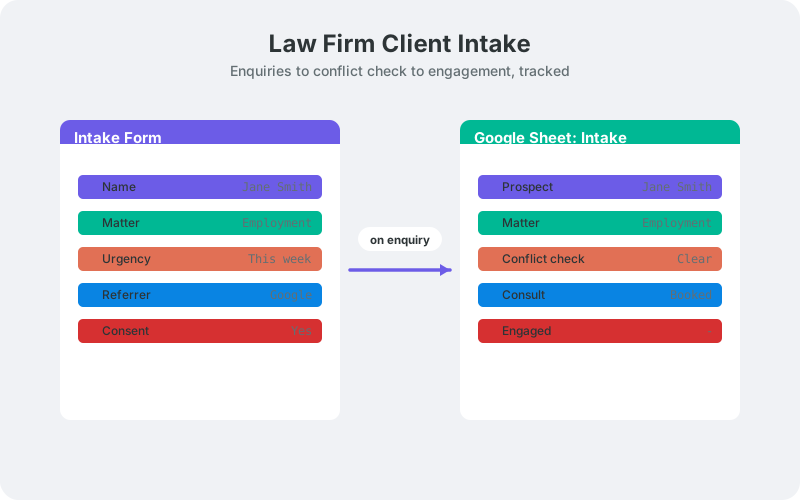
An intake sheet needs the enquiry basics plus the three status columns that make it legal-specific: conflict check, consultation, and engagement letter. Ten to twelve columns cover it. The goal is a one-row-per-enquiry view that a managing partner can scan in thirty seconds every morning and know exactly what is stuck where.
- Timestamp and contact details - captured automatically from the form, never re-typed.
- Practice area - a dropdown on the form (family, employment, conveyancing, litigation).
- Matter summary - one deliberately brief, neutral line. More on why below.
- Conflict check - Pending, Clear, or Conflict, plus the date and the checker's initials.
- First response - when a human replied to the enquiry.
- Consult booked - the date of the initial consultation, or blank.
- Engagement letter - Not sent, Sent, or Signed.
- Outcome - Engaged, Declined, Referred out, or No response.
One row tells you where each prospective matter stands. Sort by the empty cells in any status column and you have tomorrow's task list, sorted by how much money it represents.
How Do Website Enquiries Reach the Sheet Automatically?
Automatically means the enquiry appears in the sheet seconds after the form is submitted, with nobody re-typing anything. SheetLink Forms, a free WordPress plugin, delivers form submissions directly to Google Sheets - via the one-click Google connect (drive.file scope, limited to the sheets you pick or create) or a classic Apps Script receiver deployed in your own Google account. Enquiry data never passes through a third-party processor on either delivery path, which is exactly the property a law firm should want. (If you later enable the optional AI add-ons, submission content is processed via disclosed AI providers - review that against your confidentiality obligations first.)
It works with 12 major form plugins, including Contact Form 7, WPForms, and Gravity Forms, so your existing intake form almost certainly qualifies. Setup follows the Google Sheets setup guide: click Connect Google and pick your sheet (or deploy the classic receiver script), map form fields (name, contact, practice area, brief summary) to columns, and submit a test enquiry to confirm the row arrives.
Reliability matters more for a firm than for most businesses, because one lost enquiry can be a five-figure matter. Failed deliveries go into an automatic retry queue with a delivery log and a manual retry option, so a hosting blip delays a row rather than silently swallowing a prospective client.
How Do You Track Conflict Checks Without Practice Management Software?
Track conflict checks with a three-value status column, a date, and initials. The sheet does not run the check - your existing process does that - but it records that the check happened, when it happened, and who cleared it, before anyone books a consultation. That record is the part firms most often lose.
Use data validation to create a dropdown with Pending, Clear, and Conflict. Add conditional formatting so any Pending row older than two business days turns amber. The point is not sophistication; it is that no consult gets booked while the conflict cell still says Pending, and the sheet makes that state impossible to miss during the morning scan.
If the check surfaces a conflict, mark the row, note the referral in the outcome column, and stop recording details there. The row becomes a closed log entry, not a growing file. Keeping the sheet thin on substance is both good hygiene and good habit, and it makes the confidentiality question in the next sections much easier to answer.
How Do You Move an Enquiry From Consult to Engagement Letter?
Treat the three status columns as a pipeline: conflict check, then consult, then engagement letter. An enquiry moves left to right, and any row stuck in one stage for more than a few days gets a follow-up. It is a kanban board flattened into columns, and for intake volumes under a few hundred enquiries a month it works better than adding another app to the stack.
The stage that leaks quietest is the last one. An engagement letter that was sent but never signed is revenue sitting idle, and nobody's calendar reminds them about it. A 'Sent' value with an old date is one of the most valuable flags the sheet produces - a two-minute nudge call converts a surprising share of them.
If you prefer a visual board, the same data can drive one; see building a pipeline board in Google Sheets. Multi-practice firms can also split intake by area: conditional routing sends family-law enquiries to the family tab and employment enquiries to the employment tab, so each practice group owns its own list and its own response times.
Is a Google Sheet Confidential Enough for Client Intake?
It can be, provided you treat it as an intake log rather than a case file. The sheet should hold contact details, practice area, and status - never privileged narratives, documents, or advice. Three habits keep the setup defensible.
- Minimize PII. Keep the matter summary to one neutral line ('employment dispute, dismissal') and keep uploaded documents out of the sheet entirely. If a detail would worry you in the wrong inbox, it does not belong in a cell.
- Restrict access. Share the spreadsheet with named accounts only, never 'anyone with the link', and review the access list quarterly - especially after staff changes.
- Log consent. If your intake form collects consent to process personal data, record it alongside the enquiry. SheetLink's GDPR tools include opt-in consent logging and DSAR export for exactly this purpose.
Your professional-conduct rules and whatever data-protection regime you operate under still apply in full; a spreadsheet changes the container, not the obligations. For the broader compliance picture, including retention and deletion practices, read GDPR-compliant form data in Google Sheets.
How Do You Stop Enquiries Going Cold?
Add a 'First response' column next to the timestamp and make one named person responsible for it. Given that only a third of firms reply to email enquiries at all (Clio, 2024), a reliable same-day response is already a competitive position. Measuring it is how you keep it once the novelty wears off.
A duration formula between the timestamp and the first response gives every enquiry a speed number, and conditional formatting flags anything over your target. The full pattern, including weekly averages and a simple trend view, is in tracking lead response time in Google Sheets.
Then handle the slow middle of the pipeline. Consults booked but not confirmed, engagement letters sent but unsigned - these rows are waiting on the client, and they go stale politely. A small script can email a daily digest of stalled rows to the right fee earner, a pattern covered in automating follow-up emails from Google Sheets. Nothing in the pipeline should age without a named owner noticing.
Does Intake Tracking Actually Pay Off?
The available evidence says yes, and not marginally. Clio's analysis found that firms using client intake technology see 51% more leads and 52% higher revenues than firms managing intake manually (Clio 2024 Legal Trends Report). A form-to-sheet pipeline with status columns and response tracking is intake technology in its leanest form.
The mechanism is unglamorous. Nothing about a spreadsheet wins cases. It simply stops enquiries dying of neglect, and in a profession where two-thirds of email enquiries go unanswered, answering all of them is a growth strategy that costs a free plugin and an afternoon of setup.
There is a second-order benefit too. After three months the sheet knows your enquiry volume by practice area, your consult-to-engagement rate, and where prospects drop out of the funnel. Those numbers usually surprise the partners, and they turn marketing spend from a monthly argument into a decision backed by the firm's own data.
Set Up Your Intake Tracker This Week
An intake tracker is an afternoon project, not a technology programme. Create the sheet with the columns from this guide, connect your website form so enquiries arrive automatically, and agree on who owns the first-response column. Then let it run for two weeks and read the numbers honestly.
The bar, remember, is remarkably low: only 33% of firms respond to email enquiries and only 40% answer the phone (Clio, 2024). A firm that replies the same day, clears its conflict checks inside 48 hours, and chases every unsigned engagement letter is not doing anything sophisticated. It is doing reliably what most firms do occasionally - and at intake, reliable is what wins the client.
Frequently Asked Questions
Why do law firms lose potential clients at intake?
Mostly because nobody responds. Clio's secret shoppers found only 33% of firms replied to email enquiries and only 40% answered calls (2024). The bottleneck is rarely marketing volume; it is ownership and follow-through on the enquiries already arriving.
Can a small law firm use Google Sheets instead of intake software?
Yes, for the tracking layer. Clio found firms using intake technology see 51% more leads and 52% higher revenues, and a synced sheet with status columns is that technology in lean form. Case management software can come later; visibility should come now.
How should conflict checks be recorded in a spreadsheet?
With a dropdown (Pending, Clear, Conflict), a date, and the checker's initials. The sheet records that the check happened and its result - it does not perform the check. Conditional formatting on stale Pending rows keeps checks from being skipped under time pressure.
Is it safe to store client enquiry data in Google Sheets?
It can be, if the sheet stays an intake log: minimal personal data, a one-line neutral matter summary, no documents, and sharing restricted to named accounts. Consent logging and DSAR export help with data-protection duties. Your professional-conduct rules still apply in full.
How fast should a law firm respond to a new enquiry?
Same day at the latest, and faster is better. Since only a third of firms answer email enquiries at all (Clio, 2024), a consistent same-day reply already puts you ahead of most competitors. A first-response column makes that consistency measurable.
Can enquiries route to different tabs by practice area?
Yes. Conditional routing reads the practice-area dropdown on your form and sends each enquiry to the matching tab or spreadsheet. Each practice group then owns its own list, its own response times, and its own follow-up discipline.
What does an engagement letter status column actually track?
Three states: Not sent, Sent, and Signed. The valuable flag is a Sent letter with an old date - agreed work that is not yet signed revenue. A weekly sort on that column surfaces every stalled engagement in seconds.
Do I need Zapier to connect my intake form to Google Sheets?
No. A direct plugin path sends submissions from your WordPress form straight to your sheet - via one-click Google connect or a classic Apps Script receiver in your own Google account. There are no per-task fees and no third-party processor handling enquiry data in between.
More Lead Management guides
Capture Every Enquiry Before It Goes Cold
SheetLink Forms sends intake form submissions straight to your Google Sheet - no Zapier, no middleware, no per-enquiry fees.