
Job Application Tracker Spreadsheet for WordPress
Turn WordPress application forms into a hiring pipeline in Google Sheets: stage columns, a scoring rubric, CV links, duplicate detection, and response-time tracking so candidates never get ghosted.
In This Guide
- Why You Need a Job Application Tracker Spreadsheet
- Can a Spreadsheet Really Replace an ATS?
- What Columns Does a Hiring Pipeline Sheet Need?
- How Do You Get Applications From WordPress Into the Sheet?
- Stage Columns That Make the Pipeline Visible
- How Do You Score Applicants Consistently?
- Capturing CVs: File Upload URLs as Links
- How Do You Spot Repeat Applicants?
- Response-Time Tracking: Stop Ghosting Candidates
- Next Step: One Form, One Sheet, One Pipeline
- Frequently Asked Questions
Why You Need a Job Application Tracker Spreadsheet
A job application tracker spreadsheet turns WordPress application forms into a hiring pipeline with stages, scores, CV links, and response-time tracking. You need one because volume has exploded: applications per job posting rose 111%, from around 115 in 2022 to 244 in 2025 (Greenhouse, 2025).
The same benchmark, drawn from 6,000+ companies and 640 million applications, shows recruiters handling 411% more applications than in 2022 with teams roughly 55% smaller (Greenhouse, 2025). Small businesses hiring through their own website feel a scaled-down version of the same crunch: one posting, hundreds of emails, and no system for keeping them straight.
This guide builds that system in Google Sheets: stage columns (Applied, Screening, Interview, Offer), a scoring rubric, CV upload links, duplicate detection for repeat applicants, and response-time tracking so candidates stop hearing nothing at all.
Can a Spreadsheet Really Replace an ATS?
For a company hiring a handful of roles a year, yes. An applicant tracking system earns its subscription at recruiting-team scale. A spreadsheet pipeline gives you the parts that matter most - stages, notes, scores, and duplicate detection - for free, with every candidate record in your own Google account rather than a vendor's database.
The inbox is the option to avoid, not the ATS. Email threads bury applications, offer no view of pipeline stages, and make comparing candidates side by side effectively impossible. As a rough rule: an inbox copes with ten applicants, a sheet with a few hundred, and an ATS is worth evaluating beyond that or once several people hire in parallel every month.
The spreadsheet also degrades gracefully. If you adopt an ATS later, you export one clean CSV of your hiring history - stages, scores, dates, and notes - instead of forwarding a mailbox. The comparison table below summarizes the trade-offs across all three approaches.
What Columns Does a Hiring Pipeline Sheet Need?
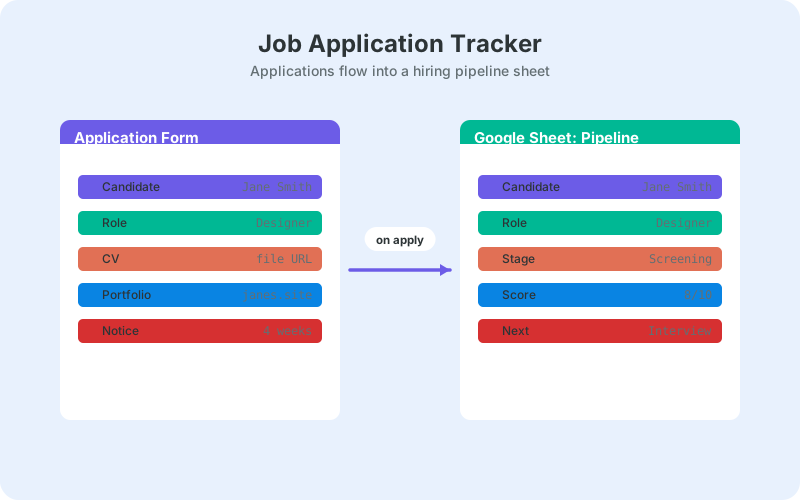
A hiring pipeline sheet needs identity columns (name, email, phone), evidence columns (CV link, portfolio URL, screening answers), and process columns (role, stage, score, owner, applied date, first-response date, notes). With postings now averaging 244 applications (Greenhouse, 2025), the process columns are what keep review moving instead of stalling.
- Applied date - the submission timestamp, filled automatically
- Role - one sheet can serve several openings
- Stage - Applied, Screening, Interview, Offer, plus Rejected and Withdrawn
- Score - the rubric total, covered below
- CV link - the uploaded file's URL as a clickable link
- Owner - who reviews this candidate next
- First response sent - the date you first replied
- Notes - short, factual, written as if the candidate could read them
Keep one row per application, and never delete rows. Repeat applicants get flagged by formula rather than merged by hand, and rejected candidates keep their history - next quarter's opening often shortlists this quarter's silver medalist, and their old score and notes are a head start.
How Do You Get Applications From WordPress Into the Sheet?
Connect the application form directly. SheetLink Forms delivers each WordPress form submission to Google Sheets in real time - via one-click Google Sheets connect (v1.12.0+) or a classic Google Apps Script receiver you deploy in your own Google account. No Zapier, no per-task fees, and no third-party automation vendor processing candidate data, which matters more in hiring than almost anywhere else.
- Install the free plugin from WordPress.org - it works with 12 major form plugins, including Gravity Forms, WPForms, Fluent Forms, and Formidable.
- Connect Google: click Connect Google and pick or create your tracker sheet in the Google file picker (about a minute, drive.file scope only), or deploy the classic Apps Script receiver by following the Google Sheets setup guide - no Google Cloud project or API keys either way.
- Map form fields to your columns, including the CV upload field.
- Submit a dummy application and confirm the row, the timestamp, and the file link all arrive.
Candidate records are personal data, so the direct path helps on compliance too: submissions travel from your site to your own Google account with no middleman retaining copies. A delivery log and an automatic retry queue with exponential backoff mean a plugin conflict or a traffic spike never silently swallows someone's application.
Stage Columns That Make the Pipeline Visible
Track stage as one dropdown column with fixed values: Applied, Screening, Interview, Offer, Rejected, Withdrawn. Set it up with data validation (Data, then Data validation, list of items) so typo stages cannot exist, then a COUNTIF per value gives you a live pipeline summary in six cells at the top of the sheet.
Per-role counts take one more condition: =COUNTIFS(D2:D, "Interview", B2:B, "Support Engineer") shows how many Support Engineer candidates sit at interview right now. Add conditional formatting so each stage gets a color, and the sheet reads at a glance - a wall of green Applied rows means screening has stalled.
If you prefer a visual board over a column, the same data can drive a kanban-style view without re-entering anything; see building a pipeline board in Google Sheets. Either way, the dropdown column stays the source of truth, because formulas can count a column but not a layout.
How Do You Score Applicants Consistently?
Score with a rubric, not a gut feeling. Add one column per criterion - for example relevant experience, portfolio quality, written communication, and salary fit - each scored 1 to 5, plus a total column. Reviewers score independently before any discussion, which blunts the loudest-voice-wins effect that unstructured CV review invites.
Weight what matters. If experience counts triple and portfolio double, the total is =E2*3 + F2*2 + G2 + H2. Sort descending by total to build the screening shortlist in seconds instead of re-reading two hundred CVs, and record a one-line justification in the notes column so the number has a memory.
The same weighted-sum approach powers sales-lead qualification, and the variants transfer directly; a simple scoring formula in Google Sheets walks through them, including threshold flags with conditional formatting so top scorers light up as they arrive.
Capturing CVs: File Upload URLs as Links
File upload fields arrive in the sheet as URLs, one per uploaded CV. Most WordPress form plugins store the file in the media library or a protected uploads folder and expose its address, which lands in your CV column as a link straight to the document - no attachment hunting across email threads.
Wrap it for readability: =HYPERLINK(F2, "CV") turns a long URL into a tidy clickable label, keeping the row scannable. Keep the uploads folder access-restricted on the WordPress side, since CVs contain addresses and work histories that should not be publicly guessable.
Uploads carry useful metadata too - file name, type, and size can all be captured alongside the link, which helps spot the occasional 40 MB portfolio PDF before you open it on hotel wifi. Our guide to file upload fields in WordPress forms and Google Sheets covers the setup per form plugin.
How Do You Spot Repeat Applicants?
Dedupe by email address, since names vary but inboxes rarely do. With emails in column C, =COUNTIF(C:C, C2) > 1 flags every row whose address appears more than once, and a conditional formatting rule on that flag highlights repeat applicants the moment their new application lands.
Repeat applications are signal, not noise. Someone applying to a second role in six months may be a persistent strong fit, or may be spraying applications at everything you post. Their earlier row - score, stage reached, interview notes - tells you which within ten seconds, which is exactly why rejected rows never get deleted.
Email-based matching has edge cases worth handling: gmail dot variants, plus-aliases, and personal-versus-work addresses can hide a match. For merge formulas and near-duplicate handling, see deduplicating records in Google Sheets automatically.
Response-Time Tracking: Stop Ghosting Candidates
Track two dates per application: applied and first response. A simple =D2 - A2 column shows how many days each candidate waited to hear anything. Hiring already feels slow from the outside - SHRM's benchmark puts average time-to-fill around 44 days (SHRM) - so the one thing you fully control is whether candidates hear anything at all.
The daily routine costs minutes: filter for blank first-response dates each morning and clear the list with an acknowledgment. Add a stage-change date column and no candidate sits in Screening for three silent weeks either. Candidates talk, review sites exist, and today's ghosted applicant is next year's lost customer or referral.
The mechanics are identical to sales-lead response tracking, down to the formulas; tracking lead response time in Google Sheets covers averages per week, business-hours variants, and flagging rows that breach your target.
Next Step: One Form, One Sheet, One Pipeline
Start with the next role you post. Connect the application form to a fresh sheet, add the stage dropdown and rubric columns, and set the dedupe flag before applications arrive - retrofitting structure onto two hundred inbox threads is the painful version of this project.
With applications per posting up 111% in three years (Greenhouse, 2025), an unstructured process now fails faster than it used to. The same tracker pattern works for any inbound list your website generates; see tracking leads in Google Sheets for the general playbook, then post the role.
| Email inbox | ATS SaaS | Spreadsheet pipeline | |
|---|---|---|---|
| Cost | Free | Paid plans, often per seat | Free |
| Setup time | None | Days to weeks | Under an hour |
| Stage visibility | None - search threads | Built-in pipeline | Stage column + live counts |
| Duplicate detection | Manual memory | Built in | One COUNTIF formula |
| Data ownership | Scattered in mailboxes | Vendor database | Your Google account |
Frequently Asked Questions
How do I make a job application tracker in Google Sheets?
Create columns for name, email, role, stage, score, CV link, applied date, first-response date, and notes, then connect your WordPress application form so submissions arrive as rows automatically. A stage dropdown (Applied, Screening, Interview, Offer) plus COUNTIF summaries turns the sheet into a working pipeline.
How many applications does a job posting get on average?
Around 244 per posting in 2025, up 111% from roughly 115 in 2022, according to Greenhouse benchmarks covering 6,000+ companies and 640 million applications. That volume is why an inbox breaks down and a structured tracker with stages and scores has become the minimum viable process.
What stages should a hiring pipeline have?
Four active stages cover most hiring: Applied, Screening, Interview, and Offer, plus Rejected and Withdrawn as terminal states. Keep the list short and enforce it with a data-validation dropdown so every formula and count works. Add sub-stages only when a step genuinely has a different owner.
How long does hiring usually take?
SHRM's benchmark puts average time-to-fill at around 44 days from posting to acceptance. You cannot always compress that, but a first-response date column ensures candidates at least hear something quickly, which protects your reputation across a six-week process.
Can candidates upload CVs through a WordPress form?
Yes. Most major form plugins support file upload fields, storing the CV on your server and passing its URL through to the sheet as a clickable link. Wrap it with =HYPERLINK(F2, "CV") for readability, and keep the uploads folder access-restricted since CVs contain personal data.
How do I find duplicate applicants in Google Sheets?
Flag rows whose email appears more than once: =COUNTIF(C:C, C2) > 1 with addresses in column C, paired with conditional formatting so repeats highlight automatically. Email beats name matching because names vary in spelling while applicants usually reuse the same address.
Is a spreadsheet applicant tracker GDPR-friendly?
It can be, if you treat applications as personal data: restrict sheet sharing, collect only what you assess, respond to deletion requests, and archive old rows on a schedule. A direct form-to-sheet connection also avoids routing candidate data through a third-party automation vendor.
When should I move from a spreadsheet to a real ATS?
When several people hire in parallel every month, when you need approval workflows and scheduling built in, or when volume passes a few hundred active candidates. Until then a sheet covers stages, scoring, and dedupe for free, and exports cleanly into any ATS you adopt later.
More Lead Management guides
Put every application in your pipeline sheet
Send WordPress application forms to Google Sheets in real time - no Zapier, no per-task fees, candidate data stays in your account.