
Client CRM Access vs a Lead Portal: What Agencies Should Give
Buying a client a HubSpot or Salesforce seat sounds generous, but most clients just want to see and act on their own leads. Here is when a CRM seat fits, and when a scoped lead portal wins.
In This Guide
- CRM Seat or Lead Portal: The Short Answer
- Why Is a Full CRM Seat Usually Overkill for a Client?
- What Does a CRM Seat Really Cost per Client?
- The Adoption Problem: A Login Nobody Uses
- When Is a CRM Seat Actually the Right Call?
- Where Does a Lightweight Lead Portal Win?
- What Does the Do-Nothing Default of Emailing Leads Cost?
- CRM Seat vs Emailed Leads vs Lead Portal, Side by Side
- How Do You Set This Up Without Zapier or a Data Migration?
- The Bottom Line for Agencies
- Frequently Asked Questions
CRM Seat or Lead Portal: The Short Answer
For most agency clients, a scoped lead portal beats a full CRM seat. A 2024 test of 1,000 B2B companies found 63.5% never responded to a demo request at all (RevenueHero, 2024). The tool matters far less than whether your client actually acts on leads fast.
Here is the honest version. A full CRM like HubSpot or Salesforce is excellent for your agency's own pipeline. But your client usually wants one thing: to see the leads their campaigns produced, and to know which ones got called. That is a much smaller job than a CRM is built for.
This guide compares three real options: buying the client a CRM seat, the do-nothing default of emailing leads, and a lightweight client lead portal. We will cover cost, setup, adoption, and the one case where a CRM seat genuinely is the right call.
Why Is a Full CRM Seat Usually Overkill for a Client?
A full CRM seat is usually overkill because your client wants visibility into their leads, not a sales operating system. CRMs are built for teams running deals, quotas, forecasts, sequences, and reports. Most clients you serve want a far simpler answer: which leads came in, and did anyone follow up?
When you hand a client a seat in HubSpot or Salesforce, you hand them the entire tool. Deal stages they will never use. Pipelines that belong to other clients. Settings, filters, and views designed for full-time sales operations. The signal - their new leads - gets buried under features they did not ask for.
There is also a boundary problem. If the client shares your agency's CRM instance, scoping their view so they see only their own records takes real configuration, and one wrong permission exposes another client's data. A dedicated view or a separate portal sidesteps that risk entirely. For a deeper look at the visibility question, see giving clients their leads without WordPress access.
What Does a CRM Seat Really Cost per Client?
A CRM seat costs more than the per-seat monthly fee. That fee is real and adds up fast across a roster of clients, but the bigger cost is the setup and admin burden every seat creates. Someone has to provision access, scope the view, train the client, and field the support questions afterward.
Break the true cost into three parts. First, the per-seat monthly cost, multiplied by every client you onboard. Second, the setup time: building a filtered view, hiding irrelevant objects, and testing that the client cannot see other accounts. Third, the ongoing admin: password resets, permission tweaks, and re-explaining the same screen each quarter.
Then there is the learning curve. A CRM assumes the user knows what a pipeline stage, a lifecycle property, or an activity log is. Your client is a plumber, a clinic owner, or a boutique operator. Every minute they spend learning CRM vocabulary is a minute they are not calling the lead. That trade rarely pays off.
The Adoption Problem: A Login Nobody Uses
The quiet failure of a CRM seat is low adoption: you provision it, the client logs in twice, then goes back to email. A tool the client never opens cannot help them respond faster, and speed is where the money is. Odds of contacting a web lead drop 100x, and of qualifying it 21x, when the first call slips from 5 to 30 minutes (InsideSales.com / MIT Lead Response Management Study, 2007).
Think about what actually drives adoption. A tool gets used when it is fast to open, shows only what matters, and answers the user's question in one glance. A full CRM optimizes for depth, not glanceability. Your client opens it, sees a wall of unfamiliar controls, and closes the tab.
That is the core insight: a heavy CRM the client never logs into is worse than a simple screen they check every morning. Adoption, not feature count, decides whether leads get called. A tool that surfaces new leads and a response-time target keeps the client honest, so slow follow-up shows up early instead of at renewal time.
When Is a CRM Seat Actually the Right Call?
A CRM seat is the right call when the client has their own sales team and a real sales process. If several reps work deals, log calls, forecast revenue, and run sequences, they need a CRM, and giving them a seat in a shared, well-governed instance can make sense. In that world, the depth is the point.
Use a CRM seat when the client already lives in one, when deals move through multiple stages over weeks, or when the client needs pipeline forecasting and rep-level reporting. Those are jobs a lead portal is not trying to do. Do not bash the CRM here: for a genuine sales operation it is the correct tool.
The cleaner pattern is often to keep the CRM as the client's system of record and feed it automatically. Route the leads your campaigns generate straight into their CRM, so reps get them without you managing a seat as a viewing screen. That is exactly what a direct WordPress-to-HubSpot connection is for.
Where Does a Lightweight Lead Portal Win?
A lead portal wins whenever the client mainly needs to see and act on their own leads, which is most of the time. It sets up in minutes, scopes to one client by design, has a small learning curve, and earns higher adoption because it shows only what that client cares about. No CRM vocabulary required.
The fit is strong because so many of these leads start on WordPress, which powers 41.2% of all websites (W3Techs, 2026). If the leads already flow from a WordPress form, a portal built on that capture is a short hop, not a migration.
A good portal answers the client's questions directly: which leads came in, from which campaign, and how fast did we respond. It replaces the shared-spreadsheet workaround many agencies fall back on, without the fragility. For that comparison, read client lead portal vs a shared Google Sheet. The point is not fewer features for their own sake; it is a tool the client opens every day.
What Does the Do-Nothing Default of Emailing Leads Cost?
Emailing leads costs you visibility and speed, even though it feels free. There is no record of who followed up, no response-time tracking, and no report you can show at the monthly call. It is also where slow follow-up hides: with 63.5% of B2B firms never replying to a demo request (RevenueHero, 2024), the gap is already enormous, and email makes it invisible.
Emailed leads have three failure modes. They get missed in a busy inbox. They get no timestamp, so nobody can prove how fast the client called. And they leave you, the agency, blind to whether the leads you generated were worked at all. When the client says the leads were bad, you have no data to answer.
Email is passive by nature. A lead lands, and then it depends entirely on the client noticing. Compare that to a screen the client checks each morning, or a CRM feeding a real sales team. Doing nothing is a choice, and it usually costs the renewal.
CRM Seat vs Emailed Leads vs Lead Portal, Side by Side
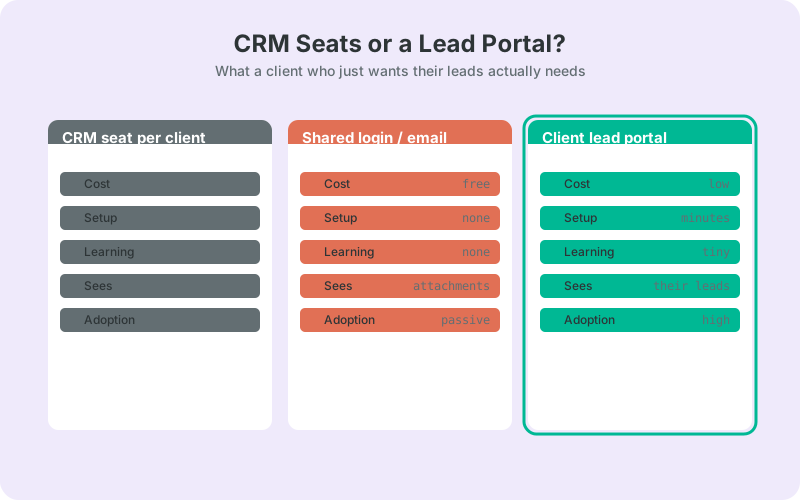
Across cost, setup, learning curve, and adoption, the lead portal is the balanced default for a client who just wants their own leads. A CRM seat wins on depth for a real sales team; emailing wins on nothing except being easy to skip. The table below keeps the claims simple and safe.
Read it as a starting point, not a verdict. Your client's situation decides the winner. A solo operator who wants to see today's leads is a different buyer from a five-rep sales team running a pipeline, and the right column changes with them.
The deciding factor stays the same across all three columns: does the client actually act on leads fast? A tool only earns its place if it moves the response time down, and it should give you a report to prove it at the monthly call.
How Do You Set This Up Without Zapier or a Data Migration?
Start where the leads already are: your client's WordPress form. Capture every submission first, then decide where it goes - a CRM for a sales team, or a scoped portal for a client who just wants visibility. The free SheetLink Forms plugin sends WordPress form submissions straight to Google Sheets in real time, with no Zapier and no per-task fees.
From that captured stream you have two clean paths. When the CRM seat is the right answer, fan the same leads out to the client's CRM automatically, so reps get them without you babysitting a viewing seat. See the multi-CRM routing guide and the CRM fan-out docs for the setup.
When a scoped portal is the better fit, LeadOps is a coming-soon companion product built on the same capture. Each client gets a branded sign-in to view, follow up with, and qualify only their own leads, with response-time tracking and per-client reports, and no wp-admin access. Agencies weighing the portal route can follow it on the LeadOps portal page and the broader agency overview.
The Bottom Line for Agencies
Default to a scoped lead portal, reach for a CRM seat only when the client runs a real sales team, and stop emailing leads into a black hole. The decision is not about which software is best in the abstract; it is about which one the client will actually open and act on tomorrow morning.
Match the tool to the buyer. Solo operator or small team that wants visibility: a portal. Multi-rep sales operation with a pipeline: a CRM seat, ideally fed automatically. Either way, capture the leads first so you keep the record and the flexibility.
Next step: connect the client's WordPress forms to a spreadsheet you control, then branch to a CRM or a portal from there. Start with the Google Sheets CRM guide to see how far a simple, owned setup goes before you ever pay for a seat.
| CRM seat for client | Emailed leads | Client lead portal | |
|---|---|---|---|
| Monthly cost | Per seat | Free | Low |
| Setup effort | Heavy | None | Minutes |
| Learning curve | Steep | None | Small |
| Client sees | Whole CRM | Attachments | Only their leads |
| Adoption | Low | Passive | High |
| Speed-to-lead help | Some | None | Yes |
Frequently Asked Questions
Should I give my client a seat in my agency's CRM?
Usually no, unless they have their own sales team. Sharing your instance risks exposing other clients' records and forces the client to learn a tool built for full-time sales. A scoped portal or a filtered view is safer and gets opened more often.
When does a CRM seat make sense for a client?
A CRM seat makes sense when the client runs multiple reps, works deals over weeks, and needs forecasting or activity logging. In that case the depth is the point. Feed the CRM automatically from their forms rather than treating a paid seat as a viewing screen.
Why do clients stop using the CRM I set up?
Low adoption comes from friction: a full CRM shows unfamiliar controls instead of a glanceable list of new leads. A tool the client never opens cannot improve response time, and slow follow-up sharply cuts contact odds (InsideSales.com / MIT, 2007), so adoption matters more than features.
Is emailing leads to the client good enough?
Rarely. Emailed leads get lost in inboxes, carry no response-time record, and leave you blind to whether they were worked. With 63.5% of B2B firms never replying to a demo request (RevenueHero, 2024), passive email hides the exact gap that costs renewals.
What is a client lead portal?
A client lead portal is a scoped sign-in where one client sees, works, and reports on only their own leads, without a WordPress or CRM login. It focuses on speed to lead and simple reporting. LeadOps is a coming-soon portal built on SheetLink Forms capture.
How do leads get into a CRM or portal without Zapier?
Capture WordPress form submissions with the free SheetLink Forms plugin, which sends them to Google Sheets in real time using a script you deploy in your own Google account. From there you can fan out to a CRM or route into a portal, with no per-task fees.
Can I use both a CRM and a portal?
Yes. Many agencies feed a client's sales team through a CRM while showing the client a simple portal for visibility and reporting. Because both read from the same captured lead stream, you set up capture once and branch to each destination as needed.
Does a portal work if leads come from WordPress forms?
It works especially well. WordPress powers 41.2% of all websites (W3Techs, 2026), so most agency leads already start on a WordPress form. Capturing from that form and surfacing it in a scoped portal is a short setup, not a data migration or a rebuild.
More Lead Management guides
Give clients their leads without a CRM seat
Capture WordPress form leads to Google Sheets free, then fan out to a client's CRM or a scoped portal - no Zapier, no per-seat fees.