
Send WordPress Form Submissions to an Airtable Relational Base
A flat spreadsheet works until your records need to relate to each other. Here's how to route WordPress form submissions straight into an Airtable base - linked records, views, conditional routing, and no Zapier per-task fees.
In This Guide
- Why Send Form Data to Airtable Instead of a Flat Sheet?
- What Does a Relational Base Give You That a Sheet Doesn't?
- How Does SheetLink Route a WordPress Form to Airtable?
- How Do You Map Form Fields to Airtable Fields?
- Can SheetLink Populate Linked Records?
- How Do Airtable Views Help With Incoming Leads?
- Can You Route Submissions to Different Bases or Tables?
- How Does This Avoid Zapier's Per-Task Fees?
- SheetLink Direct vs Zapier vs Airtable Web Forms
- What's the Quickest Way to Get Started?
- Frequently Asked Questions
Why Send Form Data to Airtable Instead of a Flat Sheet?
Airtable beats a flat spreadsheet when your records need to relate to each other. A form submission isn't always one isolated row - a lead belongs to a company, an event signup belongs to an event, a support ticket belongs to a customer. Airtable models those relationships natively with linked records.
A Google Sheet stores everything in a single rectangular grid. That's perfect for an append-only log of submissions. The moment you want to group leads by company, attach each booking to a session, or filter by stage without writing formulas, the flat model starts to fight you.
The CRM market reached roughly $73.4 billion in 2024 and is projected to hit $163.16 billion by 2030 at a 14.6% CAGR (Grand View Research, 2024). Teams are clearly investing in structured customer data. Airtable sits between a raw sheet and a full CRM, and SheetLink Forms can write to it directly. See the full destination list on the integrations page.
What Does a Relational Base Give You That a Sheet Doesn't?
A relational base gives you links, views, and typed fields - three things a flat grid can't do cleanly. Where a sheet decays as it grows, Airtable keeps structure. B2B contact databases decay around 22.5% per year (HubSpot, citing MarketingSherpa), so structure that helps you spot stale records actually matters.
With linked records, one lead row points at a Company record, and the company shows every lead linked back to it. No duplicated company names, no copy-paste.
With views, the same table renders as a grid, a Kanban board by status, a calendar by event date, or a filtered slice for one salesperson - all without touching the underlying data.
With typed fields, a single-select stays clean, a date is a real date, an attachment is a file. A spreadsheet treats everything as text until a formula says otherwise.
If your need is a simple append-only log, a sheet is still the right tool. Our WordPress forms to Google Sheets guide covers that path.
How Does SheetLink Route a WordPress Form to Airtable?
SheetLink writes form submissions directly to Airtable through the Airtable API, with no Zapier or Make in the middle. The Airtable destination is built into the core plugin alongside Google Sheets and Notion. Mirroring each submission into Airtable next to your Google Sheet is free; making Airtable a rule's sole destination - no Google Sheet in the loop - is part of the SheetLink Plus (Primary Destinations). (Core supports 12 form plugins; the Pro tier extends that to 17.)
The flow is simple. You connect your Airtable account with a personal access token, pick the base and table, then map each form field to an Airtable field. When a visitor submits, SheetLink creates a new record in that table within a second or two.
Because it's a direct integration, there's no per-task meter and no third-party uptime to depend on. The plugin owns the data path from your form to your base. You can also keep delivering to Sheets at the same time, so an Airtable rule and a Sheets rule run side by side on the same form.
How Do You Map Form Fields to Airtable Fields?
You map fields one-to-one in the SheetLink rule editor: pick a form field on the left, choose the matching Airtable field on the right. SheetLink reads your base schema, so the dropdown lists your real Airtable field names rather than asking you to type them by hand.
The key step is matching the Airtable field type to the data. A name field maps to a single-line text field. An email maps to an email field. A budget dropdown maps to a single-select. A consent checkbox maps to a checkbox. A file upload maps to an attachment field.
Unmapped form fields are simply skipped, which is useful when a form has more inputs than your base needs. SheetLink also captures attribution data automatically - GCLID, fbclid, and msclkid - so you can map the Google Click ID into its own column. Capturing the click ID is how you attribute and import offline conversions back to the campaign (Google Ads Help). Our UTM and GCLID attribution guide goes deeper.
Can SheetLink Populate Linked Records?
Yes. SheetLink can write to an Airtable link field by matching an incoming value against records in the linked table, which is the core advantage over a flat sheet. Instead of pasting a company name into a text cell, you connect each new lead to an existing Company record.
Think of an event-registration form. Each signup is a row in a Registrations table, and a link field connects it to the right Event record. Now one event shows every registrant; one registrant shows which event they joined. The relationship is queryable, not just visible.
The practical tip: keep the linked-table key clean. If your form sends a company name, that value should match an existing record's primary field so Airtable links rather than creates a stray duplicate. For records that genuinely repeat - the same person submitting twice - pair this with deduplication. Our lead deduplication guide covers the patterns, and the same thinking applies to keeping a base tidy.
How Do Airtable Views Help With Incoming Leads?
Views let one table serve every team without copying data, which is why incoming form leads land somewhere instantly useful. Speed-to-lead is the reason this matters: contacting a web lead within five minutes versus thirty makes you roughly 21x likelier to qualify it (HBR, 2011). A view that surfaces fresh leads first turns that research into a workflow.
A Kanban view by status moves leads from New to Contacted to Won as cards. A grouped view clusters submissions by source or salesperson. A calendar view plots demo bookings by date. A filtered view hides everything except this week's hot leads.
Most teams respond far too slowly to capitalize on speed-to-lead - one study of 114 B2B companies found an average email response of nearly 12 hours and almost none replying within five minutes (Workato, 2019-2020). When a submission writes to Airtable within a second or two and a view immediately flags it, the five-minute window becomes realistic.
Can You Route Submissions to Different Bases or Tables?
Yes. SheetLink supports conditional routing by field value, so the same form can write to different Airtable tables based on what the visitor selected. A budget dropdown, a region picker, or a service-type radio can each steer the record to the right place.
For example, an enterprise inquiry routes to a high-priority Sales table, a small-business inquiry routes to a Self-Serve table, and everything else lands in a general Inbox. Each rule has its own field mapping, so the right base captures the right shape of data.
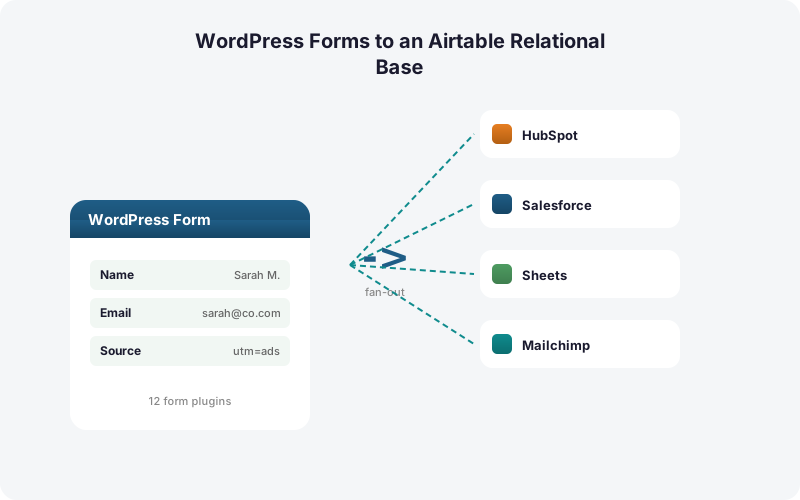
You can also fan one submission out to several destinations at once. A single lead can write to Airtable, drop into Google Sheets as a backup log, and - with Multi-CRM Routing, included in Pro - flow into HubSpot or Pipedrive in the same instant. None of this incurs a per-task fee. Our conditional routing guide walks through the rule builder in detail.
How Does This Avoid Zapier's Per-Task Fees?
SheetLink is a direct integration, so it never touches Zapier's metered task model. Zapier counts one task per action, which means fanning a single submission to a base plus two CRMs in a multi-step Zap burns three or more tasks per lead (Zapier pricing, 2026). At volume, that meter runs hot.
Zapier's free tier allows 100 tasks per month and only two-step Zaps; multi-step automation needs a paid plan starting at $19.99/month for 750 tasks, with overage billed at 1.25x (Zapier pricing, 2026). A busy form blows past 750 tasks quickly once you count multiple destinations.
SheetLink charges no per-task fee at all. SheetLink writes to Airtable as many times as your forms fire. The plugin also includes a built-in retry queue with exponential backoff (5 minutes, 30 minutes, 2 hours) and full delivery logs, so a brief Airtable outage delays delivery instead of losing a record. The true cost of Zapier for WordPress forms breaks the math down further.
SheetLink Direct vs Zapier vs Airtable Web Forms
Three common paths get WordPress data into Airtable, and they differ on cost, speed, and how much they keep you locked to one vendor. The comparison below summarizes the trade-offs.
SheetLink direct keeps your existing WordPress form, writes to Airtable in real time, supports linked records and conditional routing, and charges no per-task fee. Zapier can connect almost anything but meters every action and adds a polling delay on lower tiers. Airtable's own web forms are free and native, but they replace your WordPress form entirely - you lose your form plugin's design, validation, spam protection, and any other destinations.
The right pick depends on whether you value keeping your WordPress form and avoiding per-task fees, or whether breadth across hundreds of unrelated apps matters more. For the WordPress-to-Airtable path specifically, the direct route is usually cheaper and faster.
What's the Quickest Way to Get Started?
Getting a WordPress form into Airtable takes about five minutes. The average company now runs roughly 106 SaaS apps (BetterCloud via Statista, 2024), so adding zero new middleware tools is a feature in itself.
First, install SheetLink Forms - the Airtable destination is built in (free as a mirror alongside Google Sheets; Airtable-only rules come with SheetLink Plus). Second, create an Airtable personal access token with access to your target base and paste it into SheetLink. Third, pick the base and table, then map your form fields - including any link fields - to the matching Airtable fields.
Finally, submit a test entry and confirm the record appears. Review the delivery log to verify success, then add conditional routing or a parallel Google Sheets rule if you need them. The setup docs cover the Sheets side, and the pricing page shows what each tier includes. Agencies managing many client bases should look at the agency plans.
| Capability | SheetLink Direct | Zapier | Airtable Web Forms |
|---|---|---|---|
| Keep your WordPress form | Yes | Yes | No - replaces it |
| Per-task fees | None | 1 task per action | None |
| Linked records | Yes | Yes | Yes |
| Conditional routing by field | Yes | Paid plan | No |
| Also write to Google Sheets | Yes, same rule set | Extra tasks | No |
| Delivery speed | 1-2 seconds | Polled on lower tiers | Instant |
Frequently Asked Questions
Does SheetLink need Zapier to send WordPress forms to Airtable?
No. SheetLink writes to Airtable directly through the Airtable API - no Zapier, Make, or other middleware in the path, and no per-task fee. Mirroring into Airtable alongside your Google Sheet is free; Airtable as a rule's sole destination is part of SheetLink Plus (Primary Destinations).
Can SheetLink populate Airtable linked records?
Yes. SheetLink can write to an Airtable link field by matching an incoming value, such as a company name, against existing records in the linked table. That connects each new submission to the right parent record instead of duplicating data in a flat text column.
Which form plugins work with the Airtable destination?
The Airtable destination is built into the core plugin and works with every supported form plugin - 12 in core, 17 with the Pro tier. That includes Elementor Pro, Gravity Forms, WPForms, Fluent Forms, Contact Form 7, and several others, plus Pro additions like JetFormBuilder and Bricks.
Can I send the same submission to Airtable and Google Sheets at once?
Yes. You can run an Airtable rule and a Google Sheets rule on the same form, so one submission lands in both destinations simultaneously. Many teams use Airtable as the working base and Sheets as a flat append-only backup log, with no extra per-task cost.
How fast does a submission reach Airtable?
A submission typically creates a record in Airtable within a second or two. Fast delivery matters: contacting a web lead within five minutes versus thirty makes you about 21x likelier to qualify it, per HBR (2011). Real-time writes make that five-minute window practical.
What happens if Airtable is temporarily unavailable?
SheetLink's built-in retry queue holds the record and retries with exponential backoff at 5 minutes, 30 minutes, and 2 hours. The submission is delayed, not lost. Full delivery logs show every attempt and its status, so you can confirm the record eventually landed.
Can I route different submissions to different Airtable tables?
Yes. SheetLink supports conditional routing by field value. A budget, region, or service-type field can steer each submission to a different base or table, with its own field mapping. The same form can feed several tables based on what the visitor selected.
Why use Airtable instead of just a Google Sheet?
Choose Airtable when records need to relate to each other - leads to companies, signups to events - through linked records and views. Choose a Google Sheet when you only need a simple append-only log. SheetLink writes to either, so you can match the destination to the job.
More Automation guides
Send WordPress Forms Straight to Airtable
Linked records, views, and conditional routing - direct from your WordPress form. No Zapier, no per-task fees. The Airtable destination is built in alongside Google Sheets - mirroring next to your Sheet is free.