
Sync WordPress User Registrations to Google Sheets
Turn every new WordPress account into a row in Google Sheets. Build a living member register for audits, cohort tracking, and onboarding - with PII columns strictly opt-in.
In This Guide
- Can You Send WordPress User Registrations to Google Sheets?
- Why Keep a Member Register in a Spreadsheet?
- How Does the User Registration Source Work?
- Which Columns Sync by Default? PII Is Opt-In
- How Do You Set Up the Registration Sync?
- Choosing Columns for a Useful Register
- Use Case: Membership Audits
- Use Case: Cohort Tracking
- Use Case: Onboarding Checklists
- Next Steps
- Frequently Asked Questions
Can You Send WordPress User Registrations to Google Sheets?
Yes. Every new WordPress account can be appended as a row in a Google Sheet the moment it is created, giving you a living member register that updates itself. WordPress runs 41.2% of all websites (W3Techs, 2026), and on most of those sites, user data lives only in the admin Users screen.
That screen is fine for resetting a password. It is a poor tool for answering real questions: how many members joined last month, which roles are growing, who signed up but never finished onboarding. Those are spreadsheet questions.
This guide shows how the user-registration sync works, why the defaults deliberately exclude personal data, and three practical ways teams use a registration sheet: membership audits, cohort tracking, and onboarding checklists.
Why Keep a Member Register in a Spreadsheet?
Because spreadsheets are where operational work actually happens. Research compiled by EBSCO finds that 47-64% of companies use stand-alone spreadsheets for planning and budgeting (EBSCO, 2025). Teams do not abandon spreadsheets for dashboards; they run the business in them.
A registration register in Google Sheets gives you filters, pivot tables, charts, and sharing without handing anyone a wp-admin login. Your community manager can see signup trends without a WordPress role. Your accountant can count active members at quarter end without asking a developer.
Google's side of the equation is just as ubiquitous: Google Workspace serves over 3 billion users and more than 13 million customers (Google, 2026), so the sheet is almost certainly a tool your team already has open.
How Does the User Registration Source Work?
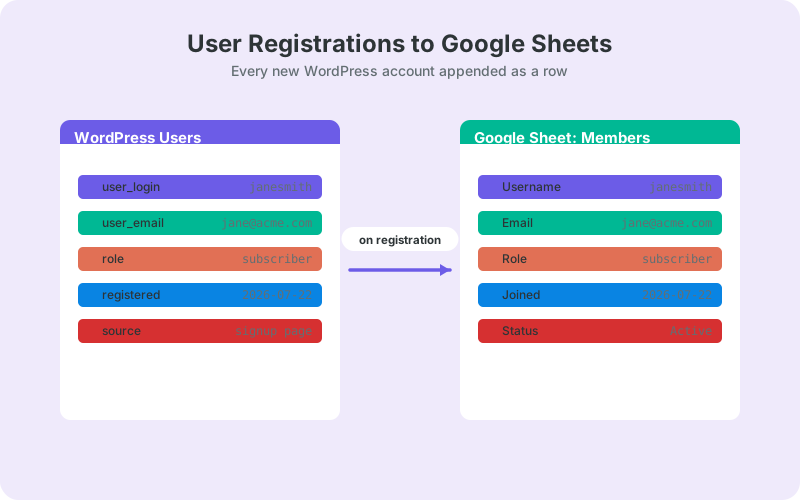
The user-registration source is a paid add-on for the free SheetLink Forms plugin. It watches for new WordPress accounts and appends one row per registration to your connected sheet, in real time, through the same Google Sheets connection the plugin uses for form submissions.
That connection is either the one-click Google connect (v1.12.0) - click Connect Google and pick or create the sheet in the Google file picker, with a drive.file scope limited to the sheets you choose - or the classic Apps Script receiver you deploy in your own Google account, which stays the OAuth-free option. Either way, registration data travels from your server to your spreadsheet with no Zapier tasks and no per-submission middleman. The form integrations documentation explains how sources and destinations fit together.
Registrations are one of several add-on sources beyond the 12 form plugins in the free core - WooCommerce customers, MemberPress signups, and LearnDash enrollments follow the same pattern if your membership stack goes deeper than core WordPress accounts.
Which Columns Sync by Default? PII Is Opt-In
By default, the register avoids personal data. Columns containing personally identifiable information - email address most obviously - are opt-in, not automatic. You start with the minimum useful row: a user ID, a role, and a registration timestamp, and consciously enable anything more sensitive.
This is the right default for two reasons. First, most register use cases - counting signups, tracking cohorts, auditing roles - do not need an email address at all. Second, every PII column you sync is a column you must protect, minimize, and be able to delete on request.
If you do enable PII columns, treat the sheet as part of your data map: restrict sharing, set a retention habit, and lean on consent logging and DSAR export tooling. The practices in GDPR-compliant form data in Google Sheets apply directly to registration data too.
How Do You Set Up the Registration Sync?
Setup is a one-time job of about ten minutes: connect a sheet, enable the registration source, choose your columns, and test with a fresh account. After that the register maintains itself.
- Install the free SheetLink Forms plugin from WordPress.org and run the setup wizard.
- Connect your Google Sheet: click Connect Google and pick or create the sheet in the Google file picker, or deploy the classic Apps Script receiver in your own Google account.
- Add the user-registration add-on - plans and bundles are listed on the pricing page.
- Enable the registration source and pick the destination sheet and tab.
- Choose columns, leaving PII columns off unless you have a clear need and lawful basis.
- Create a test account and confirm the row appears within seconds.
Delivery reliability is handled for you: failed appends enter an automatic retry queue with exponential backoff, with a manual Retry Now and a delivery log if you ever need to check.
Choosing Columns for a Useful Register
A good register is narrow. Start with user ID, role, and registration date, then add only columns you will actually filter or count. Wide sheets full of unused personal data are a liability, not an asset.
Columns that earn their place in most registers:
- User ID - the stable key for lookups and deduplication.
- Role - subscriber, customer, member; the backbone of any audit.
- Registration timestamp - powers every cohort and trend view.
- Status columns you add yourself - onboarding stage, plan tier, notes.
Keep the header row frozen and never reorder synced columns once rows are flowing; add new working columns to the right instead. Your future pivot tables will thank you.
Resist the urge to sync everything just because you can. Every column should answer to a task you actually perform: an audit, a cohort cut, a checklist. If nobody has filtered on a column in three months, it probably should not be in the register at all - and if it contains personal data, it definitely should not be.
Use Case: Membership Audits
A membership audit answers one question: does reality match the records? With every account in a sheet, a monthly audit becomes a fifteen-minute filter exercise instead of a database query nobody wants to write.
Filter by role to spot accounts with permissions they should not have. Sort by registration date to find the surge that followed a campaign, or the quiet month that needs explaining. Count rows per role and compare against your billing system's subscriber count; discrepancies surface fast when both numbers are one formula away.
Audits also catch integration drift. If your membership plugin creates accounts and your billing tool records subscriptions, the register is the neutral third record that shows where the two disagree - a duplicate account here, a paid subscriber with no WordPress login there. Finding those mismatches quarterly beats discovering them during a support escalation.
Old rows do not need to live in the working tab forever. Once an audit period closes, move aged entries out using the approach in archiving old WordPress form submissions in Google Sheets - the same pattern keeps a register lean.
Use Case: Cohort Tracking
Cohort tracking groups members by when they joined, then compares how each group behaves. Because every row carries a registration timestamp, the sheet gives you cohorts for free: a pivot table on month of signup is the whole setup.
From there you can chart signups per week, compare campaign months against baseline, and watch whether a pricing change altered the slope. Add a status column - active, lapsed, churned - and the same pivot shows retention by cohort without any external analytics tool.
The honest advantage over an analytics platform is trust. Every number in the pivot traces back to a visible row you can click, which makes cohort conversations with stakeholders faster: when someone questions a figure, you filter to the underlying accounts instead of debating tracking methodology.
As the register grows, tagging rows by acquisition source or member type makes cohort cuts sharper. The formulas and patterns in auto-segmenting and tagging WordPress leads in Google Sheets transfer directly to registration rows.
Use Case: Onboarding Checklists
An onboarding checklist turns the register into a lightweight operations board. Next to the synced columns, add your own working columns: welcome email sent, profile completed, first login confirmed, community intro posted. Each new registration arrives as a row with those cells empty - an instant to-do list.
Checkbox columns plus conditional formatting give you a visual queue: unstarted rows stay highlighted until someone works them. A simple COUNTIF across the checkbox column becomes your onboarding completion rate, tracked over time with zero extra tooling.
Teams that run this pattern often discover the register drifting toward a full customer record. That is a natural evolution - using Google Sheets as a CRM for WordPress shows how far the spreadsheet-as-system-of-record approach can reasonably stretch before you need dedicated software.
Next Steps
Connect one sheet, enable the registration source, and create a test account today. Within seconds you will have the first row of a register that never goes stale, on the free plugin plus one add-on.
Keep the defaults privacy-lean: sync IDs, roles, and timestamps, and add PII columns only when a concrete task demands them. Then pick one use case - an audit, a cohort pivot, or an onboarding checklist - and build it this week. A living member register earns its keep the first time someone asks how many members joined last month and you answer in ten seconds.
Frequently Asked Questions
Does WordPress export new user registrations automatically?
No. Core WordPress only lists users in the admin Users screen; getting them into a spreadsheet normally means manual exports or custom code. A registration sync appends each new account to Google Sheets in real time, so the register updates itself.
Is the user registration source free?
The core SheetLink Forms plugin is free, and the user-registration source is a paid add-on on top of it. Add-ons are available monthly or lifetime, individually or in bundles - current options are listed on the pricing page rather than quoted here.
Are email addresses synced to the sheet by default?
No. PII columns, including email, are opt-in by design. The default row carries a user ID, role, and registration timestamp, which covers audits and cohort tracking without exposing personal data. Enable sensitive columns only when you have a clear need and lawful basis.
Does this work with WooCommerce or membership plugin signups?
Yes, through their own add-on sources. WooCommerce customers, MemberPress signups, and LearnDash enrollments each have dedicated sources that follow the same append-a-row pattern, so you can track commerce and membership activity alongside or instead of core WordPress registrations.
Is sending registration data to Google Sheets GDPR compliant?
It can be, but compliance depends on your practices, not the tool. Helpful foundations are built in: PII columns are opt-in, consent logging is available, and DSAR export tooling supports access requests. You still need lawful basis, minimal columns, and a retention policy.
What happens if Google Sheets is temporarily unreachable?
No registrations are lost. Failed deliveries enter an automatic retry queue with exponential backoff, and you can trigger a manual Retry Now from the delivery log once the outage clears. The log also shows the status of every delivery for auditing.
Can I edit rows in the sheet and update WordPress?
Yes, with the two-way sync add-on, which pushes edits made in Google Sheets back to WordPress over an HMAC-secured channel. For a read-only register used for audits and cohort tracking, the standard one-way sync is all you need.
Do I need Google API keys or OAuth to set this up?
No Google Cloud setup either way. The one-click connect uses SheetLink's own app: approve a standard consent screen and pick the sheet, with no API keys to create. Prefer no OAuth at all? Deploy the classic Apps Script receiver in your own Google account and your site delivers rows directly to it.
More Tutorial guides
Build Your Living Member Register in Sheets
Every new WordPress account appended to Google Sheets automatically - no Zapier, no monthly task limits, privacy-first defaults.