
Elementor Form to Excel Online: Direct Real-Time Sync
Send every Elementor Pro form submission straight into an Excel Online workbook on OneDrive the moment it arrives. Setup, field mapping, and a free Google Sheets mirror alongside it.
In This Guide
- Why Send Elementor Form Submissions to Excel Online?
- Who Is a Direct Elementor to Excel Connection For?
- How Does a Direct Elementor to Excel Connection Work?
- What Do You Need Before You Start?
- How Do You Set Up an Elementor Form to Excel Online?
- Mapping Elementor Fields to Workbook Columns
- What Is Free and What Costs $29/mo?
- Can You Send to Excel and Google Sheets at the Same Time?
- How Does the Direct Route Compare to Zapier or Power Automate?
- What Happens When a Delivery Fails?
- Next Steps
- Frequently Asked Questions
Why Send Elementor Form Submissions to Excel Online?
Sending an Elementor form to Excel Online means every submission lands as a new row in a OneDrive workbook the moment a visitor clicks submit. No CSV exports, no Zapier tasks, no copy-paste. With 10,000,000+ active installations (WordPress.org, 2026), Elementor is the most widely used WordPress page builder, and its form data deserves better than the admin screen.
The scale is striking. Elementor reports its builder powers 18M+ websites, roughly 11.6% of the internet (Elementor Year in Review, 2025). A large share of those sites collect leads, quotes, and bookings through the Pro form widget, then leave the results sitting in the Submissions screen where nobody actually works.
This guide covers who a direct Excel connection suits, how the setup works, how field mapping behaves, and how the same approach lets you send WordPress form submissions to Excel Online without a middleware subscription.
Who Is a Direct Elementor to Excel Connection For?
A direct Elementor to Excel connection suits teams that already live in Microsoft 365. Microsoft passed 450 million commercial paid seats (Microsoft, 2026), and inside those organizations the spreadsheet of record is Excel, not Google Sheets. If reporting, dashboards, and file sharing all run through OneDrive and Teams, your form data should land there too.
Typical profiles: finance and operations teams who build PivotTables from lead data, agencies reporting to corporate clients standardized on Microsoft 365, and organizations whose IT policy discourages personal Google accounts for business data.
Excel also has genuine strengths for form data - PivotTables, Power Query, and Power BI connections among them. We cover those in detail in 7 things that are easier with WordPress form data in Excel.
How Does a Direct Elementor to Excel Connection Work?
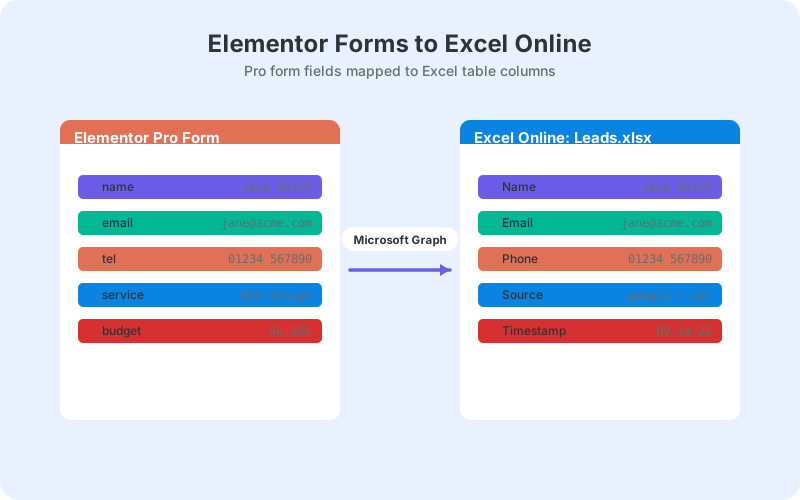
The direct route uses the Microsoft Graph API to append each submission as a row in an Excel Online workbook on your OneDrive. You authorize access once with your Microsoft account through a standard OAuth consent screen. After that, deliveries happen server to server in real time, with the refresh token encrypted at rest.
Compare that with middleware. A Zapier-style tool sits between your site and your workbook, receives the submission, queues it as a task, then writes the row on its own schedule and its own bill. A direct plugin hooks Elementor's submission event inside WordPress and pushes the row immediately.
You do not register an Azure app, generate client secrets, or touch the Microsoft developer portal. The one-time consent is the whole authorization story, which matters if a marketer rather than a developer is doing the setup.
What Do You Need Before You Start?
You need four things: Elementor Pro, the free SheetLink Forms plugin, a Microsoft 365 work or school account, and a workbook with a header row. Nothing else - no Zapier account, no Azure registration, no Google API keys for the Sheets side either.
- Elementor Pro - the form widget is a Pro feature; the free Elementor plugin does not include forms.
- SheetLink Forms - free on WordPress.org, with Elementor Pro supported among 12 major form plugins.
- A Microsoft 365 work or school account - personal Outlook.com accounts are not supported by Microsoft's Excel API, which only reaches workbooks stored on OneDrive for Business or SharePoint.
- An Excel Online workbook - one worksheet, first row reserved for column headers.
One practical tip before you begin: create the workbook in the OneDrive folder your team already shares, and name it after the form it will receive. Six months from now, quote-form-submissions.xlsx in the sales folder explains itself; Book3.xlsx in someone's own drive does not.
How Do You Set Up an Elementor Form to Excel Online?
Setup takes a few minutes: connect a Google Sheet as the primary destination, connect your Microsoft account, then enable the Excel mirror. The free path keeps Google Sheets as the system of record and mirrors every row to your OneDrive workbook in real time.
- Install and activate SheetLink Forms from the WordPress.org plugin directory.
- Connect your Google Sheet - one-click Google connect (pick or create the sheet in the Google file picker) or the classic Apps Script receiver you deploy in your own Google account - the Elementor forms to Google Sheets integration page shows this end to end.
- Connect your Microsoft account with the one-time OAuth consent.
- Pick the OneDrive workbook and worksheet that should receive mirrored rows.
- Create a rule: source is your Elementor Pro form, destination is your sheet with the Excel mirror enabled.
- Map form fields to columns.
- Submit a test entry and confirm the row appears in both places.
If you have never connected Elementor to a spreadsheet before, the walkthrough to connect Elementor forms to Google Sheets covers steps one and two in more depth.
Mapping Elementor Fields to Workbook Columns
Mapping links each Elementor field ID to a named column in your workbook. Give every field in the form widget a clean custom ID - name, email, budget - instead of the auto-generated defaults, and your column headers stay readable for whoever builds reports later.
Beyond your own fields, useful metadata rides along with each submission: a timestamp, the page URL the form was submitted from, and marketing attribution columns such as _utm_source and _gclid appended automatically when they are present on the visit. That turns a plain contact log into an attribution dataset with zero extra work.
Multi-step forms behave the same way - fields from every step arrive together as one submission, one row. If you run long qualification funnels, see Elementor multi-step forms with Google Sheets for patterns that keep those wide rows manageable.
What Is Free and What Costs $29/mo?
The Excel Online mirror is free. In the free arrangement, Google Sheets is the primary destination and your OneDrive workbook receives a real-time copy of every row. Excel as the primary destination - no Google account anywhere in the pipeline - is part of SheetLink Plus at $29/mo.
Which should you pick? If your team is happy to keep a Google Sheet running in the background, the free mirror gives you live Excel data at no cost. If your organization cannot or will not touch Google services - a common policy in regulated industries and Microsoft-standardized enterprises - the Excel-primary add-on removes Google from the loop entirely.
Either way, the core plugin stays free, and there is no per-submission metering on any tier. The cost question is purely architectural: is a background Google Sheet acceptable, or does your data path need to be Microsoft-only end to end?
The Google-free architecture, including what changes in the delivery path, is covered in Microsoft 365 WordPress forms to Excel without Google.
Can You Send to Excel and Google Sheets at the Same Time?
Yes, and on the free tier that is the default arrangement: the Google Sheet is the primary destination and the Excel workbook mirrors it row for row, in real time. Mixed teams get both tools without anyone exporting anything.
This matters more often than you would expect. Marketing teams tend to collaborate in Sheets while finance closes the month in Excel. With a mirror, each group works in its native tool against the same live data, and nobody emails a stale XLSX on Friday afternoon.
The Excel copy is also a natural feed for reporting. Once rows arrive continuously, PivotTables and charts refresh against real data - see Excel Online dashboards from WordPress form data for dashboard patterns that work well on top of a mirrored workbook.
How Does the Direct Route Compare to Zapier or Power Automate?
The direct route wins on cost and latency for this specific job. Zapier's free plan allows 100 tasks per month, with Professional from $19.99/mo on annual billing (Zapier, 2026) - and every form submission consumes tasks. A busy quote form can burn through a free plan in days.
Power Automate is the natural Microsoft answer, but it introduces flow-run quotas, connector configuration, and licensing that varies by Microsoft 365 plan. It is a fine general automation platform; it is heavy machinery for appending a form row to a workbook.
The table below summarizes the trade-offs. The short version: middleware makes sense when you orchestrate many apps, and a direct connection makes sense when the goal is simply Elementor form to Excel, every submission, forever, without a per-task meter.
What Happens When a Delivery Fails?
Failed deliveries enter an automatic retry queue with exponential backoff, and you can trigger a manual Retry Now from the delivery log. Retries cover both the Sheets and Excel destinations, so a temporary Microsoft or Google outage does not silently swallow a lead.
This mirrors how serious webhook infrastructure behaves. Hookdeck, which has processed well over 100 billion webhooks (Hookdeck, 2025), treats any delivery success rate below 99% as a signal worth investigating. The accepted best practice is exponential backoff with 6-8 attempts spread over 24-48 hours (Hookdeck), which is exactly the pattern a retry queue applies to your rows.
The delivery log doubles as an audit trail: you can see every submission, its destinations, and its status without digging through server logs.
Next Steps
Start with one form. Install the free plugin, connect your sheet and your Microsoft account, and send a test submission - you should see the row in Excel Online within seconds. That single working rule proves the pipeline before you roll it out to every form on the site.
From there, tighten your field IDs so columns stay readable, decide whether the free mirror or SheetLink Plus's $29/mo Excel-primary mode fits your organization, and let the retry queue worry about outages. Your Elementor submissions become a live dataset in the tool your team already opens every morning.
| Feature | SheetLink direct | Zapier | Power Automate | Manual CSV export |
|---|---|---|---|---|
| Delivery speed | Real time on submit | Task-based, per Zap | Flow runs | Whenever you export |
| Monthly cost | Free mirror; SheetLink Plus $29/mo Excel-primary | Free 100 tasks; from $19.99/mo | Depends on M365 plan | Free |
| Per-submission limits | None | Counted as tasks | Flow run quotas | n/a |
| Retry on failure | Automatic with backoff | Plan-dependent replay | Configure per flow | n/a |
| Setup effort | One-time OAuth + mapping | Build and maintain Zaps | Build flows and connectors | Repeat every export |
Frequently Asked Questions
Does the free version of Elementor include forms?
No. The form widget is part of Elementor Pro, so you need a Pro license to build forms at all. The free Elementor builder handles layout and design but ships no form widget, which is why every Elementor form integration guide assumes Pro.
Do I need Zapier to connect an Elementor form to Excel Online?
No. A direct plugin pushes each submission to your OneDrive workbook through the Microsoft Graph API the moment it is submitted. Zapier's free plan caps you at 100 tasks per month, and every submission consumes tasks, so the direct route is both faster and cheaper.
Do I need to register an Azure app or get Microsoft API keys?
No. You authorize once through a standard Microsoft OAuth consent screen, and the refresh token is stored encrypted at rest. There is no Azure portal work, no client secrets, and no developer account, which keeps the setup within reach of non-developers.
Can I send Elementor submissions to Excel and Google Sheets at once?
Yes. The free tier mirrors every row: Google Sheets acts as the primary destination and your Excel Online workbook receives a real-time copy. Mixed teams can work in both tools against identical live data without anyone exporting or importing files.
Is Excel as the only destination free?
No. Excel as the primary destination, with no Google account in the pipeline, is part of SheetLink Plus at $29/mo. The Excel mirror running alongside a free Google Sheets connection costs nothing.
Will rows show up in the Excel desktop app too?
Yes, indirectly. Rows are appended to the workbook stored on OneDrive, so when you open that same file in desktop Excel and it syncs, the new rows are there. Excel Online simply shows them fastest because it reads the cloud copy directly.
What happens if Microsoft's API is temporarily down?
Nothing is lost. Failed deliveries enter an automatic retry queue with exponential backoff, and you can also click Retry Now from the delivery log once the outage passes. This matches the 6-8 attempt backoff pattern webhook providers recommend as best practice.
Does this work with Elementor multi-step forms?
Yes. Fields from every step arrive together as a single submission, which becomes a single row in your workbook. Give each field a clean custom ID so your columns stay readable, especially on long multi-step qualification forms with many fields.
More Tutorial guides
Get Elementor Submissions into Excel Today
Real-time delivery to Excel Online and Google Sheets with no Zapier tasks and no per-submission fees - the core plugin is free.