
Everest Forms Google Sheets: Free Direct Setup Guide
Everest Forms has no free native Sheets connector. Here is the clean free path: a direct plugin with one-click Google connect (or a classic Apps Script receiver), field mapping, multi-tab routing, and UTM enrichment.
In This Guide
- How do you connect Everest Forms to Google Sheets?
- Does Everest Forms include a Google Sheets integration?
- Why put Everest Forms entries in a spreadsheet at all?
- How the direct connection works
- Step-by-step: Everest Forms to Google Sheets
- Field mapping: matching Everest Forms fields to columns
- Routing multiple forms to different tabs
- Enriching rows with UTM and metadata
- CSV export vs Zapier vs direct plugin
- Next steps
- Frequently Asked Questions
How do you connect Everest Forms to Google Sheets?
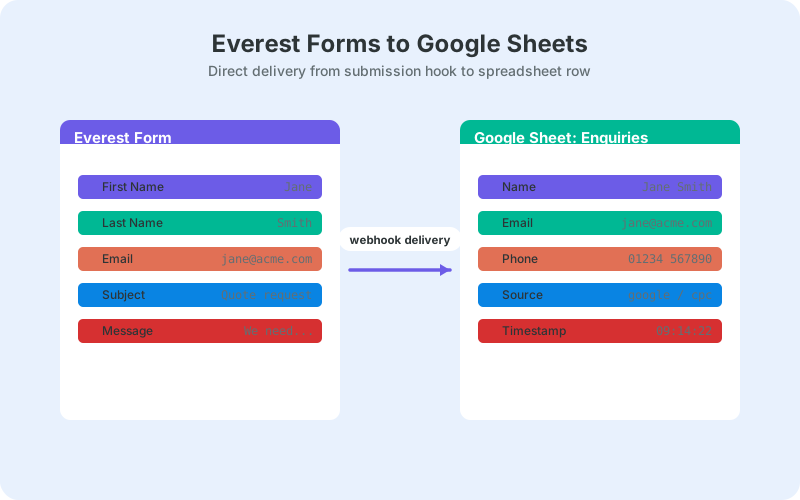
Everest Forms has no free native Google Sheets connector, so the cleanest free path is a direct plugin that sends each submission straight to your sheet. Everest Forms powers 90,000+ active installations (WordPress.org, 2026), and since SheetLink Forms v1.12.0 the connection is one click: press Connect Google, approve the consent screen, and pick or create a spreadsheet in the Google file picker - about a minute. Prefer a fully self-hosted setup? The classic Apps Script receiver in your own Google account is still fully supported.
This guide covers the complete pipeline: connecting your sheet (one click, or the classic receiver), mapping Everest Forms fields to columns, routing multiple forms to different tabs, and enriching each row with UTM data so you know which campaign produced which lead.
Everything in the core walkthrough uses free tooling: the plugin's free tier, a standard Google account, and the sheet itself. No Zapier tasks, no Google Cloud project or API keys, no per-submission fees anywhere in the chain - and no code at all (the classic route asks only for pasting one provided script).
Does Everest Forms include a Google Sheets integration?
Not in the free plugin. Everest Forms stores entries in WordPress and handles email notifications well, but sending submissions to a spreadsheet requires either a paid route or an external tool. That gap is why most Everest Forms users end up choosing between Zapier and a direct WordPress-side plugin.
Zapier works, but it bills monthly, meters your submissions as tasks, and routes every lead through a third-party processor before it reaches your sheet. For the single job of appending rows to a spreadsheet you own, a direct plugin does the same work with none of those strings attached.
Manual CSV export is the third option, and the least workable: it produces a snapshot, not a live feed. Someone has to remember to export, re-import, and reconcile, and the sheet is stale the moment they finish. Exports have a place for one-off audits and migrations, just not as an ongoing pipeline. We compare all three honestly in the table further down.
Why put Everest Forms entries in a spreadsheet at all?
Because a shared sheet is where form data becomes usable. Entries behind wp-admin are invisible to most of the team, while a Google Sheet gives everyone sortable columns, timestamps, filters, and a place to track follow-up - without granting a single person WordPress access.
Form submissions are hard-won. Per WPForms' research roundup, 2024, 29 percent of form abandoners cite security concerns, and trimming a form from four fields to three can lift conversion by around 50 percent. When each completed submission costs that much funnel effort, losing one in an unwatched entries screen is the worst possible outcome.
Those same numbers argue for keeping your Everest Forms form short and letting metadata do the heavy lifting: ask for less on the form, and capture context like source campaign and page URL automatically in the sheet instead.
A sheet also acts as an off-site backup. If a plugin update or a migration goes wrong, your lead history sits safely in your Google account rather than in a WordPress table you are currently trying to restore.
How the direct connection works
You have two direct routes, and both keep submission data between your server and Google. The default since v1.12.0 is the one-click Google Sheets connect: your WordPress server writes rows straight to the Google Sheets API over an OAuth connection scoped to drive.file, meaning SheetLink can only see the spreadsheets you pick in the Google file picker or that it creates for you - never the rest of your Drive. No Google Cloud project, no API keys, no webhook URL to paste.
The classic alternative is a Google Apps Script web app you deploy in your own Google account: WordPress posts each submission to the script, and the script appends the row. It is a short script you paste into script.google.com and deploy as a web app - because it runs under your own account, there is no OAuth anywhere and Google treats the script as you. The Google Sheets setup docs walk through both routes click by click.
Either way, delivery is real time, typically a second or two after submit. Failed deliveries are not lost: a retry queue with exponential backoff re-sends them automatically, a delivery log records each attempt, and a manual "Retry Now" button clears the queue on demand once you have fixed whatever went wrong.
Step-by-step: Everest Forms to Google Sheets
The setup is five steps: install the free SheetLink Forms plugin, connect Google with one click, pick or create your sheet, create a sync rule for your Everest Forms form, and send a live test. Everest Forms is one of the 12 major form plugins supported in the free core, so no upgrade is needed.
- Install and activate SheetLink Forms from Plugins -> Add New in your WordPress dashboard.
- Click Connect Google (SheetLink -> Google Sheets (OAuth), or the setup wizard's one-click card) and approve the standard Google consent screen.
- In the Google file picker, select an existing spreadsheet or create a new one, such as "Quote Requests". A header row is seeded automatically on new sheets.
- Create a sync rule: choose Everest Forms as the source, select the form, and pick the target spreadsheet and tab.
- Submit a test entry on the live page and confirm the row lands within seconds.
Prefer the classic self-hosted route instead? Deploy the Apps Script receiver: copy the script from the plugin's setup screen into script.google.com, deploy it as a web app, authorize it once, and paste the web app URL back into WordPress. Everything else in this guide works identically with either connection.
Start with an empty field map so every field auto-syncs to its own column - the fastest way to prove the pipeline end to end. Once rows are flowing, trim the map to only the columns you want and set their order explicitly.
Test on the published page, not a builder or preview context, and use distinctive values ("TEST-JULY" in the name field) so you can spot exactly which fields arrive.
Field mapping: matching Everest Forms fields to columns
Everest Forms assigns each field a meta key, visible in the field's Advanced options in the form builder, and that key is what maps to a sheet column. Copy keys exactly - a mismatched key is the number one cause of blank columns. An empty map simply auto-syncs every field.
Explicit maps earn their keep on messy forms. You can rename columns to human-friendly headers, reorder them to match how your team reads the sheet, and drop fields - honeypots, consent checkboxes you log elsewhere - that do not belong in the lead list.
Keep meta keys stable once the sheet is live. If you rename a key mid-stream, new rows write to a new column while old rows stay under the old header, and your history stops lining up.
When a column does come through blank, debug in this order: check the meta key against the map, confirm the field was actually filled in your test, then check the delivery log to see the exact payload that was sent. Nine times out of ten the fix is a copy-paste of the correct key.
Routing multiple forms to different tabs
One receiver serves as many sync rules as you need, so a contact form, a quote form, and a job-application form can each write to their own tab or their own spreadsheet entirely. Create one rule per form and point each at its destination - the receiver does not need to change.
You can also split a single form by field value with conditional routing. A service dropdown can send plumbing inquiries to one tab and electrical inquiries to another, keeping each team's view clean and each tab immediately actionable. The conditional routing docs cover the rule syntax and a few common patterns.
This is the pattern that scales. Ten forms dumping into one tab produces an unsortable pile; ten rules writing to purposeful tabs produces a reporting system. Agencies running many client sites tend to standardize on it early, because every new form is just one more rule rather than a new integration project.
Enriching rows with UTM and metadata
Every row can carry more than the visitor typed. UTM parameters like _utm_source and _utm_campaign, click IDs like _gclid, a timestamp, and the submitting page URL are appended automatically, which turns your lead sheet into attribution data without touching the form itself.
That answers questions the form alone cannot: which campaign produced this lead, which landing page converts, which ad spend is wasted. Sort the sheet by _utm_campaign and the answer is sitting in front of you. Our guide to UTM tracking for WordPress forms goes deeper on capture and reporting.
The metadata columns use underscore-prefixed names like _utm_source, so they are easy to spot next to your real form fields and simple to group at one end of the sheet. Pair them with the short-form advice from earlier: ask visitors for less, and let the pipeline record the context automatically.
CSV export vs Zapier vs direct plugin
For Everest Forms, the direct route is the clear default: it is free, real time, and keeps data between your server and your own Google account. CSV export suits one-off audits, and Zapier earns its cost only when the sheet is one stop in a longer cross-app workflow.
Cost behavior is the sharpest difference. CSV is free but manual, and manual means forgotten. Zapier's task-based pricing means a good month for leads is a bigger bill. The direct plugin's cost curve is flat: zero, however many submissions arrive.
Whichever route you pick, filter spam before it reaches the sheet. A lead sheet full of junk rows erodes the team's trust in it fast; see filtering WordPress form spam before it hits your Google Sheet for a practical setup that keeps the pipeline clean.
The table below puts the three options side by side.
Next steps
You now have Everest Forms writing to Google Sheets in real time, with clean field mapping, per-form routing, and UTM context on every row - all on free tooling. The same pipeline pattern extends to any of the 12 supported form plugins if your stack grows or changes later.
The Everest Forms integration page has the condensed checklist version of this guide. For a deeper mapping walkthrough on a comparable plugin, see the Formidable Forms integration guide - the concepts transfer directly.
A good first hour with the live sheet: add a Status column, sort by the timestamp, and group the underscore metadata columns at the right edge. That small bit of structure is usually all it takes for the team to start working leads out of the sheet instead of asking who checked the inbox.
| Manual CSV export | Zapier | SheetLink direct | |
|---|---|---|---|
| Data freshness | Snapshot at export time | Near real time | Real time |
| Ongoing effort | Manual, recurring | Low after setup | None after setup |
| Monthly cost | Free | Paid plans | Free |
| Third party in data path | None | Yes - Zapier servers | None |
| Retry on failure | Not applicable | Plan-dependent | Automatic retry queue |
Frequently Asked Questions
Does Everest Forms have a free Google Sheets integration?
No. The free Everest Forms plugin stores entries in WordPress and sends email notifications, but it has no free native Google Sheets connector. The clean free path is a direct plugin like SheetLink Forms: connect Google with one click and pick your sheet, or post submissions to a classic Apps Script receiver deployed in your own Google account.
Is the direct Everest Forms to Google Sheets setup really free?
Yes. Everest Forms support ships in the free core of SheetLink Forms alongside 11 other major form plugins, and both connection methods - one-click Google connect and the classic Apps Script receiver - work on a standard Google account. Real-time delivery, field mapping, auto-sync, and the retry queue are all included at no cost.
Do I need a Google API key or OAuth setup for this?
No API keys and no Google Cloud project either way. The one-click connect uses SheetLink's own verified Google app: you just approve a standard consent screen, and the drive.file scope limits access to the spreadsheets you pick or create. If you want no OAuth at all, use the classic Apps Script receiver - a web app running under your own account that you authorize once during deployment.
Why are some columns blank in my Google Sheet?
A blank column almost always means your field map key does not match the field's meta key in Everest Forms. Open the field's Advanced options in the builder, copy the meta key exactly, or clear the map so every field auto-syncs, then submit a fresh live test.
Can I send different Everest Forms to different tabs?
Yes. Create one sync rule per form and point each rule at its own spreadsheet or tab; a single receiver serves them all. Conditional routing goes further, splitting one form's rows by field value so each service type or region lands on the tab its team watches.
Can I see which campaign a lead came from in the sheet?
Yes. UTM parameters and click IDs such as _utm_source, _utm_campaign, and _gclid are appended to each row automatically, along with a timestamp and the submitting page URL. Sorting or filtering on those columns shows exactly which campaigns and landing pages produce leads.
What happens if Google is briefly unreachable when someone submits?
The submission is not lost. Failed deliveries enter an automatic retry queue with exponential backoff, and each attempt is recorded in the delivery log. Once the outage passes, queued rows deliver on their own, or you can push them through immediately with the manual "Retry Now" action.
Should I shorten my Everest Forms form?
Probably. Trimming a form from four fields to three can lift conversion by around 50 percent, per WPForms' research roundup, and 29 percent of abandoners cite security concerns. Ask for less on the form and let the pipeline capture context like source and page automatically.
More Tutorial guides
Give Everest Forms a real-time lead sheet
SheetLink Forms sends Everest Forms submissions straight to Google Sheets - free core, no Zapier tasks, no Google API keys.