
Forminator Google Sheets Integration Without Zapier
Two proven ways to send Forminator submissions to Google Sheets: the native connector with its Google Cloud setup, or a direct plugin route with a one-click Google connect that takes about a minute, plus a classic Apps Script option. No Zapier either way.
In This Guide
- How do you connect Forminator to Google Sheets without Zapier?
- Why send Forminator entries to Google Sheets?
- Route 1: what Forminator's native connector involves
- Route 2: how the direct plugin route works
- Step-by-step: Forminator to Google Sheets in minutes
- Mapping Forminator fields to sheet columns
- Which route should you choose?
- Advanced: routing and multi-form setups
- Troubleshooting the Forminator to Sheets pipeline
- Next steps
- Frequently Asked Questions
How do you connect Forminator to Google Sheets without Zapier?
You can connect Forminator to Google Sheets two ways without Zapier: Forminator's own Google Sheets connector, which requires a Google Cloud project and OAuth setup, or a direct plugin with a one-click Google connect: approve a consent screen, pick or create the sheet in the Google file picker, done in about a minute - with a classic Apps Script receiver as the self-hosted alternative. Forminator runs on 600,000+ active installations (WordPress.org, 2026), so both routes are well trodden.
Both routes are legitimate, and this guide does not pretend otherwise. The native connector is built and maintained by the Forminator team; the direct route trades a little vendor integration for a much shorter setup. Which one fits depends on how comfortable you are in the Google Cloud console and how many form plugins you run.
Below, we walk the fast direct route step by step, explain exactly what the native connector involves so you can choose deliberately, and cover field mapping and troubleshooting. It is part of our series on connecting WordPress forms to Google Sheets without Zapier, applied to Forminator specifically.
Why send Forminator entries to Google Sheets?
A live sheet turns Forminator's entries screen into shared, sortable, reportable data. Google Workspace serves over 3 billion users (Google, 2026), so a Google Sheet is usually the one tool everyone on your team - and every client - already knows how to open, filter, and comment on.
Forminator does store entries in WordPress, which puts it well ahead of email-only form modules. But entries live behind wp-admin logins, exports are manual, and non-technical teammates rarely go looking there. A sheet updates itself, travels well, and doubles as an off-site backup of your lead history.
There is a data-quality angle too. Roughly one in three people who start a form abandon it mid-form, per WPForms' research roundup, 2024. The submissions that survive that funnel are expensive, and a system where they can sit unseen in an admin screen wastes them.
Once rows land in a sheet, follow-up becomes visible work: add a Status column, sort by date, filter by service, and everyone can see which leads are still waiting.
Route 1: what Forminator's native connector involves
Forminator ships its own Google Sheets integration, and it works well once configured. The tradeoff is setup depth: you create a Google Cloud project, enable the Sheets API, configure an OAuth consent screen, generate credentials, and authorize the connection before you ever map a field.
None of those steps is hard individually, but they live in the Google Cloud console, which is unfamiliar territory for most site owners. Plan for the better part of an hour the first time through, including consent-screen settings, credential copying, and the inevitable re-read of the instructions. Once connected, submissions flow to your sheet and the integration is maintained by the Forminator team alongside the plugin itself.
If you already have a Google Cloud project and you are comfortable with OAuth credentials, this route is perfectly sound and keeps everything inside Forminator's own settings screens. The rest of this guide covers the alternative for everyone who would rather not open the Cloud console at all.
Route 2: how the direct plugin route works
The direct-plugin route skips Google Cloud entirely, and since SheetLink Forms v1.12.0 it starts with a one-click Google Sheets connect: click Connect Google, approve a standard Google consent screen, then pick or create your spreadsheet in the Google file picker. The scope is drive.file, so SheetLink only gets access to the spreadsheets you pick or create, never your whole Drive. No code, no API keys, no webhook URL to paste - about a minute, start to finish.
Prefer to avoid OAuth altogether? The classic Apps Script webhook is still fully supported. You paste a provided script into script.google.com, deploy it as a web app in your own Google account, authorize it once, and copy the resulting URL into WordPress. The script runs as you, so no credentials are needed and nothing sits between WordPress and your own Google account - fully self-hosted, in about five minutes.
Delivery is real time, typically a second or two after the visitor hits submit. If a delivery fails - a network blip, a brief Google hiccup - a retry queue with exponential backoff re-sends it automatically, a delivery log records each attempt, and a manual "Retry Now" is there when you want to push things through yourself.
Step-by-step: Forminator to Google Sheets in minutes
Install the free SheetLink Forms plugin, connect Google with one click, create a sync rule pointing at your Forminator form, and send a test submission. Forminator is one of the 12 major form plugins supported in the free core, so nothing in this walkthrough requires a paid upgrade.
- Install and activate SheetLink Forms from Plugins -> Add New in your WordPress dashboard.
- Create a Google Sheet with a clearly named tab, such as "Forminator Leads". Headers are written automatically on first delivery.
- Connect Google: click Connect Google on the setup wizard's one-click card, approve the consent screen, and pick your sheet (or create one) in the Google file picker. Prefer the classic self-hosted route? Deploy the Apps Script receiver instead and paste its web app URL into WordPress. The getting started guide shows every click.
- Create a sync rule: pick Forminator as the source, select your form, and choose the target spreadsheet and tab.
- Submit a test entry on the live page and watch the row appear within seconds.
Leave the field map empty at first so every field auto-syncs to its own column. Once you have confirmed rows arrive, tighten the map to just the columns you actually want, in the order your team reads them.
Mapping Forminator fields to sheet columns
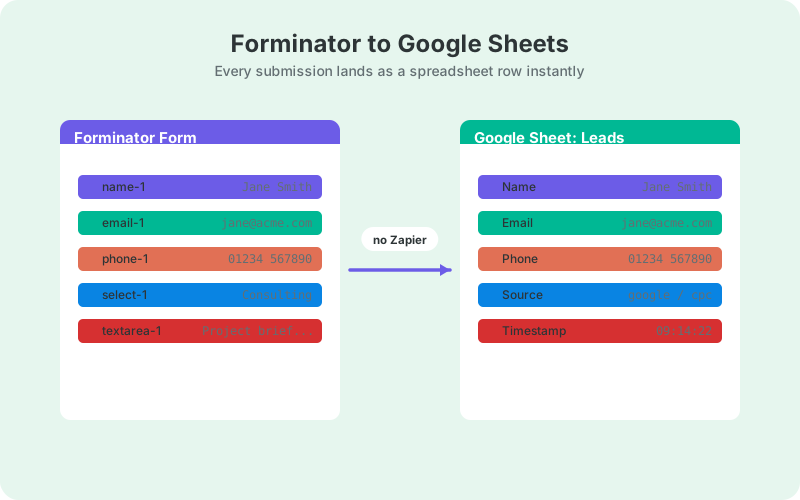
Forminator identifies fields with IDs like name-1, email-1, and phone-1, and those IDs are what you map to sheet columns. An empty map auto-syncs everything; an explicit map lets you rename columns, reorder them, and drop fields - honeypots, internal flags - that never belong in the lead sheet.
You can find a field's ID in the Forminator form builder, where each field shows it in its settings. Map keys must match those IDs exactly, so copy rather than retype. If a column comes through blank, an ID mismatch is the first thing to check, long before you suspect the receiver.
Beyond the raw fields, each row can carry useful metadata: a timestamp, the page URL the form was submitted from, and UTM parameters such as _utm_source appended automatically. That context turns a plain lead list into attribution data - you can see which campaign or landing page produced each row without adding hidden fields to the form.
One stability rule: once the sheet is live, avoid renaming fields casually. A changed ID means new rows write to a new column while your history stays under the old header.
Which route should you choose?
Choose the native connector if you are comfortable in the Google Cloud console and want everything managed inside Forminator. Choose the direct plugin route if you want a one-minute, one-click setup with no Google Cloud project or API keys - or its classic Apps Script option if you deliberately want an OAuth-free, fully self-hosted path - and whenever you are standardizing several form plugins on one delivery pipeline. Use Zapier only when Sheets is one stop in a larger multi-app workflow.
The standardization point matters most for agencies and multi-site owners. If your sites mix Forminator with other form tools, one plugin with one receiver pattern beats configuring each vendor's own connector separately - the same setup covers Ninja Forms and Fluent Forms with identical steps.
Cost behavior differs too. Both no-Zapier routes are free at any volume; Zapier's task-based pricing means a good month for leads is a bigger bill. The table below compares the three routes side by side.
Advanced: routing and multi-form setups
One receiver can serve many sync rules, so a single deployment covers your whole site. Send the contact form to one tab, the quote form to another, and a partner-signup form to a separate spreadsheet entirely - each form gets its own rule pointing at its own destination.
You can also split a single form's rows by field value with conditional routing. A budget dropdown, a service selector, or a country field can each decide where a row lands, which keeps one master sheet from becoming an unsortable dump. See conditional routing for WordPress forms for worked examples of the rule logic.
Multi-step Forminator forms need no special handling. Fields keep their IDs across steps, so the map does not care how many pages the form has - the completed submission arrives as one row with every field present.
Troubleshooting the Forminator to Sheets pipeline
Most failures are one of three things: a wrong field-map key, a stale receiver URL on the classic Apps Script route, or testing in a preview context that never fires a real submission. Check those three in order and you will resolve the large majority of "no row arrived" reports.
Blank columns mean the map key does not match the Forminator field ID - open the builder and copy the ID exactly, hyphen and number included. No rows at all on the classic route usually means the web app URL is stale; redeploying an Apps Script can create a new deployment URL, so confirm WordPress holds the current one.
If a submission fails in transit, it is not lost. Failed deliveries enter the retry queue with exponential backoff, and the delivery log shows each attempt with its result. After fixing the underlying issue, hit "Retry Now" and the queued rows flow through.
Still stuck? Send a test submission with distinctive values ("TEST-MARCH" in the name field) so you can spot exactly which fields arrive and which go missing - it narrows a vague failure to a specific key in one pass.
Next steps
You now have two clear routes and, if you followed the walkthrough, a working pipeline: Forminator submissions landing in Google Sheets in real time, mapped to clean columns, with retries covering transient failures. The native connector remains a fine choice when you want everything inside Forminator's own settings and do not mind the Google Cloud setup.
The Forminator integration page has the condensed checklist for the direct route. From here, the natural upgrades are conditional routing for multi-form sites, UTM columns for attribution, and a Status column that quietly turns the sheet into the lightweight CRM your team will actually use.
| Forminator native connector | Zapier | SheetLink direct | |
|---|---|---|---|
| Google Cloud project required | Yes | No | No |
| OAuth / API credentials | You create them | Handled by Zapier | One click (or none via Apps Script) |
| Typical setup time | Under an hour | 15-30 minutes | About a minute |
| Monthly cost | Free | Paid plans | Free |
| Third party in data path | None | Yes - Zapier servers | None |
Frequently Asked Questions
Does Forminator have a native Google Sheets integration?
Yes. Forminator includes its own Google Sheets connector, but configuring it requires a Google Cloud project, the Sheets API, an OAuth consent screen, and credentials. It works well once set up; the direct plugin route gets the same result in about a minute with a one-click Google connect, or via the classic Apps Script webhook.
Do I need a Google Cloud project to send Forminator entries to Sheets?
Only if you use Forminator's native connector. The direct plugin needs no Cloud project or API keys either way: the one-click Google connect runs on SheetLink's own app with a drive.file scope limited to the sheets you pick, and the classic Apps Script webhook runs as you in your own account with no OAuth at all.
Is the Forminator to Google Sheets integration free?
Yes, on both no-Zapier routes. Forminator's native connector is part of the plugin, and Forminator support in SheetLink Forms ships in the free core alongside 11 other major form plugins. Real-time delivery, field mapping, and the retry queue are all included without payment.
How fast do Forminator submissions appear in the sheet?
In real time - typically within a second or two of the visitor submitting, because the row travels directly from your server to Google. If a delivery fails, the retry queue re-sends it automatically with exponential backoff, so brief outages delay rows rather than lose them.
Why are some Forminator fields blank in my Google Sheet?
Almost always a key mismatch: your field map entry does not match the Forminator field ID, such as name-1 or email-1. Copy the ID exactly from the field's settings in the builder, or clear the map so every field auto-syncs, then re-test with a live submission.
Can I send different Forminator forms to different tabs?
Yes. Create one sync rule per form and point each at its own spreadsheet or tab. Conditional routing goes further and splits a single form's rows by field value, so a service dropdown can send each inquiry type to the tab its team actually watches.
Does this work with multi-step Forminator forms?
Yes. Fields keep their IDs across steps, so a multi-step form maps exactly like a single-page one. The completed submission arrives as one row containing every field, and an empty field map still auto-syncs everything regardless of how many pages the form spans.
Are UTM parameters saved with each Forminator submission?
Yes. UTM parameters and click IDs such as _utm_source and _gclid can be appended to each row automatically, along with a timestamp and the submitting page URL. That gives you campaign attribution in the sheet without adding hidden fields to the form itself.
More Tutorial guides
Forminator to Sheets in about a minute, free
Skip the Google Cloud console and the Zapier bill - SheetLink Forms posts Forminator entries straight to your sheet in real time.