
Google Ads Offline Conversion Tracking for WordPress Forms
Most WordPress sites that run Google Ads can only track form fills - not sales. That’s a problem for Smart Bidding, which optimises against the conversions you upload, not the leads you collect. Offline conversion tracking closes the loop: when a deal actually closes, you upload the click ID, the deal value, and the time of conversion back to Google Ads, and bidding starts optimising for revenue instead of form-fill rate. SheetLink does this through Google Sheets, which most agencies already use as a lightweight CRM. No HubSpot, no Salesforce, no per-submission Zapier fee.
How it works in one sentence
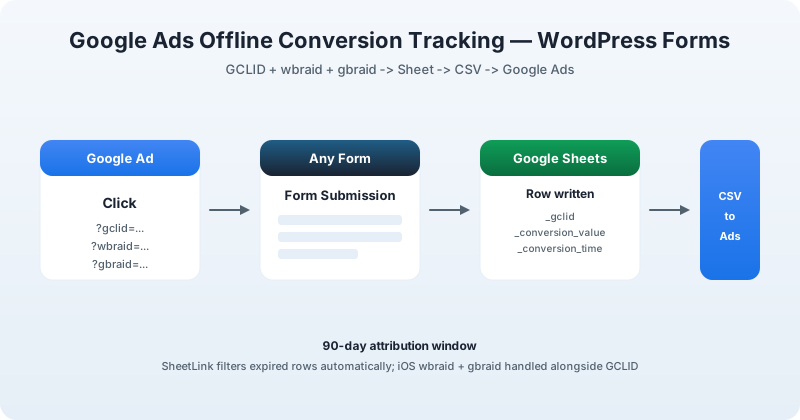
Visitor clicks a Google Ad → lands with a GCLID (or wbraid/gbraid for iOS) in the URL → fills out your form → SheetLink captures the click ID alongside the form fields and writes a row to your Sheet → you fill in the deal outcome when it closes → SheetLink exports the rows as a CSV you upload to Google Ads.
Pick your form plugin
Each guide below is the same end-to-end setup, written specifically for that plugin’s submission flow and quirks:
- Elementor Pro
- Contact Form 7
- Gravity Forms
- WPForms
- Fluent Forms
- Formidable Forms
- Ninja Forms
- Forminator
- Everest Forms
- Beaver Builder
- Divi
- WS Form
Why this matters
Smart Bidding learns from the conversions Google Ads actually sees. If the only thing you upload is “form submitted”, it optimises for high-volume, low-quality leads - because that is, mathematically, what you told it to do. Upload the closed-deal value instead and bidding starts steering spend toward the campaigns, audiences, and times of day that produce paying customers. Offline conversion tracking is one of the highest-leverage Google Ads improvements you can make on a lead-gen site, and it does not require a CRM if you already use a spreadsheet.
Ready to try it?
SheetLink Forms is free on WordPress.org. The Google Ads conversion feature is included at no extra charge.