
WordPress Multisite Forms: Centralizing All Submissions into One Google Sheet
Twenty subsites. Forty forms. One sheet. The patterns and pitfalls of multisite-wide form aggregation in Google Sheets.
In This Guide
- When Multisite Form Aggregation Pays Off
- The Two Architectures
- The Critical "Source" Columns
- Permissions and Access Control
- Network Install: The Mechanics
- Unique IDs Across Subsites
- Volume and Scaling Considerations
- Different Form Builders on Different Subsites
- Beyond Aggregation: Network-Wide Workflows
- Recap
- Frequently Asked Questions
When Multisite Form Aggregation Pays Off
WordPress Multisite networks come in three common shapes: a university with hundreds of department subsites, an agency hosting dozens of client sites, and a multi-brand company running each brand as its own subsite.
Each shape has the same data problem: form submissions are scattered across subsites, and the people who need to see them all (a central marketing team, a customer service queue, a network admin) have no consolidated view. WordPress Multisite's native admin only shows one site at a time.
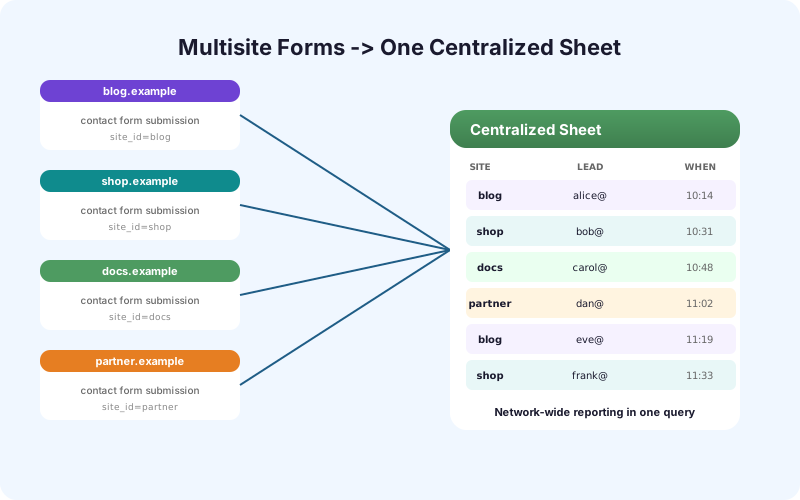
A centralized Google Sheet solves this. Every submission across the network lands in one place, tagged with its source subsite, available to anyone with sheet access regardless of subsite permissions.
The Two Architectures
There are two real ways to aggregate.
Architecture A: per-subsite plugin, shared destination. Each subsite has its own SheetLink Forms install with the same destination URL. Simple to set up, easy to bypass per-subsite (admins can change settings on their own site), no central enforcement.
Architecture B: network-activated plugin, network-controlled settings. SheetLink Forms is network-activated and the destination URL is set in network admin. Subsite admins can't change it. Stronger enforcement, more control, but requires network-admin coordination.
Most universities and agencies pick Architecture B for control. Smaller multi-brand setups often pick A because it's simpler. SheetLink Forms supports both.
The Critical "Source" Columns
A consolidated sheet without per-row source attribution is unusable. You need at minimum three columns: Site ID, Site URL, and Form ID.
Site ID is the WordPress Multisite blog ID, a number. Useful for joining against other multisite-aware data.
Site URL is the human-friendly URL like `https://english.uni.edu` or `https://brand-a.example.com`. Anyone scanning the sheet can immediately see where a submission came from.
Form ID is the form's ID within its subsite. Combined with Site ID, this uniquely identifies the form across the network.
With those three columns, your team can filter by subsite, group by form, or build pivot tables that show submission volume per site per month.
Permissions and Access Control
A consolidated sheet has a permissions tension. The data spans many subsites, but those subsites may have different privacy expectations. A central marketing team should not necessarily see HR form submissions from an internal HR subsite.
The practical pattern is one master sheet plus per-subsite or per-team replica sheets. The master is locked down to network admins and a small audit team. Replicas are shared with the relevant subsite owners and contain only their own data, filtered via QUERY or pulled in via the Multi-Node Routing add-on.
For regulated workflows, this is the only architecture that's defensible: the master is the audit trail, replicas are the operational tools, and the boundary between the two is enforced by Sheets sharing rules, not by trust.
Network Install: The Mechanics
Installing SheetLink Forms on a Multisite network takes one of two paths.
Network-activated: Upload the plugin to the network and click Network Activate. Every subsite gets the plugin. Settings live in network admin only - subsite admins see "this is managed at the network level." Use this for enforcement.
Per-site activated: Upload the plugin to the network but don't Network Activate. Subsite admins choose to activate per-site and set their own destination. Use this when subsites should manage their own integrations but you still want a single license file.
Licensing is per-network for both paths - one purchase covers unlimited subsites. This matters for agencies and universities where the per-subsite cost of typical SaaS would be prohibitive.
Unique IDs Across Subsites
Subsite-local IDs (entry ID, form ID, post ID) collide across the network. Two subsites both have an "entry 1" because each subsite has its own database tables.
For a consolidated sheet, you need a network-unique ID. The standard pattern is a UUID per submission, generated at the WordPress level and written as the first column of every row. A UUID is collision-free across an unlimited number of subsites.
If you need to relate sheet rows back to specific subsite entries, also include `Site ID + Entry ID` as a composite reference. The UUID is for sheet-side joins; the composite is for "go look this up in WordPress."
Volume and Scaling Considerations
A small network of 5-10 subsites typically generates a few hundred submissions per day to the consolidated sheet. Sheets handles that easily.
A university network of 200 subsites might generate 10,000 submissions per day. That's pushing Sheets - cells, lookups, and conditional formatting all slow down past 100,000 rows. Plan for partition by month or year (one tab per month, archived to a separate spreadsheet annually).
For very large networks, the right destination might not be Sheets at all - it might be BigQuery or a Postgres database with Sheets as a reporting layer reading the last 30 days. Don't force-fit Sheets when the volume actually wants a database.
Different Form Builders on Different Subsites
Multisite networks often have heterogeneous form builders. The English department uses Gravity Forms, the Math department uses WPForms, the central admissions office uses Formidable.
SheetLink Forms supports all major builders and writes to the same destination from any of them. The Form Builder column on each row identifies which plugin produced the submission, so a consolidated sheet can mix Gravity, WPForms, Formidable, Fluent, and Ninja entries cleanly.
The field mapping happens per-form-per-subsite in the plugin, so heterogeneous data lands in a consistent column structure on the sheet.
Beyond Aggregation: Network-Wide Workflows
Once every subsite's submissions land in one sheet, you can drive network-wide workflows that were previously impossible.
- Score every lead with AI regardless of subsite (AI Lead Scoring add-on). - Fan out every contact submission to a single CRM, with the source subsite as a tag (Multi-CRM Routing). - Build network-wide marketing dashboards that pivot by subsite, source, or campaign.
These unlock the value of running a network in the first place - shared infrastructure plus shared data, not 200 disconnected silos.
Recap
A WordPress Multisite network without consolidated form data is a network paying coordination costs without getting coordination benefits. The consolidation pattern is well-trodden: a single Google Sheet destination, network-activated plugin, per-row Site ID/URL/Form ID columns, UUIDs for joins, and master/replica access control.
Get that in place and your network admins, central marketing team, and customer service queue all become more effective at the same time. Skip it and you're running 20 disconnected websites that happen to share a header.
For agencies specifically, the multi-site licensing model is the unlock - a per-SaaS-account pricing model on Zapier or Make produces line items that compound with every new client. A one-time multi-site plugin license collapses that into a fixed cost. Network-wide audit, white-label admin, and a clean upgrade path from per-subsite billing make this the default architecture for agency-managed multisite networks.
Frequently Asked Questions
Does SheetLink Forms work on WordPress Multisite?
Yes. The plugin supports both network-activated mode (single network-controlled destination) and per-site activated mode (subsite admins manage their own destinations). One license covers unlimited subsites.
How do I tell which subsite a row in the sheet came from?
Every row includes Site ID, Site URL, and Form ID columns. Filter by Site URL for the human-friendly view, or Site ID for joins against other multisite data.
Can different subsites have different form builders?
Yes. SheetLink Forms supports Gravity, WPForms, Formidable, Fluent, Ninja, Elementor, Contact Form 7, and others. A consolidated sheet can mix submissions from multiple form builders cleanly, with a Form Builder column identifying the source.
What about subsite-level privacy?
Use a master/replica pattern. The master sheet has all submissions and is locked to network admins. Replica sheets are filtered per subsite or per team and shared with the relevant audiences. SheetLink Forms' Multi-Node Routing add-on handles the replicas.
How are entry ID conflicts handled across subsites?
The plugin generates a UUID for every submission and writes it as the first column. Subsite-local entry IDs are also written, paired with Site ID for resolution back to the original submission.
Will this scale to a 200-subsite university network?
For typical volumes (10,000 submissions per day), yes - with partitioning. Use one tab per month and archive annually. For very high volumes, consider BigQuery or Postgres as the primary destination with Sheets as a 30-day reporting layer.
Does network activation prevent subsite admins from disabling it?
Yes. When the plugin is network-activated and settings live in network admin, subsite admins see a managed-at-network-level notice and cannot change destinations or field mappings.
Is licensing per-subsite or per-network?
Per-network. One SheetLink Forms license covers unlimited subsites. This makes it cost-effective for agencies, universities, and multi-brand sites where SaaS per-subsite pricing would be prohibitive.
Can I white-label this for agency clients?
Yes. SheetLink Forms' White-Label add-on rebrands the plugin admin with your agency name and logo. Clients see your brand, not SheetLink Forms - useful for agencies that want to present integrations as part of their service offering.
More Automation guides
Consolidate Your Multisite Forms Now
Network activation, per-row source tracking, master/replica access control. One license, unlimited subsites.