
Multi-CRM Routing: Route Forms to Every CRM
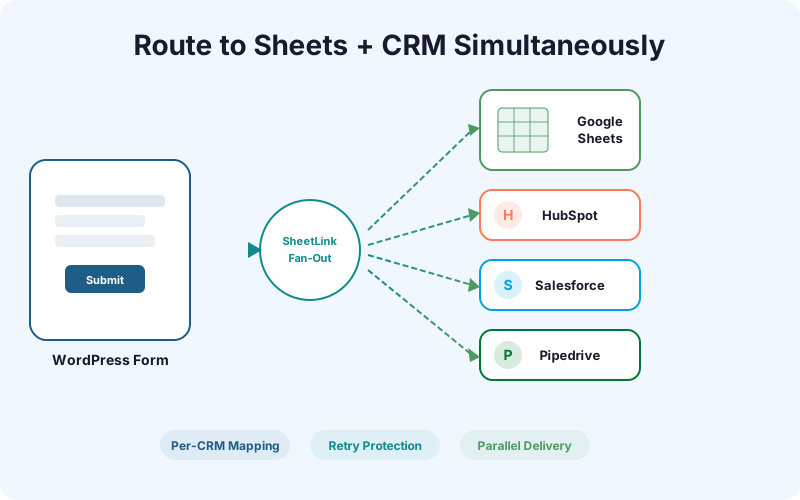
Send every WordPress form submission to Google Sheets and your CRM or ESP at the same time. HubSpot, Salesforce, Pipedrive, Zoho, Mailchimp, ActiveCampaign - all from one plugin, with per-destination field mapping.
Ships in SheetLink Pro, a separate plugin installed next to the free SheetLink Forms plugin. The free plugin contains no locked features.
Key Benefits
No Duplicate Data Entry
Every submission lands in Google Sheets and your CRM simultaneously. No more copying and pasting contacts from spreadsheets into Salesforce or manually importing CSV files into HubSpot.
Instant CRM Sync
Leads appear in your CRM within seconds of form submission - not minutes or hours. Your sales team can follow up while the prospect is still on your site.
Multi-CRM Support
Route to HubSpot, Salesforce, Pipedrive, Zoho, Mailchimp, and ActiveCampaign from a single WordPress installation. Different forms can target different destinations, or the same form can fan out to all of them.
Per-CRM Field Mapping
Map form fields independently for each CRM destination. Your Salesforce field names do not need to match your HubSpot properties - SheetLink handles the translation.
Retry Protection
If a CRM endpoint is temporarily unavailable, SheetLink queues the delivery and retries with exponential backoff. No submissions are lost during CRM downtime.
How It Works
When a visitor submits a form on your WordPress site, SheetLink Forms captures the data and metadata as usual. With Multi-CRM Routing enabled, the plugin simultaneously sends the mapped fields to each configured CRM destination using their native APIs. Google Sheets still receives the full row as before - the CRM delivery happens in parallel, not instead of Sheets. Each CRM connection has its own field mapping, authentication credentials, and retry queue. If HubSpot is down but Salesforce is up, the Salesforce delivery succeeds immediately while the HubSpot delivery enters the retry queue. You can monitor delivery status for each destination independently in the SheetLink delivery log.
Real-World Use Cases
Sales Team on Salesforce, Marketing on Sheets
Your sales reps live in Salesforce. Your marketing team tracks lead volume in Google Sheets. With Multi-CRM Routing, both teams get the data they need in real time without either team having to change their workflow.
Agency Managing Client CRMs
You run a digital agency where Client A uses HubSpot, Client B uses Pipedrive, and Client C uses Zoho. Multi-CRM Routing lets you configure each client site to route to their specific CRM, all using the same SheetLink plugin.
Multi-Department Lead Routing
Marketing captures leads in HubSpot for nurturing, sales qualifies them in Salesforce, and operations tracks everything in Google Sheets. One form submission feeds three systems without middleware.
Feature Comparison
| Feature | Without Multi-CRM Routing | With Multi-CRM Routing |
|---|---|---|
| CRM data entry | Manual copy from Sheets | Automatic, real-time |
| Sync delay | Minutes to hours | Under 3 seconds |
| Multiple CRMs | Separate Zapier zaps per CRM | One plugin, all CRMs |
| Field mapping | Generic or manual | Per-CRM custom mapping |
| Monthly middleware cost | $20-100+ (Zapier/Make) | $0 middleware fees |
| Failure handling | Silent data loss | Retry queue with logging |
Frequently Asked Questions
Which CRMs does Multi-CRM Routing support?
Multi-CRM Routing supports HubSpot, Salesforce, Pipedrive, Zoho CRM, Mailchimp, and ActiveCampaign. Each destination uses its native API for reliable delivery. Mailchimp uses the Lists API with double-opt-in by default; ActiveCampaign uses the contact/sync endpoint so duplicate emails update existing contacts.
Can I route different forms to different CRMs?
Yes. Each form can have its own set of CRM destinations. Your contact form can route to HubSpot while your demo request form routes to Salesforce - or both forms can go to both CRMs.
Does Multi-CRM Routing replace Google Sheets delivery?
No. CRM delivery happens in parallel with Google Sheets delivery. Your spreadsheet still receives every submission as before. Multi-CRM Routing adds destinations - it does not remove them.
What happens if my CRM is temporarily down?
SheetLink queues failed deliveries and retries automatically with exponential backoff. You can see pending retries and delivery status in the SheetLink delivery log within WordPress.
Do I need Zapier or Make for CRM routing?
No. Multi-CRM Routing connects directly to CRM APIs without any middleware. This eliminates per-task fees, reduces latency, and removes a point of failure from your data pipeline.
Route forms to your CRM in seconds
Stop copying leads from spreadsheets. Multi-CRM Routing delivers to Sheets and your CRM simultaneously.