
AI Lead Scoring: Prioritize Every Lead Instantly
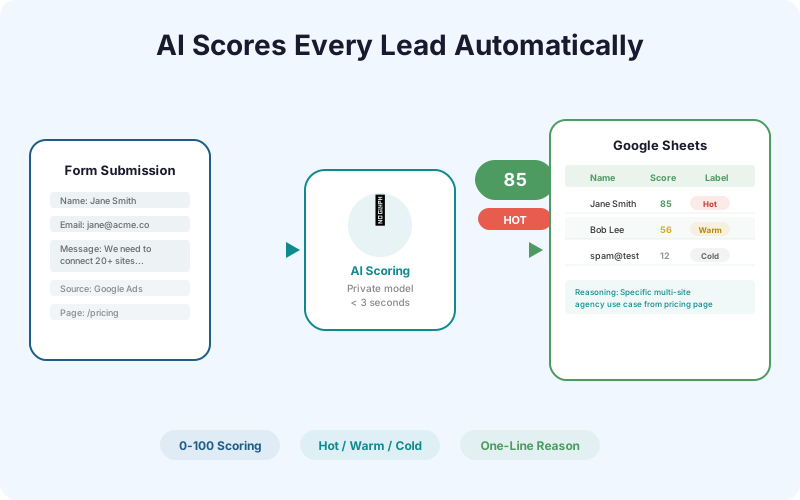
Every form submission scored 0-100 automatically. Hot, warm, or cold - with a one-line reason why. Your team knows which leads to call first before opening the spreadsheet.
Hosted service - works with the free SheetLink Forms plugin once your licence is active. No extra plugin needed.
Key Benefits
Prioritize Leads Instantly
No more reading through every submission to find the good ones. AI scoring surfaces high-intent leads at the top of your sheet so your team calls the best prospects first.
No Manual Review Required
The AI evaluates message content, traffic source, form page context, and contact completeness automatically. Your team focuses on selling, not sorting.
Works with Any Form
AI Lead Scoring works with all 12 core form integrations (and the 5 additional ones from the Integrations Bundle). Any form that SheetLink captures can be scored.
Scores Appear in Sheets
The 0-100 score, hot/warm/cold label, and one-line reasoning are added as columns in your Google Sheet. Sort by score, filter by label, and use conditional formatting to highlight hot leads.
How It Works
When a form submission arrives, SheetLink sends the form data and enrichment metadata (UTM parameters, page URL, referrer, traffic source) to the AI scoring engine. The model analyzes message specificity, purchase intent signals, contact completeness, and traffic source quality to produce a 0-100 score. Scores above 75 are labeled Hot, 40-74 are Warm, and below 40 are Cold. The AI also generates a one-line explanation for each score (e.g., 'Specific multi-site use case with budget mention from pricing page'). The score, label, and reasoning are appended as additional columns in your Google Sheet alongside the original form data. Scoring happens in under 3 seconds, so by the time you open the sheet, every submission is already scored.
Real-World Use Cases
Dental Office Triaging Inquiries
A dental practice receives 20-30 contact form submissions per day. AI Lead Scoring helps the receptionist focus on high-intent inquiries (specific procedure questions, insurance mentions) over generic 'just looking' messages.
SaaS Company Qualifying Demo Requests
A B2B SaaS company gets demo requests through their website. AI scoring identifies enterprise prospects (specific use case, team size, budget signals) from tire-kickers, letting the sales team prioritize callbacks.
Real Estate Agent Scoring Buyer Leads
A real estate agent's website captures property inquiry forms. Leads mentioning specific neighborhoods, price ranges, and timelines score higher than vague 'send me listings' requests.
Feature Comparison
| Capability | Without AI Scoring | With AI Lead Scoring |
|---|---|---|
| Lead prioritization | Manual review of every submission | Automatic 0-100 scoring |
| Time to first call | Depends on review speed | Instant - call highest scores first |
| Scoring consistency | Varies by reviewer | Consistent AI evaluation |
| Score visibility | N/A | Score column in Google Sheets |
| Reasoning | N/A | One-line explanation per lead |
| Spam detection | Manual identification | Low scores flag low-quality entries |
Frequently Asked Questions
Where does the AI processing happen?
Submission content is processed by OpenAI's models via the OpenRouter API gateway (routing pinned to OpenAI), with Google's Gemini API as an automatic failover - all three are listed as sub-processors in our privacy policy, and none of them train on your data. With BYOK on AI Analytics, processing runs on your own OpenAI or Gemini key instead. The core delivery pipeline never involves an AI provider.
How accurate is the AI scoring?
The AI evaluates multiple signals (message content, traffic source, page context, contact completeness) to produce scores. High-intent submissions with specific details consistently score higher than vague or incomplete entries. The model improves with each SheetLink platform update.
Can I customize the score thresholds?
Yes. The default thresholds are Hot (75-100), Warm (40-74), and Cold (0-39). You can adjust these in the add-on settings to match your business's qualification criteria.
Does AI scoring slow down form delivery?
Scoring adds less than 3 seconds to the delivery pipeline. The score is calculated in parallel with the Sheets delivery, so your form data arrives in the sheet with the score already populated.
What does the one-line reasoning look like?
Examples: 'Specific multi-site agency use case from pricing page via Google Ads' (Score: 92), 'Generic inquiry with email-only contact from social traffic' (Score: 24). The reasoning helps your team understand why a lead scored the way it did.
Is my form data sent to a third-party AI provider?
No. SheetLink uses a private AI model hosted on SheetLinkWP infrastructure. Your form data is not sent to OpenAI, Google, or any third-party AI service.
Score every lead automatically
AI evaluates intent, source, and context to score 0-100. Your team calls the best leads first.