
WordPress Quiz & Assessment Forms: Scoring, Segmenting & Following Up via Sheets
Quiz funnels work because they segment leads. The work isn't building the quiz - it's building the follow-up engine that scores, segments, and routes the responses.
Why Quizzes Convert
A standard contact form asks for a name, an email, and a message. Conversion rate: 1-3% of page visitors.
A quiz asks 5-10 questions and gives the user a personalized result. Conversion rate: 10-30% of page visitors. The reason is engagement: people who answer questions are invested by the time they hit the email-capture step.
But the conversion is not the goal. The goal is segmentation. A user who completes a "Which marketing channel should you focus on?" quiz tells you exactly what content they're ready to consume next. A "What's your business stage?" quiz tells you whether to send the early-stage nurture or the growth-stage offer.
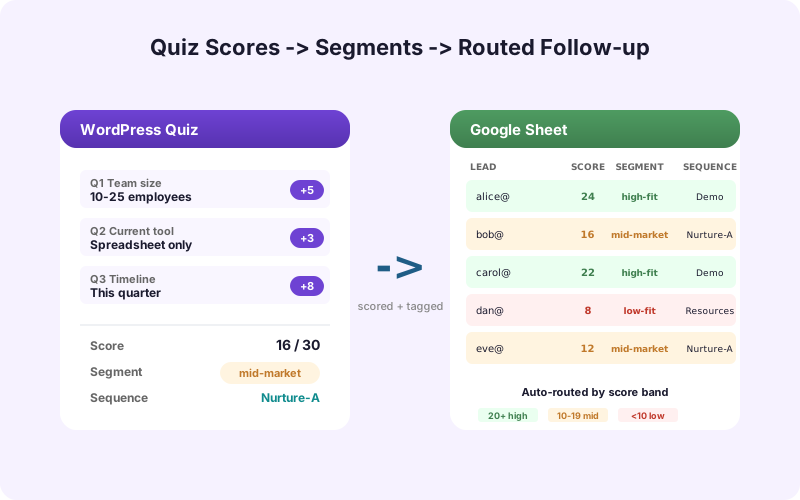
The sheet is where this segmentation lives. Every quiz submission writes the answers, the score, the segment, and triggers the right follow-up.
Quiz Builder Options
Three categories of WordPress quiz tools.
Dedicated quiz plugins: Thrive Quiz Builder, Quiz Maker, FluentForms' built-in quiz mode. Strong UX for users, good logic and branching support.
SaaS quiz tools embedded in WordPress: Interact, Outgrow, Typeform. Polished UX, strong analytics, monthly fees. Submit responses to webhooks that flow into your sheet.
Form builders with conditional logic: Gravity Forms, Formidable, Fluent Forms can all act as quiz builders if you wire up scoring fields. Cheaper but more setup work.
For most teams, FluentForms or Gravity Forms with a scoring field is the right choice - you're likely already using them, and the data flows cleanly to Sheets via SheetLink Forms.
Building the Score
A quiz score is a per-answer point total. The simplest version is 1 point per "correct" answer; the more useful version is weighted scoring per category.
Example: a "What's your business growth stage?" quiz has 10 questions. Each question scores into one of three categories: Early, Growth, or Scale. The user's segment is whichever category has the highest total score.
In Gravity Forms or Formidable, this is done with calculation fields. The plugin computes the score on submission and writes it to a scoring field that flows to your sheet.
In the sheet, you have columns for Score Early, Score Growth, Score Scale, and a derived Segment column = MAX of the three. Now you can pivot by Segment to see how your audience splits.
Segment-Driven Routing
The Segment column is what drives every downstream action.
Early-stage leads go into a "Foundations" email sequence. Growth-stage leads see a different sequence about scaling. Scale-stage leads get a sales-qualified flag and a calendar booking link in their result page.
The routing happens in two places. Inside the quiz, the result page is dynamic per segment - the user sees content matched to their segment. Outside the quiz, the segment writes to your email tool (Mailchimp, ConvertKit, Klaviyo) as a tag, which triggers the right sequence.
The Sheet is the source of truth. Both the quiz result page and the email tool read from it (or get pushed to from it). When the segmentation logic changes, you change it in one place.
The Follow-up Engine
A typical quiz funnel follow-up has three phases.
Immediate (within seconds): Result page shown, lead written to Sheets, email tag applied, welcome email triggered.
Short-term (1-7 days): Segment-specific nurture sequence runs. Each email links to content matched to the segment.
Long-term (week 2+): Re-engagement and conversion. The lead is invited to book a call, buy a product, or join a webinar - timed to where they should be in the buying cycle for their segment.
The sheet tracks each touchpoint. Add columns for Welcome Sent, Nurture Day 3, Nurture Day 7, Conversion Event. When the email tool reports back, those columns get updated. Now you can measure: which segment has the highest conversion, which nurture email has the highest CTR, which segment's lead quality is best.
Lead Quality Tracking
A quiz with a 25% conversion rate sounds great. But if 80% of those quiz-takers are wrong-fit leads who chose entertaining answers, your sales team is drowning.
Lead quality tracking solves this. Add a Quality column. Sales fills it in (Qualified, Disqualified, Unresponsive) over time. Now you can compute Quality Conversion = qualified leads / quiz-takers per segment.
You'll often find one segment dramatically outperforms the others. Double-down on the messaging that brings that segment in. Cut the messaging that brings in the lower-quality segments.
AI Lead Scoring can pre-fill the Quality column based on the quiz answers and any other data the lead provided. Useful for teams running high-volume quizzes where manual qualification can't keep up.
How Many Segments Should You Have?
Three to five segments is the sweet spot. Less than three and the quiz isn't segmenting meaningfully. More than seven and you can't maintain distinct content tracks for each.
The segments should map to real differences in what the user needs. "Early stage" and "Growth stage" are real differences if your content for them is genuinely different. "Likes blue" and "Likes green" are not real differences if the follow-up is the same anyway.
Design the follow-up content tracks before you write the quiz. If you can't articulate what each segment will receive that's different from the others, the segments don't exist yet.
Quiz Analytics in Sheets
Once your quiz is live and feeding Sheets, you have answers to questions most teams don't think to ask.
- Drop-off per question: which question is where users abandon? Add a "Reached Question" column and pivot. - Time per question: shows where users hesitate (a sign of confusing copy). - Most-common wrong answer: per question, which answer was most popular among low-quality leads vs. high-quality leads. - Best-converting result page: which segment's users convert best after the quiz.
These insights drive iteration. Over a quarter, your quiz gets sharper - shorter, better-segmented, higher-converting - because you have the data to drive the changes.
Beyond Quizzes: Assessments and Calculators
The same architecture works for assessments and calculators. A "Mortgage affordability calculator" generates a per-user output (max loan amount). A "Cybersecurity risk assessment" generates a per-user score and a list of recommended actions.
In each case, the output is the email-capture trigger and the user-specific value. The sheet logs the inputs, the output, and the segment. The follow-up uses the output as the personalization variable.
For B2B teams, this is one of the highest-converting forms of content - users who complete an assessment have signaled buying intent in a way generic content downloads don't match.
Recap
A WordPress quiz isn't a form - it's a segmentation engine. The quiz earns the email; the segment drives the follow-up; the sheet ties everything together.
Keep segments to 3-5. Track lead quality alongside form-fill rate. Use the sheet for both real-time routing (to email tools, to result pages) and analysis (drop-off, conversion, segment performance). Iterate from there. The teams that nail this turn quizzes from "marketing gimmick" into the highest-conversion content type they have.
One additional pattern worth borrowing: progressive quizzes. Instead of one long 10-question quiz, run a 3-question micro-quiz that segments coarsely, then deepen the segment with 3-5 more questions in a follow-up email. Higher initial completion rate, deeper segmentation for the engaged users, and the data still flows to the same sheet structure. The cost is operational complexity (two quizzes instead of one); the benefit is dramatically higher data quality on the customers who matter most.
Frequently Asked Questions
What's the best WordPress plugin for building quizzes?
Thrive Quiz Builder for dedicated quiz UX. Gravity Forms, Formidable, or Fluent Forms with scoring fields if you're already using them. Interact and Outgrow are SaaS options with stronger analytics but monthly fees.
How do I score quiz answers?
Assign points per answer to category buckets (e.g., Early, Growth, Scale). Use the form builder's calculation fields to compute totals per category. The user's segment is whichever category scores highest.
How many segments should I have?
Three to five. Less than three and the quiz isn't meaningfully segmenting. More than seven and you can't maintain distinct content tracks for each segment.
How do I trigger different email sequences per segment?
Apply a tag to the lead in your email tool based on the Segment column from your sheet. Each tag triggers a different sequence in Mailchimp, ConvertKit, Klaviyo, or whichever ESP you use.
Should I track lead quality in addition to conversion rate?
Yes. A quiz with high conversion but low lead quality is a problem. Add a Quality column that sales fills in over time. Compute Quality Conversion = qualified leads / quiz-takers per segment.
Can AI lead scoring work with quiz responses?
Yes. SheetLink Forms' AI Lead Scoring add-on can score quiz responses immediately, giving you a quality estimate before sales has a chance to qualify manually.
How do I see which questions have the highest drop-off?
Track a "Reached Question" column for each user (the last question they answered before submitting or abandoning). Pivot the column to see drop-off per question.
What about assessments and calculators?
Same architecture. The output (a calculated value, a recommended action list) is the email-capture trigger. The sheet logs inputs and outputs. The follow-up uses the output as the personalization variable.
Should I run one long quiz or multiple shorter ones?
Progressive is often better. A 3-question micro-quiz segments coarsely with high completion. A follow-up email with 3-5 deeper questions segments the engaged users more precisely. Both feed the same sheet structure but produce higher-quality data on the customers who matter.
More Lead Management guides
Build a Quiz Funnel That Actually Segments
Score, segment, and route quiz leads through Google Sheets. SheetLink Forms is the engine.