
How to A/B Test WordPress Forms and Measure Results in Google Sheets
Form A/B tests fail when teams can't see the data. Here's how to run a clean test and analyze it in Sheets, without spending money on a CRO platform.
Why Form A/B Tests Are Worth Running
Most WordPress sites have one form on their contact page that has been the same for years. The headline, the field count, the CTA button copy - all unchanged since the site launched.
Form A/B testing is one of the highest-leverage things a marketing team can do. Field count alone can swing conversion rates by 30-50%. Headline copy shifts perceived value. CTA color and copy moves form-fill rates measurably.
The blocker isn't the test - it's the measurement. Teams run a test, can't agree on whether it won, and stop testing. A clean Sheets-based measurement system fixes that.
Plan Before You Test
Three decisions need to happen before you write a single variant.
What metric matters most? Form-fill rate (conversions / visits) is the surface metric. Lead quality (qualified leads / form-fills) is what actually matters. Both should be tracked but the second is what wins or loses a test.
What's the minimum detectable effect? If your current conversion rate is 3% and you want to detect a 10% relative lift (3% to 3.3%), you need ~6,000 visits per variant for statistical significance. Many teams run tests with too little traffic and call coin flips "wins."
How long will the test run? A test should run at least one full business cycle (typically a week or two). Running a test only on weekdays misses weekend behavior; running for two days misses the day-of-week pattern.
Building the Variants
You need at least two form variants - the control (A) and the variant (B). Most teams test more than one thing at once, which contaminates results. Test one change at a time.
In WordPress, the cleanest way is to duplicate the form in your form builder, modify the variant, and route 50% of visitors to each. Page-level A/B testing tools like Google Optimize (deprecated, but Optimize alternatives exist) handle the splitting. Or you can do it in code: a randomization assigns each visitor to A or B and stores the assignment in a cookie.
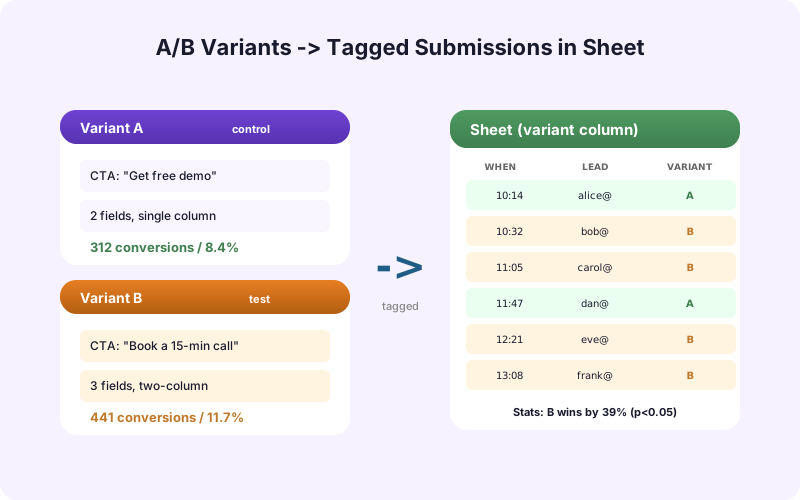
Whatever you use, every form submission must include a Variant column with value A or B. Without it, you can't measure.
Tracking the Right Variables
Your Google Sheet for A/B test data needs at minimum these columns.
- Submission ID (UUID). - Variant (A or B). - Submitted At (timestamp). - Page URL where the form was submitted. - UTM source/medium/campaign (from the visitor's entry). - Form Field Values (the data they actually entered). - Lead Quality (filled in later by sales).
The Lead Quality column is the difference between a casual test and a real one. Without it, you can only measure form-fill rate, which is necessary but not sufficient.
Running the Analysis
Once your test has run for the full duration, do the math in Sheets.
Conversion rate per variant: COUNTIF(Variant=A) / Visits to Variant A. Same for B.
Statistical significance: Use a chi-squared test or two-proportion z-test. Sheets has the formulas. Or use a free online calculator and paste in the numbers. You're looking for p < 0.05 (95% confidence) at minimum.
Lead quality rate per variant: COUNTIF(Variant=A AND LeadQuality=Qualified) / COUNTIF(Variant=A). This often inverts the form-fill metric - lower-friction forms get more fills but lower-quality leads.
Report both metrics. A win on form-fill that loses on lead quality is not actually a win for the business.
The Five Most Common Mistakes
Stopping early. A test that's "winning" at day 3 may revert by day 7. Predetermined sample size and run duration prevent this.
Testing too many things at once. A new headline plus a new field plus a new button color tells you nothing about which change moved the metric. Test one thing.
Ignoring lead quality. Form-fill optimization that produces unqualified leads is worse than no optimization at all. Always measure quality, not just volume.
Insufficient traffic. If you're seeing 100 form-fills per month, you can't measure a 10% lift in any reasonable timeframe. Either accept longer test windows or test bigger changes.
Sampling bias. Routing all desktop visitors to A and mobile to B is not an A/B test - it's a comparison of desktop and mobile. Make sure assignment is truly random.
Testing Beyond the Form
Most form A/B tests focus on the form itself. The bigger wins are usually upstream.
Headline above the form. "Get a Quote" vs. "Get Your Custom Quote in 24 Hours" - same form, very different perceived value.
Number of fields. A 3-field form usually beats a 7-field form on conversion. Whether the lead quality holds up is the real test.
Trust signals near the form. Customer logos, security badges, "5,000 happy customers" social proof. These move form-fill rates more than button color.
Form placement on the page. Above the fold vs. after a benefits section vs. as a sticky sidebar.
Log the variant in your sheet for each, run the test, do the math, decide.
Building a Testing Culture
One A/B test is a project. Continuous testing is a culture.
Keep an Experiments tab in your Sheet that logs every test you've run: hypothesis, variants, dates, sample sizes, results, decision. Over time this becomes the most valuable artifact your team has - it's the playbook of what works for your audience.
Review it quarterly. Tests that won and shipped should be re-tested annually because audiences shift. Tests that lost are sometimes worth re-running with a different angle. Tests that ended inconclusive often deserve another look with more traffic or a different metric.
Without this log, every team you have in three years will repeat tests you've already run.
AI-Driven Hypothesis Generation
A modern wrinkle: AI lead scoring tells you which submissions were genuinely high-quality even before sales has a chance to qualify them manually. SheetLink Forms' AI Lead Scoring add-on writes a score column on every submission.
This means your test analysis can use AI score as a proxy for quality, available immediately. You don't have to wait two weeks for sales to qualify each lead by hand. The score is also a more consistent metric than human qualification (which varies between sales reps).
For teams running many tests in parallel, this is a force multiplier - your "did the variant produce qualified leads" question gets answered the day the test ends, not the month after.
Recap
A WordPress form A/B test is straightforward when the measurement is clean. Variant column on every submission. Sheets-based math. Sample size and duration set in advance. Lead quality measured alongside form-fill rate. Experiments log built up over time.
You don't need a $300/month CRO platform to do this well. A free Google Sheet, a free plugin, and discipline about how you run tests covers 90% of what you need.
Frequently Asked Questions
Do I need a CRO tool to A/B test WordPress forms?
No. Free Google Sheets plus a form plugin that supports variant tagging is sufficient for most teams. CRO platforms add value when you need automated multivariate tests or page-level personalization, neither of which is required for basic form testing.
How do I tag form submissions with variant A or B?
Add a hidden field on each form variant with value "A" or "B." When the form submits, the hidden field flows to your sheet alongside the user-entered data. SheetLink Forms reads it like any other field.
What sample size do I need?
Depends on your baseline conversion rate and target lift. For a 3% baseline detecting a 10% relative lift, expect ~6,000 visits per variant. Use a free A/B test sample size calculator to compute yours.
How long should I run a test?
At minimum one full week to capture day-of-week patterns. Two weeks is safer. Don't stop early, even if the test looks like it's "winning" at day 3.
Should I measure form-fill rate or lead quality?
Both. Form-fill rate alone misleads - a low-friction form increases volume but often drops quality. Lead quality (qualified leads / form-fills) tells you whether the variant is actually better for your business.
Can I test multiple changes at once?
Not in a basic A/B test. If you change three things and the variant wins, you don't know which change drove the result. Run sequential tests, one change at a time, or use a multivariate test (which requires more traffic).
How do I run statistical significance in Sheets?
Use Sheets' CHISQ.TEST() function or a two-proportion z-test formula. Or copy the totals to a free online significance calculator. Look for p < 0.05.
Can AI lead scoring speed up my test analysis?
Yes. SheetLink Forms' AI Lead Scoring add-on writes a quality score on every submission immediately. You can use it as a proxy for "qualified lead" without waiting weeks for manual sales qualification.
More Lead Management guides
Run Form A/B Tests Without a CRO Platform
Variant tracking, lead-quality measurement, and Sheets-based analysis. SheetLink Forms is all you need.