
WooCommerce Sync: Orders to Google Sheets
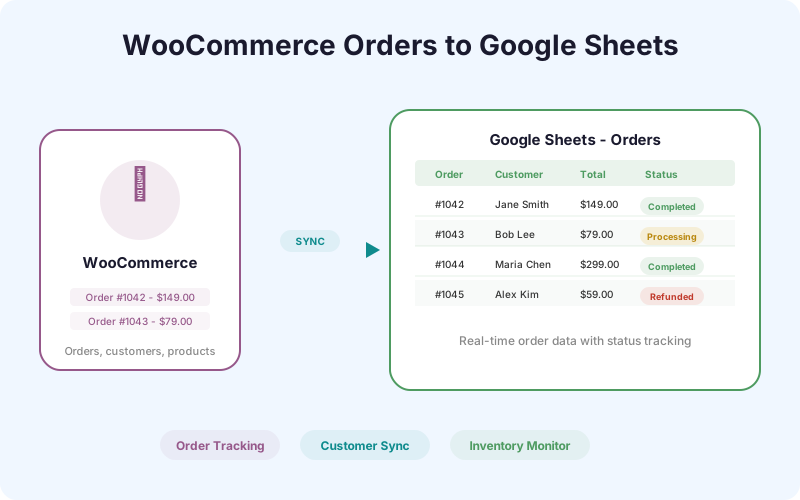
Every WooCommerce order, customer record, and product update flows to Google Sheets in real time. Build operations dashboards, accounting exports, and inventory monitors without leaving your spreadsheet.
Ships in SheetLink Pro, a separate plugin installed next to the free SheetLink Forms plugin. The free plugin contains no locked features.
Key Benefits
Real-Time Order Tracking
New orders appear in your Google Sheet within seconds. Track order status, payment method, shipping address, and line items without logging into WooCommerce.
Inventory Visibility
Product stock levels sync to Sheets so your operations team can monitor inventory, set up alerts for low stock, and plan reorders from a shared spreadsheet.
Customer Export
Customer data flows to Sheets automatically - name, email, order history, lifetime value. Build customer segments and analysis without CSV exports.
Refund and Status Tracking
Order status changes (processing, completed, refunded) update in Sheets in real time. Your finance team sees refunds the moment they happen.
How It Works
WooCommerce Sync hooks into WooCommerce's order lifecycle events. When a new order is placed, the plugin captures order details (items, totals, shipping, billing, payment method, coupons) and sends them to your configured Google Sheet. As the order progresses through statuses - processing, on-hold, completed, refunded - each status change updates the corresponding row. Customer data and product catalog changes can also be synced to separate sheets or tabs. The sync uses the same reliable delivery pipeline as the core plugin: retry queue, delivery logging, and exponential backoff for transient failures.
Real-World Use Cases
Operations Dashboard
Your operations manager monitors daily orders in a Google Sheet with pivot tables showing orders by status, revenue by day, and fulfillment backlog. No WooCommerce admin access needed.
Accounting Export
Your bookkeeper works in Google Sheets. WooCommerce Sync delivers order data including tax, shipping, discounts, and refunds directly to their working spreadsheet - eliminating monthly CSV exports.
Inventory Monitoring
A shared Google Sheet shows current stock levels for all products. The warehouse team watches for low-stock highlights and triggers reorders without accessing the WordPress admin.
Feature Comparison
| Feature | Manual Export | WooCommerce Sync |
|---|---|---|
| Order data freshness | Whenever you export | Real-time, under 3 seconds |
| Status updates | Not tracked | Auto-updated in Sheets |
| Customer data | Separate CSV export | Continuous sync |
| Refund visibility | Check WooCommerce admin | Instant in Sheets |
| Setup effort | Recurring manual exports | One-time configuration |
| Accounting prep | Hours per month | Always current |
Frequently Asked Questions
What WooCommerce data gets synced?
Orders (line items, totals, tax, shipping, coupons, payment method, status), customer records (name, email, address, order count, lifetime value), and product catalog data (name, SKU, price, stock level, status).
Does it sync historical orders or only new ones?
By default, WooCommerce Sync captures new orders going forward. You can trigger a one-time historical sync from the settings page to backfill existing orders into your Google Sheet.
Can I sync orders and products to different sheets?
Yes. You can configure separate Google Sheets (or separate tabs within the same sheet) for orders, customers, and products. Each data type has its own field mapping.
Does it work with WooCommerce Subscriptions?
WooCommerce Sync captures subscription renewal orders like any other order. Subscription-specific metadata (renewal date, subscription status) is included in the synced data.
How does it handle high-volume stores?
SheetLink's delivery queue processes orders sequentially with retry protection. Stores processing hundreds of orders per hour will see consistent delivery without overwhelming the Google Sheets API.
Get WooCommerce data into Sheets automatically
Orders, customers, products - synced in real time. No more CSV exports or manual data entry.