
White-Label: Your Brand, Your Plugin
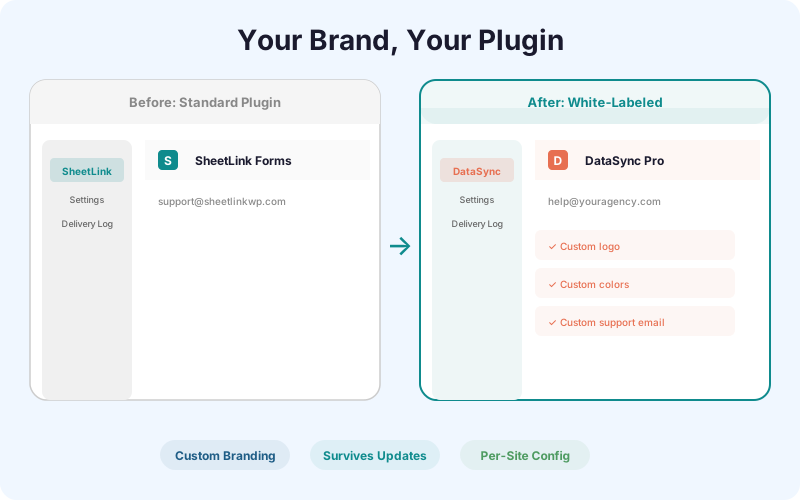
Remove all SheetLink branding from the WordPress admin panel. Replace it with your agency logo, brand colors, custom plugin name, and support email. Your clients never see SheetLink.
Ships in SheetLink Pro, a separate plugin installed next to the free SheetLink Forms plugin. The free plugin contains no locked features.
Key Benefits
Agency Credibility
Clients see your brand throughout the WordPress admin - not a third-party plugin name. This reinforces that the Sheets integration is part of your service offering, not something they could set up themselves.
Consistent Client Experience
Every admin page, settings panel, and notification email carries your brand identity. The experience is seamless from your client's perspective.
Custom Support Email
Replace the default support link with your own support email or helpdesk URL. When clients need help, they contact you - not SheetLink.
Branded Admin UI
Customize the plugin name in the sidebar menu, the logo on settings pages, and the accent colors throughout the admin interface. Full visual control.
How It Works
White-Label works at the WordPress admin UI level. When activated, you configure your custom plugin name, upload your logo, set your brand colors (primary and accent), and enter your support email. SheetLink then replaces all visible branding throughout the admin: the sidebar menu label, the settings page header, notification emails, and the plugin description on the Plugins page. The underlying functionality is identical - only the visual presentation changes. White-Label settings are stored per-site, so each client site can have different branding if needed. The customization survives plugin updates.
Real-World Use Cases
Agency Delivering to Clients
You build WordPress sites for clients and include Google Sheets integration as part of your service. White-Label lets you present the integration under your agency brand, making it feel like a proprietary feature.
SaaS Company Embedding the Feature
Your SaaS platform includes WordPress sites for customers. White-Label lets you embed the Sheets sync feature under your product brand without exposing the underlying plugin.
Freelancer Building a Productized Service
You sell a 'WordPress to Sheets automation' service. White-Label lets you brand the plugin with your service name, creating a professional, cohesive experience for your clients.
Feature Comparison
| Element | Standard Plugin | White-Labeled |
|---|---|---|
| Sidebar menu | "SheetLink" | Your custom name |
| Settings page logo | SheetLink logo | Your uploaded logo |
| Admin accent colors | SheetLink brand colors | Your brand colors |
| Support link | SheetLink support | Your helpdesk URL |
| Plugin list description | SheetLink Forms by SheetLinkWP | Your name and description |
| Email notifications | SheetLink branding | Your branding |
Frequently Asked Questions
What branding elements can I customize?
You can customize the plugin name (sidebar menu and page titles), the logo (settings page header), primary and accent colors, the support email or URL, and the plugin description shown on the WordPress Plugins page.
Does White-Label survive plugin updates?
Yes. Your branding settings are stored in the WordPress database, not in the plugin files. When SheetLink updates, your customizations remain intact.
Can I use different branding on different client sites?
Yes. White-Label settings are per-site. If you manage multiple client sites with different brands, each one can have its own logo, colors, and plugin name.
Will my clients know the plugin is SheetLink?
With White-Label active, all visible references to SheetLink are replaced with your branding. The plugin source code still references SheetLink internally, but nothing user-facing exposes it.
Brand the plugin as your own
Remove SheetLink branding. Add your logo, colors, and support email. Deliver a seamless client experience.