
WooCommerce Abandoned Cart Data to Google Sheets: Retargeting Without the SaaS Tax
Abandoned-cart SaaS tools cost $50-$200/month. The same data lands in Google Sheets for free - and gives you the flexibility a SaaS tool never will.
In This Guide
- The Abandoned-Cart SaaS Tax
- Capturing Abandoned Cart Data
- Identifying the Customer Before They Submit
- The Abandoned Cart Sheet
- Running Recovery Emails From Sheets
- Recovery Email Templates That Convert
- Cart Analytics in Sheets
- Beyond Recovery: Inventory and Fraud Signals
- When the SaaS Tool Is Worth Buying
- Recap
- Frequently Asked Questions
The Abandoned-Cart SaaS Tax
WooCommerce abandoned-cart SaaS tools - CartFlows Pro, AutomateWoo, Klaviyo, Omnisend - charge $50-$200/month to do something straightforward: capture incomplete checkouts, identify the customer, and send recovery emails.
The data they need is already in WordPress. The customer's email is captured at checkout step 1 (when they fill in the address fields). The cart contents are in WooCommerce session data. The abandonment threshold is whatever you decide.
Logging this data to Google Sheets - and running recovery emails from there - replaces the SaaS at zero monthly cost. You give up some polish (drag-and-drop email designers) but gain flexibility (any logic you want, any data you want, no monthly cap).
Capturing Abandoned Cart Data
A cart is "abandoned" when the customer enters checkout, fills in fields, but doesn't complete payment. The trigger is usually:
- Cart contains items. - Customer email captured (entered in checkout). - No order completed within X minutes of last activity.
WooCommerce fires hooks during checkout (`woocommerce_checkout_update_order_meta` and others) that let you save the in-progress data. A small custom plugin (or SheetLink Forms' WooCommerce abandoned-cart module) listens for these hooks and saves the data to your Google Sheet.
Key fields to capture: Customer Email, Customer Name, Phone, Cart Contents (line items as a JSON-ish string), Cart Total, Coupons Applied, Last Activity Timestamp, Status (Active, Abandoned, Recovered, Manually Cleared).
Identifying the Customer Before They Submit
The trickiest part: identifying who abandoned. WooCommerce captures the customer's email when they fill in the email field. Most sites have email as the first checkout field, so this captures most abandoners.
But some checkouts have email later in the flow. In that case, you can't identify the abandoner. The right pattern is to put email as the first field on checkout - both for cart recovery and for general UX.
For logged-in customers, identification happens automatically (we know who they are). For guest checkouts, an "auto-save partial checkout" plugin can persist email entry to a session cookie before form submission so even early abandoners are captured.
The Abandoned Cart Sheet
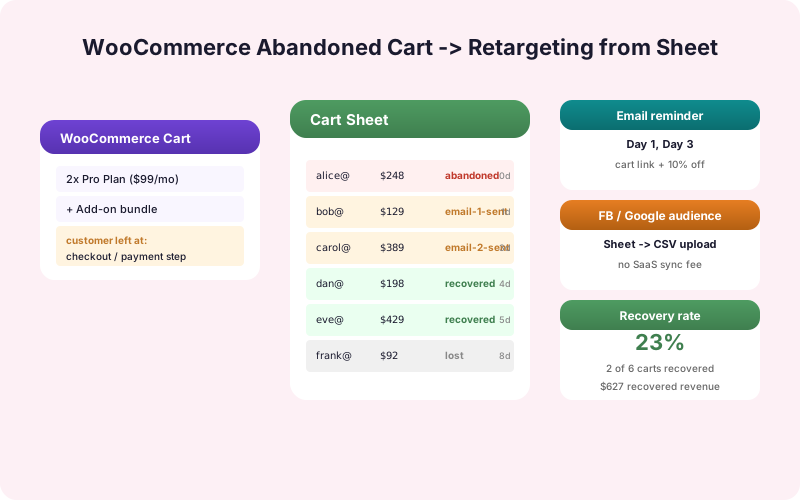
Build a "Carts" sheet with these columns.
Active state: Status, Created At, Last Activity At, Customer Email, Customer Name, Cart Total, Item Count, Cart Contents Summary, UTM Source.
Recovery state: Recovery Email Sent At, Recovery Email Opened, Recovery Email Clicked, Order Recovered Order ID.
Closed state: Status (Recovered, Expired, Manual Close), Closed At.
The sheet has one row per cart abandonment. Status transitions update the row in place rather than appending.
With this structure, your dashboard can show: today's abandonments, recovery rate by source, average value of abandoned vs. completed carts, which products most commonly trigger abandonment.
Running Recovery Emails From Sheets
A simple recovery email cadence: 1 hour after abandonment, 24 hours after, 72 hours after.
A time-based Apps Script trigger runs every 15 minutes. It scans the Carts sheet for rows where: - Status = Active - Last Activity > 1 hour ago AND Recovery Email Sent At is empty.
For each match, the script sends a recovery email (using GmailApp or a transactional API like Postmark/SendGrid) and updates the row's Recovery Email Sent At column.
The script repeats for 24-hour and 72-hour cadences. After 72 hours and three emails, mark the cart as Expired and stop sending.
This gets you 80% of what an abandoned-cart SaaS does for $0/month. The remaining 20% (drag-and-drop designer, A/B testing, complex segmentation) is rarely worth $50-$200/month for typical small stores.
Recovery Email Templates That Convert
Three principles for recovery email content.
Be useful, not pushy. "Forgot something?" works better than "Don't miss out!" The first acknowledges they're busy. The second creates pressure that often triggers an unsubscribe.
Show what they had. Include the cart contents (with images) so they remember what they were buying.
Add a low-friction CTA. "Continue Checkout" with a one-click link that resumes their cart at the right step. No retyping fields, no re-adding items.
Optional: a small discount code in the third email to push wavering buyers over the line. Test whether the discount is worth it - sometimes it just trains customers to abandon for the discount.
Cart Analytics in Sheets
Once carts are flowing, the analytics get interesting.
- Recovery rate: count Recovered / count Abandoned. A baseline is 10-15%. With good emails and timing, 25%+ is achievable. - Time-to-recover: average time between Created At and Recovered At. Tells you which email in the cadence is doing the work. - Recovery rate by source: which UTM sources produce abandoners who recover at the highest rate. - Cart value distribution: are abandonments concentrated at a particular cart-value range? (Often, very high-value carts abandon more.)
These pivot tables and conditional formatting drive ecommerce growth decisions in a way that an abandoned-cart SaaS's built-in dashboard rarely does.
Beyond Recovery: Inventory and Fraud Signals
Cart data is useful beyond recovery emails.
Inventory signal. If a specific product appears in many abandoned carts, it's either overpriced, has a checkout-experience problem (missing image, broken description), or has a stock confusion issue. Pivot abandoned carts by product to surface candidates for review.
Fraud signal. Repeated cart creation from the same IP with different emails can indicate fraud reconnaissance. A flag in the Carts sheet on suspicious patterns lets your team intervene.
Pricing experiment. A/B test a discount on certain product categories and measure the impact on cart abandonment rate by variant.
None of these are easy in a SaaS abandoned-cart tool. All of them are easy in Sheets where you have full control of the data.
When the SaaS Tool Is Worth Buying
There are real cases where an abandoned-cart SaaS is worth it.
Multi-channel orchestration. If you also need SMS recovery, push notifications, and Facebook retargeting from the same cart data, a SaaS that does all of them in one product is cleaner than building each channel separately.
Polished email designer. If your team needs a drag-and-drop email designer with templates, A/B testing, and segment management, a Klaviyo or Omnisend-level tool is more efficient than building it yourself.
Higher volumes. At 10,000+ carts per month, the time saved by managed deliverability and built-in analytics may exceed the SaaS cost.
Below these thresholds, the Sheets approach typically wins on flexibility and cost.
Recap
WooCommerce abandoned-cart SaaS tools charge for something WordPress already captures. The Sheets approach replaces the SaaS for $0/month: capture cart data via WooCommerce hooks, run recovery emails via Apps Script triggers, analyze in Sheets.
You trade some polish for flexibility and cost. For most stores under 10,000 carts/month, that trade is the right one. For very large stores or stores needing multi-channel orchestration, the SaaS still earns its cost.
One specific tactic worth testing: include the original cart price in the recovery email even if you offer a discount. "Your cart total was $245 - we'd like to offer you 10% off ($24.50) to complete your order." The contrast between the original price and the discount feels more substantive than a percentage alone. This is psychology rather than mechanics, but it consistently outperforms generic discount language in tests.
Frequently Asked Questions
How do I capture abandoned cart data in WooCommerce?
WooCommerce fires checkout hooks (`woocommerce_checkout_update_order_meta` and others) during the checkout flow. A custom plugin or SheetLink Forms' WooCommerce module listens for these hooks and saves the in-progress cart data to Google Sheets.
When does a cart count as abandoned?
Typically after 30-60 minutes of inactivity with cart contents present and customer email captured. The exact threshold is yours to set based on your typical checkout duration.
How do I run recovery emails from Sheets?
A time-based Apps Script trigger runs every 15 minutes, scans the Carts sheet for matches against your cadence (1 hour, 24 hours, 72 hours), and sends emails via GmailApp or a transactional email API.
What's a good recovery rate?
Baseline is 10-15% with basic recovery emails. With well-timed, well-written emails plus optional discounts, 25%+ is achievable. The exact number varies by industry and price point.
Should I include a discount in recovery emails?
Test it. Some stores see meaningful lift from a 10-15% discount in the third email. Other stores see customers learn to abandon for the discount. Run it as an A/B test before committing.
What about guest checkouts where email is captured late?
Move email to the first checkout field. This both captures abandonment data earlier and improves general checkout UX. For deeper-in-the-flow capture, use a session cookie that persists email entry before form submission.
When is an abandoned-cart SaaS still worth buying?
When you need multi-channel orchestration (SMS, push, Facebook retargeting from one tool), a polished drag-and-drop email designer, or volumes above 10,000 carts/month where managed deliverability matters.
Can I see which products abandon most?
Yes. Pivot the Carts sheet by product. Products that appear disproportionately in abandoned carts are candidates for pricing review, checkout-UX investigation, or stock-confusion fixes.
What discount tactics work in recovery emails?
Include the original cart price alongside the discount amount. "Your cart was $245 - we'd like to offer 10% off ($24.50)." This contrast performs better than percentage-only language. Test whether discounts produce net lift or train customers to abandon for the discount.
More Lead Management guides
Replace Your Abandoned-Cart SaaS
Capture cart data, send recovery emails, run analytics. All from Google Sheets. SheetLink Forms' WooCommerce module makes it work.