
Two-Way Sync: Edit in Sheets, Update WordPress
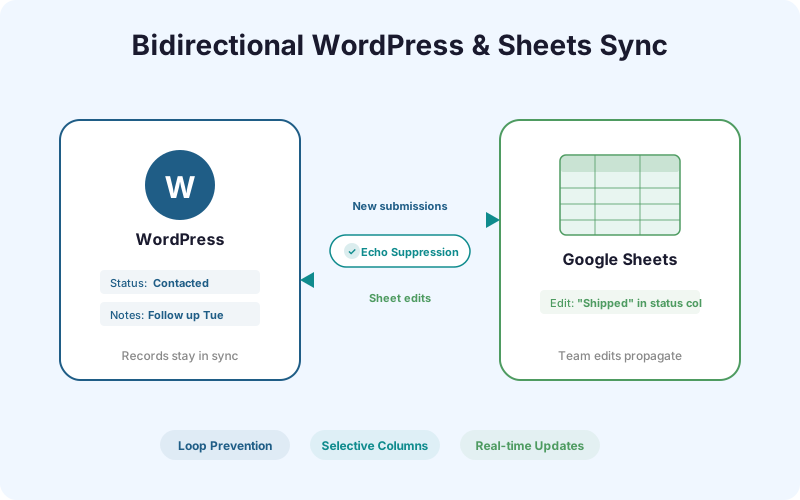
Your team edits lead statuses, adds notes, and updates fields in Google Sheets. Two-Way Sync pushes those changes back to WordPress - with echo suppression to prevent infinite loops.
Ships in SheetLink Pro, a separate plugin installed next to the free SheetLink Forms plugin. The free plugin contains no locked features.
Key Benefits
Team Edits Propagate Back
When your sales rep marks a lead as 'Contacted' in Google Sheets, that status update flows back to WordPress automatically. No need to log into the WordPress admin to update records.
Status Field Sync
Define which columns are synced bidirectionally. Status fields, priority flags, assignment columns, and notes can all be configured for two-way updates.
No Manual Re-Entry
Eliminate the double-handling problem. Changes made in Sheets are the single source of truth - WordPress stays in sync without anyone touching the admin panel.
Echo Suppression
SheetLink's echo suppression engine prevents infinite sync loops. When a change originates from Sheets, the WordPress update does not trigger a re-sync back to Sheets.
How It Works
Two-Way Sync works by installing an Apps Script trigger in your Google Sheet that watches for cell edits. When a team member changes a value in a synced column, the trigger sends the updated row data back to your WordPress site via a secure webhook. SheetLink's echo suppression engine tags each change with an origin identifier. If the change came from Sheets, WordPress updates the record but does not re-send it back to Sheets. If the change came from WordPress (a new form submission), it flows to Sheets but Sheets does not echo it back. This prevents the infinite loop problem that plagues naive bidirectional sync implementations.
Real-World Use Cases
Fulfillment Team Updating Order Status
Your fulfillment team works in Google Sheets. When they mark an order as 'Shipped' or 'Delivered', Two-Way Sync updates the corresponding WooCommerce order status in WordPress without anyone logging into the admin.
Sales Marking Leads as Contacted
Sales reps review leads in a shared Google Sheet. When they add notes or change a lead's status to 'Contacted' or 'Qualified', those updates sync back to WordPress so the marketing team sees current statuses.
Content Team Managing Submissions
A content team triages user-generated content submissions in Sheets. They mark entries as 'Approved' or 'Rejected' and Two-Way Sync updates the status in WordPress, triggering automated email notifications.
Feature Comparison
| Feature | One-Way (Core) | Two-Way Sync |
|---|---|---|
| Data flow | WordPress → Sheets only | WordPress ↔ Sheets |
| Sheet edits in WP | Not reflected | Auto-synced back |
| Status updates | Manual in both systems | Edit once in Sheets |
| Loop prevention | N/A | Echo suppression built-in |
| Team workflow | Sheets is read-only archive | Sheets is active workspace |
Frequently Asked Questions
What is echo suppression?
Echo suppression prevents infinite sync loops. When a change originates in Sheets and syncs to WordPress, SheetLink tags it so the WordPress update does not trigger a re-sync back to Sheets. Without this, bidirectional sync would loop forever.
Can I choose which columns sync bidirectionally?
Yes. You configure exactly which columns participate in two-way sync. Typically you would sync status fields, notes, and assignment columns while keeping form submission data as one-way (WordPress to Sheets only).
How fast do Sheets edits appear in WordPress?
Changes typically sync within 5-10 seconds. The Apps Script trigger fires on edit and sends the data immediately. Network latency and Google's trigger execution time account for the delay.
Does Two-Way Sync work with shared Google Sheets?
Yes. Multiple team members can edit the same sheet simultaneously. Each edit triggers an independent sync event, and echo suppression handles all of them correctly.
Make Google Sheets your command center
Edit in Sheets, update WordPress. Bidirectional sync with echo suppression keeps both systems aligned.